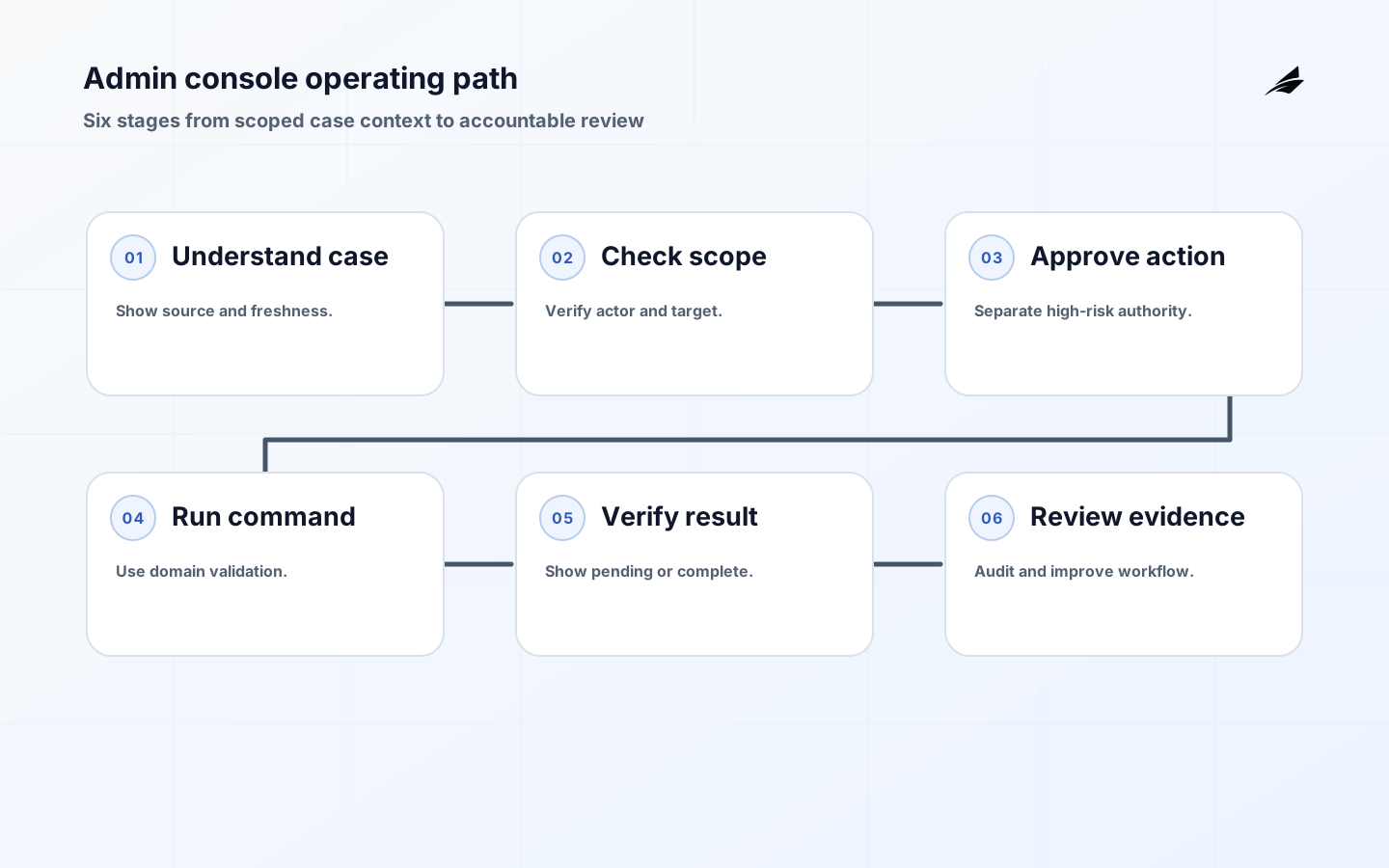
Admin consoles are product surfaces for privileged work, not attractive wrappers around a database. An operator needs enough context to understand a customer state, a clear boundary around what they may do, a safe command that uses domain rules, and evidence that explains the result later. The console should be useful when a payment is delayed, an import is stuck, an entitlement is wrong, or a workspace needs correction. This practical guide treats admin consoles as controlled workflows with identity, scope, approval, auditability, accessibility, and recovery built into the first slice.
Define the operator decision
Start with one recurring support or operations journey. State what the operator must determine, which records are authoritative, what action is permitted, and what the customer should see afterward. A console that shows a ticket but cannot explain whether a retry is safe is only a search screen. A console that can change access without confirming current membership or recording purpose is a risk multiplier. Keep the first workflow narrow enough to rehearse from report to resolution.
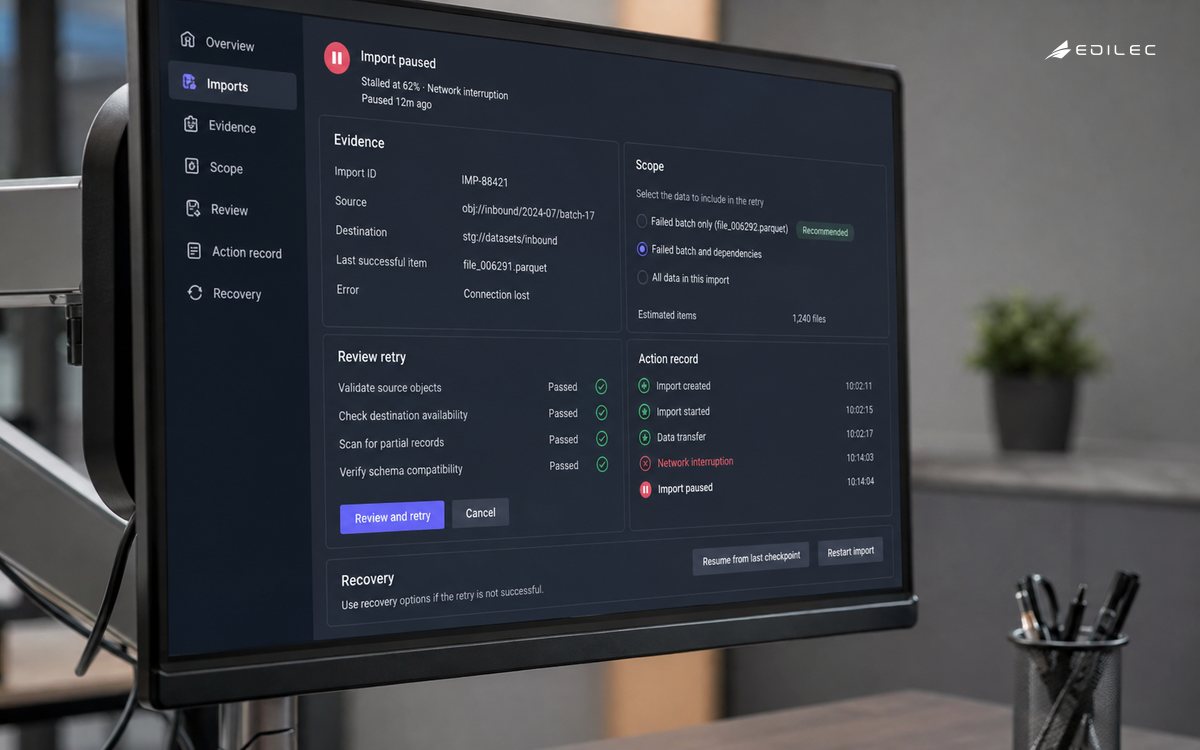
Separate evidence from command. The evidence view can compose current subscription, job, account, and event state, but the mutation should call the domain service that owns validation and business rules. The OWASP Authorization Cheat Sheet distinguishes authentication from authorization; apply that distinction to operators. Being logged into the console does not mean a person may view every tenant or perform every action.
| Operator need | Console capability | Safety condition |
|---|---|---|
| Understand | Timeline with source and freshness | Current tenant and account scope |
| Diagnose | State, reason, and related signals | No inferred fact presented as truth |
| Act | Narrow domain command | Role, target state, and preconditions rechecked |
| Verify | Result and new state | Pending, failed, and completed are distinct |
| Escalate | Evidence package and owner | Sensitive data minimized and linked safely |
Design roles around consequence
Use least privilege by job and action, not only by screen. A support agent may view a payment failure but not issue a refund; a reliability engineer may retry a job but not change customer entitlements; a security responder may contain an account but not export its data. Model tenant scope, resource scope, action scope, and temporal scope. Recheck authorization at execution because a role or case assignment may change after the page was loaded.
For sensitive actions, Add separation of duties or an approval step. A second person may approve a bulk export, account closure, financial correction, or cross-tenant investigation. Approval should include the target, purpose, proposed effect, expiry, and evidence viewed. Avoid blanket “admin” roles that turn convenience into permanent authority. If emergency access is necessary, make it time-bound, reason-coded, monitored, and reviewed after use.
| Action class | Example | Control pattern |
|---|---|---|
| Read | View a scoped case timeline | Role and tenant scope |
| Retry | Re-run a failed import | Idempotency and current state |
| Correct | Adjust a domain record | Reason, preview, approval, audit |
| Export | Download customer data | Purpose, minimization, expiry, approval |
| Contain | Suspend access during incident | Emergency role, verification, recovery plan |
Make scope and freshness visible
Every page should show which tenant, account, workspace, or resource is in scope and how that scope was established. Include data source, last update time, and pending operations. A stale subscription record should be labelled stale; it should not look identical to a current entitlement. Use correlation identifiers to join a customer report with requests, jobs, events, and command results. When a console composes data from several services, show which service owns each fact so operators do not assume the view itself is authoritative.
Do not overload operators with every field available. Expose the facts needed for the decision, and provide a controlled path to more detail when the role permits it. Redact secrets and unnecessary personal data. A bulk action should show the exact target set before confirmation. A destructive action should explain scope, effect, and recovery. These interface choices are security controls because ambiguity and stale context create real operational mistakes.
Keep mutations inside domain services
The console should request an intent such as retry import, resend invitation, suspend access, or issue correction; it should not write arbitrary columns. The service owning the domain state must validate permissions, resource version, invariants, idempotency, and side effects. Return a durable command result with a status such as accepted, completed, rejected, or pending. If a workflow is asynchronous, show the follow-up path and correlation identifier rather than pretending the button click is completion.
Design for duplicate clicks, timeouts, lost browser sessions, and partial dependency failure. Use idempotency keys for retryable commands and make the operator see whether the original command is still running. Provide a safe no-op or escalation route when the source service cannot confirm state. The console must not become a backdoor around business logic because a support request is urgent.
Build an audit trail that explains action
The OWASP Logging Cheat Sheet treats logging as more than enabling web server logs; it covers event data, protection, monitoring, and disposal. For an admin console, record actor, role, tenant and resource scope, purpose, action, request and correlation identifiers, before and after state where safe, result, and time. Keep the audit record tamper-resistant and limit who can read it because the record itself may contain sensitive context.
Use audit data operationally. Review unusual access, repeated denied actions, bulk operations, emergency elevation, and corrections that bypass normal workflow. Retain enough history for customer support and incident response while following the product’s retention and privacy requirements. Link the audit event to the case, release, incident, or approval record that explains why the action occurred. That makes the console accountable without forcing a future investigator to reconstruct intent from chat messages.
Make privileged work accessible and calm
Operators work under pressure, often across dense tables and long timelines. Follow WCAG 2.2 for labels, focus order, keyboard access, target size, contrast, error identification, and status announcements. A confirmation should name the action and scope; a long-running command should announce pending and completion; a denial should state a useful next step. Do not rely on color alone to distinguish pending, failed, or successful states.
Test the complete case journey with keyboard-only navigation, a narrow viewport, and assistive technology. Make filters and tables understandable without hidden hover content. Avoid destructive controls that move when the table updates. Accessibility improves accuracy for all operators because it reduces guesswork, protects focus, and makes state transitions explicit. Treat the findings as product work with an owner, not as cosmetic polish after the console is “done. ”
Roll out one controlled workflow
Choose a journey with a clear source of truth and a bounded command. Build the read path, then validate that operators can solve normal, stale, denied, duplicate, and dependency-failure cases. Add one mutation with preview, authorization, idempotency, audit, and verification. Invite support and operations into acceptance testing because they know the language customers use and the manual work that the first version should remove.
NIST Zero Trust Architecture focuses on protecting resources rather than trusting a network location and treats authentication and authorization as discrete functions before resource access. Apply that model to rollout: the console is not trusted simply because it is internal. Verify the actor, device or session controls, target scope, and action permission at the resource boundary. Measure time to useful diagnosis, correction success, repeat contacts, denied-action rate, and audit completeness, then expand only when the evidence supports it.
Before adding a new console action, write its command contract. Include target type, allowed roles, scope requirements, preconditions, idempotency behavior, expected state transition, failure categories, audit fields, and customer communication. This turns a request such as “let support fix imports” into a bounded product decision. It also makes the action testable outside the console so an API client or background job cannot accidentally bypass the same safety rules.
Review the console with real cases rather than a blank demo account. Choose one normal case, one stale case, one denied case, one duplicate request, and one case that needs escalation. Watch where the operator leaves the console to find missing evidence. Those exits show whether the first slice should add a source link, a freshness indicator, or a recovery command. They do not justify copying every underlying record into the interface.
Key takeaways
- Start with one operator decision, authoritative evidence path, and narrow domain command.
- Model tenant, resource, action, and time scope; separate viewing from changing and approving.
- Show freshness, source, pending state, and exact target scope before a consequential action.
- Keep mutations inside domain services with idempotency, preconditions, and verification.
- Audit actor, purpose, scope, action, result, and time while protecting sensitive records.
- For related implementation context, See tenant isolation, self-serve onboarding, and product analytics.
Frequently asked questions
What should an admin console do first?
It should help an authorized operator understand a scoped customer state and choose a safe next step. Start with a read path that shows authoritative facts, freshness, ownership, and correlation. Add a narrow command only after the team can explain its preconditions, failure behavior, audit record, and recovery route.
How is an admin console different from a database tool?
A database tool exposes records; a product-grade console applies roles, tenant scope, domain validation, safe commands, explanations, and auditability. It should prevent an operator from making a change that bypasses invariants or cannot be reconciled. Raw access may still exist for a tightly controlled engineering path, but it should not be the normal support workflow.
Which actions need approval?
Use consequence to decide. Financial corrections, bulk exports, cross-tenant access, account closure, entitlement changes, and emergency containment often deserve a second person, time-bound approval, or elevated review. A lower-risk retry may only need a role check and idempotency. Record the rationale so the approval model can evolve with evidence.
What should be logged?
Log actor, role, tenant and resource scope, purpose, action, target, decision, result, correlation identifier, and time. Include before and after values only when they are safe and necessary. Exclude secrets and unnecessary personal data, protect the audit store, and make retention and access part of the operating design.
Conclusion: make privileged work accountable
Admin consoles become trustworthy when they explain before they act, enforce scope at the resource boundary, keep mutations inside domain services, and preserve evidence for correction. Begin with one operator journey, make stale and pending states visible, test difficult cases, and measure the customer outcome. A smaller console with accountable commands is more valuable than a universal screen that quietly becomes an unreviewed backdoor.
The measurement plan for admin consoles in saas should pair an outcome with a reason to investigate it. Reconcile admin consoles in saas changes against the original record.
A durable operating note for admin consoles in saas records the assumptions that made the decision safe: the authoritative source, effective time, permitted actor, protected resource, and recovery route. Measure admin consoles in saas outcomes alongside correction effort.
For admin consoles in SaaS, a good handoff ends with observable evidence rather than a verbal promise. Explain pending and denied states before expansion.
This decision also connects to How CTOs Should Think About Admin Consoles, Product Support Tooling Implementation: A Safe Operations Checklist, How Engineering Teams Should Think About Roadmap Systems. Review those boundaries together when admin consoles in saas shares identity, data, billing, or support evidence with another workflow.
For Admin Consoles in SaaS, NIST Zero Trust Architecture defines scope. Treat exceptions as evidence for the next decision.
Evidence for “Admin Consoles in SaaS: Designing a Safe Operator Control Plane” is grounded in OWASP Authorization Cheat Sheet, OWASP Logging Cheat Sheet, NIST Zero Trust Architecture, Web Content Accessibility Guidelines 2.2; each source informs a specific decision, test, or operating trade-off described in this guide.