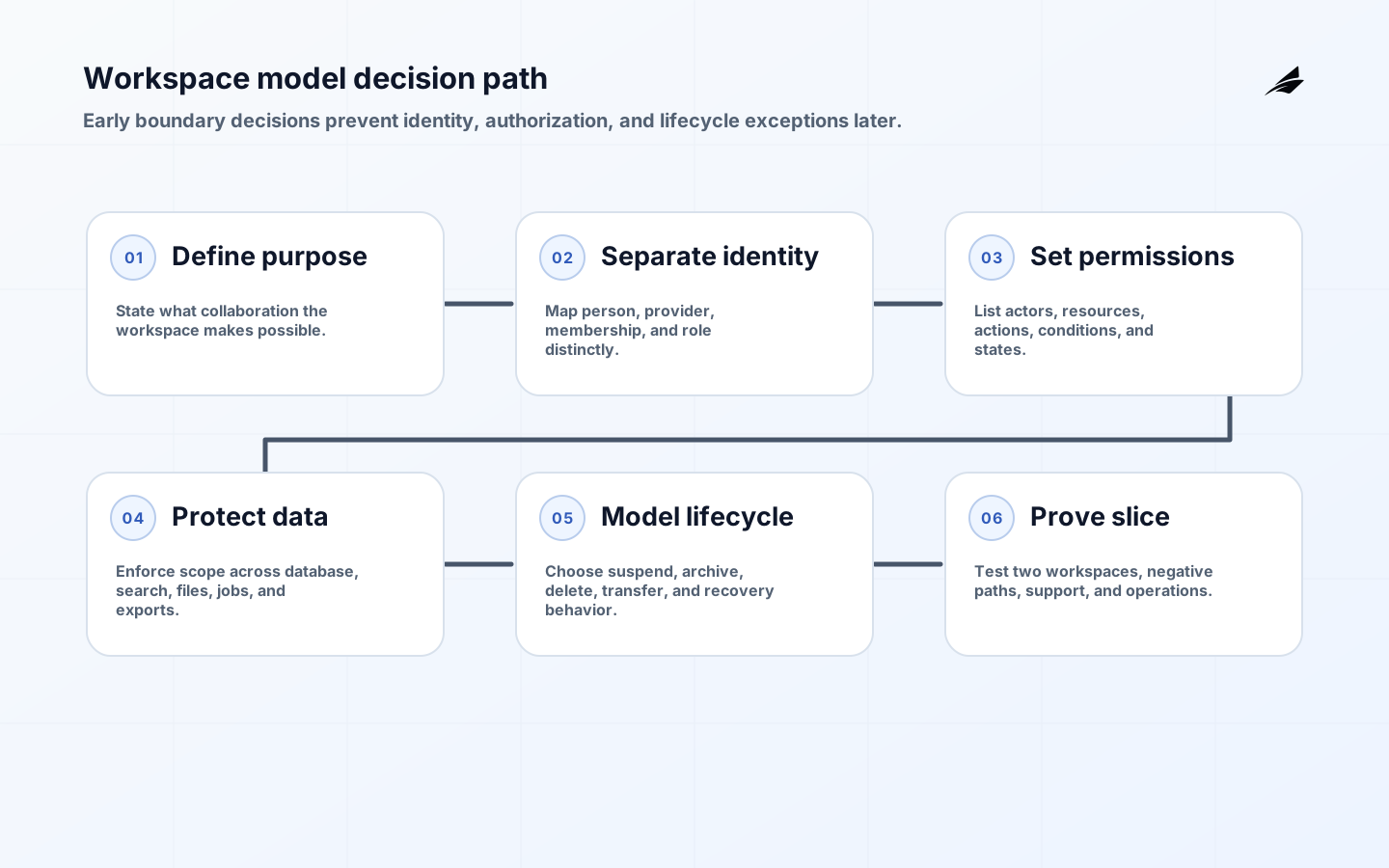
Workspace Models: Decisions That Matter Before the First Build
A workspace model is a product decision disguised as a data model. It tells customers how people collaborate, which resources belong together, who may act, and what happens when a relationship changes. Before building screens or tables, decide whether the workspace is a customer account, a project, a team, a billing boundary, or a collaboration space inside a larger tenant. The right answer affects identity, authorization, data isolation, invitations, support, analytics, and deletion. A small clarification at the start can prevent years of exceptions in production.
Name the collaboration promise
Write the user-visible promise in one sentence. For example: a workspace is the place where a customer team owns shared projects and can invite colleagues without sharing data with another customer. Then list what is deliberately outside the boundary: billing accounts, individual preferences, platform administration, or shared public resources. If the workspace has several jobs, decide which is authoritative when they conflict. This statement becomes a test for API design, navigation, roles, lifecycle, and support.

Choose the smallest boundary that explains real collaboration. A workspace that is too broad creates confusing permissions and large blast radius; one that is too narrow forces users to duplicate data or switch contexts constantly. Sketch three real customer situations, including an owner change and a contractor who needs limited access. If the model cannot explain those cases without hidden exceptions, it is not ready for implementation.
| Question | Decision to make | Failure if deferred |
|---|---|---|
| Boundary | What people and resources share this context? | Leaking or duplicating data |
| Ownership | Who can transfer, close, or recover it? | Unclear authority during change |
| Identity | Is a person a member, an account, or both? | Stale or duplicate access |
| Lifecycle | What states exist before and after active use? | Jobs acting on closed data |
| Global data | Which records are shared or cross-workspace? | Inconsistent authorization |
Keep login, membership, and role separate
A person signing in proves an identity; it does not prove membership in a particular workspace or permission to perform an action. Keep those concepts separate in the domain model. A user may belong to several workspaces with different roles, and an organization directory may provision a person before the product grants access to a workspace. OpenID Connect Core is useful for understanding identity claims, while application authorization still needs a current membership decision.
Plan for invitation, acceptance, revocation, role change, and deprovisioning. A delayed directory event should not silently restore a removed member. SCIM's RFC 7644 provides a lifecycle reference for provisioning and deprovisioning, but your product must decide how a directory group maps to a workspace role, what happens when an identity is ambiguous, and which actions require an owner or administrator.
Write permission rules before screens
Build a permission matrix before designing buttons. List actors, workspace states, resources, actions, conditions, and consequences. Include read, write, invite, export, delete, billing, support, API token, webhook, and background-worker paths. The OWASP authorization cheat sheet supports deny-by-default and server-side enforcement. Use it to challenge any design that assumes a hidden control or a client-supplied workspace ID is a security boundary.
Decide whether roles are fixed, custom, or a combination. Fixed roles are easier to reason about; custom permissions may be necessary for larger customers but increase support and testing cost. Keep role changes attributable and effective immediately or at a clearly stated time. For high-consequence actions, require recent authentication or a second confirmation without making the normal collaboration flow painful.
Trace workspace scope through every data path
Every workspace-scoped resource needs an unambiguous relationship to the workspace, enforced by queries, constraints, and service code. Avoid relying on a convention that a developer must remember. Use stable internal IDs, distinguish display names from keys, and decide how imports, copies, templates, and shared resources behave. If a resource can move between workspaces, the move needs authorization, an audit record, conflict handling, and a clear effect on related objects.
Think beyond the primary database. Search indexes, object storage, caches, analytics, exports, notifications, and third-party integrations must preserve the boundary too. Test direct object access with guessed identifiers and test a background job after a member or workspace has been removed. The model is only as strong as its least visible read path.
| Resource path | Design question | Test |
|---|---|---|
| Database | Can every query prove workspace scope? | Cross-workspace identifier and join tests |
| Search | Does the index retain and filter membership context? | Removed-member and stale-index tests |
| Files | How are objects named, authorized, and expired? | Direct URL and export tests |
| Jobs | What if membership changes before execution? | Recheck policy at worker time |
| Integrations | Which external identity owns the side effect? | Retry, revoke, and reconciliation tests |
Decide suspend, archive, delete, and restore
Decide what pending, active, suspended, archived, and deletion-requested mean before implementing navigation. A suspended workspace may need read-only access for appeal or export; an archived workspace may be hidden but recoverable; deletion may need a delay for safety and contractual reasons. Background jobs should stop or adapt when state changes. State transitions need an owner, timestamp, reason, and a recovery procedure that does not require a database operator to guess.
Test concurrency. What happens when two owners transfer control at the same time? When an invitation is accepted after a role was revoked? When an export starts just before suspension? Use durable version or state checks, idempotency, and explicit conflict responses. Make a human-readable history available to support so the product does not turn ordinary lifecycle changes into forensic work.
Explain invitations, exports, and destructive actions
Workspace creation, invitations, role changes, and deletion are forms with real consequences. Use clear labels, grouped fields, accessible errors, confirmation that names the target, and a visible current context. The W3C forms tutorial provides practical guidance on labels, instructions, validation, and error recovery. Accessibility and safety reinforce each other: a person who cannot tell which workspace is selected can make an authorization mistake even when the server is correct.
Keep asynchronous actions visible. Show invite status, role-change completion, export progress, and deletion timing. Give a user an explanation when an action is denied and a safe next step where appropriate. Do not reveal sensitive information through error messages, but do not make every failure a generic dead end either.
Test the boundary with realistic roles
Before building every feature, implement a vertical slice that includes sign-in, workspace selection, membership, one scoped resource, one background job, one export or integration path, and an audit event. Exercise two workspaces and several roles. Run normal and negative cases through UI, API, job, and support tooling. Keep the decision record and test evidence so the team can expand the model without reopening settled questions.
For adjacent product patterns, see the billing workflows field guide, the customer feedback loops field guide, and the multi-tenant architecture checklist. They help test whether the workspace concept remains coherent once money, feedback, and operational controls enter the design.
Write the model in examples as well as rules. Show a person who belongs to two workspaces, a contractor who needs one project, a customer administrator who transfers ownership, and a directory that removes a user. Examples reveal hidden assumptions about inheritance, switching, pending invitations, and stale sessions. Turn each example into an acceptance test for the API, interface, job, and support path.
Choose defaults that fail safely. A new member should not receive broad access because a role is missing; a missing workspace context should stop the request rather than fall back to a last-used value; a failed deletion should preserve a clear state rather than appear complete. Safe defaults make the product easier to operate and reduce the number of emergency decisions required later.
Keep migration in the design. If the product already has records without a workspace, define how they are classified, who owns ambiguous data, and how reads behave during backfill. A migration that adds a column but not an ownership decision can create a false sense of isolation. Use sampled reconciliation and explicit exceptions before declaring the boundary complete.
Plan the customer explanation. Workspace concepts appear in invitations, permissions, billing, exports, deletion, and support. Use consistent names, warn before boundary-changing actions, and tell people what remains recoverable. When customers understand the model, they make fewer risky requests and support can resolve questions with product language instead of implementation jargon.
Before implementation, ask which decisions must remain stable even if the product changes its screens or provider. Stable identity, workspace scope, membership state, resource ownership, and lifecycle transitions should not depend on a particular UI. Those durable concepts make migrations safer and let the team replace an integration without rewriting the product's meaning.
Use a small evidence pack for the first build: domain glossary, permission matrix, state diagram, sample cases, negative tests, migration plan, and recovery notes. It gives designers, engineers, support, and security a common object to review. When the team disagrees, the disagreement becomes a decision to settle rather than a hidden assumption in code.
Do not overfit the first workspace model to today's organization chart. Model stable concepts such as member, role, resource, owner, state, and external identity, then keep policy configurable where the business genuinely varies. Avoid a flexible system that has no clear defaults or audit. The goal is a model that can absorb growth without making every customer configuration a bespoke security review.
Include migration and support in the first design review. A workspace model that is elegant for new records can still fail when old data, imported users, legacy API tokens, and historical exports enter the system. Identify the facts that cannot be inferred, define a safe default, and give support a way to resolve an exception without a direct database edit. This makes the first build more honest and the second build less expensive.
Use a decision log for questions that are likely to recur: whether roles inherit, whether workspaces can be nested, whether a resource can move, whether members can export, and who can recover a suspended workspace. The log should state the chosen behavior, why it fits the product promise, and which tests protect it. Reopening a decision is healthy; silently changing it is not.
Key takeaways
- Define what a workspace means to a customer before choosing tables or screens.
- Keep authentication, membership, role, and resource authorization distinct.
- Make every visible and background path prove the same workspace boundary.
- Decide lifecycle, ownership transfer, deletion, and recovery before launch.
- Design accessible, contextual administration for actions with lasting consequences.
- Use a thin vertical slice and cross-workspace negative tests to validate the model early.
Frequently asked questions
Can one person belong to multiple workspaces?
Yes, when the product supports distinct collaboration or customer contexts. Make the current workspace visible, require the server to resolve it, and ensure switching context changes every scoped read and write. Never infer access from the last workspace shown in the browser alone.
Should we support custom roles from the start?
Only when real workflows require them. Fixed roles reduce ambiguity and testing cost. If custom roles are needed, define permission primitives, inheritance, audit, support tooling, and migration behavior before exposing a flexible editor.
Conclusion
The best workspace models make collaboration feel simple because the hard decisions are explicit underneath. Define the boundary, separate identity from membership, enforce authority everywhere, model lifecycle and recovery, and test the negative space. That foundation gives the product room to grow without turning every new feature into a new exception.