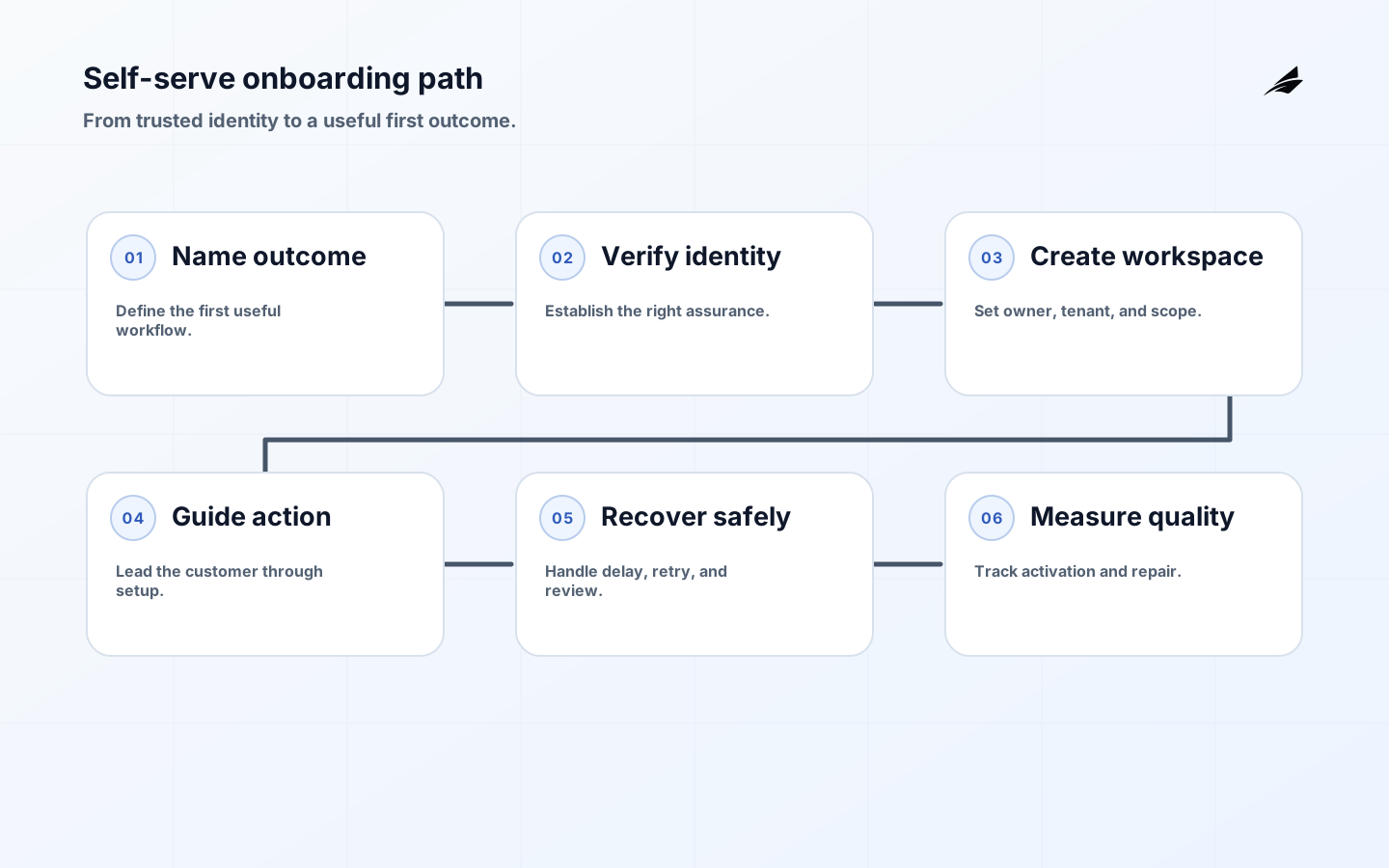
Self-serve onboarding is successful when a new customer reaches a meaningful first outcome without requiring a hidden operator to repair identity, workspace, or permissions behind the scenes. A signup is only an event; an activated account has a known owner, a verified contact path, an explicit tenant or workspace, an appropriate starting role, and a safe way to recover from an interrupted step. This self-serve onboarding checklist treats the journey as a small production system. It gives product, engineering, security, and support a shared way to decide what may happen automatically, what needs evidence, and when a person should take over.
Use the related SaaS MVP delivery plan, SaaS product development guide, and multi-tenant architecture plan when the onboarding decision affects a larger build. Here the focus is narrower: make the first customer path dependable, explainable, and easy to improve.
Set the boundary around a real first outcome
Write down the user, account, workspace, first action, and evidence that define completion. For a collaboration product, completion might mean the owner verifies an email, creates a workspace, imports one safe sample, and invites a colleague who can complete a task. Do not make “dashboard viewed” the milestone if the customer has not configured anything useful. Name the data classes and actions that are unavailable until stronger proof exists. Also name the human handoff: a high-risk business domain, a failed domain claim, or a request for a regulated feature may deserve review instead of an endless automated loop.

| Onboarding stage | Decision to make | Evidence of completion |
|---|---|---|
| Identity | What must be verified before the account is usable? | Verified contact and recorded method. |
| Workspace | Who owns the tenant and what is its initial scope? | Tenant record, owner, and default policy. |
| Activation | Which real workflow demonstrates first value? | Event tied to an account and workflow. |
| Handoff | When does automation stop and support begin? | Reason, owner, and next action in the record. |
Design identity and account recovery together
Registration, login, email change, invitation acceptance, and recovery are one identity surface from a security perspective. Use a consistent account identifier policy and do not reveal whether an address exists through different messages or timing. NIST’s digital identity guidance separates proofing, authentication, and federation assurance; that is a useful mental model for deciding which step is required for which capability. A low-risk trial may need a verified email, while exporting sensitive customer data may require stronger authentication and an administrator-approved path. Store the decision and its expiry rather than treating a single signup event as permanent proof.
Make the journey accessible and recoverable
A customer cannot reach first value if the form loses data, the focus disappears inside a modal, or the only recovery channel depends on a device they no longer have. Apply WCAG 2. 2 principles to labels, focus order, error identification, keyboard use, and authentication assistance. Keep progress explicit, preserve safe inputs between retries, and let a user return to a completed step without redoing it. Recovery should be an alternate authentication path with comparable strength, not a support-only bypass. Record whether a failure came from the user, a provider, a stale invitation, or an unavailable dependency so the team can fix the right boundary.
- Use one stable account and tenant identifier across product, billing, analytics, and support records.
- Keep invitations single-purpose, time-bounded, and bound to the intended workspace.
- Treat missing verification or stale claims as an explicit state, never as implicit permission.
- Show a clear next action after every failed step and preserve safe progress.
- Give support a reversible recovery tool with reason capture and least privilege.
Automate the boring work, not the uncertain decisions
Automation is valuable when the input and output are bounded. It can create a workspace, assign a conservative role, send a verification message, provision a trial feature, and emit an activation event. It should pause when a domain already belongs to another organization, a request crosses a sensitive boundary, or an identity provider returns ambiguous information. Make each transition idempotent: a retried invitation must not create two owners, a repeated webhook must not extend access twice, and a delayed job must not overwrite a later user choice. Prefer a durable state machine with visible states over a chain of hidden callbacks.
Choose controls that match the account risk
Separate the account’s ability to enter the product from its ability to perform consequential actions. A new user may browse a guided workspace while exports, billing changes, member administration, and integrations remain gated. Put authorization checks on the server and evaluate the current tenant, action, and resource on every request. OAuth redirect handling should use exact registered destinations and the flow should not trust a client-supplied tenant field. For every gate, define the allow condition, deny condition, missing-data behavior, and evidence retained for later review.
| Risk signal | Safer default | Test case |
|---|---|---|
| Unverified contact | Limit sensitive actions and show the verification path. | Attempt export before verification. |
| Expired invitation | Deny acceptance and require a new invitation. | Replay an old invitation after role change. |
| Unknown workspace | Stop provisioning and route to review. | Submit a tenant identifier not present in the session. |
| Provider timeout | Keep state pending and allow bounded retry. | Repeat the callback after the user changes browser. |
Measure progress, not just clicks
A useful onboarding dashboard follows a cohort from invitation or signup to first value and then to a stable next action. Track step completion, elapsed time, retry count, invitation acceptance, support contact, and the percentage of accounts that require manual repair. Segment by signup route, identity provider, plan, and tenant size only when those dimensions are safe and actionable. An average can hide a broken path for one cohort. Pair conversion with quality: a fast signup that produces mis-scoped tenants or immediate access revocations is not a healthy improvement. Keep event names and meanings versioned so a dashboard does not silently change its question.
Roll out changes with a reversible checkpoint
Start with one signup route and a cohort whose ownership is clear. Define the baseline, observation window, stop conditions, and return action before changing the flow. A safe rollout can place a new invitation screen behind a flag, preserve the old completion path, and compare activation quality rather than only conversion. Test duplicate submissions, expired links, provider delays, browser refreshes, role changes during setup, and data import failures. When the evidence is mixed, keep the scope bounded and inspect support cases before broadening it. A rollout is complete only when the operations team can explain what happened without reconstructing it from chat messages.
Plan for the failure modes that customers actually meet
The common failures are not exotic attacks; they are collisions between a user’s timing and a distributed system. Email delivery can be slow, an invitation can be accepted after a role is revoked, a billing provider can confirm payment after the browser has closed, and a workspace import can finish after the user has changed plan. Model these as normal states. Use correlation identifiers across events, make consumers idempotent, and give support a safe view of the state machine. For security-sensitive exceptions, require a reason, restrict the action’s scope, set an expiry, and review whether the exception points to a design gap.
- Exercise a browser refresh at every transition that depends on a callback.
- Try two invitations arriving for the same email and two owners claiming the same domain.
- Simulate delayed email, identity-provider outage, and a job retry after a later state change.
- Verify that revoked access wins over a stale success message.
- Review failed cohorts weekly and promote recurring support repairs into product behavior.
Key takeaways for self-serve onboarding
- Define first value as a real workflow with evidence, not a page view.
- Match verification and authorization friction to the risk of the next action.
- Make onboarding states durable, idempotent, accessible, and recoverable.
- Measure activation quality and manual repair, not just signup conversion.
- Roll out one bounded change at a time with a known return path.
Self-serve onboarding FAQ
The right onboarding policy depends on the product’s data, users, and consequential actions. These answers provide a practical starting point for a team reviewing its current flow.
What is the first milestone for self-serve onboarding?
Choose a verifiable first outcome, such as an invited teammate completing a real workflow, rather than counting account creation alone. The milestone should prove that identity, workspace scope, and the core value path are all working.
Should every signup receive the same verification steps?
No. Match identity and verification friction to the risk of the data and actions the account can reach. Start conservatively and add stronger checks before sensitive actions.
How should teams measure onboarding quality?
Track time to first value, completion by step, recovery success, support contact rate, and the quality of the resulting workspace. Segment only by dimensions that lead to a decision.
What is a safe fallback when an onboarding dependency fails?
Preserve the account state, explain what is pending, offer a bounded retry, and avoid silently granting access that the dependency was meant to establish. Escalate when the system cannot establish a trustworthy state.
Conclusion: make the first customer path trustworthy
A dependable self-serve onboarding flow is a chain of explicit decisions: establish the right identity, create the right workspace, guide the right first action, and retain enough evidence to recover or improve the journey. Teams that treat onboarding as production infrastructure can move quickly without making support absorb every edge case. Start with one valuable workflow, instrument its states, test the awkward transitions, and expand only when the resulting customer experience is both easier and safer to operate.
For self-serve onboarding checklists for SaaS teams, review the operating scope during normal handling. Reconcile any change against the original record.
A durable operating note for self-serve onboarding checklist for saas teams records the assumptions that made the decision safe: the authoritative source, effective time, permitted actor, protected resource, and recovery route. Test self-serve onboarding checklist for saas teams with normal, delayed, denied, and corrected workflow cases.
For self-serve onboarding checklist for saas teams, a good handoff ends with observable evidence rather than a verbal promise. Treat self-serve onboarding checklist for saas teams exceptions as evidence for the next decision.
The smallest useful improvement to self-serve onboarding checklists for SaaS teams is often a sharper boundary, not another feature. Record the state, evidence, and recovery path.
For self-serve onboarding checklist for saas teams, test an unexpected load spike before treating the first release as complete. For self-serve onboarding checklist for saas teams, name the decision boundary and its owner.
For Self-serve Onboarding Checklist for SaaS Teams, NIST SP 800-63-4: Digital Identity Guidelines defines scope; OWASP Authentication Cheat Sheet supports the control; OWASP Email Validation and Verification in Identity Systems clarifies evidence; Web Content Accessibility Guidelines (WCAG) 2. 2 guides recovery; RFC 9700: Best Current Practice for OAuth 2. 0 Security frames review. Make self-serve onboarding checklist for saas teams corrections visible, scoped, and reversible during reliable digital operations.
Ownership for self-serve onboarding checklists for SaaS teams is clearer when the customer promise is separated from the mechanism. Review the operating scope during a reconciliation pass.
Before widening self-serve onboarding checklist for saas teams, rehearse normal, denied, delayed, and corrected cases with realistic identifiers. For self-serve onboarding checklist for saas teams, review the for reliable digital operations recovery during a reconciliation pass.
For self-serve onboarding checklist for saas teams, review the for reliable digital operations control during normal handling. For self-serve onboarding checklist for saas teams, review the for reliable digital operations evidence during a reconciliation pass.
Evidence for “Self-serve Onboarding Checklist for SaaS Teams” is grounded in NIST SP 800-63-4: Digital Identity Guidelines, OWASP Authentication Cheat Sheet, OWASP Email Validation and Verification in Identity Systems, Web Content Accessibility Guidelines (WCAG) 2.2, RFC 9700: Best Current Practice for OAuth 2.0 Security; each source informs a specific decision, test, or operating trade-off described in this guide.