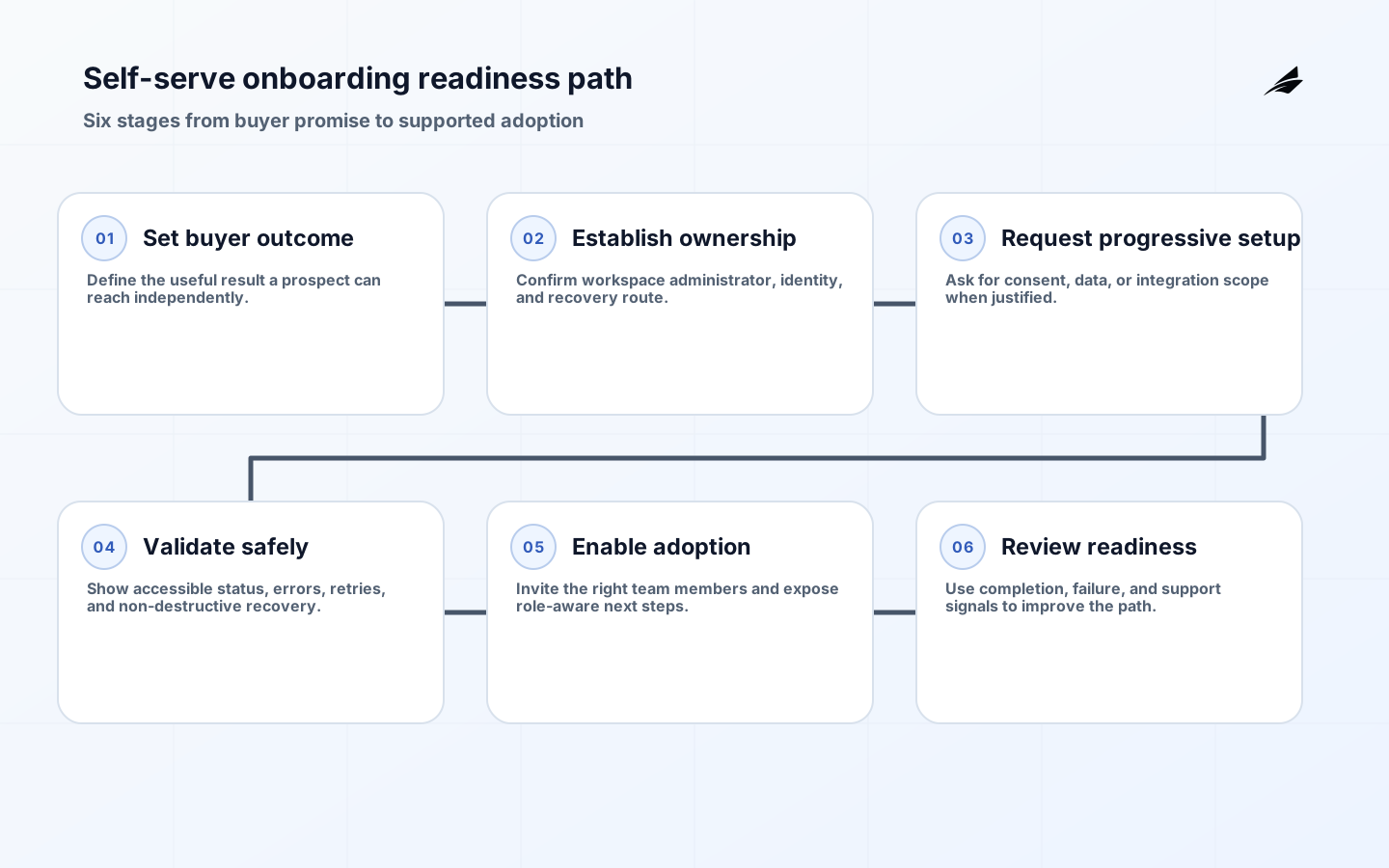
Self-serve onboarding is where a product’s promise meets a customer’s real environment. A buyer wants to know whether the service solves a meaningful problem and can be adopted without an endless sales cycle. A CTO or IT manager needs confidence about identity, permissions, data handling, integrations, reliability, and exit options. Those concerns are not competing onboarding tracks; they are different views of the same implementation journey. A product that makes evaluation effortless but conceals setup requirements creates disappointment later. A product that asks every technical question before showing value creates abandonment. Design the journey so a prospect can reach an honest first outcome quickly while the organization can discover and control the prerequisites before they become production risk.
Align the buyer promise with technical reality
Begin with the problem the product can solve without human intervention. Define the minimum account information, role, data, integration, or configuration needed to demonstrate that outcome. Then identify the points where organizational approval is genuinely necessary, such as connecting a production system, inviting more users, enabling an administrator feature, or importing regulated data. Surface those gates early and explain why they exist. A buyer should not have to discover at the last screen that a security review, email domain verification, or administrator consent is required. Conversely, do not force a low-risk evaluator to complete enterprise setup before they can see a relevant result. The goal is progressive commitment: each step requests only the information and permission justified by the next useful action.

| Journey moment | Buyer question | Technical owner question |
|---|---|---|
| Evaluation | Can I see a meaningful result soon? | What safe sample or limited data path is available? |
| Account creation | Who owns this workspace? | How is identity verified and recovered? |
| Connection | What will the integration enable? | Which scopes, data, and failure modes apply? |
| Adoption | Can my team use it confidently? | How are roles, audit events, and support handled? |
Make identity, ownership, and recovery clear
An account is not merely an email address. Decide who owns the workspace, who can invite users, how an administrator is verified, how a departing owner is replaced, and what happens when a domain is claimed by another team. Use managed identity options that match the customer segment, but keep a safe recovery path that does not rely on a single employee’s mailbox. Authentication requirements should be proportionate to the risk; sensitive actions such as changing billing, adding identity providers, exporting data, or granting broad roles may need additional confirmation. Present errors in a way that helps a legitimate user proceed without disclosing whether an unrelated account exists. Document the route from a personal evaluator to an organization-managed account so that a successful trial does not become a security exception when procurement arrives.
Design setup for progressive risk and real accessibility
Sequence setup tasks by the risk they introduce and the value they unlock. A user may start with a guided workspace, then connect read-only data, then configure automation after an administrator has reviewed the scope. Each step needs clear status, a non-destructive retry, and an explanation of what will happen. Avoid a linear wizard that traps users when a prerequisite is missing; allow them to save, return, delegate, or use an alternative route. Forms, validation, dialogs, status messages, and help links must be operable with keyboard and assistive technology. Use concise labels rather than relying on placeholder text, and associate errors with the field that needs attention. Accessibility is not an extra polish phase here: a blocked onboarding journey is lost value regardless of the customer’s reason for being blocked.
| Setup control | Practical design | Recovery path |
|---|---|---|
| Integration authorization | Request the smallest useful scope and show it before redirect. | Disconnect, retry, and show a safe diagnostic reference. |
| Data import | Validate structure before a destructive write. | Provide errors by row or field and retain the original file securely. |
| Role assignment | Show capability impact before confirmation. | Require an authorized administrator for elevated changes. |
| Automation enablement | Preview trigger and destination behavior. | Pause or disable safely with an audit event. |
Run onboarding as an operational system
Self-serve does not mean unobserved. Define an owner for the journey, a support route for blocked customers, and a review cadence for technical failures. Instrument milestones such as workspace creation, ownership confirmation, integration consent, first successful use, invite acceptance, and escalation. Capture only the event data needed to understand the flow and attach a correlation reference that support can use. Review the path with different customer types: a small team without an IT function, an enterprise evaluator, a user with assistive technology, and a buyer who needs to hand work to an administrator. Look for mismatches between the promise and the real sequence. The SaaS MVP delivery guide can help teams keep the first journey narrow enough to learn from without deferring the essential controls.
- Define the first honest outcome before building a broad setup tour.
- Ask for ownership, identity, and consent when the next action justifies them.
- Surface organizational prerequisites before a customer becomes deeply invested.
- Build accessible retries, delegation, and error recovery into each step.
- Review completion, failure, and support signals by customer context.
Verify the journey before broad release
Test onboarding end to end with fresh accounts, existing accounts, organization-managed users, expired invitations, slow integrations, missing permissions, and a failed network step. Check the screen-reader and keyboard journey, not only the visual path. Verify that a user who pauses can resume without losing a completed safe step or accidentally duplicating a side effect. Test messages from the customer’s perspective: a confirmation link, invitation, error notice, and support reply should all identify the relevant workspace without exposing sensitive details. Use production-like identity and email configuration in a controlled environment, because many onboarding failures appear only when real redirect domains, spam filtering, or provider policies are involved.
A broad launch needs a support and service plan. Name the owner watching early failures, set a route for identity recovery and integration questions, and prepare status language for a degraded dependency. Review the first cohort daily for a short period, with product, engineering, support, and security represented when the journey carries material risk. Distinguish a true product problem from a customer prerequisite, then decide whether to improve the flow, publish better preparation, or offer guided assistance. This review protects the self-serve promise: it should not mean leaving customers alone when the product has created a predictable obstacle.
Provide buyers with implementation evidence that is useful before they commit: a concise architecture overview, identity options, data-processing summary, integration prerequisites, availability expectations, and a route for security questions. Keep the material current and distinguish documented capability from future intent. This prevents the onboarding journey from becoming a scavenger hunt through sales decks and support messages. The CTO should be able to assess whether the first deployment fits the organization’s environment without being forced to create a production account merely to learn basic boundaries. That transparency also saves product teams from building onboarding prompts to compensate for missing pre-purchase information.
Keep an onboarding decision log for material customer transitions: ownership claimed, domain verified, integration authorized, data imported, and elevated role granted. Each record should identify the actor, time, result, and safe support reference. This is not a substitute for a full audit platform; it is the minimum evidence that lets the team resolve a disputed setup step without asking the customer to repeat the whole journey. It also exposes where the product is relying on fragile assumptions, such as a one-time email link or an administrator who has left the company.
Treat onboarding documentation as a product dependency, not a separate marketing artifact. The quick-start guide, security overview, integration instructions, data-retention statement, and support contact should describe the same current behaviors shown in the interface. Assign owners and review dates, then link the relevant material from the exact setup decision it supports. When an integration changes scopes or an authentication option is retired, update the guide in the same release. Customers notice the discrepancy immediately when a help page tells them to click a setting that no longer exists. Keeping these materials aligned reduces cognitive load for evaluators and lets internal teams answer technical questions from a shared factual record.
- Show the first customer outcome before requesting unnecessary configuration.
- Establish workspace ownership and a recovery route during account creation.
- Explain integration scopes and make retry behavior visible.
- Keep forms, errors, and dialogs usable with keyboard and assistive technology.
- Provide buyers current security and implementation evidence before production connection.
- Review blocked journeys with support, product, engineering, and security together.
Key takeaways
- Buyers and CTOs need different evidence from the same onboarding journey.
- Progressive commitment reduces friction without hiding material requirements.
- Workspace ownership and identity recovery deserve first-class design.
- Accessible setup is necessary for reliable customer adoption.
- Self-serve needs operational observation and a visible recovery route.
Frequently asked questions
Does self-serve onboarding remove the need for sales or implementation help?
No. It should make a safe, useful first route available without mandatory intervention. Customers with complex integration, procurement, or migration needs may still benefit from guided help, but the product should clearly show where that help begins.
When should a security review appear in the journey?
Introduce it when the customer is about to connect sensitive data, enable a material integration, or progress to organizational use. Give a concise explanation and relevant evidence rather than surprising a buyer after they have already configured the product.
Conclusion: give both confidence and control
A strong self-serve onboarding path lets a buyer experience credible value while giving the technical owner enough control to adopt safely. Make the promise, ownership, data boundaries, and recovery routes explicit, then observe where real customers get blocked. The result is a product journey that is faster because it is more truthful about the work ahead.