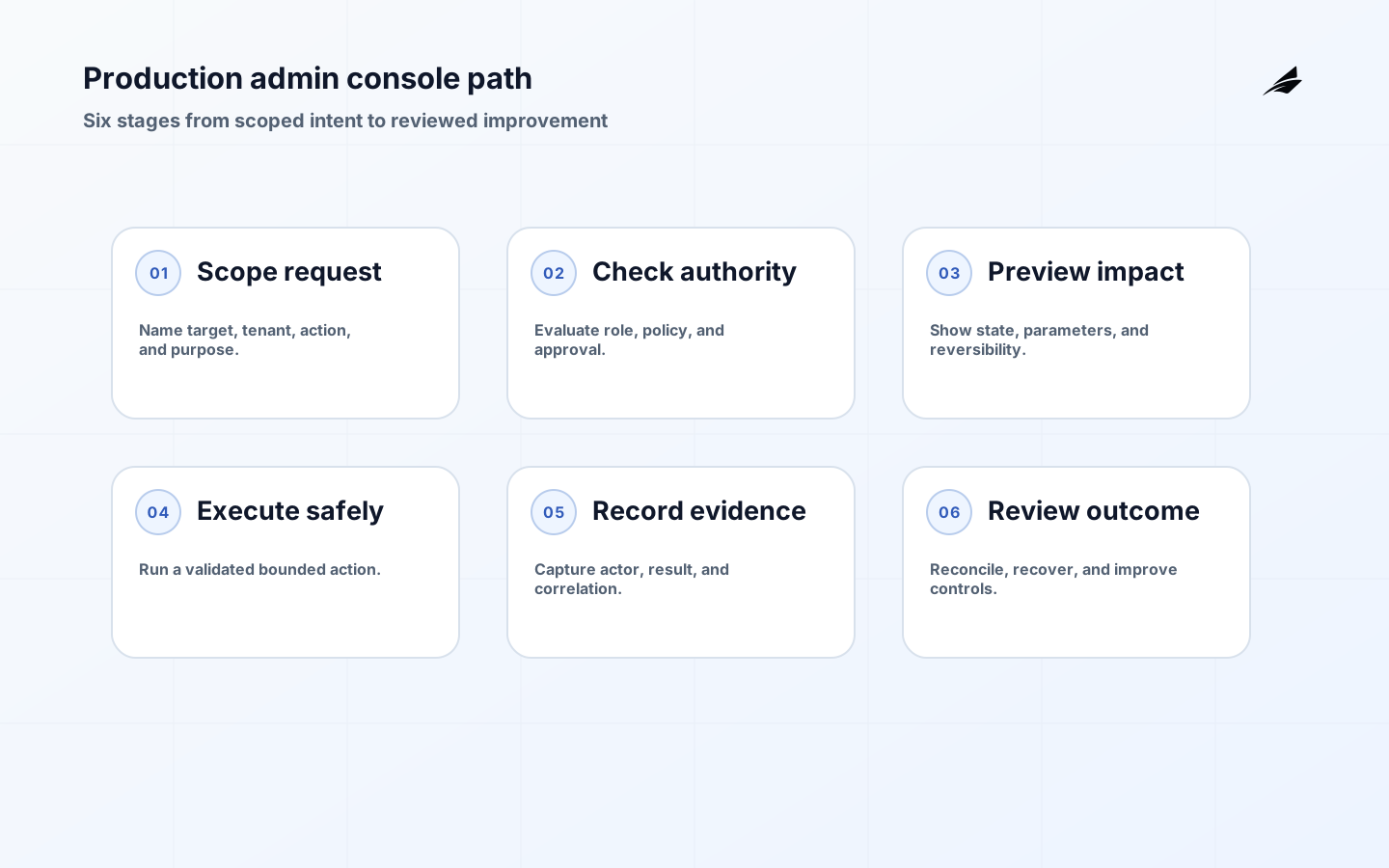
When admin consoles move into production, an internal screen becomes a control surface for real accounts, data, and entitlements. The design question changes from can an operator edit this record to who is allowed to perform which action, on which scope, with what evidence and recovery. AWS recommends least privilege, MFA, temporary credentials, review, and permissions boundaries. NIST defines least privilege as the minimum access needed for assigned tasks, while OWASP ASVS provides a basis for testing web application security controls. Edilec's admin consoles practical guide covers the wider implementation choice; this article focuses on the production transition.
Define the operator decision and scope
Start with a customer or operational problem that needs an authorized action. A support agent may need to inspect entitlement state, an operations engineer may need to replay a failed job, and a security administrator may need to disable a compromised session. These are different actions with different risk and scope. Name the target object, tenant or workspace boundary, allowed duration, expected result, and escalation route. Avoid a generic edit screen that exposes every field because the underlying record is convenient. Narrow actions create clearer tests and safer review.
Separate visibility from authority
A user who can see a record does not automatically have permission to change it. Model read, propose, approve, execute, and reverse as separate capabilities where the consequence justifies it. Enforce authorization on the server or domain service, not only by hiding a button. Check role, tenant scope, resource state, action parameters, and approval at execution time. AWS guidance recommends starting with the minimum permissions and refining them with access evidence. For a console, that means a role should expose only the actions needed for its work and exceptional access should expire or be reviewed.
| Console capability | Control question | Evidence |
|---|---|---|
| View | Which records and fields are visible? | Role, tenant scope, and data classification. |
| Propose | What change is being requested? | Structured action, reason, and target. |
| Approve | Who may authorize the consequence? | Policy, role, and approval record. |
| Execute | What state transition is allowed? | Server-side check and result. |
| Reverse | How can harm be contained? | Rollback or corrective action with owner. |
Use safe actions instead of unrestricted edits
A button labelled edit hides validation, side effects, and audit expectations. Prefer actions such as resend invitation, pause entitlement, retry import, rotate session, or issue a bounded credit. Each action can validate required fields, display impact, require confirmation, and produce a known event. If a free-form field is unavoidable, restrict syntax and validate it at the service boundary. Show the current state, proposed result, affected records, and reversibility before execution. A console should make the safe path easier than a direct database command, not merely put a browser around the same danger.
Make tenant boundaries visible and enforceable
Multi-tenant consoles need a strong scope signal because an operator can otherwise act on the wrong customer while believing the screen is correct. Display tenant name, stable identifier, environment, region, and sensitive status near the action. Require a deliberate scope selection when searching across tenants and prevent a stale selection from carrying into a new action. Test cross-tenant reads and writes, including exports, bulk actions, background jobs, and support impersonation. A support view should explain why a record is available without exposing data that the role does not need.
Design the audit record for investigation
NIST identifies useful audit content such as time, source and destination, user or process identity, event description, affected file or object, invoked access rule, outcome, and event-specific result. Apply that to admin actions: actor, target, tenant, action, reason, approval, policy version, correlation ID, before and after state where safe, and result. Do not store passwords, tokens, or unnecessary personal data in a log. Protect the record from unauthorized modification and make it searchable by customer, actor, action, and time. An audit entry that says admin changed record is not enough to reconstruct the decision.
Build recovery into the action
Every consequential action should answer what happens if it is wrong. A retry should be idempotent; a session revocation should show affected devices; an entitlement change should retain the prior state; a bulk operation should provide a preview and a bounded batch. Make irreversible actions rare and require stronger approval. If an action calls another service, show whether the request was accepted, completed, or pending rather than claiming success after a network response. A recovery path can be a reverse action, a compensating event, a queue replay, or a human escalation, but it must be named before launch.
- Scope every action to a role, tenant, target, and allowed state transition.
- Keep read, propose, approve, execute, and reverse authority distinct where risk requires it.
- Prefer narrow, validated actions over unrestricted record editing.
- Show impact, current state, proposed result, and reversibility before execution.
- Make audit records searchable, protected, and sufficient for an independent investigation.
Example: correcting a subscription entitlement
A support operator sees that a customer paid an invoice but the workspace entitlement is still pending. The console displays the workspace scope, invoice identifier, payment evidence, current entitlement, and the allowed correction action. The operator cannot type a new entitlement end date directly. They can request a bounded resynchronization, select a reason, and see that the action will re-read the provider state and emit an entitlement correction event. A reviewer is required when the proposed end date exceeds policy. The audit record captures actor, evidence, policy, result, and correlation ID. If the provider state conflicts, the action stops and routes to billing review.

| Readiness area | Normal case | Exceptional case |
|---|---|---|
| Authorization | Role can perform defined action. | Approval or escalation is required. |
| Scope | One named workspace is selected. | Cross-tenant or bulk action is blocked or reviewed. |
| Validation | State and parameters are valid. | Conflict stops execution with a useful reason. |
| Audit | Actor, action, target, result are recorded. | Before and after evidence supports investigation. |
| Recovery | Idempotent action completes. | Compensating action or owner is visible. |
Test the console as a security and operations product
Test permission matrices, tenant isolation, direct API calls, stale sessions, bulk selection, retries, timeouts, partial failures, exports, and audit integrity. Run an operator through a normal request and a case where the underlying evidence conflicts. Measure time to investigate, correction success, unsafe-action blocks, stale permissions, and audit search usefulness. OWASP ASVS can supply a security verification framework, but local tests must reflect the console's real data and side effects. Include a review after new actions are added; production consoles often expand faster than their permission model.
Key takeaways
FAQ: Production admin console questions
FAQ: What is least privilege in an admin console?
It means each operator or service receives only the records, actions, and duration needed for assigned work. Start narrow, review actual use, and add authority through a governed request rather than a broad default role.
FAQ: Should every screen view be audited?
Audit the views and searches that carry security, privacy, or sensitive-data significance according to policy. Always audit privileged actions with enough context to reconstruct the decision, and avoid logging secrets or unnecessary personal data.
FAQ: Are bulk actions safe to offer?
They can be safe when scope is explicit, preview and confirmation are required, batches are bounded, authorization is evaluated per target, partial results are visible, and recovery is defined.
Set a production readiness bar
Before enabling a new admin action, require a short readiness record. It should identify the action owner, affected data, role and tenant scope, authorization test, audit fields, failure behavior, recovery method, support wording, and monitoring. Exercise a normal case, a denied case, a stale-state case, a duplicate request, a timeout, and a partial failure. The operator should know whether the action completed, is pending, or stopped before attempting it again. This is especially important for asynchronous work, where a successful request response may only mean that a job was accepted.
Usability is a security property for privileged tools. An operator who cannot find the current scope, evidence, or safe next action is more likely to copy data into an ungoverned tool or ask an engineer to make a direct change. Show the minimum data needed to decide, provide searchable history, preserve keyboard and accessibility support, and make dangerous actions deliberately slower. Keep error messages specific without leaking sensitive information. A console that is both constrained and legible helps people follow policy under time pressure.
Review production actions after incidents, near misses, permission changes, and new integrations. Remove actions that are no longer needed, narrow roles that accumulated unused access, and sample audit records for completeness. AWS recommends continuous review and removal of unused permissions; apply the same discipline to the consoleÃÂÃÂÃÂâÃÂÃÂÃÂÃÂÃÂÃÂÃÂÃÂs UI, API, jobs, and runbooks. Production readiness is not a one-time approval. It is an operating habit that keeps authority proportional to the work.
Keep emergency access separate from everyday operator roles. Require a reason, time limit, and review for exceptional elevation, then remove it when the incident or correction ends. This preserves speed without allowing an emergency path to become the normal permission model.
Document the console's own permission changes in release notes and review them like product changes. Operators need to know when an action, scope, approval, or audit field has changed so they do not rely on an outdated runbook.
For SaaS admin consoles moving into production, a good handoff ends with observable evidence rather than a verbal promise. Make corrections visible, scoped, and reversible.
The smallest useful improvement to when saas admin consoles move into production is often a sharper boundary, not another feature. Explain when saas admin consoles move into production pending and denied states before expansion.
For SaaS admin consoles moving into production, test a stale integration event before treating the first release as complete. Use support evidence to decide whether the workflow is ready.
A practical example for when saas admin consoles move into production is a required input is absent at the moment of action.
For SaaS admin consoles moving into production, Security best practices in IAM defines scope; Policies and permissions in IAM supports the control; OWASP Application Security Verification Standard clarifies evidence; NIST SP 800-171 Revision 3 guides recovery; the least-privilege glossary frames review. Test the workflow with normal, delayed, denied, and corrected cases.
Conclusion
When admin consoles move into production, the product becomes an operational authority. Design around least privilege, visible tenant scope, narrow actions, server-side enforcement, protected audit evidence, and recovery. Edilec's product support tooling guide helps connect operator work to customer support, while the subscription access control architecture guide adds entitlement context. A production console is ready when an operator can act quickly and another person can later understand exactly why that action was allowed.
Evidence for “When SaaS Admin Consoles Move into Production” is grounded in Security best practices in IAM, Policies and permissions in IAM, OWASP Application Security Verification Standard, NIST SP 800-171 Revision 3, Least privilege glossary; each source informs a specific decision, test, or operating trade-off described in this guide.