Product Support Tooling Checklist for Reliable Digital Operations
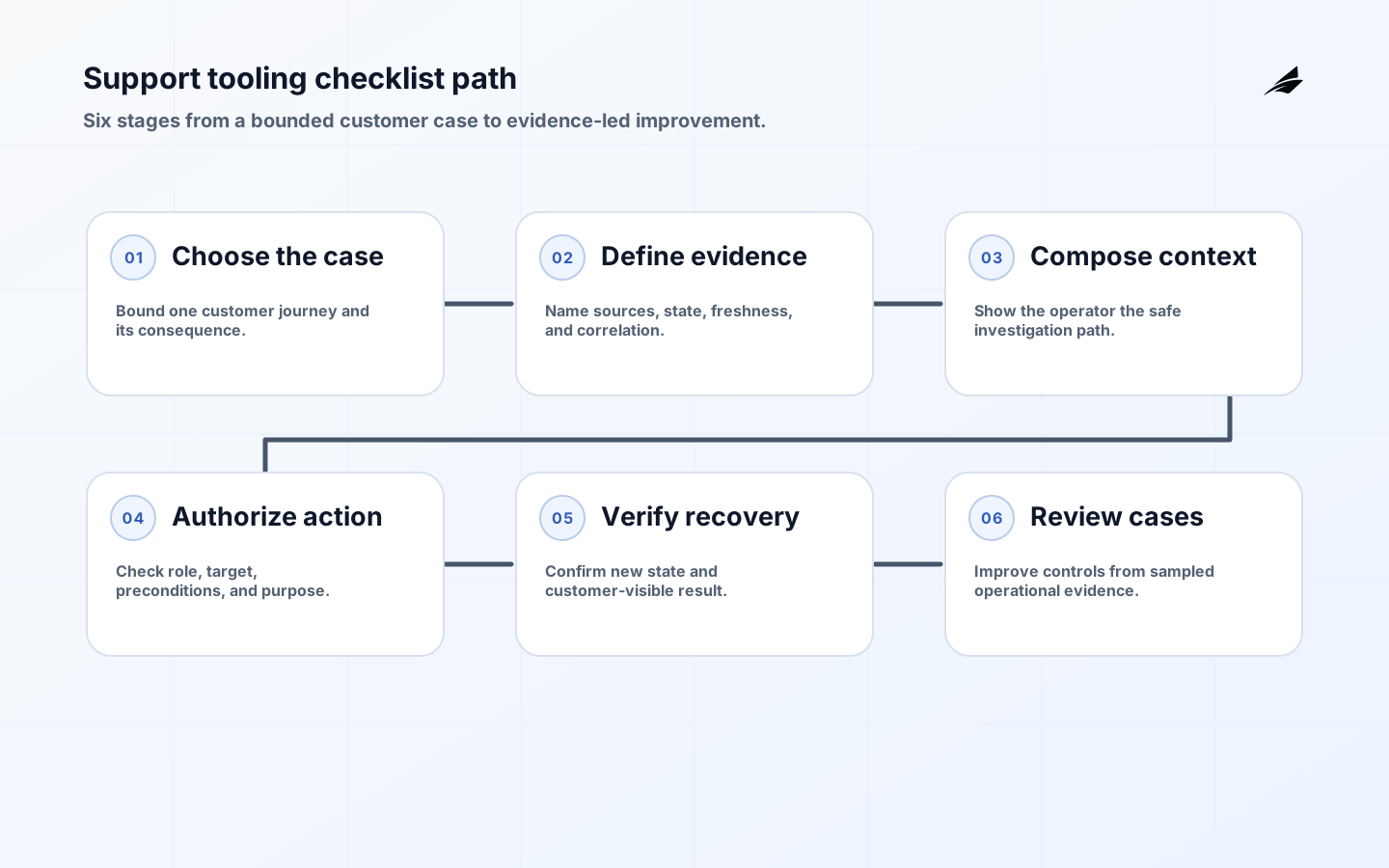
Product support tooling is the operating layer that helps a team understand a customer problem, decide what may be done, and preserve evidence of the result. It is not merely a ticket inbox, a collection of dashboards, or a privileged button that changes production data. A dependable support workflow connects an account, request, product state, diagnostic evidence, and responsible operator. The first useful release should make one journey easier to explain and safer to repair. This checklist shows how to choose that journey, model the evidence, design controls, and measure whether the tooling improves resolution without weakening customer privacy or product integrity.
Set the decision boundary before choosing tools
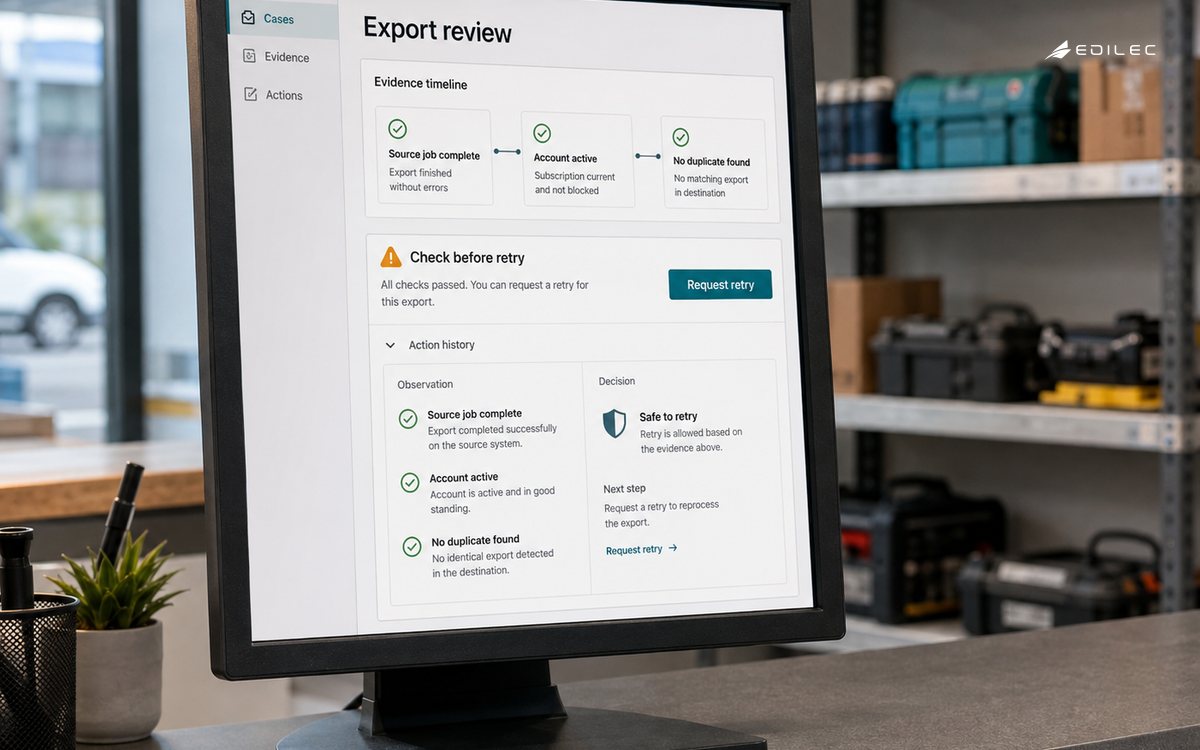
Start with a sentence that names the decision: for example, “an operator may retry a failed export when the account is active, the source job is complete, and no duplicate export exists. ” The sentence identifies the customer consequence, the evidence required, and the condition that stops an unsafe action. Record which system owns each fact and which facts are only observations. A support screen can gather context, but it should not quietly become the authority for subscription state, access rights, or financial records. The NIST Secure Software Development Framework is useful here because it treats secure practices as part of the development lifecycle, not as a final inspection.
| Decision area | Practical question | Evidence to retain |
|---|---|---|
| Customer scope | Which account, user, request, and product area are affected? | Stable identifiers and effective time |
| Authority | Which service owns the fact used to decide? | Source name, freshness, and version |
| Operator action | What may the operator retry, correct, or explain? | Actor, reason code, target, and result |
| Recovery | What happens if the evidence is incomplete? | Safe state, escalation owner, and review date |
Model the support case as a chain of evidence
A support case should be more than a conversation with a hidden investigation behind it. Give it a durable case identifier and connect that identifier to the customer request, relevant product event, trace or job, current state, and next action. Separate observed facts from an operator’s interpretation. For instance, “job 842 completed at 10:14 UTC” is evidence; “the customer should retry” is a decision that still needs a rule. Preserve both so a later reviewer can understand what was known at the time. This distinction matters when an asynchronous worker finishes after a support reply, when a browser shows stale state, or when a configuration change alters what the same request would do today.
- Use one correlation identifier from customer request to service event and support case.
- Show source timestamps and freshness beside values that can change.
- Distinguish a product state, an observation, a hypothesis, and an approved action.
- Make missing evidence visible instead of filling it with a reassuring default.
- Store corrections as new events with an actor and reason rather than overwriting history.
Design the operator view for a real investigation
The useful support screen answers four questions in order: what happened, who is affected, what is safe now, and what must be watched next. Put the current state and its reason near the top, then provide a compact timeline with links to the source records. Use role-aware redaction for personal data, secrets, and payment information. Do not expose a broad search box merely because a privileged user can technically query many records. The OWASP ASVS describes a basis for testing technical security controls; translate that basis into checks for authorization, input handling, error disclosure, logging, and session behavior in the support workflow.
| View element | Good default | Reason to change it |
|---|---|---|
| Current state | State, reason, effective time, and source | A domain needs a richer state machine |
| Timeline | Key transitions with correlation IDs | An investigation spans more than one service |
| Action | Narrow command with preview and confirmation | The action has material customer or financial impact |
| Sensitive data | Minimum fields for the operator’s role | A verified business need requires temporary access |
Put authorization and safe errors in the workflow
Every support command needs a server-side authorization check; hiding a button is not a control. Verify the operator, target account, action, purpose, and current state at the moment of execution. Add idempotency for retries and a clear response when the state changed between preview and confirmation. For APIs, RFC 7807 Problem Details provides a common shape for machine-readable errors without redefining HTTP semantics. Use that idea to return a stable problem type, a safe human explanation, and a correlation reference. Avoid returning stack traces, tokens, or internal query details to the support browser.
Instrument the path from report to resolution
Support tooling becomes trustworthy when an engineer can follow one case through the same signals an operator sees. Capture event names, timestamps, account context, actor or service identity, outcome, and correlation identifiers. OpenTelemetry documentation gives teams a shared vocabulary for traces, metrics, and logs; the important local decision is which fields are safe and useful for this product. Measure time to first useful diagnosis, time to safe recovery, repeat contacts, unexplained handoffs, and the share of cases resolved with source evidence. Pair each aggregate with sampled cases so a fast but wrong resolution does not look like success.
Roll out one support journey and rehearse failure
Choose a journey with meaningful volume and a bounded risk, such as a failed import or an invitation that never completed. Before release, walk through a normal request, a duplicate request, missing context, stale state, a permission change, and a dependency outage. Have an operator perform the investigation while an engineer watches the evidence path. The acceptance result is not a polished screen; it is a reproducible case in which the operator can explain why the action was allowed, what changed, and how to reverse or contain it. Expand only after support language, access boundaries, and runbook ownership are clear.
Use a case review to improve the checklist
Run a weekly review of a small sample of resolved cases. Ask whether the operator had the right account context, whether each important fact had a source and timestamp, and whether the chosen action matched the current state. Compare the customer message with the evidence actually available. This catches a subtle failure mode: a tool can make an investigation faster while making its explanation less accurate. Keep the review focused on one change the team can make, such as adding a missing event, tightening a role, or clarifying a reason code.
Include one case that looked routine and one that required escalation. For the routine case, look for unnecessary steps, stale panels, and fields that invite unsafe copying. For the escalated case, identify exactly where evidence ran out and whether the escalation carried enough context to be efficient. A good support tooling checklist should make the boundary visible: the operator knows what is safe to do, what is pending, and which owner must decide the next step.
Use the review to refine customer language as well as system behavior. If operators repeatedly tell customers that a job is “stuck” when it is actually waiting for an external approval, add the real state and the expected timing. If customers receive different answers from support and the product interface, align the explanation to the same state transition. This is product work because the wording changes expectations, retries, and trust.
Close each review with an owner, a small implementation change, and a date to check the result. Do not turn every observation into a new dashboard. Prefer a control that prevents recurrence, such as an idempotency check, an explicit pending state, or a narrower command. The checklist is doing its job when evidence and recovery improve together.
One useful review question is whether the case could be handed from support to engineering without a second investigation. If the answer is no, add the missing correlation, source reference, or state transition to the evidence contract. The checklist should reduce rework for the customer as well as for the team.
Key takeaways
- Start with one customer decision and name the authoritative facts behind it.
- Keep support context adjacent to product evidence without making the support view a second source of truth.
- Authorize every action at execution time and record actor, reason, target, and result.
- Measure resolution quality with case review, not only response speed.
- For adjacent delivery planning, See SaaS MVP delivery planning, SaaS product development implementation, and multi-tenant SaaS architecture.
Frequently asked questions
What should be automated first?
Automate evidence collection and safe, repeatable checks before automating corrective actions. A timeline that joins the account, request, job, and current state can remove hours of searching while leaving a human responsible for a consequential decision. Add automation for a correction only when its preconditions, idempotency, authorization, and rollback route are explicit.
How much customer data belongs in the support view?
Show the minimum data needed to answer the case. Start with identifiers, state, reason codes, timestamps, and safe summaries; reveal sensitive fields only for a defined role and purpose. Review access logs and expiration rules as part of the support workflow, because an information-rich screen can become a long-lived privacy risk.
When is the first release ready?
It is ready when a representative operator can investigate a normal case and an interrupted case, take only authorized actions, explain the result to a customer, and leave evidence another teammate can reproduce. If the workflow still depends on a private conversation with an engineer, the tooling has not yet captured the real operating contract.
Conclusion: make support evidence part of the product
Reliable product support tooling gives customers a calmer path through failure because the team can see what happened, what is authoritative, and what may safely happen next. Begin with a bounded journey, make the evidence chain explicit, enforce access at the command boundary, and learn from actual cases. The result is not a larger support console; it is a product that can explain and repair its own operating behavior.
A durable operating note for product support tooling checklist for reliable digital operations records the assumptions that made the decision safe: the authoritative source, effective time, permitted actor, protected resource, and recovery route. Measure product support tooling checklist for reliable digital operations outcomes alongside correction effort.
For product support tooling checklist for reliable digital operations, a good handoff ends with observable evidence rather than a verbal promise.
The smallest useful improvement to product support tooling checklist for reliable digital operations is often a sharper boundary, not another feature. Test product support tooling checklist for reliable digital operations with normal, delayed, denied, and corrected workflow cases.
For product support tooling checklist for reliable digital operations, test an incomplete setup before treating the first release as complete.
This decision also connects to Release Notes Checklist for Reliable Digital Operations, SaaS Reliability Checklist: From Happy Path to Recovery, The Plain-language Guide to Subscription Access Control. Review those boundaries together when product support tooling checklist for reliable digital operations shares identity, data, billing, or support evidence with another workflow.
For Product Support Tooling Checklist for Reliable Digital Operations, OWASP Application Security Verification Standard defines scope. For product support tooling checklist for reliable digital operations, name the decision boundary and its owner.
A practical review of product support tooling checklist for reliable digital operations should rehearse a disputed customer result with a real identifier and a visible owner. For product support tooling checklist for reliable digital operations, review the for reliable digital operations scope during normal handling. For product support tooling checklist for reliable digital operations, review the for reliable digital operations control during normal handling.
Before expanding product support tooling checklist for reliable digital operations, compare the normal case with a delayed dependency. For product support tooling checklist for reliable digital operations, review the for reliable digital operations evidence during normal handling. For product support tooling checklist for reliable digital operations, review the for reliable digital operations recovery during normal handling.
Evidence for “Product Support Tooling Checklist for Reliable Digital Operations” is grounded in Secure Software Development Framework (SSDF) Version 1.1, OWASP Application Security Verification Standard, OpenTelemetry Observability Primer, RFC 7807: Problem Details for HTTP APIs; each source informs a specific decision, test, or operating trade-off described in this guide.