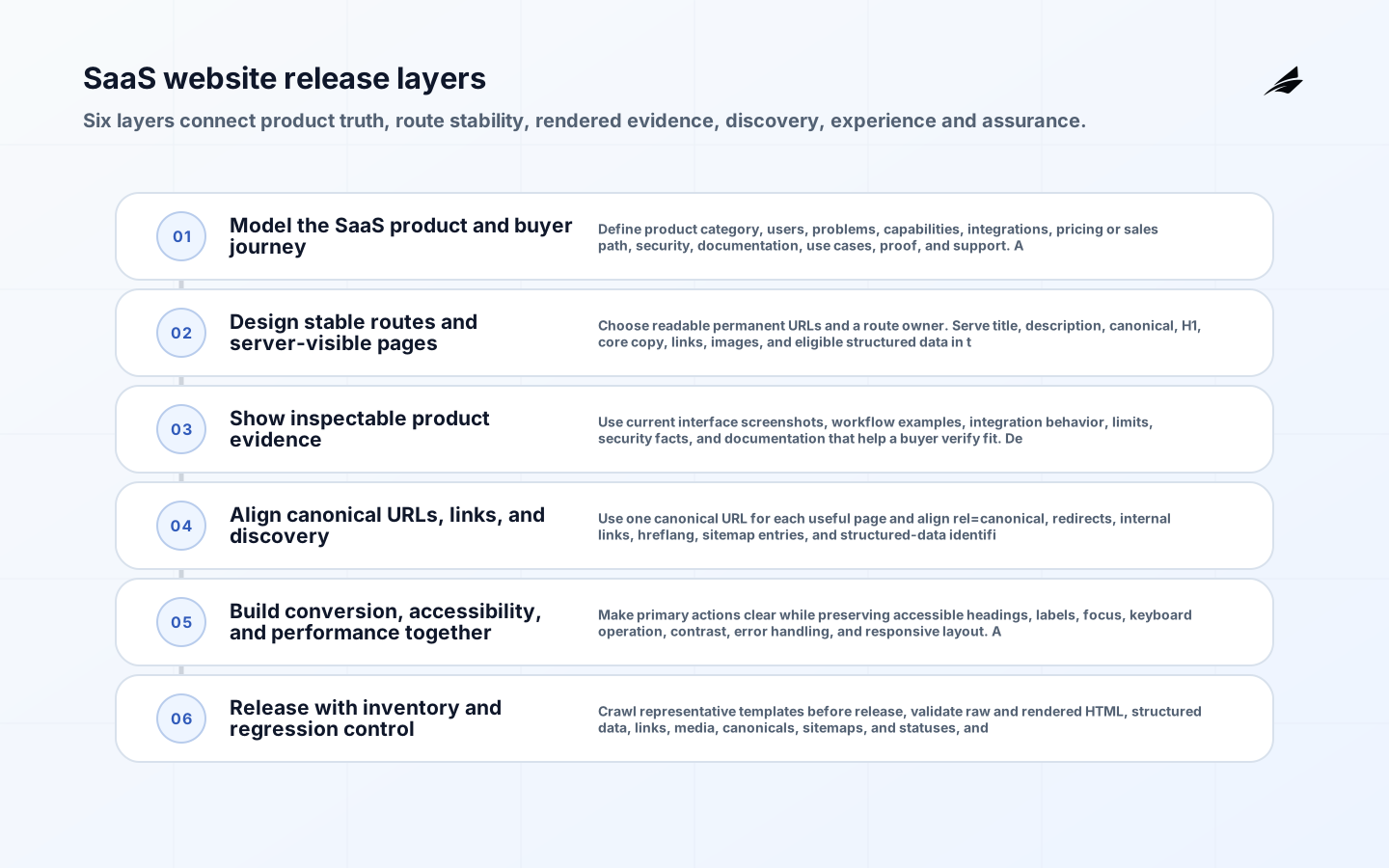
SEO-ready website development for SaaS companies should make the product understandable before asking a visitor to register. Public pages need stable purpose, inspectable product evidence, coherent links, reliable HTML, and performance across real devices. Authenticated product states require a separate privacy and indexing boundary. Building those decisions into components and release checks is more durable than adding metadata after design and routing are complete. The primary planning lens is SEO-ready website development for SaaS companies, with decisions expressed in language that product users and operating teams can verify.
Nearby planning resources include SEO-ready Website Development for SaaS Companies Implementation Checklist, SEO-ready Website Development for SaaS Companies FAQ, SEO Ready Website Development Implementation Plan: Scope, Cost, Risks and Delivery Plan, SEO Ready Website Development Implementation Plan Readiness Checklist. Those pages provide companion scope and checklist views; this article develops the technical and operating evidence for the topic here.
Model the SaaS product and buyer journey
Define product category, users, problems, capabilities, integrations, pricing or sales path, security, documentation, use cases, proof, and support. Assign a distinct public page only when the team can maintain useful content.
Connect exploration to evaluation and action through meaningful navigation and contextual links. Keep terms consistent with the product interface and contractual promise. Publishing hundreds of near-identical industry or integration pages weakens trust and creates overlapping canonical intent.
Design stable routes and server-visible pages
Choose readable permanent URLs and a route owner. Serve title, description, canonical, H1, core copy, links, images, and eligible structured data in the initial response.
Use static generation or server rendering where appropriate, accurate status codes, and progressive enhancement. Test loading, error, and empty states without relying on JavaScript to repair a noindex or soft 404. A visually complete client-rendered page can still expose a blank shell, conflicting metadata, or universal 200 status to crawlers.
| Decision area | Required decision | Acceptance evidence |
|---|---|---|
| Model the SaaS product and buyer journey | Define product category, users, problems, capabilities, integrations, pricing or sales path, security, documentation, use cases, proof, and support. Assign a distinct public page only when the team can maintain useful content. | Connect exploration to evaluation and action through meaningful navigation and contextual links. Keep terms consistent with the product interface and contractual promise. |
| Design stable routes and server-visible pages | Choose readable permanent URLs and a route owner. Serve title, description, canonical, H1, core copy, links, images, and eligible structured data in the initial response. | Use static generation or server rendering where appropriate, accurate status codes, and progressive enhancement. Test loading, error, and empty states without relying on JavaScript to repair a noindex or soft 404. |
| Show inspectable product evidence | Use current interface screenshots, workflow examples, integration behavior, limits, security facts, and documentation that help a buyer verify fit. Describe outcomes without inventing customer statistics or unsupported superlatives. | Give images stable URLs, descriptive filenames, dimensions, responsive variants, literal alt text, and nearby explanatory captions. Keep private tenant data out of demonstrations and media. |
Show inspectable product evidence
Use current interface screenshots, workflow examples, integration behavior, limits, security facts, and documentation that help a buyer verify fit. Describe outcomes without inventing customer statistics or unsupported superlatives.

Give images stable URLs, descriptive filenames, dimensions, responsive variants, literal alt text, and nearby explanatory captions. Keep private tenant data out of demonstrations and media. Decorative technology imagery and generic claims add weight without helping a reader understand the actual product.
Align canonical URLs, links, and discovery
Use one canonical URL for each useful page and align rel=canonical, redirects, internal links, hreflang, sitemap entries, and structured-data identifiers.
Create crawlable HTML anchors among capabilities, use cases, integrations, docs, comparisons, and related guides. Detect orphans and broken links in delivery. Sitemaps help discovery but cannot replace site architecture, and canonical tags cannot make thin duplicates useful.
| Control area | Failure to prevent | Production proof |
|---|---|---|
| Align canonical URLs, links, and discovery | Sitemaps help discovery but cannot replace site architecture, and canonical tags cannot make thin duplicates useful. | Create crawlable HTML anchors among capabilities, use cases, integrations, docs, comparisons, and related guides. Detect orphans and broken links in delivery. |
| Build conversion, accessibility, and performance together | A faster page does not convert when controls are confusing, and a polished form loses demand when scripts block interaction on common devices. | Measure Core Web Vitals by template in field data. Budget analytics, experimentation, chat, consent tools, fonts, video, and screenshots; reserve media space to prevent layout shift. |
| Release with inventory and regression control | Design-system or routing changes can create site-wide regressions even when the edited page passes visual review. | Monitor logs, indexing reports, template performance, form completion, and unexpected error or redirect patterns. Automate checks for title loss, noindex, blank content, canonical drift, and broken primary actions. |
Build conversion, accessibility, and performance together
Make primary actions clear while preserving accessible headings, labels, focus, keyboard operation, contrast, error handling, and responsive layout. Avoid intrusive overlays that obscure product evidence.
Measure Core Web Vitals by template in field data. Budget analytics, experimentation, chat, consent tools, fonts, video, and screenshots; reserve media space to prevent layout shift. A faster page does not convert when controls are confusing, and a polished form loses demand when scripts block interaction on common devices.
Release with inventory and regression control
Crawl representative templates before release, validate raw and rendered HTML, structured data, links, media, canonicals, sitemaps, and statuses, and compare the URL inventory during migrations.
Monitor logs, indexing reports, template performance, form completion, and unexpected error or redirect patterns. Automate checks for title loss, noindex, blank content, canonical drift, and broken primary actions. Design-system or routing changes can create site-wide regressions even when the edited page passes visual review.
Definition of done for a SaaS website template
A template is complete when it has an owner, page purpose, content model, stable URL behavior, responsive and accessible states, initial HTML, canonical and social metadata, structured-data mapping, media rules, analytics events, performance budget, and automated regression checks. Product and content teams own factual claims; design owns usability; engineering owns rendering and routing; growth owns measurement without overriding consent and performance.
Test the template with the longest product names, missing optional content, slow image connection, blocked third-party scripts, keyboard-only navigation, narrow mobile, wide desktop, non-JavaScript request, invalid form input, deleted record, and changed canonical route. The result should remain understandable and actionable, and failures should return accurate HTTP states rather than an endless loading surface.
Taken together, the decision for SEO-ready website development for SaaS companies must connect model the saas product and buyer journey, design stable routes and server-visible pages, show inspectable product evidence, align canonical urls, links, and discovery, build conversion, accessibility, and performance together, release with inventory and regression control. The release review should show which owner accepts each decision, where its source evidence is stored, which threshold blocks production, and how a failed dependency or incorrect result is contained. It should also explain how changes to data, policy, integrations, identities, customer scope, or software versions trigger renewed testing. That linkage matters because controls assessed independently can still conflict in operation: a secure interface may carry stale data, a reliable service may enforce the wrong authority, and a useful workflow may become uneconomic when review or support demand rises. Record these dependencies as maintained product artifacts, not one-time project notes, so later operators can distinguish an approved constraint from an accidental behavior.
The control chain starts with model the saas product and buyer journey: Define product category, users, problems, capabilities, integrations, pricing or sales path, security, documentation, use cases, proof, and support. Assign a distinct public page only when the team can maintain useful content. Evidence must explicitly guard against Publishing hundreds of near-identical industry or integration pages weakens trust and creates overlapping canonical intent. Next, design stable routes and server-visible pages: Choose readable permanent URLs and a route owner. Serve title, description, canonical, H1, core copy, links, images, and eligible structured data in the initial response. Evidence must explicitly guard against A visually complete client-rendered page can still expose a blank shell, conflicting metadata, or universal 200 status to crawlers. Next, show inspectable product evidence: Use current interface screenshots, workflow examples, integration behavior, limits, security facts, and documentation that help a buyer verify fit. Describe outcomes without inventing customer statistics or unsupported superlatives. Evidence must explicitly guard against Decorative technology imagery and generic claims add weight without helping a reader understand the actual product. Next, align canonical urls, links, and discovery: Use one canonical URL for each useful page and align rel=canonical, redirects, internal links, hreflang, sitemap entries, and structured-data identifiers. Evidence must explicitly guard against Sitemaps help discovery but cannot replace site architecture, and canonical tags cannot make thin duplicates useful. Next, build conversion, accessibility, and performance together: Make primary actions clear while preserving accessible headings, labels, focus, keyboard operation, contrast, error handling, and responsive layout. Avoid intrusive overlays that obscure product evidence. Evidence must explicitly guard against A faster page does not convert when controls are confusing, and a polished form loses demand when scripts block interaction on common devices. Next, release with inventory and regression control: Crawl representative templates before release, validate raw and rendered HTML, structured data, links, media, canonicals, sitemaps, and statuses, and compare the URL inventory during migrations. Evidence must explicitly guard against Design-system or routing changes can create site-wide regressions even when the edited page passes visual review. Reading these checks as one chain prevents a local pass from hiding an end-to-end failure. The accountable owners should review the chain after any material incident or change and record whether the original assumptions, thresholds, and fallback remain valid.
Implementation takeaways
- Model product information before composing page layouts.
- Serve useful public content and signals in initial HTML.
- Use real product evidence and purposeful media.
- Align canonical URLs, internal links, redirects, and sitemaps.
- Make accessibility, performance, conversion, and indexing release criteria.
Frequently asked questions
| Question | Answer |
|---|---|
| How many SaaS landing pages should be created? | Only as many as the company can support with distinct, useful, accurate content for real buyer tasks. |
| Should screenshots be indexable? | Useful public screenshots can be crawlable with stable URLs and descriptive context; protect any tenant or private data. |
| Is static generation always best? | No. Choose static, server, or hybrid rendering based on freshness and scale, while preserving reliable initial HTML and status behavior. |
| What should be tested after launch? | Canonical selection, crawling, rendering, links, media, structured data, field performance, forms, and conversion by template. |
Conclusion
A SaaS website becomes discoverable by being clear, stable, and useful. Architecture should reveal how product, use case, integration, documentation, and proof relate, while rendering and HTTP behavior make that information dependable for people and crawlers.
Release discipline keeps that quality from decaying. When templates own accessibility, performance, metadata, media, and regression tests, product teams can publish quickly without reintroducing blank shells, duplicate routes, broken actions, or unsupported claims.