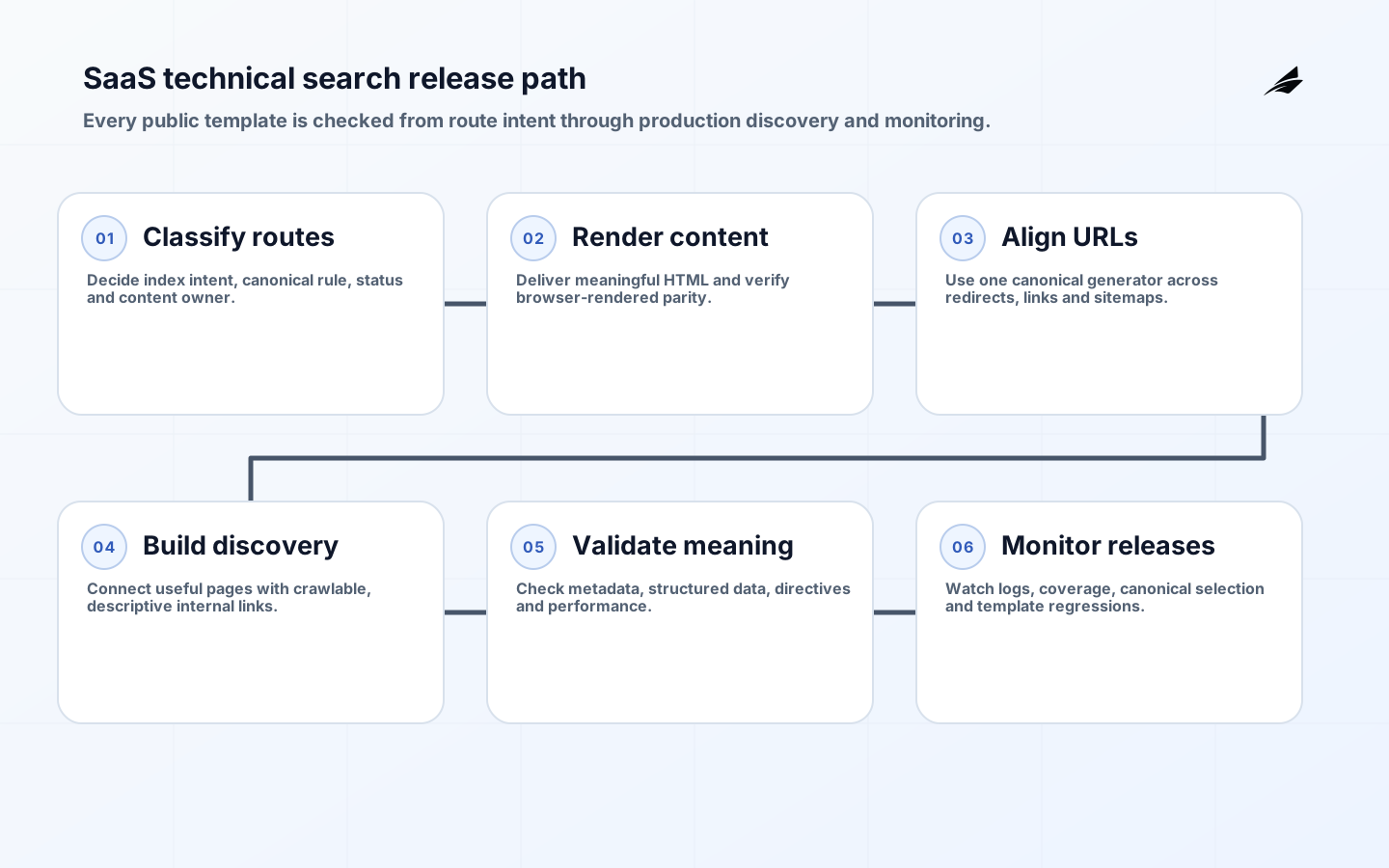
Technical SEO services for SaaS companies should make valuable public pages discoverable, renderable, understandable and consistently canonical while keeping private application surfaces out of search. The work is architectural: routing, rendering, content sources, navigation, status codes, metadata, performance and release controls must agree. Adding tags after a JavaScript application is built cannot repair missing server responses, infinite URL spaces or duplicate product pages. A strong implementation turns search requirements into testable acceptance criteria in the normal software delivery process.
This checklist is intended for SaaS marketing, product, engineering and content teams. It complements the SaaS technical SEO scope guide and SaaS technical SEO FAQ. Search inclusion and ranking are not guaranteed by any checklist. The practical goal is to remove technical ambiguity, publish useful pages with stable evidence, and monitor how crawlers and users experience each release.
1. Inventory public, duplicate and private URL classes
Create a URL inventory by template and purpose: home, product, service, use case, integration, documentation, pricing, comparison, customer story, article, author, category, legal, account and application routes. For each class, state whether it should be indexed, its canonical rule, expected status, renderer, content owner and discovery path. Include protocol, host, trailing slash, case, locale, campaign parameters, pagination and filtered variants. Crawl production and compare the resulting set with routes from the application and content system.
Keep authenticated and low-value utility pages outside the public index using access control and appropriate directives; do not rely on robots.txt to protect sensitive information. Resolve duplicate hosts and paths with redirects and consistent links. Return a real 404 or 410 for removed pages rather than a successful response containing an error message. Map intentional redirects and remove chains. A useful inventory explains every large URL cluster and lets the team predict what a crawler will receive before a release.
| URL class | Index intent | Canonical rule | Primary test |
|---|---|---|---|
| Product and use case | Index when substantively distinct | Self-canonical | Unique HTML, title and internal links |
| Campaign parameter | Usually consolidate | Canonical to clean URL | No conflicting sitemap entry |
| App and account | Private or excluded | Not a public acquisition page | Authentication and robots behavior |
| Removed integration | No index | Redirect only to a true successor | 404/410 or one-hop redirect |
2. Deliver complete, crawlable HTML
Inspect the initial HTTP response for every public template. It should contain the meaningful title, description, canonical, main heading, body content and crawlable links whenever architecture permits. Google can render JavaScript, but rendering adds another processing stage and failure mode. Server rendering, static generation or controlled prerendering can improve predictability; choose according to freshness and platform constraints. Ensure that browser and crawler receive equivalent content. Do not serve empty app shells or hidden keyword blocks intended only for crawlers.

Test routes with JavaScript enabled and disabled, then use rendered inspection to confirm content and links. Handle timeouts and API failures with meaningful status codes. Avoid requiring interaction, scrolling or consent state before primary content enters the document. If metadata is updated client-side, prevent multiple or conflicting canonical and robots elements; Google recommends keeping JavaScript canonical values consistent with original HTML. Validate hydration so the browser does not replace correct server content with an error or a different URL signal.
3. Establish one canonical URL contract
Define URL generation in one shared function used by navigation, canonical tags, structured data, hreflang where applicable, feeds and sitemaps. Use stable, human-readable paths and percent-encode reserved characters correctly. Avoid generating content variants through arbitrary parameter order. Canonicalization is a preference signal, not a substitute for controlling links and duplicates. Google documents redirects and rel=canonical as strong signals, while sitemap inclusion is weaker; align all three rather than making them contradict one another.
For intentionally similar pages, decide whether each serves a distinct user need. Consolidate pages that differ only by superficial keyword substitution. Product, use-case and industry pages should have independent evidence, examples and navigation value if they remain separate. Point canonical tags to accessible, indexable pages with equivalent content. Never canonicalize every page to the home page. Test host, protocol and slash variants, and verify that internal links go directly to the preferred URL instead of relying on redirects.
4. Design architecture and internal links around user tasks
Organize public content so a visitor can move from problem to capability, proof, implementation detail and next action. Keep important pages within a reasonable crawl path from stable hubs. Use real anchor elements with href attributes; Google notes that links implemented only through script events may not be reliably crawled. Write anchor text that describes the destination. Connect product pages to relevant documentation and customer evidence, and connect educational pages to the specific capability that resolves the reader’s problem.
Audit orphan pages, broken links, redirects and excessive repeated navigation. Related-content modules should use topical and journey relevance rather than random rotation. Pagination should expose crawlable page URLs when content extends beyond one view. Faceted integration or resource directories can create enormous URL spaces; permit indexing only for combinations with durable demand and distinct value, and prevent uncontrolled combinations from consuming crawl resources. Empty combinations should return an appropriate not-found response rather than a generic successful page.
| Release check | Method | Failure threshold | Owner |
|---|---|---|---|
| Initial HTML | Fetch without browser execution | Primary content or canonical missing | Web platform |
| Status and redirect | Crawl route variants | Soft error or chain | Platform engineering |
| Internal discovery | Graph crawl from public hubs | Priority page orphaned | Content and product |
| Rendered parity | Compare source and rendered document | Material content or directive conflict | Frontend engineering |
| Performance | Field and lab diagnostics by template | Regression beyond agreed budget | Product team |
5. Generate accurate metadata and structured data
Give every indexable page a descriptive title and concise summary matched to its actual content. Put the unique page concept in the main heading and use subordinate headings to explain decisions and evidence. Metadata should come from the same authoritative content record as the page, with safe fallbacks that do not create duplicate titles. Social images, article dates and authors should be accurate. Do not publish large meta-keyword lists; modern search systems rely on page content and many other signals, and invisible repetition reduces quality.
Add structured data only for types and properties represented visibly on the page and supported by applicable search documentation. Validate syntax and semantics in continuous integration, then inspect production rendering. Use stable entity identifiers and absolute canonical URLs. Article markup should identify headline, author, dates and representative image; organization and product information should remain consistent across pages. Structured data can help systems interpret content but does not guarantee a display feature and must not invent ratings, prices, availability or questions.
6. Align sitemaps, robots and index directives
Generate XML sitemaps from the same published route inventory. Include only canonical, indexable, successful URLs and accurate last-modified dates tied to meaningful content change. Partition large sets by stable type or update behavior so errors can be isolated. Add image or video metadata only when the media is accessible and important to the page. Submit sitemap indexes through search-engine tooling and monitor discovered versus indexed patterns by template. A sitemap aids discovery; it does not override a noindex, redirect or weak page.
Use robots.txt to manage crawling, not confidentiality, and remember that blocked crawlers cannot inspect page-level noindex directives. Keep staging and preview hosts protected by authentication. Define robots meta and X-Robots-Tag behavior for HTML and non-HTML assets. Test production rules during deployment because an inherited staging block can remove an entire site from discovery. Conversely, exposing private application routes can leak titles or consume crawl resources even when login prevents content access.
7. Protect performance and monitor indexing through releases
Set performance budgets by template for server response, JavaScript, images, fonts and third-party code. Measure Core Web Vitals using field data where sufficient and use lab diagnostics to find causes. Optimize the largest content element, reserve image dimensions, reduce long main-thread work and control third-party tags. Performance work should preserve content and accessibility. A fast empty shell is not a useful page, and a visually rich page that blocks interaction can still fail users.
Monitor search-console reports, sitemap state, crawl logs, server errors, canonical selections and index coverage by template and deployment. Alert on sudden changes in successful public URLs, noindex, canonical targets, rendered content size and internal link counts. Keep a release annotation so changes can be correlated with evidence. Investigate samples rather than treating every discovered-but-not-indexed URL as a defect; search engines choose what to index, while the site team is responsible for technical consistency and content value.
Key takeaways
- Classify every route before trying to optimize individual pages.
- Deliver meaningful HTML and consistent canonical signals.
- Control duplicates through architecture, links, redirects and canonicalization together.
- Use crawlable links and content hubs that match user journeys.
- Make technical search checks part of continuous integration and production monitoring.
Frequently asked questions
Can Google index a client-rendered SaaS site?
Google can render JavaScript, but implementation errors, delayed content and conflicting signals can reduce reliability. Test initial and rendered HTML. Server or static rendering often improves predictability for public acquisition pages.
Should every integration filter have an indexable URL?
No. Index only stable combinations that satisfy a distinct user need with substantive content. Uncontrolled facets can create near-infinite URL spaces and slow discovery of important pages.
How often should technical audits run?
Automated route and template checks should run with every relevant release. Broader crawl, log and performance review should follow a regular cadence and major migrations. Investigate anomalies continuously rather than waiting for an annual audit.
Conclusion
Technical search quality for a SaaS site is a property of the product architecture and release process. Stable routes, complete rendering, coherent canonical signals, crawlable links, honest metadata and observable performance give useful content the best chance to be discovered and understood. None can substitute for a page that answers a real question.
Before accepting the implementation, select one page from every public template and trace its HTTP response, rendered document, canonical, internal links, sitemap entry, structured data and performance. Then test a duplicate, removed page and private route. When those paths behave predictably in production, the site has an operable foundation rather than a collection of one-time fixes.