Technical SEO for small business is the work that lets search engines reliably discover, render, understand and select the right version of useful pages. It cannot manufacture demand or make weak content authoritative. It can remove preventable barriers such as blocked pages, contradictory canonicals, broken internal links, slow templates and stale location information.
This checklist is designed for owners, marketers and developers who need a controlled implementation plan rather than a one-time score. It pairs with the small-business technical SEO scope guide, practical FAQ and enterprise technical SEO governance guide. Search behavior changes, so use current official documentation and observe your own site.
Inventory page types and search intent
List templates and route families: home, service, product, location, category, article, profile, campaign, search, filter, account and utility pages. For each, record intended audience, unique value, owner, canonical policy and index decision. Crawl the site, export XML sitemaps and compare them with analytics, Search Console and the CMS. This reveals orphan pages, duplicate routes and valuable pages absent from navigation.
Match one primary intent to each indexable page. A local service page should explain the actual service, location, evidence, availability and next action rather than swap a city name into generic text. Consolidate overlapping pages when users would not benefit from separate results. Keep internal search, cart, login and thin filter combinations out of the index unless they have a deliberate search purpose.
| Page family | Default index intent | Required unique value | Owner check |
|---|---|---|---|
| Core service | Index | Specific scope, process, evidence and contact path | Offer is current and deliverable |
| Location | Index when genuinely served | Address or service area, local details and consistency | Business facts are verified |
| Article or guide | Index when useful and maintained | Original answer, examples and reviewed date | Subject owner exists |
| Campaign variant | Usually consolidate | Only index if it serves distinct lasting intent | Canonical does not conflict |
| Internal search or filters | Usually exclude | Curated landing page if demand warrants | No crawl explosion |
| Account and utility | Exclude | Accessible function, not search landing page | No sensitive or empty result |
Verify crawl access and status behavior
Google’s crawling and indexing documentation distinguishes robots controls, status codes, rendering, canonicalization and sitemaps. Use robots.txt to manage crawling, not to remove a URL already known to search engines. Use appropriate authentication, noindex or removal processes for content that should not appear, and never rely on robots.txt to protect confidential data.
Return 200 only for a useful page, permanent redirect for a durable move, 404 or 410 for removed content without replacement, and 5xx for temporary server failure. Avoid soft 404 pages that return 200 with an error message. Limit redirect chains and update internal links to the final destination. Test the rendered response as a search crawler and an unauthenticated mobile user.
Align canonical, redirect and internal-link signals
Choose one preferred URL for duplicate or near-duplicate content and make signals consistent. Google’s canonical guidance describes redirects and rel=canonical as strong signals and sitemap inclusion as weaker. Point duplicate variants to the preferred page, link internally to it and list it in the sitemap. Do not create loops, chains or cross-topic canonicals.
Normalize protocol, host, trailing slash, case and tracking parameters in routing rules. Check ecommerce variants, print pages, campaign parameters and CMS previews. A canonical is a hint for duplicate selection, not a substitute for removing crawl traps or redirecting retired pages. Verify Google-selected canonical in URL Inspection for representative templates.
| Technical check | Pass condition | Test method | Release blocker |
|---|---|---|---|
| HTTP status | Intentional 200, redirect, 404/410 or 5xx | Crawler and direct request | Valuable URL errors or false 200 |
| Robots and noindex | Policy matches page purpose | Raw response and rendered DOM | Index page blocked or private page exposed |
| Canonical | Absolute, valid and consistent target | Template crawl and URL Inspection | Loop, conflict or unrelated target |
| Internal links | Crawlable links reach preferred URLs | Crawl graph and manual navigation | Orphan revenue page |
| Sitemap | Only canonical, indexable preferred URLs | Parse and compare with crawl | Errors or redirected URLs listed |
| Rendering | Main content and links visible | Rendered HTML and mobile check | Critical content absent |
| Structured data | Matches visible content and policy | Rich Results Test | Misleading or invalid required fields |
Improve sitemaps and internal discovery
Generate sitemaps from the same publishing rules that determine canonical indexable pages. Google’s sitemap documentation states that submission is a hint, not a guarantee. Use accurate last-modified values only when meaningful content changes. Remove redirected, noindexed, missing and duplicate URLs.
Build clear navigation around customer tasks and business hierarchy. Use descriptive anchor text in normal crawlable links. Important service and location pages should be reachable without site search or scripted interactions that hide links. Add contextual links where they help a reader choose or continue, not blocks of repetitive exact-match text.
Fix titles, descriptions and page semantics
Give each indexable page a concise descriptive title aligned with its visible heading and purpose. Write unique meta descriptions that accurately preview the page; search engines may choose other snippets. Use one clear main heading, logical subheadings, descriptive image alternatives and HTML elements that express lists, tables, addresses and navigation. Do not hide phrases or repeat location and service terms unnaturally.
Keep business name, address, phone, hours, service area, pricing claims and availability consistent with actual operations and maintained profiles. Show review dates where freshness matters. Redirect or update obsolete offers rather than leaving contradictory pages discoverable. Technical correctness cannot rescue inaccurate business information.
Improve page experience from field evidence
Measure representative templates on real mobile conditions. The official Web Vitals guidance defines the current Core Web Vitals and lifecycle. Use field data where available and lab tools for diagnosis. Optimize the largest content element, reduce interaction blocking, reserve layout space, compress appropriately sized images, cache static assets and remove unnecessary third-party code.
Do not chase a perfect lab score while breaking forms, analytics or accessibility. Prioritize pages with search demand, poor user outcomes and repeatable template issues. Establish performance budgets for images, scripts and fonts, then test them in deployment. Recheck consent tools, chat, booking and tag-manager changes because third parties can erase earlier gains.
Add accurate structured data selectively
Use only types supported for the visible content and business. Google’s structured data guidelines require markup to represent visible, relevant and current content and do not guarantee a rich result. Organization, LocalBusiness, Product, Breadcrumb or Article markup may fit particular pages; implement the most specific applicable type without inventing reviews, prices or locations.
Generate markup from authoritative CMS fields so visible content and JSON-LD do not diverge. Validate examples before release and monitor enhancement reports afterward. Treat warnings by relevance, but fix syntax and required-property errors. Remove markup when the underlying content or eligibility disappears.
Control redesigns, domain moves and URL changes
Before a migration, crawl and export URLs, status, canonical, titles, internal links, sitemap membership, traffic and search performance. Create a one-to-one redirect map to the closest relevant replacement; do not send every old page to the home page. Preserve useful content and metadata, update internal links and canonicals, and block staging with access controls.
After release, test top pages and a sample of every template, submit new sitemaps and monitor crawl errors, index coverage, selected canonicals and performance. Keep redirects long enough for users, links and search systems. Separate migration effects from seasonal demand and other marketing changes by recording release dates and annotations.
Monitor outcomes and technical regressions
Create a weekly view of indexed preferred pages, excluded reasons, crawl and server errors, sitemap health, rich-result validity, Core Web Vitals and organic outcomes by page family. Google provides guidance for combining Search Console and analytics data; expect differences because the products measure different stages and apply distinct processing.

Alert on sudden loss of impressions, clicks or indexed pages, robots changes, widespread noindex, canonical shifts and template 5xx errors. Investigate before attributing every change to an algorithm update. Preserve deploy history and compare raw HTML, rendered output, logs and Search Console evidence. Assign an owner and acceptance test to every recurring template defect.
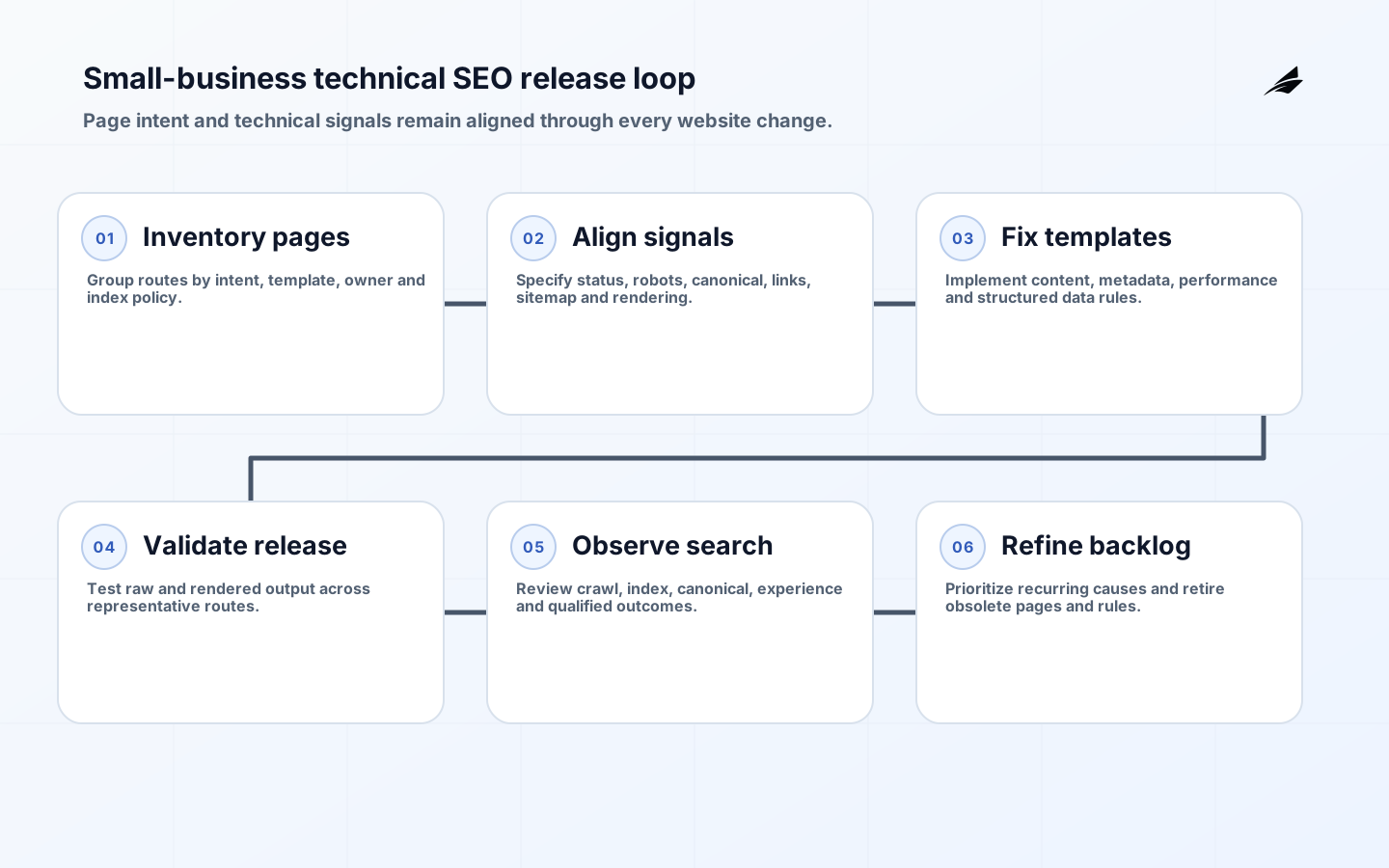
- Inventory templates, routes, intent, owner and index policy.
- Correct crawl access, status codes, rendering and sensitive-content controls.
- Align canonical, redirect, internal links and sitemap signals.
- Improve useful content, metadata, semantics and real-user performance.
- Add only accurate structured data supported by visible content.
- Release in controlled changes and monitor index and business outcomes by page family.
Key takeaways
- Give every indexable page a distinct user purpose and an accountable owner.
- Keep status, robots, canonical, links and sitemap signals coherent.
- Optimize real templates for useful mobile experience, not isolated tool scores.
- Mark up only visible, truthful and maintained business information.
- Monitor technical and search outcomes around every website release.
Frequently asked questions
How long before technical fixes affect search?
It depends on recrawl, reprocessing, site demand and the defect. Critical access fixes may be discovered quickly; canonical consolidation and migrations can take longer. Validate the live response, request inspection where appropriate and monitor by page family without promising a ranking date.
Can an SEO plugin handle technical SEO?
A plugin can generate titles, canonicals, sitemaps and markup, but configuration and templates determine whether those outputs are correct. It cannot resolve unclear page intent, server behavior, JavaScript rendering, performance, migrations or business accuracy by itself.
Do technical fixes guarantee higher rankings?
No. They help search engines access and interpret eligible pages and improve user experience. Search results also depend on relevance, quality, competition, location and many other systems. Measure corrected defects, index behavior and qualified business outcomes rather than guaranteeing position.
Conclusion
Small-business technical search work is most effective as disciplined website operations. Define which pages deserve discovery, make signals consistent, ship template fixes with tests and watch what search systems and customers do. That produces a maintainable foundation for useful content and local demand rather than a temporary audit score.