Web app performance planning begins before a framework or hosting tier is selected. Product and engineering teams first need to identify the journeys in which delay, instability or failed feedback changes a user outcome: finding a case, submitting a form, approving work, completing payment or recovering from an interrupted action. Each journey needs a realistic device, network, geography, data volume and concurrency assumption. A single desktop benchmark cannot represent that operating context.
Connect performance to the system around it. Edilec's admin dashboard architecture guide, API platform planning guide and custom-system quality assurance guide show how interface, service and verification decisions shape the same user journey.
Turn user journeys into performance budgets
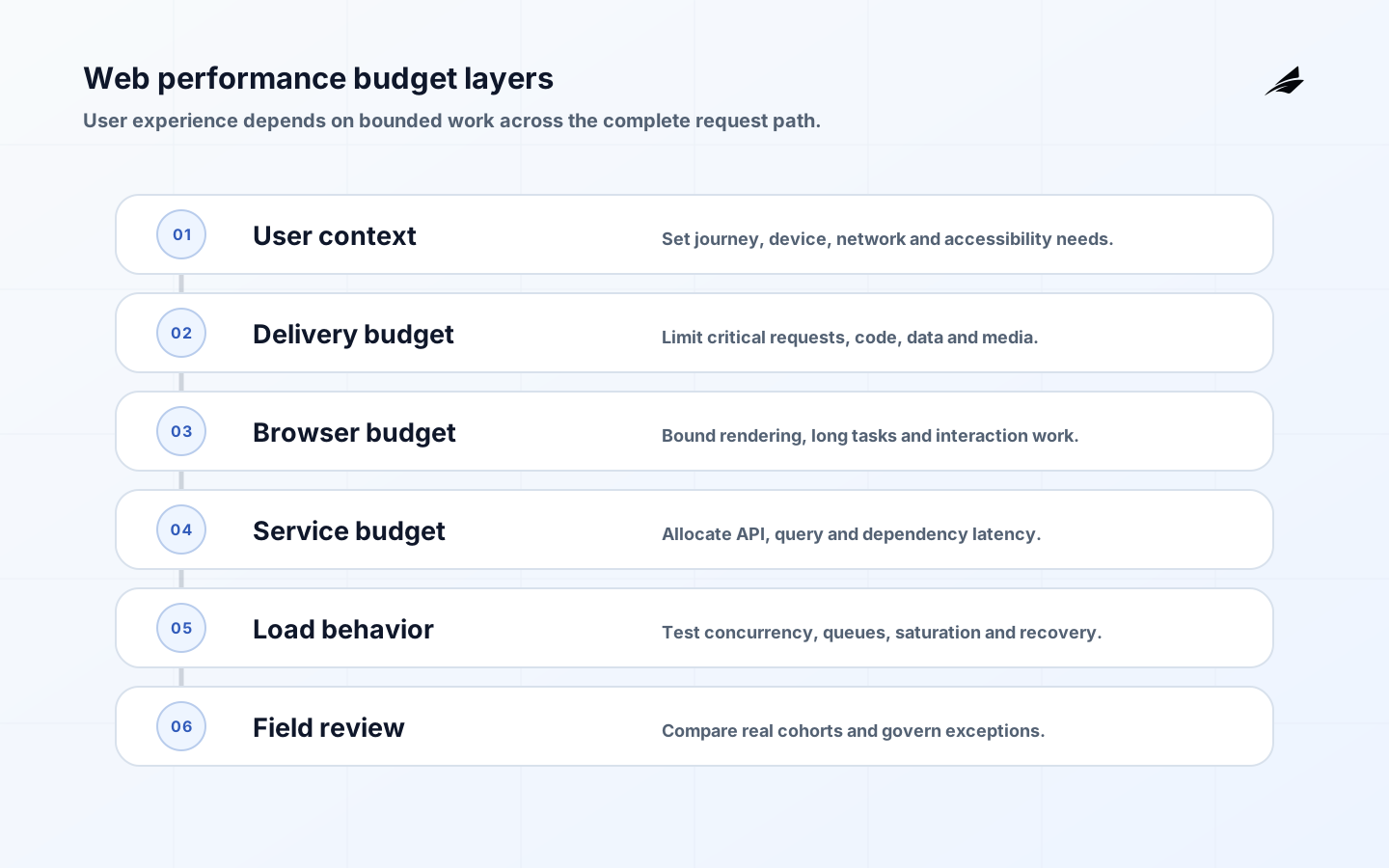
A useful budget allocates time and bytes across the complete path. For the initial view, budget network connection, server response, critical resources, rendering and main-content discovery. For an interaction, budget event handling, application work, service calls, state update and visible feedback. Set a payload ceiling for scripts, styles, images and initial data, plus service-side limits for database work and downstream calls. The allocation is a design constraint and review tool; it is not permission to consume every millisecond.
| Budget layer | Planning question | Release evidence |
|---|---|---|
| User context | Which devices, networks and assistive technologies matter? | Test matrix and field cohort coverage |
| Delivery | How much critical code, data and media is transferred? | Compressed payload and request budget |
| Browser work | What blocks rendering or interaction? | Long-task, rendering and interaction traces |
| Service path | Which APIs, queries and dependencies consume latency? | Percentiles and distributed traces |
| Peak behavior | What happens under concurrency and queueing? | Load profile, saturation point and recovery |
| Failure experience | Can users understand delay and retry safely? | Accessible status, idempotency and fallback tests |
Web Vitals defines user-centered loading, responsiveness and visual-stability measures that can anchor public web journeys. Use HTTP Semantics to plan caching and conditional requests, and OpenTelemetry to correlate client experience with services and dependencies. Test feedback, time limits and interaction behavior against WCAG 2.2; an optimization that removes usable focus, status or control is a regression.
Write release gates before implementation. A gate can require representative laboratory runs, field percentiles from a controlled cohort, peak-load evidence and a passed dependency-degradation scenario. Define who can approve an exception, its expiry and the planned repayment. Monitor distributions by journey and release rather than one site-wide average. When the budget is exceeded, remove unnecessary work or change the architecture before purchasing capacity; faster infrastructure cannot correct unbounded payloads, serial dependencies or an interface that waits for irrelevant data.
Key takeaways
- Set performance targets around critical user journeys, devices, networks, and data sizes.
- Use budgets for rendering, network transfer, server work, and third-party dependencies.
- Measure field experience and service behaviour together; neither view is sufficient alone.
- Plan caching, pagination, loading states, and failure recovery as product behaviour.
- Test realistic concurrency and degraded dependencies before users discover the limits.
Define user-centred performance outcomes
Write a performance statement for each critical journey. For a customer application, a person may need to see the main content promptly and interact without an unexpected layout shift. For an internal queue, the target may be a filtered result within a workable interval at peak load. Include device class, network condition, geography where relevant, and the largest expected record set. Web Vitals provides user-centred measures for loading, responsiveness, and visual stability that can anchor discussion, but do not copy a threshold without understanding the journey. A compliance form may tolerate a slower initial load than a dispatch screen, while requiring excellent feedback after every submitted action.
| Journey | User outcome | Planning target |
|---|---|---|
| Account lookup | Operator can identify the correct case quickly | Bound query time with realistic filters and data volume |
| Application submission | Customer receives clear confirmation | Responsive validation and durable result receipt |
| Operations queue | Team sees actionable work at peak | Predictable sort, pagination, and freshness |
| Payment action | User knows whether the request succeeded | Idempotent command and visible pending state |
Allocate a performance budget
Turn the target into a budget across the browser, network, server, and dependencies. A slow interactive page may be caused by a large client bundle, unbounded query, serial service calls, image payload, third-party script, or saturated database connection. Allocate an expected share to each portion so a team can make trade-offs deliberately. For example, a search result may need a server limit, indexed filter, paginated response, and small initial interface payload. Keep a dependency register that states why each external script or service is necessary and what happens when it delays. Budgeting is not a guarantee; it is a design constraint that exposes where new features spend the scarce time available to the user.
Design the data and network path
Use interface patterns that match the work. Fetch the summary needed for a queue before loading optional detail. Paginate or cursor through large collections rather than transferring every record. Cache content only when its freshness rule is explicit, and make invalidation or revalidation part of the plan. RFC 9110 is a useful reference for HTTP semantics and caching behaviour. Avoid speculative client polling that overwhelms a constrained service; use an update mechanism that reflects the actual need for freshness. When a command requires slow processing, acknowledge it promptly, preserve the user input, and show a durable pending state instead of holding the page hostage to a long request.
| Design choice | Benefit | Guardrail |
|---|---|---|
| Pagination | Bounds transfer and rendering work | Stable ordering and clear total or continuation |
| Server filtering | Avoids exposing unnecessary records | Validate filter cost and authorization |
| Cache with freshness rule | Reduces repeated work | Show stale state and invalidate predictably |
| Asynchronous command | Keeps interface responsive | Provide status, retry, and idempotency |
Measure field and service behaviour
Laboratory tests reveal regressions, but field measurements reveal the networks, devices, extensions, and data conditions users actually face. Collect user-centred timing without recording sensitive content, and connect it to backend traces through privacy-conscious correlation. The OpenTelemetry Specification offers a shared model for traces, metrics, and logs across the service path. Break results down by journey, release, device capability, region, response class, and data size to avoid an attractive average hiding a painful cohort. Set alerts on sustained degradation and use traces to distinguish browser work from slow dependencies. Performance should be reviewed after every meaningful product or infrastructure change.
Protect usability while optimizing
A faster interface is not automatically a better one. Do not remove meaningful confirmation, error detail, focus management, or user control merely to reduce a metric. Loading states should communicate what is happening and prevent accidental repeated action without trapping keyboard users. WCAG 2.2 provides relevant guidance for focus, timing, and understandable status changes. Test slow paths deliberately: delayed search, failed upload, temporary outage, and large result sets. The application should let a person recover or continue with a saved draft when possible. Performance planning that ignores error conditions often creates a quick happy path and a punishing real-world one.
Verify under realistic load
Define a test profile from observed or expected behaviour: concurrent users, arrival patterns, peak periods, read-to-write ratio, payload sizes, and dependency latency. Include the database queries and background work that the journey triggers. Test capacity gradually, identify the first limiting resource, and decide whether to improve code, add capacity, reduce work, or alter the product behaviour. Apply NIST SSDF practices to control changes and retain verification evidence. A load test is useful only when it represents a decision the team might face; a large request rate without realistic paths can produce noise rather than confidence.
Review performance choices before they become production incidents
| Review area | Question to settle | Evidence to collect |
|---|---|---|
| Journey | Which user task suffers first from delay? | Observed path, device profile, network condition, and business consequence |
| Payload | What bytes are necessary for the initial useful view? | Bundle report, response size, and optional-content plan |
| Query | How is data access bounded as records grow? | Indexes, filters, pagination, and query-plan observation |
| Rendering | Which browser work blocks interaction? | Profiler trace, component cost, and interaction test |
| Caching | What may remain stale and for how long? | Freshness rule, invalidation design, and user-visible status |
| Dependencies | Which remote calls sit on the critical path? | Timeout, retry, fallback, owner, and latency budget |
| Commands | What happens when a slow action cannot finish immediately? | Durable pending state, idempotency, and recovery route |
| Peak load | What traffic pattern represents the busy period? | Concurrency, data volume, read-write mix, and threshold |
| Monitoring | How will field degradation be detected quickly? | User metric, trace, alert, dashboard, and incident owner |
| Accessibility | Does the loading or error state preserve user control? | Keyboard test, focus behaviour, and understandable status |
| Release | How will a regression be contained after deployment? | Performance guardrail, cohort, rollback trigger, and communication |
| Capacity | Which resource becomes limited first and what then? | Test result, scaling policy, queueing, and degradation plan |
Operate and improve the budget
Treat budgets as living service objectives. Review them after launches, data growth, new integrations, and incidents. Record performance regressions with the affected journey, user impact, technical cause, and corrective action. Give product and engineering a shared view so a new feature can weigh its latency cost against its value. When capacity is limited, protect the critical journey through queues, backpressure, or temporarily reduced secondary features rather than letting every request fail together. The best performance programme makes trade-offs visible early and leaves a team prepared to explain why a user experienced delay and how the system will improve.
Frequently asked questions
What is the first web performance metric to choose?
Choose the measure that best reflects the critical user outcome. It may be a Web Vital for a public page, time to usable search results for an internal tool, or time to a durable confirmation for a transaction. Pair it with an error or abandonment signal so speed is not measured in isolation.
Will a CDN solve web application performance?
A CDN can improve delivery of cacheable assets and content, but it cannot fix an unbounded query, slow authorization call, oversized client work, or overloaded dependency. Use it as one design component within a measured journey and budget, not as a substitute for diagnosis.
Conclusion
Web app performance planning protects the moments when people need software to respond. Define the journey, set a practical budget, measure users and services together, and test the difficult conditions. That work creates performance that remains useful as data, traffic, and product scope grow.