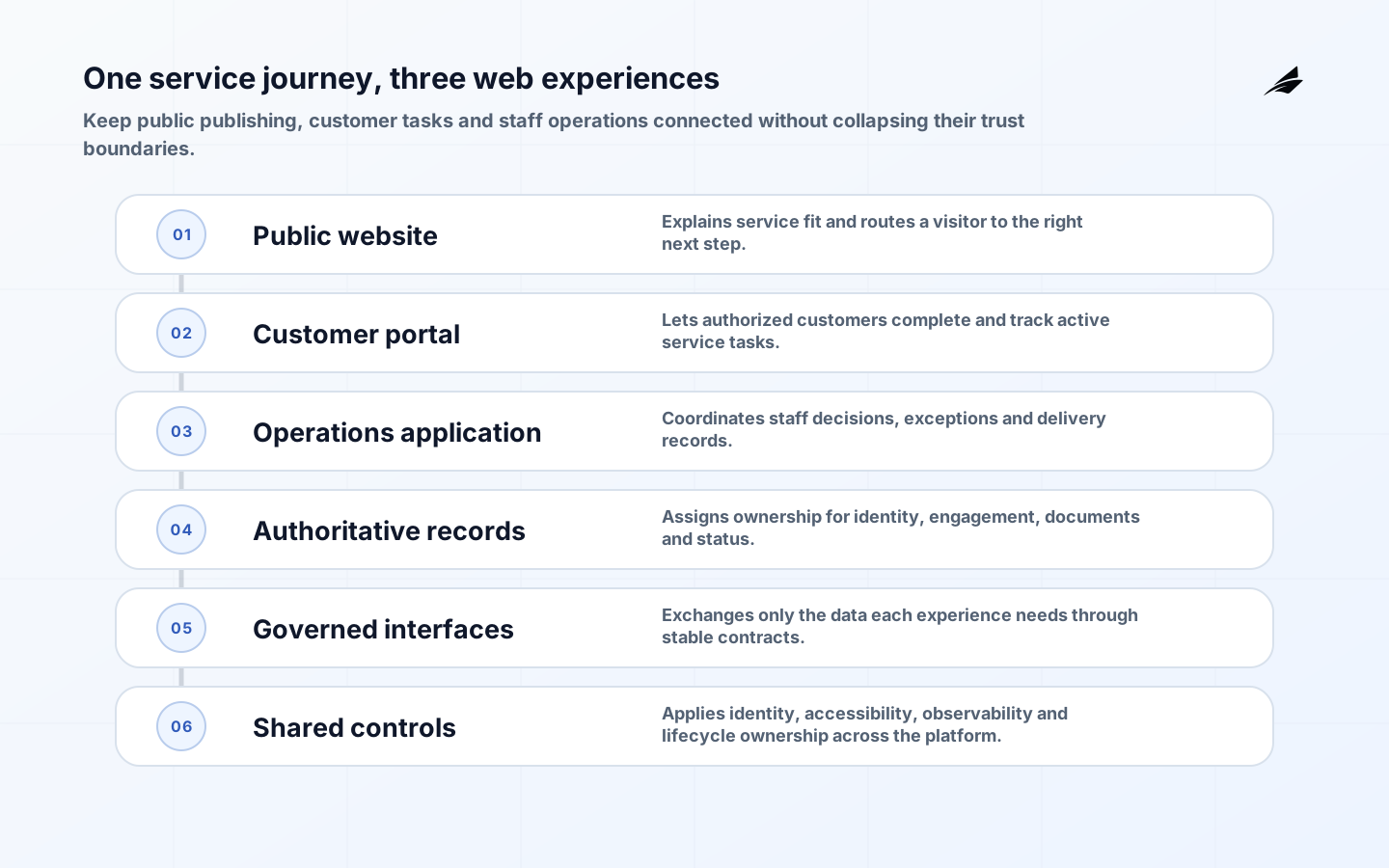
A service company often needs three web experiences at once: a public site that explains and earns trust, a customer workspace that makes an active engagement easier, and an internal application that coordinates delivery. Planning them as one large build creates avoidable coupling. Planning them as unrelated projects produces duplicate identities, conflicting records and manual re-entry. The useful middle path is a shared product strategy with deliberately separate trust boundaries, release cadences and ownership.
The plan should begin with the service journey, not a framework choice. A prospective customer may discover a service, assess fit, request contact and provide initial context. An accepted customer may then schedule work, exchange documents, approve decisions, see status or raise an issue. Staff may qualify the request, assign work, record evidence and communicate an outcome. Each step has different users, data sensitivity, assurance needs and measures of success.
Separate the website, portal and operations application
The public website is primarily a publishing and acquisition surface. It should make services, limitations, proof, contact routes and policies easy to understand. A customer portal is an authenticated service surface where a known organization can complete tasks and inspect records. The operations application is the system staff use to perform or coordinate work. These surfaces can share design tokens, approved content, APIs and identity infrastructure without sharing a deployment or exposing the same data.

| Surface | Primary job | Planning emphasis |
|---|---|---|
| Public website | Help a visitor understand fit and take a clear next step | Content ownership, accessibility, discoverability, performance and consent |
| Customer portal | Let an authorized customer complete and track service tasks | Identity, tenancy, permissions, audit history, support and recovery |
| Operations application | Coordinate staff decisions and records | Workflow states, data quality, exception handling, integrations and accountability |
| Shared platform capabilities | Connect experiences without collapsing their boundaries | Stable APIs, event contracts, observability, design standards and lifecycle ownership |
Map the service journey and authoritative records
Run a planning workshop around real scenarios. For each stage, name the actor, trigger, information required, decision, resulting record, notification and exception path. Include awkward cases: a prospect submits twice, a customer has multiple locations, an approver leaves, a file is unsafe, an appointment is moved, or a staff member corrects a mistaken status. Happy-path screens alone do not reveal the application that must be operated.
- Identify the business owner for acquisition, onboarding, delivery and support outcomes.
- Choose the authoritative system for customer identity, engagement status, documents, appointments, invoices and consent.
- Classify public, internal, confidential and regulated information before deciding where it appears.
- Document retention, correction, export and deletion needs for every record type.
- Define service language and status labels that customers and staff interpret the same way.
- Record integrations, manual handoffs and reconciliation steps, including what happens when a dependency is unavailable.
Avoid copying every field into every system. A marketing platform may own campaign consent while a delivery system owns the active engagement. A portal can retrieve the status a customer is allowed to see through a narrow API rather than replicating an internal work queue. Where replication is necessary, define direction, freshness, conflict behavior and reconciliation. The phrase single source of truth is useful only when a specific owner and correction path are attached to it.
Turn journeys into requirements and content
Write requirements as observable outcomes. Instead of asking for a modern homepage, specify which audiences must identify the relevant service, understand prerequisites and reach the appropriate inquiry route. Instead of asking for a dashboard, specify which customer roles may see which engagements, what status means, how stale information is signaled and how an error is challenged. Acceptance criteria should cover content and behavior, not screenshots alone.
Content is operational data on a service website. Assign an owner and review interval to service descriptions, eligibility rules, locations, staff information, legal notices and calls to action. Build structured content only where reuse or governance justifies it. A page composition system can help a publishing team, but unlimited layout flexibility increases testing and accessibility work. Prefer approved components with clear editorial choices.
| Requirement area | Evidence before build | Acceptance evidence |
|---|---|---|
| Audience and content | Priority tasks, content inventory and named owners | Representative users can find accurate information and complete the intended next step |
| Portal workflow | State model, role matrix and exception catalogue | Authorized users complete valid transitions; invalid transitions are blocked and explained |
| Integration | Contract, owner, failure behavior and test environment | Retries, duplicates, timeouts and reconciliation are demonstrated |
| Accessibility | WCAG 2.2 target and component responsibilities | Automated checks plus keyboard, zoom and assistive-technology review |
| Performance | User journeys, device/network assumptions and budgets | Field and lab measures meet agreed thresholds without layout instability |
| Operations | Service objectives, telemetry, support model and recovery needs | Alerts, runbooks, restore tests and ownership are reviewed before launch |
Choose architecture from the operating needs
A service company rarely needs the most distributed design available. A well-structured application with clear modules can support a public experience, portal API and operations workflow while keeping deployment understandable. Split components when the boundary has a reason: independent security exposure, materially different scaling, a separate owner, a distinct availability requirement or a stable capability used by several products. Every additional service introduces contract, monitoring, deployment and failure-handling work.
Keep the browser-facing layer narrow. Validate input on the server, authorize access at the protected resource, and avoid putting secrets or internal identifiers in client code. Apply browser defenses such as a restrictive Content Security Policy according to the application's resources and test it before enforcement. For uploaded files, define allowed types, size limits, malware handling, storage isolation, download authorization and deletion. OWASP ASVS can help turn broad security intentions into verifiable requirements.
Accessibility belongs in architecture and delivery. WCAG 2.2 covers perceivable, operable, understandable and robust experiences through testable criteria. Teams still need human review because automated tools cannot determine whether language is clear, focus order is sensible or an error message helps the user recover. Use native controls where possible, maintain keyboard operation and visible focus, and test authentication and document workflows as carefully as public pages.
Example: planning a field-service customer journey
Consider a hypothetical inspection company. The public site explains inspection types and lets a prospect request a call without creating an account. Once staff qualify the request and create an engagement, an authorized contact receives a time-limited invitation to the portal. The contact confirms locations, uploads permitted documents and sees appointment status. Inspectors use an internal application to record work; customers receive only approved findings after a review state is complete.
The engagement record, not the website form submission, becomes authoritative. Appointment updates use an idempotent integration so retries do not create duplicate visits. If the scheduling dependency is unavailable, the portal shows the last confirmed time and routes changes to support instead of pretending a request succeeded. A release can begin with one inspection type and a small staff group, preserving the existing contact route until status accuracy, support volume and recovery have been observed.
Estimate cost and control the main risks
Estimate by capability and uncertainty rather than page count. Public templates may be predictable; identity federation, document handling, workflow exceptions, migration and integration behavior are not. Separate discovery, content work, design system, application development, security and accessibility assurance, data transition, platform operation and support. State assumptions about who supplies content, resolves data questions, accepts risks and operates the service. A narrow first release with unresolved dependencies can cost more than a broader but well-understood one.
| Risk | Early control | Signal to watch |
|---|---|---|
| Unclear product boundary | Assign outcomes and authoritative records per surface | Duplicate features and contradictory status |
| Portal authorization failure | Model roles, organizations and resource-level checks; test denial paths | Cross-account access attempts or permission exceptions |
| Inaccessible critical journey | Use accessible components and test complete journeys | Keyboard traps, form abandonment or support workarounds |
| Integration divergence | Design idempotency, observable states and reconciliation | Duplicates, stale status or manual correction |
| Content decay | Give structured content an owner and review date | Conflicting eligibility, locations or policy text |
| Fragile launch | Use progressive exposure, monitoring and a practiced fallback | Errors, latency and contacts rise without a pause rule |
Roll out a coherent web platform in stages
- Frame the outcome: agree audiences, service journeys, baseline measures, constraints and accountable owners.
- Discover the estate: inventory content, domains, analytics, forms, identities, systems, records, integrations and manual work.
- Prototype risky journeys: test language, navigation, permissions and exception handling with representative users and staff.
- Build a vertical slice: deliver one service journey through interface, API, record, telemetry, security checks and support runbook.
- Release progressively: start with controlled traffic or a defined customer group, compare outcomes and keep a usable fallback.
- Expand and retire: add journeys based on evidence, migrate remaining records, remove duplicate forms and close obsolete access and infrastructure.
Measure what users experience. Web Vitals provide loading, responsiveness and visual-stability signals, but they are not the full scorecard. Add journey completion, qualified inquiry quality, accessibility defects, portal task success, status freshness, support contacts and error recovery. Define reliability around the journeys that matter, following the Google SRE principle that indicators and objectives should reflect user concerns. Review measures by surface so healthy marketing traffic does not hide a failing customer workflow.
Key takeaways
- Plan the public site, customer portal and staff application as distinct products within one service journey.
- Name authoritative records and failure behavior before connecting systems.
- Make accessibility, authorization, content governance and operations acceptance criteria from the start.
- Estimate workflows, uncertainty and transition work rather than screens alone.
- Launch one observable vertical slice, learn from real use and retire duplicate paths deliberately.
Frequently asked questions
Should the website and customer portal use the same platform?
They may share hosting, components or APIs, but they should not be forced into one deployment. Decide from security exposure, content workflow, team ownership, scaling and release needs. Preserve a clear authenticated boundary even when technology is shared.
Does every service company need a headless CMS?
No. Choose a content system from publisher roles, reuse, approval, localization and integration needs. A conventional CMS or a small set of managed templates may be simpler when content is edited in one channel by a small team.
What belongs in the first portal release?
Choose one valuable end-to-end task with known users, records and ownership. Include identity, authorization, telemetry, support and recovery needed to operate it. Defer adjacent convenience features, not the controls that make the slice dependable.
How should success be measured?
Use a balanced set: comprehension and qualified action on the public site; completion, correctness and support burden in the portal; workflow quality and exception volume internally; plus accessibility, security, reliability and operating cost across the platform.
Conclusion
Good website and web-app planning follows the service from first question to delivered outcome. It gives each surface a clear job, keeps authority and permissions explicit, and treats content, accessibility, reliability and support as product work. The result is not merely a consistent interface. It is a web platform customers can understand, staff can operate and the company can change without losing control of the journey.