Custom software development services for small business make sense when a recurring operational problem is costly, existing products cannot fit an essential workflow and the business can support the system after launch. The goal is not to imitate enterprise technology. It is to remove a specific constraint with the smallest dependable solution, while keeping data, accounts and decisions under business control.
Start with the small-business scope and cost guide and use the implementation checklist. The broader custom development FAQ covers contracting and engineering in more depth. This FAQ focuses on constrained teams where cash flow and owner attention are real delivery dependencies.
How does a small business decide whether to build?
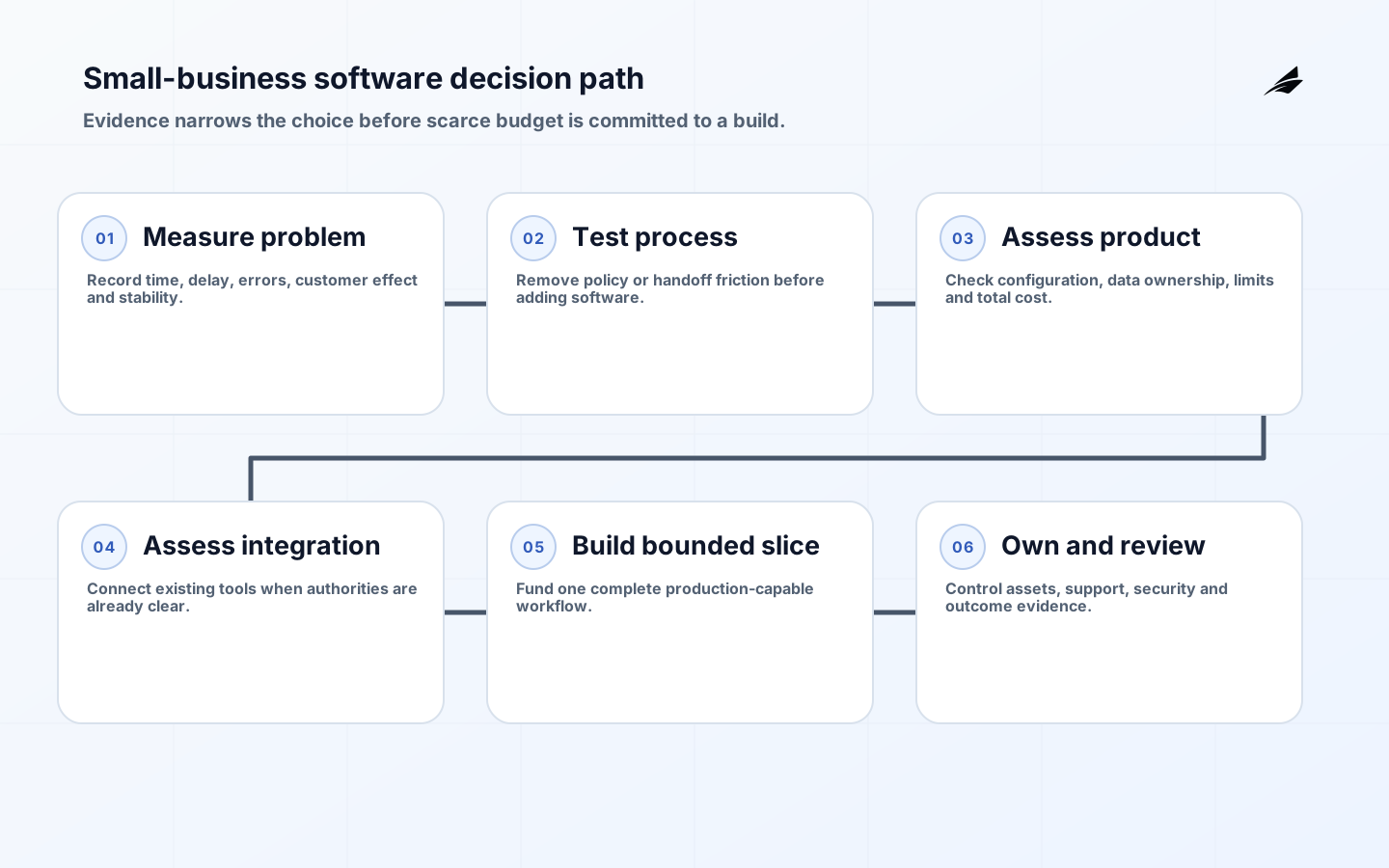
Document the present workflow using real examples. Count staff time, delays, corrections, lost opportunities and customer frustration. Then test four options: change the process, buy a product, connect existing tools or build. Custom work is strongest when the process differentiates the business, the volume is durable and available products fail a non-negotiable need. It is weak when the requirement is mostly preference or the process changes every month.

Name one outcome and a stop threshold. For example, reduce double entry between approved jobs and invoices while preserving a finance review. Do not commission an all-in-one platform as the first step. A narrow workflow can demonstrate value and reveal hidden rules. Include subscription, hosting, support, security, training and owner time in the total cost comparison.
| Question | Evidence to gather | Warning sign |
|---|---|---|
| Is the problem material? | Hours, delay, errors and customer effect | Only anecdotal annoyance |
| Is the workflow stable? | Repeated cases and known exceptions | Policy changes weekly |
| Can software solve it? | Controllable cause and measurable outcome | Problem is missing authority |
| Can we operate it? | Owner, budget, support and data plan | No post-launch responsibility |
What should the first release include?
Include one complete path, essential permissions, recovery, reporting and support. A job-management slice might cover approved request, assignment, completion evidence, invoice preparation and exception review. Leave adjacent marketing, payroll and advanced analytics for later unless the core path depends on them. Write explicit exclusions so estimates are comparable and a useful release is not held hostage by optional features.
Use real records and edge cases during design. Ask staff where spreadsheets, messages and memory compensate for the current system. Include empty, rejected, duplicate and cancelled states. Define acceptance in observable language and decide who signs it off. A small pilot with a few trained users reduces risk, provided there is a reliable way back to the present process.
How can cost and cash-flow risk be controlled?
Fund work in decision-sized phases: discovery, prototype where needed, production slice, rollout and support. Each phase should produce artifacts and a go, change or stop decision. A fixed budget cap with prioritized scope is often safer than pretending every feature can be fixed in advance. Require frequent demonstrations, a visible backlog and written effects for changes. Keep a contingency for data cleanup and third-party surprises.
Avoid paying most of the fee before usable evidence exists. Tie milestones to accepted workflows, migration rehearsal and production readiness. Ask for recurring provider costs at expected volume and the assumptions behind them. Confirm tax treatment and contract terms with advisers. The cheapest quote can become expensive if it omits testing, accessibility, deployment, documentation or transfer rights.
| Budget line | Often missed | Control |
|---|---|---|
| Build | Discovery, QA and project decisions | Phased acceptance and backlog priority |
| Cloud and vendors | Minimum fees, storage and usage growth | Volume model and budget alerts |
| Data | Cleanup, mapping and manual review | Profile before final estimate |
| Operations | Monitoring, support and security updates | Named service scope |
| Change | Training and temporary parallel work | Rollout and adoption plan |
How should a development partner be selected?
Give candidates the same problem brief and ask how they would reduce uncertainty. Strong responses discuss users, data, exceptions, security, release and ownership before prescribing a stack. Check references for projects that entered production and required support. Meet the people who will do the work, not only sales. Ask to see a sample decision record, test approach, runbook and status report with confidential details removed.
The contract should state scope, acceptance, rates, change process, repository access, data handling, intellectual property, open-source licenses, subcontractors, incident notification, support and exit assistance. Business-controlled accounts should hold the source repository, domain, cloud and key vendor subscriptions where practical. Get professional legal advice for consequential agreements.
What security baseline is realistic for a small business?
Small does not mean low impact. Inventory the data and collect only what is needed. Require individual accounts, multifactor authentication for privileged access, least privilege, encryption, backups and supported software. The FTC and NIST small-business guidance emphasize practical governance, protection, detection, response and recovery. Assign an incident contact and test how the business will continue if the application or provider is unavailable.
Require the supplier to use secure development practices and to explain dependency updates, secret handling, vulnerability reports and offboarding. Separate production data from development and avoid copying sensitive records into test environments. Keep logs sufficient to investigate changes without exposing unnecessary personal data. Review vendor access and remove it when no longer required.
How should data migration and rollout work?
Profile current data before promising automation. Identify duplicates, missing identifiers, inconsistent dates and records that should not be retained. Decide which source owns each field and how corrections are approved. Rehearse import with a copy, compare counts and key totals, and have business users inspect representative records. Keep an encrypted backup and a documented rollback or forward-correction plan.
Train by role using actual tasks. Run a limited cohort, collect support issues and watch where users leave the system. Do not operate two editable sources indefinitely; define the cutover and archive. Accessibility matters for staff and customers, so test keyboard use, labels, errors, focus and contrast against WCAG guidance. Record who can correct data after launch.
What support and ownership are needed after launch?
Name a business owner for priorities and a technical owner for service health, even if both roles use external help. Support should define contact route, hours, severity, response, backups, monitoring, security updates and included changes. Keep source, deployment instructions, architecture, data model, vendor list, licenses and known risks accessible to the business. Test that another person can access critical accounts.
Review outcome, reliability, support volume and cost monthly at first. Retire unused features and old credentials. Plan a yearly recovery and supplier-exit exercise. A small system stays affordable when ownership is simple and decisions are timely; neglected software accumulates risk regardless of its original quality.
Run a practical owner acceptance day
Set aside a focused session in which the business owner and representative staff complete real work from start to finish, including a duplicate, correction, permission denial and dependency outage. Ask the supplier to deploy the accepted version, show monitoring, restore a backup and explain a support case. Record defects and decisions in the same backlog used for delivery; do not accept critical fixes through private messages.
Finish by checking that the business can reach the repository, cloud account, domain, vendor subscriptions, invoices, documentation and emergency contacts without the supplier acting as gatekeeper. Confirm recurring cost and renewal dates. This exercise is inexpensive compared with discovering after a departure or incident that the company owns a contract but not the practical means to operate its software.
Ask one staff member who was not involved in the build to complete a normal task using the delivered guidance and support route. Their questions expose assumptions shared by the project team but absent from the product. Update labels, help, runbooks and training from that observation. Keep the acceptance case as a regression scenario so future changes protect the workflow that justified the investment.
Finally, agree on a ninety-day review with the original baseline in front of the team. Compare saved effort, errors, customer response, support requests, recurring cost and manual bypasses. Decide whether to stabilize, extend or stop. Small businesses preserve cash by funding the next feature from observed value, not from the momentum of a successful launch celebration.
Keep a one-page continuity sheet outside the application with provider contacts, account owners, renewal dates, backup location, recovery steps and the person authorized to approve emergency spending. Review it after staff or supplier changes. A modest continuity habit protects a small organization when the normal administrator, device or communication channel is unavailable.
Key takeaways
- Compare process change, buying, integration and building with real evidence.
- Start with one complete workflow and explicit exclusions.
- Fund phases that each support a go, change or stop decision.
- Keep repositories, cloud accounts, data and exit rights under business control.
- Budget for security, support and change after launch.
Frequently asked questions
Can a spreadsheet or no-code tool be enough?
Yes, when volume, access, audit and integration needs are modest. Define limits and an export path. Move to custom software when workarounds create material risk or the platform cannot enforce the workflow.
Should we hire a freelancer or agency?
Choose based on scope, continuity and risk. A freelancer can suit a narrow system; a team may provide broader design, security and support coverage. In either case, insist on client-controlled assets and documented handover.
How do we avoid vendor lock-in?
Use standard exports and interfaces, retain source and history, own core accounts, document deployment and understand proprietary dependencies. Lock-in is sometimes acceptable when its value and exit cost are explicit.
What is an MVP for a small business?
It is the smallest production-capable workflow that can prove the intended outcome. It still needs access control, data integrity, recovery, telemetry and support; those are not optional polish.
Conclusion
Small-business custom software should be narrow enough to afford and complete enough to trust. A measured build-versus-buy decision, phased budget, client-controlled ownership and realistic security baseline protect that balance. The right first system removes one persistent constraint and leaves the business more capable, rather than dependent on an undocumented supplier relationship.