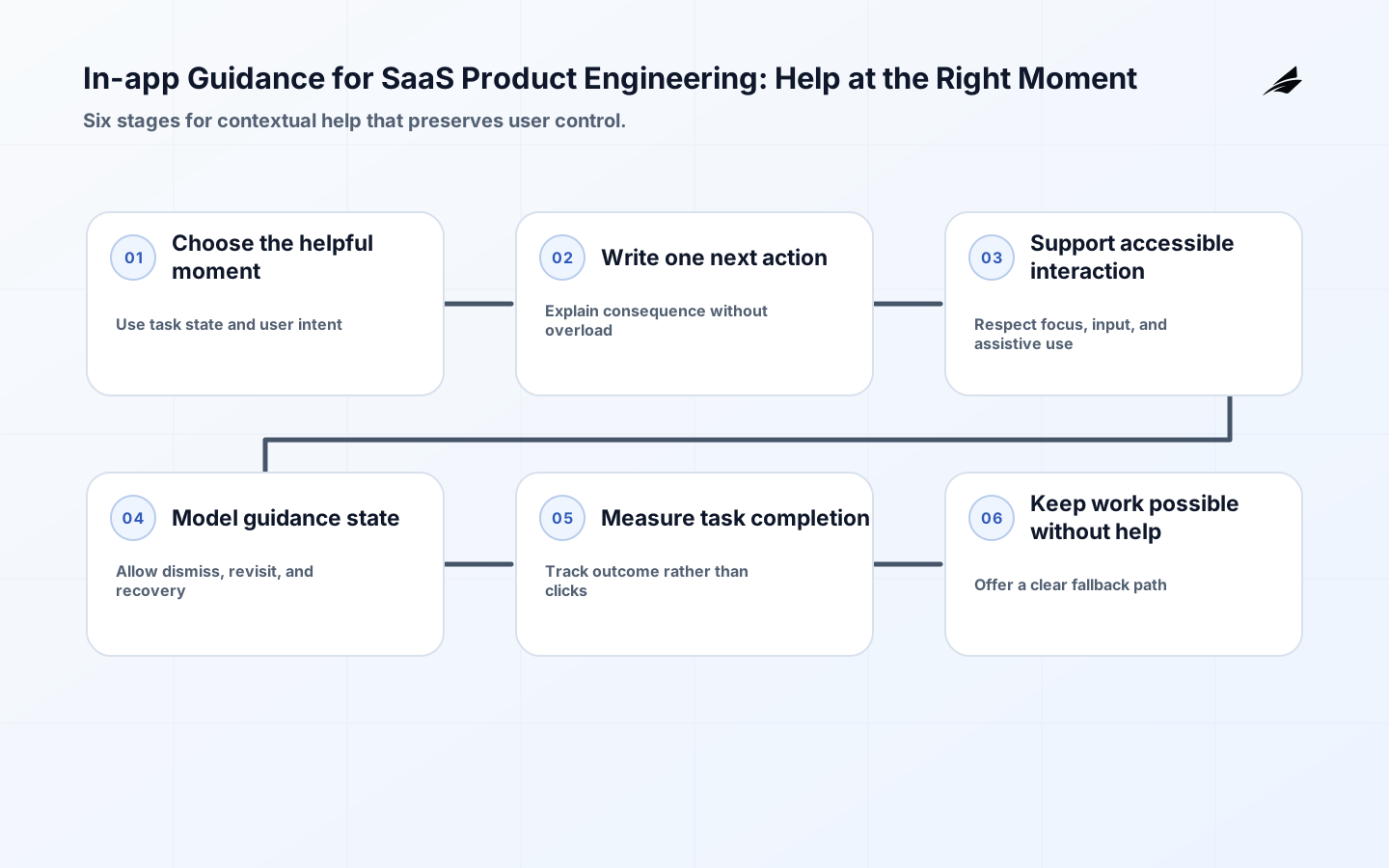
In-app guidance is not a layer of bubbles placed over a product. It is a decision about when a person needs context, what they should understand, and how much interruption the product can justify. Helpful guidance clarifies a label, previews a consequence, explains an error, or helps someone complete a new task. Unhelpful guidance hides controls, repeats what the interface already says, or blocks the work it claims to support. WCAG 2. 2 provides testable accessibility guidance, while OpenTelemetry and OWASP help teams observe the system without collecting more than they need. Use this guide with SaaS reliability planning and self-serve onboarding in production.
Choose the context that makes guidance timely
Start with the user task and the moment of uncertainty. A first-use explanation can define an unfamiliar concept; a confirmation can clarify an irreversible action; a recovery message can explain what failed and what remains safe. Name the context signals that are allowed to trigger guidance: role, feature stage, completion state, error code, or an explicit request for help. Do not infer sensitive characteristics or use hidden surveillance to manufacture relevance. The product should be able to explain why the message appeared and what event proves the person no longer needs it.
| Moment | Guidance purpose | Control to preserve |
|---|---|---|
| Before a new task | Set expectation and name the outcome | Dismiss or skip |
| During a complex form | Explain an unfamiliar input or choice | Keep fields and focus usable |
| Before an irreversible action | Describe consequence and confirmation | Require deliberate consent |
| After an error | Identify issue and recovery route | Preserve valid work |
Write one useful instruction instead of a tour
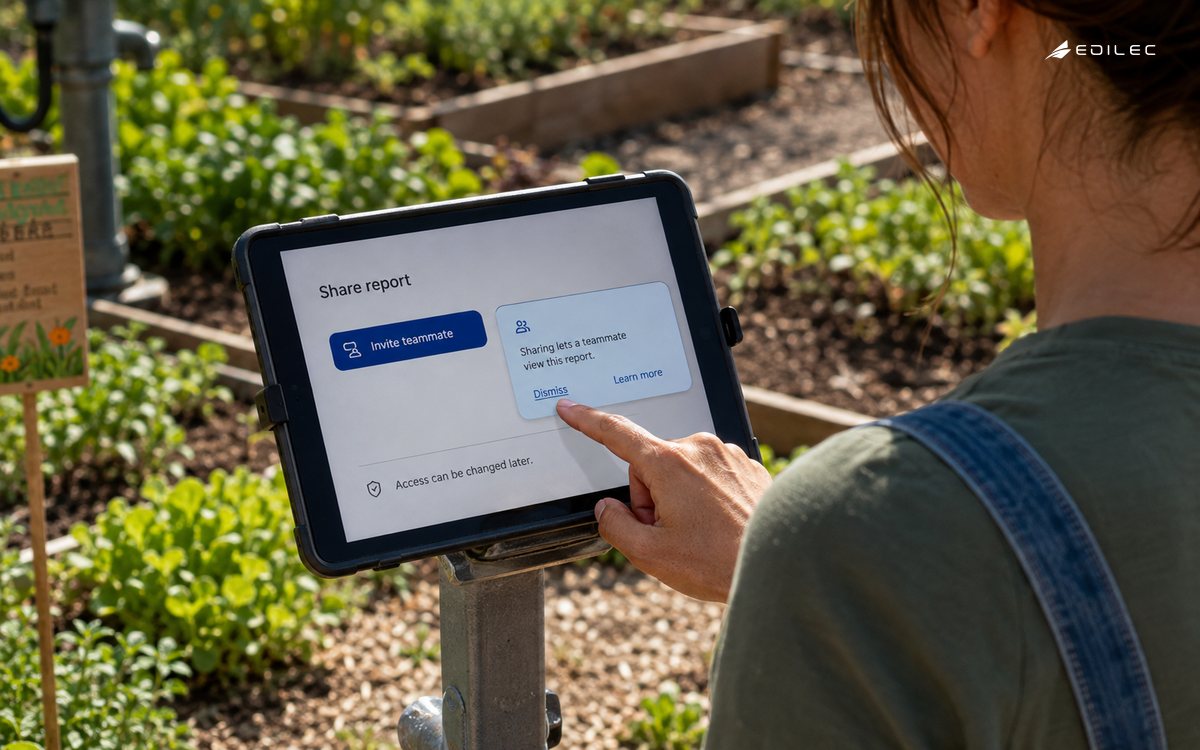
Good guidance has a clear subject, action, consequence, and next step. Replace “Welcome to your dashboard” with “Invite a teammate to make this report shared; you can change access later.” Keep the message close to the control it explains, but do not cover the control or force a reading order that the task does not need. Use plain words, a visible heading, and a specific action label. If the user needs a policy or detailed reference, link to it without turning the moment into documentation. Short guidance should still be honest about limitations, permissions, and whether a step can be undone.
Make guidance perceivable and operable
WCAG 2. 2 covers people using different devices, input modes, and assistive technologies, and it frames accessibility through perceivable, operable, understandable, and robust principles. Treat an overlay, coach mark, tooltip, status message, and inline hint as content that needs a name, focus behaviour, reading order, contrast, and keyboard path. Do not rely on hover, colour, motion, or a tiny close icon. The message must not trap focus or obscure the next control. Test zoom, reduced motion, keyboard-only navigation, screen readers, and touch targets. Make help consistent so a person can find it again without restarting the task.
Model guidance state and user control explicitly
A guidance message can be unseen, shown, dismissed, completed, deferred, or retired. Persist only the state needed to deliver the promised experience, and define what happens when content is updated. A dismissal should not always mean a person has learned the task; a completion event should refer to an outcome, not an impression. Let users reopen important help, mute a non-essential message, and recover from an accidental dismissal. If a message becomes obsolete after a release, retire it centrally rather than leaving stale instructions in old clients. State modelling prevents repeated interruption and makes measurement more honest.
| State | Reader sees | System action |
|---|---|---|
| Eligible | No interruption yet | Wait for the defined trigger |
| Shown | Contextual message and next step | Record exposure without sensitive content |
| Dismissed | Task remains available | Respect choice and offer revisit |
| Completed | Task outcome or confirmation | Retire or move to the next relevant cue |
| Stale | No obsolete instruction | Remove and record content version |
Keep guidance aligned with product state
Guidance should read the same state that controls the product action. If a feature is unavailable, do not show a tutorial that promises access; if an import is still processing, do not explain the empty state as a permanent lack of data. Connect content versions to feature flags, entitlement rules, workflow stages, and release changes. A content editor and an engineer should be able to see the dependency and test it together. This is particularly important in multi-tenant products where roles, plans, and data states differ. Contextual help that is wrong for the current state is worse than no help because it sends a person down a path the system cannot complete.
Measure the task outcome, not exposure alone
Track guidance eligible, shown, dismissed, revisited, and followed, but treat those as diagnostic events. The success measure should be the task outcome the message supports: fewer repair attempts, faster first value, better completion quality, or fewer support contacts. OpenTelemetry's documentation provides a common vocabulary for signals and context; use a small, stable set of attributes such as content version, stage, outcome, and correlation key. OWASP's logging guidance is a prompt to protect these records, avoid sensitive free text, and make access to diagnostic detail intentional. A message that gets clicked often may be confusing rather than effective.
Design for guidance failure and interruption
A content service can be unavailable, a trigger can be wrong, or an overlay can render over a control after a layout change. The product should continue safely with a useful baseline interface. Keep critical instructions in the page or form itself; do not make a popover the only route to complete a necessary action. Add a kill switch for a message that causes confusion, preserve the content version and trigger in telemetry, and provide support with a known fallback. Test slow loading, offline or degraded mode, browser zoom, localization expansion, and a release that changes the target element.
Roll out guidance as a product change
Start with one moment where users repeatedly need context and where the intended outcome is measurable. Test the copy, target, focus, keyboard path, dismissal, content version, and fallback with real tasks. Release to a representative cohort and review task success, support language, accessibility findings, and unintended interruption. NIST's SSDF recommends integrating secure practices into the development lifecycle; follow the same discipline for guidance by including content review, implementation review, evidence, and rollback in the release path. Expand only when the message improves the task without creating a new barrier.
Give support and content owners a shared view
When a customer says “the product told me to do this,” support needs the content version, trigger context, product state, and action result. Content owners need to know whether a message is stale, ignored, or associated with repeated confusion. Keep a small catalogue of guidance purpose, audience, dependencies, owner, review date, and retirement condition. Do not give a support agent an unrestricted ability to change customer-visible instructions without review; a quick wording fix can create a new contractual expectation or conflict with the actual product rule. Shared evidence keeps the message and the system aligned.
Test guidance against a real task interruption
Take a first-time user who opens a complex report builder, receives a contextual hint, dismisses it, changes the browser zoom, and then encounters a validation error. The user should still be able to find help, move focus to the problem, read the error, preserve valid choices, and finish or leave without losing work. The guidance trigger should not fire repeatedly because the layout changed, and the content should match the current entitlement and report state. Record the content version and task outcome, not the user's free-form input. This test exposes whether the message is genuinely contextual or merely attached to a selector, whether the fallback interface stands on its own, and whether accessibility was treated as a release property rather than a later polish step.
Content review should include the unhappy path. Ask what the reader sees if the target control is hidden, the feature is unavailable, the user has insufficient permission, the network is slow, or the content service is down. The guidance should never promise an action the current state cannot complete. A short fallback sentence in the product can be more valuable than a sophisticated overlay that disappears at the exact moment a customer needs it. This is why guidance content and product state should be versioned together.
Key takeaways
- Trigger guidance from a meaningful task context and explain why the message is relevant.
- Write one clear instruction with a consequence and next step; keep essential help in the interface itself.
- Treat overlays, tooltips, and status messages as accessible content with focus and keyboard requirements.
- Model shown, dismissed, completed, and stale states so user control and retirement are explicit.
- Measure the supported task outcome and protect diagnostic data with minimal, stable context.
- Related reading: product analytics in plain language and release notes decisions. In this context, guidance needs its own decision record.
Frequently asked questions
Are guided tours bad for users?
Not inherently, but a tour should earn attention by helping with a real task. If users cannot dismiss it, return to the task, or understand the next action, it is likely creating friction rather than reducing it.
What should be measured first?
Measure the task result the guidance is meant to improve, with exposure and dismissal as supporting signals. Review support and accessibility findings so a superficially positive click metric does not hide confusion.
Who owns in-app guidance?
Product or content should own the promise and wording, engineering should own dependable delivery and state alignment, and operations or support should own the evidence and recovery path for customer-impacting failures.
Conclusion: help without taking control away
In-app guidance works when it arrives at the right moment, matches the product state, respects accessibility and attention, and leaves the person more capable of completing a task. Build the message, trigger, state, telemetry, and fallback together. Then judge it by the customer outcome and the quality of the recovery path. Help should make a product easier to understand, not make the interface another obstacle to work around.
A practical example for in-app guidance for saas product engineering is an operator loses access during a handoff. Use in-app guidance support evidence to decide whether the workflow is ready.
Ownership is clearer when in-app guidance for SaaS product engineering separates the promise from the mechanism. Give each message a content owner, a product-state dependency, and a review date so the guidance remains accurate as the workflow changes.
Before widening in-app guidance for saas product engineering, run a small rehearsal with normal, denied, delayed, and corrected cases.
The measurement plan for in-app guidance for saas product engineering should pair an outcome with a reason to investigate it.
This decision also connects to SaaS Reliability for SaaS Product Engineering: A Practical Guide, When Product Analytics Moves into Production, A Field Guide to In-app Guidance for Growing Teams. Review those boundaries together when in-app guidance for saas product engineering shares identity, data, billing, or support evidence with another workflow.
For In-app Guidance, Web Content Accessibility Guidelines (WCAG) 2. 2 defines scope; OpenTelemetry Observability Primer supports the control; Logging Cheat Sheet clarifies evidence; Secure Software Development Framework (SSDF) Version 1. 1 guides recovery. Give in-app guidance a named owner and a review date for a practical guide.
Evidence for “In-app Guidance for SaaS Product Engineering: Help at the Right Moment” is grounded in Web Content Accessibility Guidelines (WCAG) 2.2, OpenTelemetry Observability Primer, Logging Cheat Sheet, Secure Software Development Framework (SSDF) Version 1.1; each source informs a specific decision, test, or operating trade-off described in this guide.