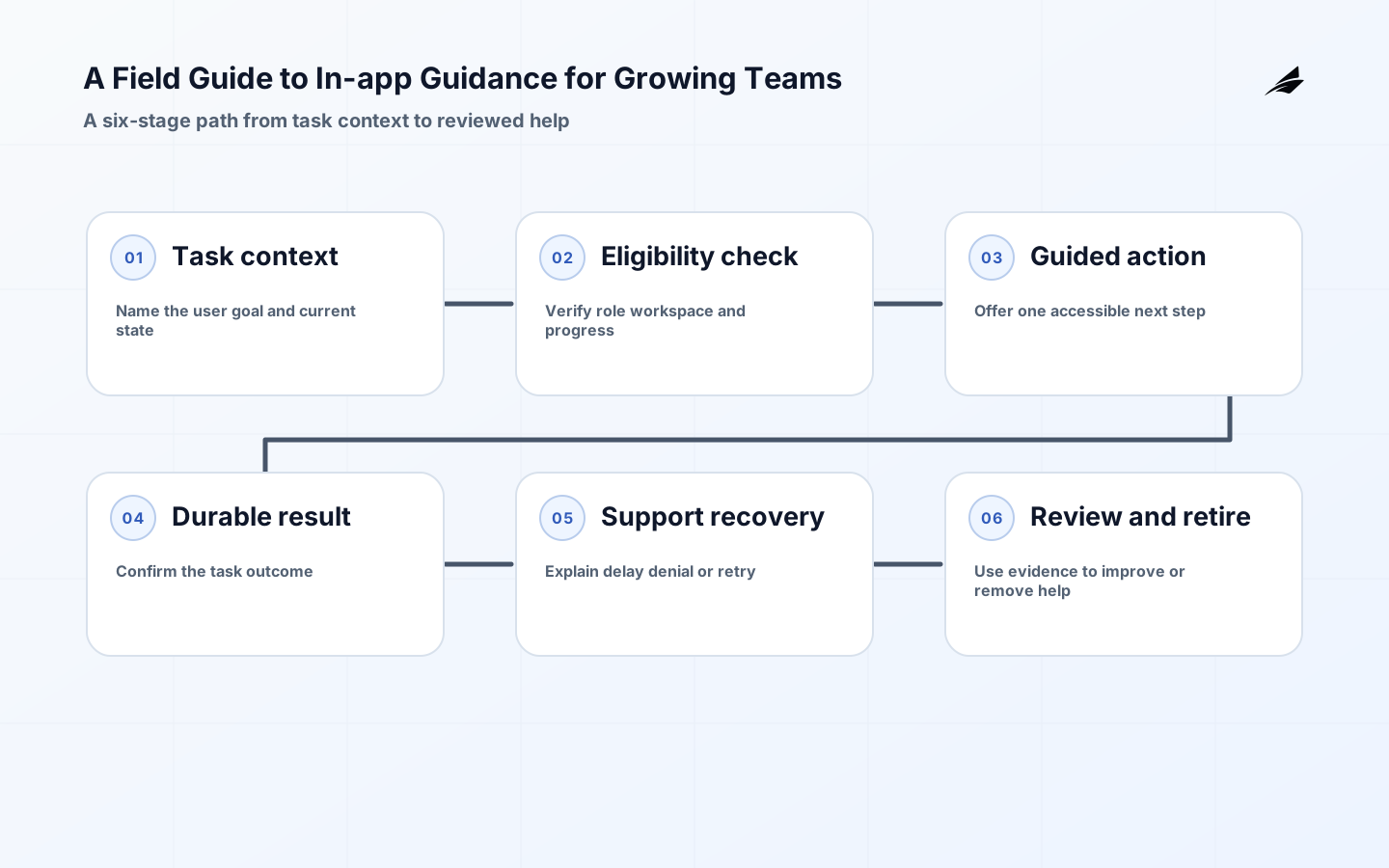
In-app guidance helps when a person is already trying to complete a meaningful task and the next decision is not obvious. For a growing team, the temptation is to buy a tour builder, add a bright prompt, and call the problem solved. That approach confuses visibility with usefulness. Good in-app guidance names the task, respects the current state, explains one decision, and leaves the person in control. It also gives the team evidence about whether the task became easier. Treat the phrase in-app guidance as a product capability with a boundary, an owner, a support path, and a retirement rule—not as a collection of popovers.
Define the helpful moment
Start with a single high-friction workflow: inviting a teammate, configuring a first integration, exporting a report, or resolving a failed payment. Write the user’s goal in one sentence and identify the exact state in which help is relevant. A person who has already completed setup should not see the setup tour again. A person who lacks permission should not receive a tutorial that implies the action is available. The trigger therefore needs more than a URL or CSS selector; it needs task, role, account context, progress, and a freshness rule. This is the smallest useful model for in-app the workflow.

| Boundary question | Decision to record | Evidence to retain |
|---|---|---|
| Who needs help? | Role, account, task, and current state | Evaluated context and source timestamp |
| What should change? | One next action or explanation | Completion event and visible confirmation |
| What must not happen? | No prompt, no write, or a handoff | Reason code and safe fallback |
| Who owns the exception? | Named product or support owner | Queue, due time, and resolution note |
Make guidance accessible by default
A visual callout is only one representation of help. The W3C WCAG 2.2 recommendation treats accessibility as testable criteria across perceivable, operable, understandable, and robust experiences. Apply that lens directly: a prompt must be reachable by keyboard, have a visible focus state, use a meaningful name, avoid trapping focus, and announce important status changes without stealing attention. Provide a predictable close or defer action, preserve the user’s location, and make the same explanation available as ordinary page content. Test zoom, reflow, small screens, reduced motion, and assistive technology before calling a tour complete.
Model state and authority
Guidance often sits beside permissions, billing, or customer data, so the browser must not become the authority. The OWASP Authorization Cheat Sheet recommends deny-by-default behavior, permission checks on every request, and server-side enforcement. If a prompt offers an action, the service must re-check the actor, workspace, resource, and current policy when the action is submitted. Keep dismissal state separate from authorization state. A person may dismiss a reminder, but that dismissal cannot grant access, bypass a required step, or hide an unresolved restriction.
Build one narrow journey
A first release should follow one workflow from entry to outcome. For example, an integration setup guide can confirm the account, show the required permission, explain the callback step, validate the first successful event, and link to recovery when the callback is delayed. Do not expand to every screen until this path has a normal case, a missing-record case, a duplicate request, an interrupted session, and a permission change. The narrow journey creates a real test object. It reveals whether the product state is understandable or whether the guidance is compensating for a confusing design.
| Journey stage | Useful behavior | Failure to expose |
|---|---|---|
| Orient | State the goal and current step | A prompt that appears without context |
| Act | Offer one relevant, reversible action | A link that implies authority the user lacks |
| Confirm | Show what changed and what remains | Completion inferred from a click |
| Recover | Explain delay, retry, or support route | Silent failure or repeated interruption |
| Rediscover | Keep help available without replaying noise | A one-time tour with no durable documentation |
Design the content operation
Treat guidance copy, targeting rules, and screenshots as versioned product inputs. A content owner should be able to retire a stale prompt after navigation or policy changes, while engineering should be able to see which rule displayed it and why. Give each item a purpose, audience, trigger, owner, review date, accessibility check, and completion signal. Keep high-risk instructions close to the source of truth; if a billing or permission rule changes, update the explanation in the same change review. This prevents the guidance layer from becoming a second, contradictory product manual.
Observe the task, not the click
Measure whether help improved the customer outcome. The OpenTelemetry observability primer distinguishes traces, metrics, and logs and frames reliability from the user’s point of view. Use a small event vocabulary: guidance evaluated, shown, dismissed, action started, task completed, task failed, and support contacted. Correlate those signals to a task identifier without collecting more behavior than the feature needs. A click-through rate alone is ambiguous: it can mean relevance, curiosity, confusion, or an interruption people cannot avoid.
Review signals with owners
The Google SRE monitoring guidance is useful here because it asks monitoring to provide visibility into service health and diagnosis, rather than a decorative dashboard. Pair task completion and time-to-value with guardrails such as repeated dismissals, support contacts, accessibility defects, and unauthorized-action blocks. Review a small sample of complete and exceptional traces with product, support, and engineering. When a metric moves, make an explicit decision: improve the wording, change the trigger, simplify the workflow, or remove the guidance.
Test real context before widening
Use cases that expose weak guidance
Test a new user, a returning user, a user with several workspaces, a user whose permission changed mid-task, and a user who uses only the keyboard. Add a slow network, a stale configuration, a duplicate submission, and an operator-assisted session. The test question is not “did the tooltip render? ” It is “could the person understand the next safe action, complete the task, and recover when the assumption was wrong? ” Record expected state, observed state, evidence, and owner for every scenario.
Support should be part of the same test. A support professional needs to know what the customer saw, which rule fired, and which record made the decision. That does not require broad production access. A constrained view with account scope, guidance version, relevant events, and a documented escalation route is safer and faster than asking support to infer behavior from screenshots. It also provides qualitative feedback that metrics cannot explain.
Key takeaways
- Anchor in-app guidance to a customer task and verified state, not to a screen selector.
- Keep authorization, billing, and data scope decisions on the server.
- Make help keyboard-accessible, dismissible, rediscoverable, and understandable without animation.
- Measure completed work, recovery, support demand, and accessibility—not prompt clicks alone.
- Version and retire guidance as deliberately as any other product behavior.
Frequently asked questions
What should a growing team guide first?
Choose the one workflow that repeatedly causes customer confusion and has a visible success condition. A first integration, invitation, or report export is usually better than a tour of the whole product because the team can observe completion and failure. Write the normal path and recovery path before selecting a vendor or UI pattern.
Do we need a dedicated guidance platform?
Not necessarily. A small team can start with accessible page content, a focused callout, and a few server-side rules. A platform becomes useful when many owners need targeting, versioning, experimentation, and lifecycle controls. It does not remove the need to model state, enforce authorization, or review outcomes.
When should guidance be removed?
Remove it when the underlying product is clear enough, the task has changed, the help is inaccurate, or the evidence shows that it increases interruption without improving completion. Keep the durable explanation in documentation if customers still need the concept, but do not preserve a prompt merely because it exists.
Walk through a practical scenario
Consider a growing team that wants to guide a workspace administrator through connecting an accounting integration. The useful moment is after the administrator has selected a workspace but before the first connection exists. The guidance can explain the required permission, link to the setup action, and show a pending state while the provider confirms the callback. It should not imply success after the button click. If the administrator loses the role during setup, the service must deny the final mutation and explain that the workspace state changed. If the provider is slow, the customer should be able to leave and return without starting a second connection. This example is small enough to test end to end and consequential enough to reveal weak state, authority, accessibility, and recovery design.
| Scenario | Customer-facing result | Operator evidence |
|---|---|---|
| Permission available | Setup action and clear completion state | Role, workspace, and provider result |
| Permission removed | Safe denial with a useful next step | Denied request and effective role time |
| Provider delayed | Pending state with rediscovery path | Correlation ID and retry age |
| Duplicate callback | One durable connection, no repeated prompt | Event ID and idempotency outcome |
Use this scenario to decide what belongs in the interface, the service contract, the support view, and the release checklist. The prompt is only one surface. The product is dependable when the same rule governs the button, API, callback handler, background retry, and operator correction. Review the scenario after an integration, permission, or navigation change, and retire the guidance when it no longer removes uncertainty.
The smallest useful improvement to a field guide to in-app guidance for growing teams is often a sharper boundary, not another feature. For a field guide to in-app guidance for growing teams, name the decision boundary and its owner.
For a field guide to in-app guidance for growing teams, test a delayed dependency before treating the first release as complete.
A practical example for a field guide to in-app guidance for growing teams is when two workers attempt the same transition.
Ownership is clearer when a field guide to in-app guidance for growing teams separates the promise from the mechanism.
Before widening a field guide to in-app the workflow, rehearse normal, denied, delayed, and corrected cases with realistic identifiers. For in-app guidance, review scope during normal handling.
The measurement plan for a field guide to in-app guidance for growing teams should pair an outcome with a reason to investigate it.
A durable operating note for a field guide to in-app guidance for growing teams records the authoritative source, effective time, permitted actor, protected resource, and recovery route.
For a field guide to in-app guidance for growing teams, test a revoked permission before treating the first release as complete.
Compare a successful guidance flow with the same task after a permission change, and confirm that the user sees an accurate next step.
During a late or disputed event, record the observed state before deciding how in-app guidance should respond, and verify that it still protects the user's next action.
A concrete operating test for a field guide to in-app guidance for growing teams is to rehearse in-app guidance during a recovery drill. For a field guide to in-app guidance for growing teams, review the scope during normal handling.
Evidence for “A Field Guide to In-app Guidance for Growing Teams” is grounded in Web Content Accessibility Guidelines (WCAG) 2.2, Authorization Cheat Sheet, Observability primer, Monitoring Systems with Advanced Analytics; each source informs a specific decision, test, or operating trade-off described in this guide.
Conclusion
In-app guidance earns its place by reducing uncertainty at the moment a customer needs help. A growing team can build that capability with a narrow task model, accessible presentation, server-side authority, observable outcomes, and an owner who is willing to retire stale prompts. Pair this field guide with Onboarding Flows: Engineering a Safe Path to First Value, In-app Guidance: Hands-on Planning Guide, and What Changes When In-app Guidance Moves into Production. The goal is not more messaging; it is a calmer, more trustworthy path through real work.