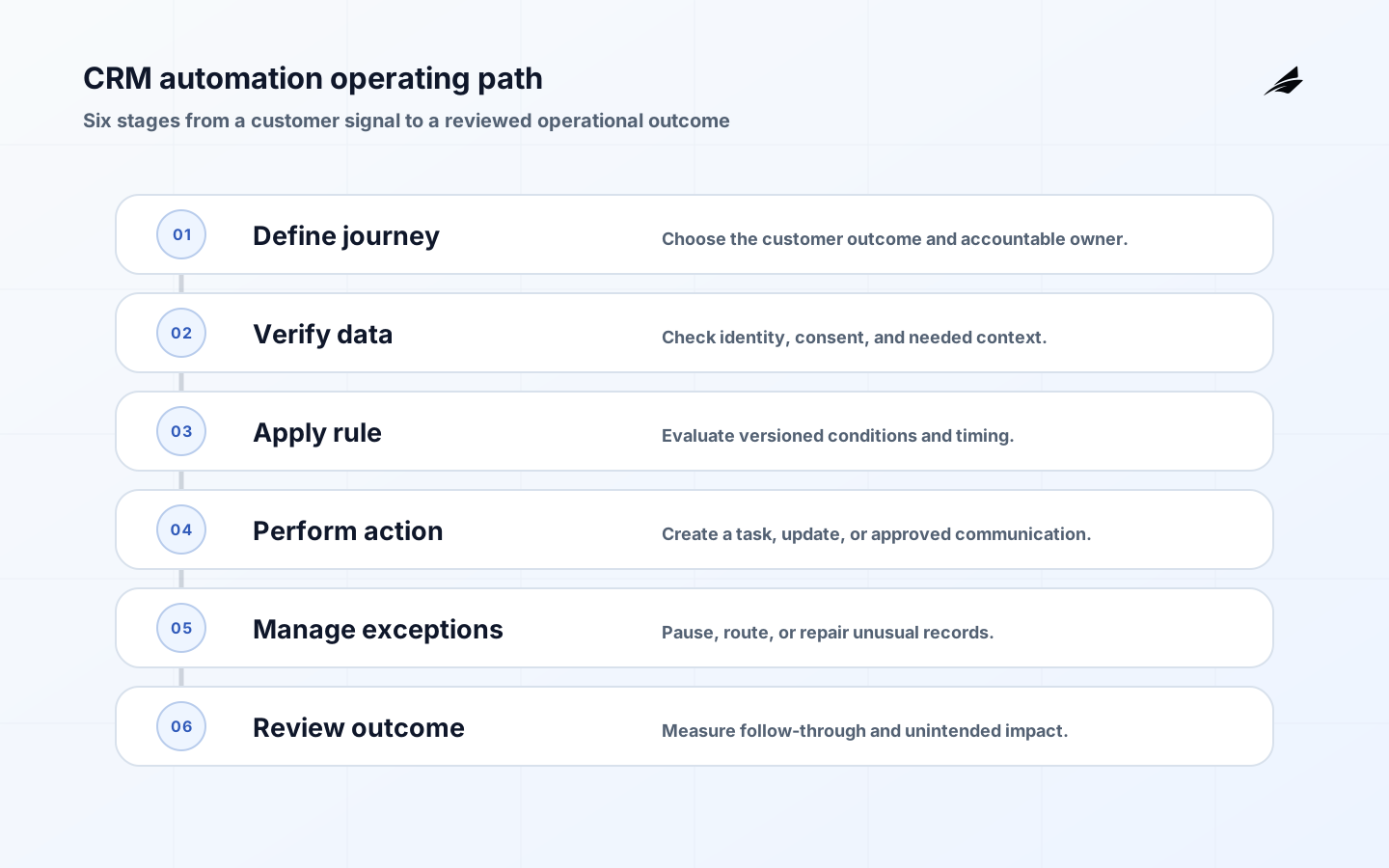
CRM automation earns trust when it removes routine coordination while preserving the judgment needed for real customer relationships. An automatic assignment, reminder, or lifecycle update can improve follow-through; an unreviewed rule can also send the wrong message, overwrite a sales decision, or create an account nobody owns. The right question is not which tasks can be automated, but which customer outcome the automation should protect and how a person can intervene.
Build CRM automation around an accountable operating model
Start with one journey such as lead intake, trial conversion, renewal preparation, or customer handoff. Define the trigger, required record quality, action, owner, stop condition, and evidence of completion. Distinguish an internal task from an external communication, because a customer-facing message deserves stricter consent, timing, and content review. Keep broad data enrichment and scoring separate until the team can explain the operational value of each input. Teams planning adjacent work should also consider this master data management guide, because shared records and handoffs often determine whether an apparently local improvement survives production use.

Define the records and states that make CRM automation explainable
Model automation as small, observable rules rather than one sprawling flow. A rule should state its event, conditions, action, delay, and exit criteria. Use a stable contact and account identity, and account for relationship changes such as merged accounts, reassigned owners, or a contact opting out. Record the rule version and the reason it acted so an operator can answer why a task appeared or why a communication was not sent.
| Decision | Practical definition | Why it matters |
|---|---|---|
| Journey | Lead intake, renewal, handoff, or service follow-up | Keeps the rule tied to a customer outcome |
| Trigger | Reliable record or event with required context | Avoids acting on incomplete data |
| Action | Task, assignment, internal update, or approved message | Sets the risk and review level |
| Stop condition | Opt-out, completed outcome, owner change, or pause | Prevents stale or harmful actions |
Set ownership and controls before automating the happy path
Revenue, customer success, marketing, legal or privacy, and operations may all have authority over different parts of a CRM rule. Establish who approves customer-facing templates, who changes qualification logic, and who can pause automation during an incident or campaign error. Limit service accounts to the data and actions they need. Periodically review rules that update ownership, stage, or communication preferences because those fields affect accountability and customer expectations. The related ticketing workflows guide is a useful comparison when the design includes cross-team rules, because both practices depend on knowing whose decision controls the next state.
- Choose one customer journey and the business outcome automation must improve.
- Write each rule as trigger, conditions, action, delay, exit, and owner.
- Protect consent, owner, and communication-preference changes with review.
- Make rule version and execution reason visible on the affected record.
- Test duplicates, opt-outs, reassignment, and delayed integrations.
- Review outcomes, overrides, and customer-impact samples after launch.
Deliver CRM automation in slices and make exceptions visible
Pilot a single automation with a small cohort and an explicit control group or manual review where practical. Test duplicate events, missing owner, opt-out, stale data, a reassigned account, an integration delay, and manual completion before the rule fires. Build a visible exception queue rather than silently skipping records. The first release should make it easy to pause, inspect, and correct the flow without a code deployment.
Use operating signals that lead to an action
Measure the operational result, such as response time to qualified leads, completion of renewal preparation, or reduction in unowned accounts, alongside error and override rates. Watch for unintended behavior: increased duplicate tasks, contacts receiving overlapping messages, or automation activity that looks healthy while conversion deteriorates. Review samples of affected records with the teams who use them; numerical volume alone cannot establish that a customer interaction was appropriate.
| Control area | Signal to review | Accountable role |
|---|---|---|
| Execution | Rule runs, errors, and skipped records | CRM operations |
| Customer impact | Message overlap, opt-out, and complaint signals | Lifecycle owner |
| Ownership | Unassigned or reassigned record age | Revenue operations |
| Change | Rule versions, approvals, and emergency pauses | Process owner |
Common CRM automation failure modes and practical responses
CRM automation has its own failure patterns. A configured tool can still fail because a key record is ambiguous, authority is missing, or an integration hides a rejected change. Treat each repeated exception as a case with evidence, a named owner, and a specific decision about whether policy, data, process, or code must change. That approach preserves operational learning without normalizing a workaround as part of the system.
Use a decision workshop before expanding scope
A useful decision workshop for CRM automation starts with a concrete operating case rather than a platform diagram. Put the people who create the record, apply the policy, consume the result, and repair failures in the same discussion. Ask them to trace the first design choice: journey. The team should agree on lead intake, renewal, handoff, or service follow-up and why it matters: keeps the rule tied to a customer outcome. Then repeat the exercise for trigger. Disagreement is useful evidence; it often reveals that two teams have been using the same term for different business conditions.
Turn the workshop into a short operational rehearsal. First, choose one customer journey and the business outcome automation must improve. Next, write each rule as trigger, conditions, action, delay, exit, and owner. Then test whether the team can protect consent, owner, and communication-preference changes with review. Do this with a representative, non-sensitive record and an ordinary time constraint. A review that only describes the ideal path will miss the handoff, authorization, or missing-data condition that causes the real escalation. The purpose is to make ownership and evidence usable before more users depend on the workflow.
The exception path deserves equal design attention. Use the next steps as a practical test: make rule version and execution reason visible on the affected record. Also, test duplicates, opt-outs, reassignment, and delayed integrations. Finally, review outcomes, overrides, and customer-impact samples after launch. Record the decision with the relevant source evidence and avoid repairing a symptom in a private message. When an exception returns, compare it with the earlier case; recurrence is a signal to change the input rule, policy, mapping, or service boundary rather than simply closing another ticket.
As scope grows, preserve the second set of design choices. For action, the operating definition is task, assignment, internal update, or approved message; this matters because it sets the risk and review level. For stop condition, use opt-out, completed outcome, owner change, or pause so the team can prevent stale or harmful actions. These details are where a pilot becomes a service other teams can rely on. They also give reviewers a stable way to distinguish a legitimate exception from an undocumented bypass.
Review evidence on a regular cadence with the people able to change the system. Look at execution through rule runs, errors, and skipped records, owned by crm operations. Pair that with customer impact: message overlap, opt-out, and complaint signals. The goal is not a perfect dashboard. It is a short list of decisions: which failure needs an immediate repair, which trend needs a policy change, and which measurement no longer represents the operating outcome the team cares about.
Use a written acceptance test for the next release of CRM automation. The test should show that a normal record completes, an invalid record is stopped with a useful reason, and a corrected record can continue without creating a second outcome. It should also prove the policy behind journey remains visible to the person reviewing the result. These tests create shared confidence between the business owner and the delivery team, especially when a change crosses an integration boundary.
Keep the review practical by sampling a recent case and asking the questions users actually ask: What is a good first CRM automation? How can a team avoid duplicate customer messages? Should automation change deal stages automatically? Then compare the answers with the current evidence in the system. The control view should help the responsible team inspect ownership through unassigned or reassigned record age, and decide whether the next improvement belongs in policy, data, product behavior, or operations. This small discipline prevents a growing system from accumulating unexplained exceptions.
Key CRM automation takeaways
- A CRM rule needs a business owner as well as a technical maintainer.
- Customer-facing actions require a clear stop condition and intervention path.
- Execution history is essential for explaining and correcting automation.
Frequently asked questions about CRM automation
What is a good first CRM automation?
Choose a repetitive handoff with a measurable outcome, such as creating an owner task after a qualified form submission or preparing a renewal review at a defined interval. Avoid automating a poorly understood sales or service decision first.
How can a team avoid duplicate customer messages?
Use stable identities, communication preferences, frequency rules, and a visible execution history. Test overlap across campaigns and workflows, especially after account ownership or lifecycle stage changes.
Should automation change deal stages automatically?
It can when the underlying event is objective and approved, but important sales stages often carry judgment. Start by creating a recommendation or task, then automate only after the team has evidence the rule reflects real process decisions.
Conclusion
CRM automation should make customer work more reliable, not less human. Keep each rule tied to an observable journey, expose its reason and owner, and give people a fast way to stop or repair it. Once one flow produces better follow-through with manageable exceptions, expand using the same discipline rather than layering opaque automation on top of a weak record model.