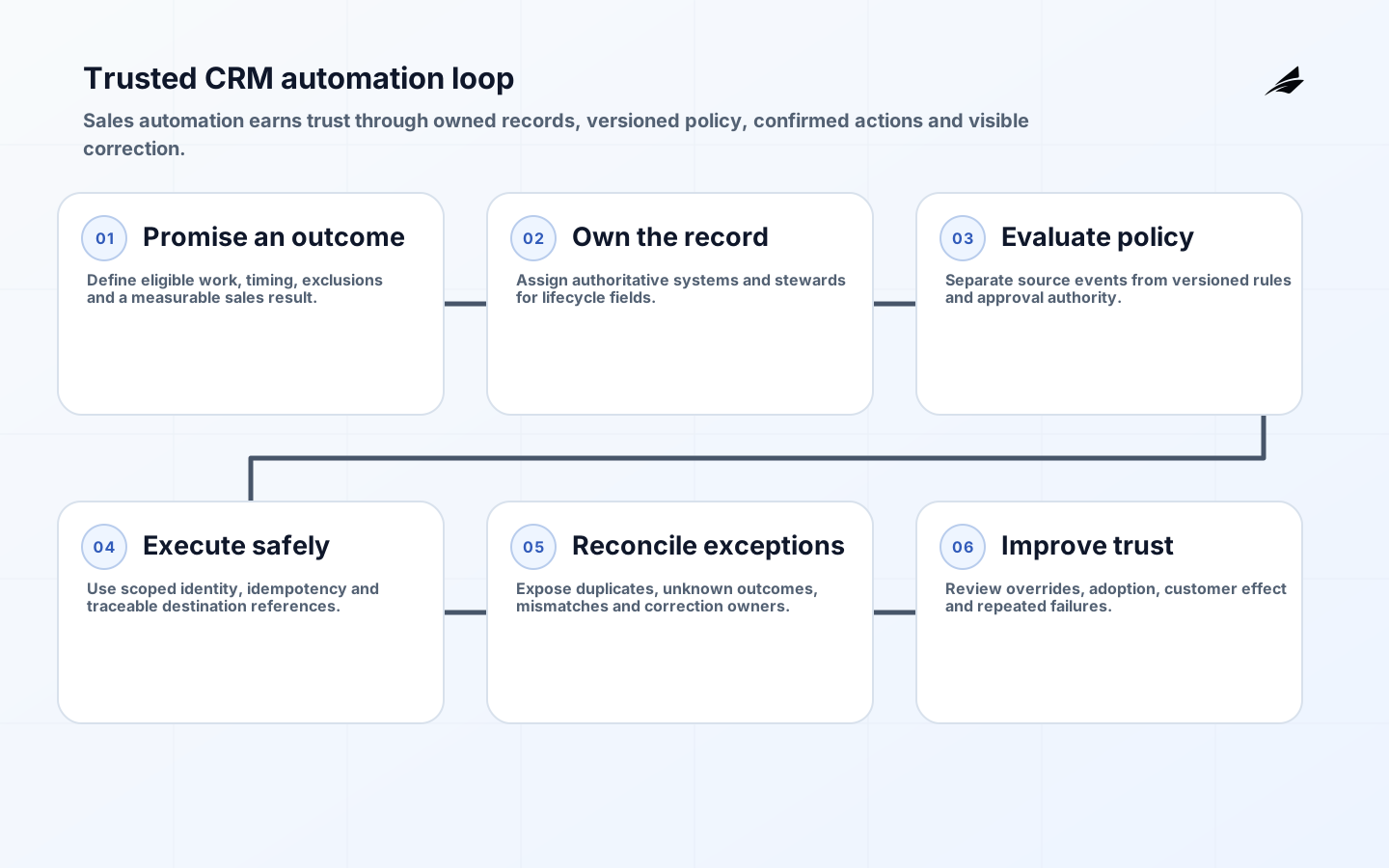
CRM automation earns trust when it reduces administrative work without sending the wrong message, overwriting a good record or hiding why an opportunity changed. Sales teams stop trusting automation when lifecycle stages mean different things, integrations race, assignments cannot be explained and exceptions disappear into logs. The remedy is not more workflow rules. It is an operating model that defines record ownership, trigger meaning, authority, downstream confirmation and a visible way to correct errors.
This guide is for sales, revenue operations and engineering teams designing reminders, routing, enrichment, approvals and system integrations. It connects to finance approval workflows, master data ownership and ERP modernization. Start with a sales decision that should become faster or more reliable, not a catalog of available CRM triggers.
Choose one workflow outcome and define its promise
A useful first scope might assign an inbound lead, enforce an approval before discount, create an onboarding handoff after a signed order or remind an owner when a next step is missing. Define the business event, eligible population, clock, decision rule, action and exception. Baseline manual time, misrouting, delayed follow-up, duplicate work and correction effort. The automation should improve one outcome without silently changing incentives or customer communication.
Write the promise in operational language: every qualified request receives one accountable owner within fifteen minutes during covered hours; every discount above a threshold has a recorded approver; every closed-won record creates one fulfilment handoff. Avoid vague goals such as better productivity. Name exclusions and a safe manual path. Sales leadership owns policy, revenue operations owns process and data, and engineering owns dependable execution; no single team can define all three alone.
| Workflow element | Decision to record | Example evidence |
|---|---|---|
| Trigger | Which authoritative event starts work? | Record change and source transaction |
| Eligibility | Which records and exclusions apply? | Rule version and evaluated fields |
| Authority | Who may approve or override? | Identity, role and reason |
| Action | What system change or communication occurs? | Attempt and downstream reference |
| Exception | Who resolves an unknown or rejected result? | Owned case and ageing |
Make record and field ownership explicit
Define which system owns account, contact, lead, opportunity, quote, order, subscription and support identity. Within a record, different fields may have different sources. A CRM can own sales stage while billing owns payment status and a product service owns usage. Document synchronization direction, transformation and conflict policy. Do not let the last write win when systems express different business authority. Stable IDs and source references are essential for deduplication and traceability.
Assign a business steward to lifecycle definitions and required fields. Stage changes should have entry and exit criteria, not personal interpretation. Preserve important history as events or field history rather than overwriting it. Profile completeness, duplicates, stale ownership and invalid transitions by segment. Data quality work should prioritize fields that drive automation and decisions; requiring dozens of unused fields increases avoidance without improving trust.
Separate triggers, policy and side effects
A trigger reports that something happened; policy decides whether action is allowed. A record update can be caused by a person, import, integration or another automation. Use origin, changed fields and transaction context to avoid loops and irrelevant work. Salesforce Change Data Capture publishes record changes and includes change metadata, but high-volume imports can produce many events. Filter according to business intent and design consumers for duplicate or resumed delivery.

Keep policy in versioned rules with test cases and an owner. Approval limits, territory, assignment, communication consent and customer tier can change independently of workflow code. Record the rule version that produced each consequential action. For low-risk reminders, reversible automation may proceed automatically. For discounts, account merges, bulk communication or deletion, require stronger authorization and review. UI visibility is never the enforcement boundary.
Design CRM integrations for replay and reconciliation
Use asynchronous events when decoupling and replay are useful, but understand retention and delivery semantics. Salesforce documents a finite event retention window and replay identifiers; consumers must persist progress and recover within that model. Every action needs an idempotency key based on business intent. Store the source event, attempt, destination reference and outcome. A timeout remains unknown until the destination is queried, and an acknowledgement does not always mean the business process completed.
Run periodic reconciliation between CRM and authoritative downstream systems. Compare accepted orders, active subscriptions, customer ownership or support handoffs using stable references. Route missing, duplicate and mismatched records to an owned queue with enough context to repair safely. Logs alone are not an operating process. OpenTelemetry traces can connect a workflow action across services, but business identifiers and privacy controls are still required for a sales operator to understand the case.
| Failure scenario | Unsafe reaction | Trusted response |
|---|---|---|
| Destination timeout | Repeat action immediately | Query outcome, then retry idempotently |
| Duplicate change event | Create another task or email | Deduplicate by event and business intent |
| Stale enrichment | Overwrite verified customer data | Apply source precedence and review |
| Rule changes mid-flight | Use whichever version runs later | Preserve evaluated policy version |
| Automation disabled | Hide backlog until restored | Expose queued work and manual path |
Protect customer data and privileged automation
Apply least privilege to users, service accounts, integration clients and support roles. Use OAuth flows suited to the client and follow current security best practice for redirect validation, token protection and proof mechanisms where supported. Rotate secrets and certificates, restrict network and API scopes, and attribute every administrative change. Automation identities should not have broad read and write permission simply because it is convenient.
Define lawful use, consent and retention for enrichment, recording and communication. Do not copy sensitive CRM fields into logs, prompts, analytics or test fixtures. Restrict exports and bulk actions, and monitor unusual volume. Account merge and deletion need review because they can affect orders, support and audit records. NIST CSF 2.0 provides a governance framework, but business owners must translate it into the actual customer-data lifecycle.
Roll out with sales-team participation and visible correction
Pilot with a representative team, not only automation enthusiasts. Use real territories, edge cases and handoffs. Explain what the system will do, what it will never do, how to pause it and where an error goes. Keep the first rules narrow and inspect every result. Provide a reason on assignments and approval outcomes so users can challenge the rule rather than invent workarounds. Treat overrides as evidence for improving policy, not user disobedience by default.
Train managers and operations on exception handling, not only normal fields. A dashboard should show eligible population, actions, suppressed cases, failures, overrides and queue age. Compare automated results with the prior baseline and customer outcomes. Do not reward record volume without quality. If representatives create shadow spreadsheets because corrections are slow, the operating model has failed even if the workflow engine is healthy.
Govern the automation portfolio after launch
Maintain an inventory of active workflows with owner, trigger, purpose, rule version, permissions, downstream systems, alerts and review date. Detect overlapping rules and circular updates. Review automation before schema, process or provider changes. Test in a representative sandbox and release through version control where the platform supports it. Emergency disable controls should be scoped so one faulty workflow does not require stopping all sales operations.
Measure business and system results: assignment time, approval time, follow-up completion, duplicate actions, correction rate, exception age, customer opt-outs and integration failure. Retire automations that no longer improve an outcome. Incident reviews should include policy and data causes, not only technical failure. Trust grows when the organization can explain an action, correct it quickly and show that the same class of error will be less likely after review.
Accept CRM automation for sales teams with observed evidence
For one full pilot cycle, compare every eligible record with the action taken, suppression reason, exception or override. Sample correct and incorrect outcomes with representatives and managers. Confirm that assignments arrive within the promised time, approvals use the right policy, communications respect consent and downstream systems receive one action. Reconcile totals independently. CRM automation for sales teams is ready to expand only when users can explain the result and corrections do not require privileged engineering intervention.
Publish a short operating agreement that names policy owner, automation owner, data steward, integration responder and sales escalation. Include covered hours, pause authority, queue thresholds, change process and support route. Train managers to use exception and quality measures rather than activity volume alone. Review the pilot after enough time to include handoffs and ageing, not only immediate trigger execution. Expansion should proceed by team or workflow with the same evidence gates.
Key takeaways
- Automate a defined sales outcome, not every available trigger.
- Assign authoritative ownership to records and important fields.
- Separate event detection, business policy and side effects.
- Use idempotency, replay evidence and reconciliation at integrations.
- Make explanations, exceptions and correction speed visible to users.
Frequently asked questions
Should CRM automation use low-code flows or custom code?
Choose based on complexity, testability, volume and ownership. Low-code can be excellent for clear platform-native rules; code may fit complex integration or reusable policy. Both need versioning, tests, error handling, monitoring and an accountable owner.
How can a team reduce duplicate customer records?
Define match rules, authoritative identifiers, field precedence and a reviewed merge process. Validate at entry and integration boundaries, but avoid aggressive automatic merges that could combine different people or legal entities. Measure duplicate creation by source.
What should never be fully automated?
Actions with high irreversible consequence or ambiguous judgment should retain approval or bounded authority. Examples may include major discounts, account merges, bulk customer messages and deletion. The threshold depends on business risk and available recovery.
Conclusion
Sales teams trust CRM automation when it behaves like a transparent operating system rather than an invisible rule collection. Clear record ownership, versioned policy, reliable integration and fast correction make actions explainable. Start with one measurable workflow, prove the complete path and expand only while users can see and challenge what the system does.