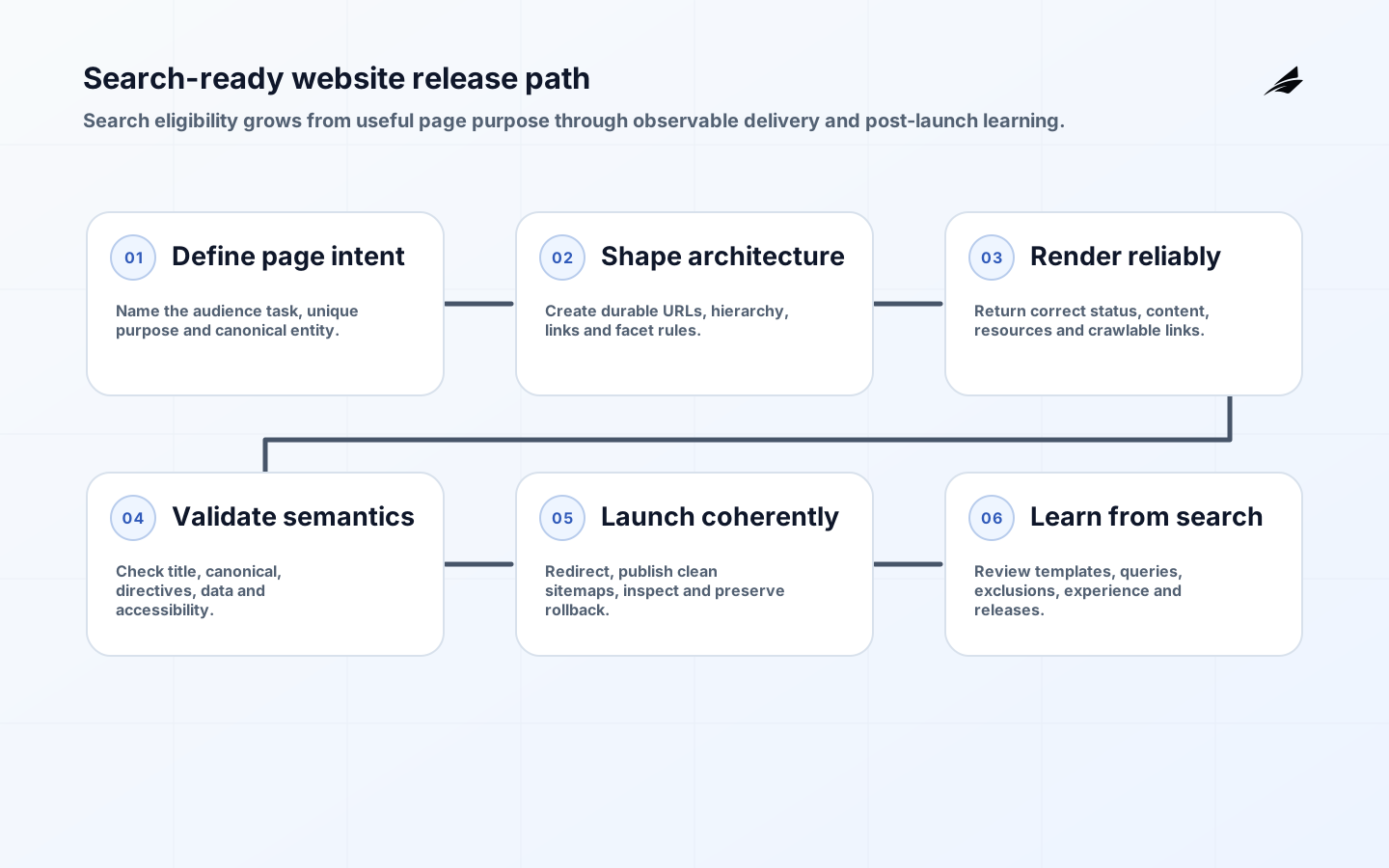
This SEO-ready website development FAQ answers the engineering questions that determine whether useful pages can be discovered, rendered, understood and maintained. Search readiness is not a launch-day plugin or a promise to rank. It is a quality of the information architecture, HTTP behavior, rendered content, semantic markup, accessibility, performance and publishing controls. Build those properties into requirements and automated checks, then measure real search outcomes after release.
Use the practical website guide to shape the operating model, the implementation checklist for release gates and the schema and sitemap checklist for deeper markup work. Search engines decide what to crawl and index, so development can improve eligibility and clarity but cannot guarantee inclusion, position or traffic.
What makes website development SEO-ready?
An SEO-ready implementation gives every intended public page a stable, descriptive URL; a successful indexable response; unique primary content; meaningful title and description; navigable internal links; and consistent canonical signals. It lets crawlers fetch required CSS and JavaScript and does not hide essential meaning behind interaction. Google's SEO Starter Guide emphasizes useful, organized content and explicitly rejects shortcuts such as keyword stuffing and meta-keyword optimization.
Readiness also includes human quality. The page must work on relevant devices, make purpose and next action clear, protect users and meet accessibility requirements. The developer guide tells teams to make sites secure, fast, accessible and mobile-compatible. These are product requirements with search consequences, not separate work owned by one marketing specialist after engineering is finished.
| Layer | Release evidence | Common failure |
|---|---|---|
| URL and HTTP | Stable route, correct status, redirect and canonical | Duplicate parameters or soft 404 responses |
| Rendered content | Primary copy and links visible in inspected HTML | Empty shell or blocked resources |
| Semantics | Unique title, headings and appropriate structured data | Boilerplate metadata on every page |
| Experience | Mobile, accessibility and performance tests | Critical content unusable by keyboard or slow networks |
| Operations | Sitemap, monitoring and rollback owner | Launch succeeds but errors remain invisible |
Can JavaScript websites perform well in search?
Yes, but the rendered result must be reliable. Google documents crawling, rendering and indexing as distinct phases in its JavaScript guidance. Server rendering, static generation or dependable dynamic rendering can reduce the time and dependencies required to expose primary content. Client-side rendering is not inherently disallowed, but failed API calls, authentication gates, browser-only links and inconsistent metadata create avoidable discovery risk.
Test representative templates with URL Inspection or an equivalent rendered-HTML workflow. Confirm that title, canonical, robots directives, main content, links and structured data exist after rendering. Ensure links use crawlable anchors with real destinations, and return meaningful HTTP status codes at the server edge. A friendly not-found view that returns 200 can be misread as valid content. Keep hydration failures and blocked asset errors in production telemetry because a crawler and a user can receive the same broken shell.
How should information architecture and URLs work?
Organize pages around user tasks and durable entities rather than internal department names or campaign cycles. Each indexable page should have a distinct purpose and enough original evidence to satisfy it. Connect hubs and detail pages with descriptive internal links so users and crawlers can understand relationships. Avoid generating a page for every filter combination. Facets, sorting and tracking parameters need explicit rules for links, canonicalization and crawling before the catalog grows.
Treat URL changes as data migration. Inventory old-to-new mappings, prefer one-hop permanent redirects, update internal links and canonicals, preserve meaningful content, and monitor both old and new routes. Do not redirect every removed page to the home page. When no relevant replacement exists, a genuine 404 or 410 is clearer. Keep redirects long enough for users, external links and crawlers to transition, and prevent deleted routes from reappearing in sitemaps.
What metadata and structured data are required?
Write a unique title that accurately names the page and a concise description that helps a searcher judge relevance. Metadata must match visible content; it cannot repair a thin or misleading page. Use one canonical URL consistently in internal links, sitemaps, redirects and the canonical element. Robots directives control indexing behavior, while robots.txt primarily manages crawling and is not a confidentiality mechanism. Sensitive content needs authentication and authorization.
Structured data should describe entities and facts already visible on the page using a supported vocabulary and eligible search feature. Generate it from the same trusted source as visible content, validate syntax and required properties, and test rendered output. Do not mark up fabricated reviews, hidden FAQs or organization-wide facts on unrelated pages. Eligibility does not guarantee a rich result. Version templates and monitor enhancement reports because requirements and page data change.
| Signal | Use it for | Do not use it for |
|---|---|---|
| Canonical | Indicating a preferred duplicate URL | Blocking discovery or securing content |
| Robots meta | Controlling page indexing and link following | Fixing unauthorized access |
| robots.txt | Managing crawler access patterns | Removing an already indexed secret |
| XML sitemap | Listing preferred current URLs and useful dates | Forcing indexing or replacing internal navigation |
| Structured data | Expressing supported visible entities | Adding claims absent from the page |
Do sitemaps and robots files guarantee indexing?
No. A sitemap is a discovery hint. Google's sitemap documentation says inclusion does not guarantee crawling or indexing. Generate sitemaps from the canonical publish state, include only indexable successful URLs, use accurate last-modified values, split large sets correctly and reference sitemap indexes where needed. Reconcile submitted and indexed populations by template, not only by one site-wide percentage.

A robots file should be simple, intentional and tested in every environment. Deployment automation must not copy a staging-wide disallow rule into production or expose staging hosts for indexing. Decide how crawlers should handle faceted URLs, internal search results, preview paths and generated files. Pair these rules with server logs and Search Console evidence. A lower crawl rate may be healthy after duplicate spaces are removed; volume alone is not success.
How do accessibility and performance fit?
Accessibility improves the actual product and often reinforces clean structure, text alternatives, keyboard operation and understandable interaction. Use WCAG 2.2 as a testable standard, with an agreed conformance target and manual evaluation alongside automation. Search benefits should never be the justification for access. Design templates, components and authoring controls so teams can keep publishing accessible content rather than repairing every page later.
Measure field performance for important journeys and template groups, then diagnose server response, render-blocking assets, image sizing, fonts, third-party scripts and interaction work. Performance is more than a score from one lab run. Set budgets in delivery pipelines and monitor real users by device and geography. Preserve content and functionality when optimizing; deleting useful material or delaying critical UI solely to improve a metric can worsen the experience the metric is meant to represent.
What should happen before and after launch?
Crawl a production-like environment and sample every template. Verify status codes, redirects, canonicals, index directives, rendered content, links, structured data, language annotations, pagination, media and accessibility. Compare old and new URL inventories for a migration. Remove test content and credentials, confirm analytics consent behavior, register properties, submit clean sitemaps and preserve a rollback path that does not create conflicting URL states.
After launch, monitor availability, server errors, redirect misses, excluded URLs, rendered failures, enhancement issues, page experience and search demand by query and landing page. Annotate releases so teams can connect changes to outcomes. Search effects can take time, and seasonality or demand shifts can mimic technical impact. Diagnose by template and intent, inspect samples, and change one controllable cause at a time instead of issuing mass rewrites from a dashboard fluctuation.
Practical example: relaunching a service catalog
Imagine a professional-services company replacing a client-rendered catalog with a new component platform. Discovery finds 4,800 public URLs, including duplicate filters, expired campaign pages and PDFs that still attract useful visits. The team assigns each route a retain, merge, redirect or remove decision; defines canonical service and location entities; and preserves high-value copy and external-link destinations. New templates server-render the primary content, navigation and metadata while keeping interactive comparison features client-side.
Before launch, automated tests request every mapped URL and inspect status, redirect destination, canonical, robots directive, title, main heading and sitemap membership. Rendered samples verify internal links and structured data. Manual checks cover keyboard journeys, screen readers, mobile layouts and slow connections. Search Console and analytics configurations are preserved, and releases are annotated. A staged host test confirms that production rules do not inherit the staging noindex directive.
After release, the team watches redirect misses, server errors, indexed pages, queries and landing-page outcomes by template. A drop confined to location pages leads to inspection of rendered address content, not a site-wide rewrite. Obsolete parameters gradually leave the crawl space while consolidated pages retain relevant demand. The example shows why search-ready development is migration engineering plus content and experience quality, with evidence gathered before and after the switch.
Key takeaways
- Make search readiness a property of architecture, content and operations.
- Expose meaningful rendered content, links and status behavior without fragile dependencies.
- Keep URL, canonical, sitemap and index signals consistent.
- Use structured data only for supported facts visible to users.
- Test accessibility and field performance as product quality.
- Measure post-launch outcomes by template and search intent, without promising rank.
Frequently asked questions
How long does SEO-ready development take to affect search?
Technical fixes may be discovered in hours or may take weeks or months to be crawled, processed and reflected. The interval depends on site scale, crawl patterns, change type and demand. Confirm implementation first, then evaluate over an appropriate evidence window.
Can a CMS make a website SEO-ready automatically?
A CMS can enforce fields, templates, URLs, sitemaps and checks, but it cannot guarantee useful content, correct architecture or sound migration decisions. Evaluate defaults and author controls, then test the deployed output.
Conclusion
SEO-ready website development makes public information technically reachable, semantically clear and genuinely useful. Build stable routes, robust rendering, honest metadata, accessible templates and observable publishing into the system. That foundation gives search engines better evidence, gives users a better experience and gives teams a disciplined way to improve visibility without chasing unsupported shortcuts.