SEO-ready website development for support teams begins with a customer trying to solve a real problem, not with a list of phrases to place in metadata. A dependable help center makes current answers accessible through stable public URLs, useful initial HTML, crawlable navigation and clear escalation. This checklist treats the support site as a maintained product. The companion scope and delivery plan helps estimate the broader program, while the steps below define the technical release evidence.
Map support journeys before choosing templates
A support website serves customers who are trying to diagnose an error, configure a feature, understand an outage or decide whether to open a case. Inventory those journeys before choosing a framework. For each one, name the audience, product version, owning support team, authoritative source, update trigger and escalation route. Separate public troubleshooting from tenant-specific account information. The public site should answer stable questions; authenticated support should handle entitlement, personal data and case history. This boundary prevents a search index from exposing private material and prevents public articles from drifting away from the product teams that must maintain them.
Capture the language used in tickets and product interfaces, but do not publish a page for every query variant. Group questions that lead to the same task and outcome. A useful article states prerequisites, supported versions, procedure, expected result, recovery and contact path. Distinguish a known limitation from an incident and a permanent feature from an experimental flag. This content contract gives writers and engineers a shared acceptance test. It also helps internal search, external search and support agents point to the same canonical answer instead of maintaining subtly different copies.
Design a crawlable help-center architecture
Organize content around products, tasks and failure states rather than internal department names. Every article needs a permanent canonical URL, descriptive title, one clear H1 and crawlable links from category and product hubs. Avoid navigation that exists only after a client-side search or filter interaction. Versioned documentation requires an explicit policy: either maintain separate canonical versions with visible labels or consolidate obsolete versions into the current answer with a redirect where user intent remains equivalent. Search and browse should lead to the same published record so the sitemap, internal links and breadcrumbs cannot disagree about which URL is authoritative.
| Page contract | Implementation requirement | Release evidence |
|---|---|---|
| Public support article | Server-rendered instructions, canonical URL and visible version context | Raw response, rendered comparison and content approval |
| Category or product hub | Crawlable links to canonical task pages | Link graph and orphan-page report |
| Retired answer | Purposeful redirect or genuine 404/410 | Redirect map and status test |
| Interactive diagnostic | Useful fallback content before scripts execute | No-script and degraded-network test |
Render dependable content and status signals
Support articles must return meaningful HTML and an accurate HTTP status before a browser runs application JavaScript. A missing article should return 404 or 410, while an intentionally moved answer should use a server redirect to the closest equivalent. Render the title, main instructions, warnings and links into the initial response. Load interactive diagnostics as enhancement, not as the only source of the answer. Generate canonical tags, robots directives and sitemap entries from the same publication state. This arrangement helps crawlers, customers on constrained networks and support engineers reproducing failures from logs.
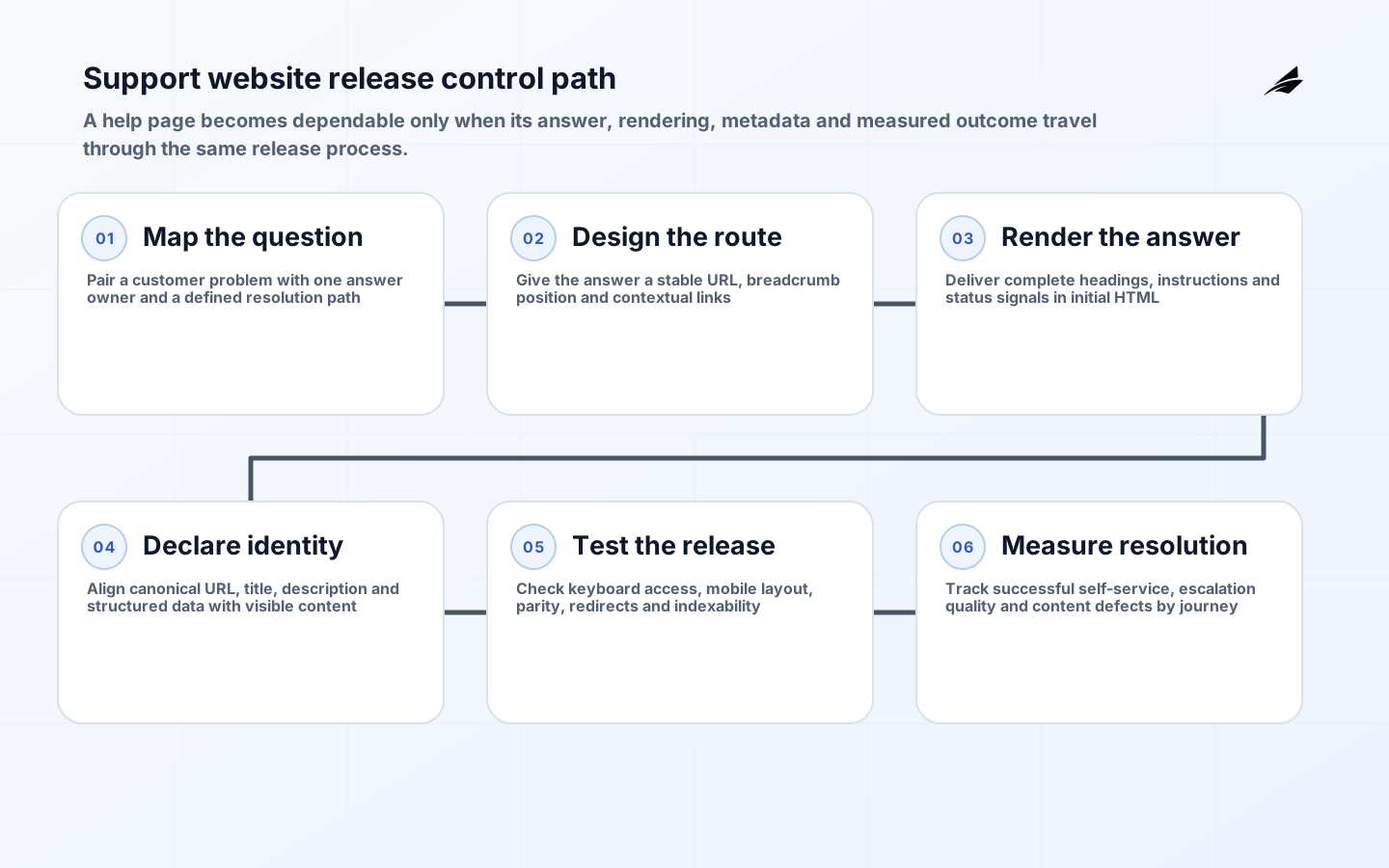
- Inventory support tasks, public and private boundaries, and content owners.
- Define canonical routes, version rules and crawlable navigation.
- Build templates with semantic HTML and meaningful server responses.
- Connect publication state to metadata, sitemaps and redirects.
- Test representative pages for accessibility, rendering and performance.
- Release with monitoring for indexing, broken links and support outcomes.
Test accessibility, structured data and content parity
A support article is not usable if keyboard users must traverse the entire header before reaching the procedure or if an error message cannot be associated with its field. Test landmarks, heading order, focus, skip links, code samples, tables and responsive zoom against WCAG 2.2. Structured data should describe only visible content and only a type supported for the page. Compare raw HTML, rendered DOM and the content-management preview for representative templates. Image alt text must describe diagnostic evidence rather than repeat a phrase. These controls belong in continuous integration because a shared layout defect can affect thousands of help pages.
| Failure | Why it harms support | Control |
|---|---|---|
| Wrong canonical version | Customers land on obsolete steps | Generate metadata from publication state |
| Client-only article body | Some crawlers and constrained users see an empty shell | Render primary content into initial HTML |
| Hidden contact path | Case deflection appears better while customers are blocked | Measure confirmed task completion and preserve escalation |
| Layout accessibility regression | Repeated navigation or focus traps affect every article | Automate template checks and conduct keyboard review |
Measure successful resolution, not page impressions
Combine Search Console, web analytics and support-case data carefully. Useful signals include valid indexed pages by template, queries that land on the correct product version, article completion, search refinement, case creation after reading and customer-confirmed resolution. A falling case rate is positive only if customers actually complete the task; an inaccessible form or missing contact route can create the same number. Review zero-result searches and internal support links because they expose language customers use that the taxonomy missed. Keep privacy boundaries intact when joining datasets, and evaluate changes by task family rather than hiding poor articles inside site-wide averages.
Establish a baseline before a template migration or content consolidation. Sample high-volume and high-consequence tasks separately. An article that prevents a routine case may save minutes, while an accurate security-recovery article may avoid a far larger incident despite low traffic. Track content freshness and product-version mismatch alongside acquisition metrics. When a change affects case creation, ask support teams whether demand disappeared, moved channels or became harder to diagnose. This review prevents the website from optimizing for apparent deflection while customers and agents absorb more effort elsewhere.
Operate the support website as a product
Give each content family a product owner, technical owner and subject-matter approver. Publication should record the product version, evidence used, review date and next review trigger. Release notes, incident reviews and deprecations should create content work automatically. Monitor broken links, canonical conflicts, failed builds, slow templates and sudden crawl changes. When an answer is withdrawn, update navigation and related articles before changing the status. This operating model turns the help center into a maintained service and reduces the common gap in which support agents know an answer has changed but the public page remains confidently wrong.
Run a pre-release exercise using one troubleshooting article, one versioned procedure, one interactive diagnostic and one retired page. Fetch each response without a browser, inspect the rendered page with JavaScript, navigate by keyboard and follow every escalation link. Verify that analytics do not capture secrets or customer identifiers. Then simulate a failed content API and a blocked asset host. The customer should still receive a useful explanation and next step. This compact test covers the boundaries where technically polished support sites most often fail in production.
Rehearse a representative operating scenario
The operating rehearsal for SEO-ready website development for support teams should follow one representative case across content publication and rendering and navigation. Stop after every transition and ask which record is authoritative, which identity is acting, whether the rule is current and whether retrying can create a duplicate result. Introduce missing evidence and a delayed dependency. The operator must be able to identify the owner, explain why the case paused and continue through a documented fallback without private coaching.
Next, simulate stale content and rendering failure. Verify that monitoring exposes the problem before users discover it indirectly, that the retained evidence supports diagnosis and that containment does not broaden permissions or damage unrelated work. Record elapsed time, manual steps and unresolved ambiguity. Add the scenario to regression evidence so the next release is tested against the exact failure rather than a simplified happy path.
The acceptance packet for SEO-Ready Website Development for Support Teams: Implementation Checklist should contain the approved boundary, ownership map, source and interface versions, permission tests, evaluation sample, support route, cost baseline and recovery procedure. Give those artifacts to someone who did not build the service. Their ability to operate a normal case, diagnose a stale input and choose a safe fallback demonstrates that the service is transferable. Temporary exceptions require an owner, compensating control and expiry before authority or volume increases.
Key takeaways
- Design around customer support tasks, not internal team names.
- Keep public content separate from tenant and case data.
- Use one publication source for routes, canonicals and sitemap entries.
- Test raw HTML and keyboard flow on every shared template.
- Tie success to resolved customer tasks and content freshness.
Frequently asked questions
- Does every support article need structured data? No. Use supported markup only when the visible page satisfies the required properties; ordinary crawlable HTML is more important than an inapplicable schema type.
- Should old product documentation be deleted? Preserve it when customers still operate that version and label it clearly. When the old intent is fully replaced, redirect to the closest equivalent; otherwise return an honest removal status.
- Can client-side rendering be search-ready? It can be indexed, but server rendering or reliable pre-rendering reduces dependency on a second rendering phase and gives customers useful content sooner.
- How should support and content teams share ownership? Support supplies issue language and escalation patterns, product owners validate behavior, and a content operations owner manages publication, review and retirement.
- What is the first release gate? Fetch representative URLs without a browser and verify status, canonical, title, H1, core instructions and crawlable internal links before testing richer interactions.
Conclusion
SEO-ready website development for support teams is successful when a customer and a crawler receive the same clear, current and accessible answer. Stable URLs, meaningful HTML, disciplined versioning and honest status codes form the technical base. Ownership, support feedback and release monitoring keep that base trustworthy after launch. Treat the help center as a product with measurable resolution outcomes, and organic discovery becomes a consequence of useful support rather than a layer of metadata added at the end.