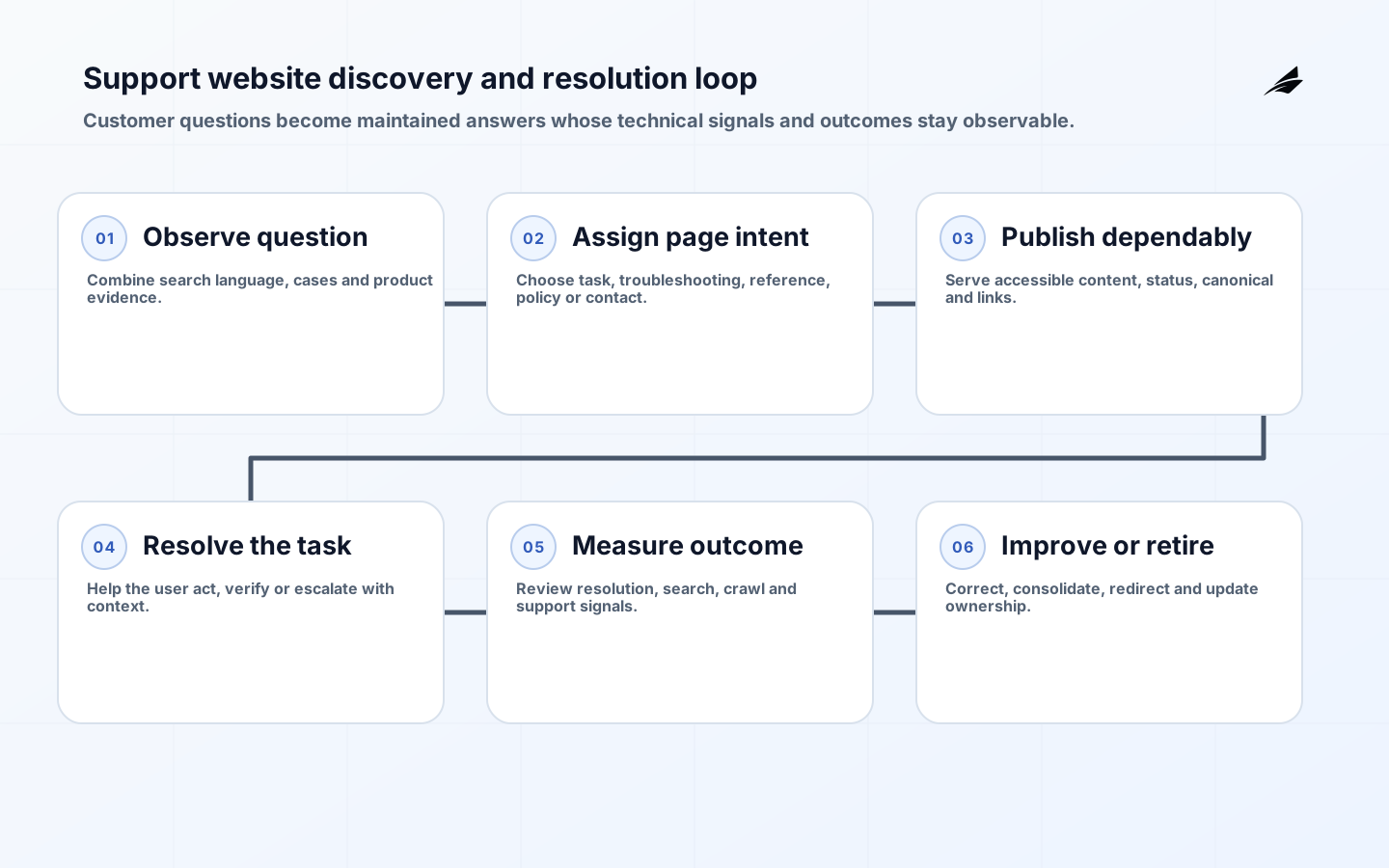
SEO-ready support website development creates a help system that people and crawlers can discover, understand and trust. The objective is not traffic alone. A useful support site helps a customer identify the correct product and version, complete a task, recover from an error or reach human support with context. Technical search signals, accessible content and support operations must reinforce that outcome.
This delivery plan complements Edilec's support-site implementation checklist, support-site FAQ and search-ready website scope guide. Search engines do not guarantee indexing or ranking. The controllable work is to publish original, accurate, crawlable content with consistent technical signals and to measure whether it resolves genuine support needs.
Define support journeys and page families
Inventory customer questions from search queries, cases, chat, product telemetry, release notes and frontline interviews. Group intent into setup, concept, task, troubleshooting, policy, status and contact. Define page families with one clear purpose and owner. Record product, version, audience, locale, prerequisites and last review. Decide which content should be public, authenticated, retired or explicitly excluded from indexing. Search demand cannot justify exposing sensitive configuration or customer-specific evidence.
| Page family | Primary user need | Required state |
|---|---|---|
| Task guide | Complete a known action | Prerequisites, steps and verification |
| Troubleshooting | Diagnose a symptom | Observable checks and escalation |
| Reference | Confirm syntax or limits | Versioned authoritative detail |
| Policy | Understand terms or process | Owner, effective date and jurisdiction |
| Release note | Assess a change | Version, impact and migration link |
| Contact path | Obtain accountable help | Eligibility, channel and context |
Design a crawlable information architecture
Use stable descriptive URLs and ordinary HTML links with meaningful labels. Organize by user mental model rather than internal departments. Every important page should be reachable through navigation or contextual links; an XML sitemap aids discovery but does not replace linking. Keep breadcrumbs and product/version context consistent. Search and filters may generate unbounded parameter combinations, so define which result and faceted URLs can be indexed and which remain functional user tools only.
Serve correct HTTP status codes: 200 for a real page, 301 or 308 for a durable move, 404 or 410 for removed content, and 5xx for genuine server failure. A branded error message returned as 200 creates a soft-error ambiguity. RFC 9309 defines robots.txt crawler access rules and explicitly notes that they are not authorization. Use authentication to protect private pages, and use noindex only where a reachable page should not appear in search.
Render complete, equivalent support content
Google documents crawling, rendering and indexing as separate phases for JavaScript pages and recommends server-side or pre-rendering as a useful option. Put the article's title, main content, links, canonical and essential metadata in dependable initial HTML where practical. If client rendering is used, test raw and rendered output, failures, blocked resources and slow APIs. Do not publish an empty application shell whose help text appears only after a fragile private request.
Choose a content platform from editorial workflow, preview, versioning, localization, redirects, access control, APIs and export, not from themes alone. Generated pages need the same semantic structure and content parity across desktop and mobile. Preserve heading order, code semantics, table alternatives, link purpose and visible focus. WCAG 2.2 should shape templates and acceptance, while research with disabled users verifies the complete support journey.
Align titles, canonicals and structured data
Write unique titles and descriptions that identify the task, product and differentiator without repeated boilerplate. Select one canonical URL for duplicate or near-duplicate representations and keep HTML canonical, redirects, sitemap and internal links aligned. Google describes canonical signals as hints that can be combined; conflicting signals waste crawl and create unpredictable selection. During migrations, map old URLs individually and retain redirects long enough for users, links and crawlers to update.
Structured data must describe visible page content and follow the search engine's current eligibility rules. It may improve understanding or presentation but does not guarantee a rich result. Do not mark hidden FAQ text, fabricate ratings or add schema merely because a content type exists in a vocabulary. Validate generated markup in release tests and monitor enhancement reports after deployment.
Create a support content operating model
Assign each page an accountable owner, review trigger and retirement behavior. Product releases should identify affected documentation before launch. A support case should be able to propose a change with evidence; a content owner should verify it against the product. Use reusable facts carefully: shared snippets reduce duplication but can spread one incorrect statement widely. Keep source links, version history and approvals for consequential instructions.

Estimate cost from complexity and operating demand
| Cost driver | Why effort changes | Evidence that narrows estimate |
|---|---|---|
| Content migration | Duplicates, obsolete pages and weak metadata need decisions | Crawled inventory and disposition sample |
| Rendering platform | Client dependence and integrations affect reliability | Representative rendered prototype |
| Localization | Workflows, variants and hreflang governance expand | Locale and ownership matrix |
| Search and facets | Index control and relevance need testing | Query set and route rules |
| Assurance | Accessibility, privacy and security raise acceptance depth | Applicable control baseline |
| Operations | Release pace and page count drive maintenance | Publishing volume and service data |
Separate discovery, platform delivery, content remediation, migration and ongoing operation. Content quality usually dominates a large migration; automated import does not decide whether two contradictory articles should merge. Include analytics, search tooling, accessibility testing, redirects, monitoring and training. Avoid traffic guarantees. Fund a bounded release that proves page templates, editorial flow, migration rules and support outcomes before estimating the full estate.
Deliver and verify by page family
- Baseline queries, cases, page inventory, crawl state and successful resolution.
- Approve page families, metadata, index policy, ownership and retirement rules.
- Build representative templates with accessible content and stable HTML signals.
- Migrate a bounded topic, mapping redirects and reviewing every disposition.
- Validate status, robots, canonical, links, structured data and rendered parity.
- Release, monitor recrawl and resolution, then expand with lessons recorded.
Monitor indexed coverage, crawl errors, selected canonicals, search impressions, onsite no-result queries, task completion, case deflection with quality checks and escalation. A falling case count can mean success or abandonment, so sample user outcomes. Segment by page family, product and version. Review technical signals after deployments and content quality on a cadence tied to product change.
Control migration and release risk
Crawl the estate before migration and preserve URL, title, canonical, status, inbound links, traffic, onsite use, owner and proposed disposition. Review high-value and high-risk pages manually. Redirect only to a genuinely equivalent destination; sending every removed article to the home page confuses users and search systems. Keep the redirect map under version control and test chains, loops, case and encoded characters.
Release templates and content in controlled groups. Compare raw HTML, rendered DOM and visible page for title, headings, text, links, robots and canonical. Test with authentication absent and scripts or APIs failing. Validate mobile layout, keyboard flow, zoom, screen reader, code copying, print and translated text. Monitor 404s and indexing evidence after cutover while keeping rollback URL-compatible.
Create a content incident path for instructions that can cause data loss, security exposure or failed service. Let support unpublish or warn quickly under controlled authority, preserve the original for review and notify affected teams. Search visibility increases the consequence of a wrong answer, so correction needs the clarity of a software incident.
Key takeaways
- Design support pages around resolvable user intent and authoritative versions.
- Make important content reachable, renderable, accessible and technically consistent.
- Align canonical, redirect, sitemap and internal-link signals.
- Treat structured data as accurate machine-readable description, not a ranking promise.
- Measure successful resolution and maintain every indexed page through ownership and retirement.
Frequently asked questions
Can a JavaScript help center rank in search?
Yes, but rendering introduces another dependency and not every crawler executes JavaScript. Ensure essential content, links and signals are dependable, test rendered output and return correct status codes. Server rendering or pre-rendering can simplify discovery when implemented consistently.
Should every FAQ page use FAQ structured data?
Only when the markup matches visible content and current search documentation says the site and use case are eligible. Even valid markup does not guarantee a special result. The page should remain useful without it.
Should authenticated support content be indexed?
Generally no, because crawlers cannot access protected customer content and it may expose sensitive context. Publish a safe public explanation where useful, then direct authenticated users to account-specific details. Do not use robots.txt as the access control.
Govern search as part of support operations
Hold a recurring review with support, product, content and engineering. Examine external queries, onsite searches, no-result terms, case themes, crawl errors and pages with high entrances but poor resolution. Decide whether the fix is content, product behavior, navigation, status communication or human support. Search data reveals language and demand, but it should not overrule safety, accuracy or privacy.
Define release responsibilities for template, routing, robots, canonical and sitemap changes. Add automated route and metadata tests, then sample live pages after deployment. Maintain emergency contacts for domain, CDN and content platform failures. Review permissions and publishing history, especially for pages that authorize downloads or operational changes.
Quarterly, retire duplicate and low-value content, check top pages against current products and test a sample of journeys with users. Preserve useful redirects and update contextual links. A smaller maintained corpus often resolves more questions than a large archive whose search results require customers to guess which answer is current.
Conclusion
An SEO-ready support website is a maintained resolution system. Connect real questions to stable page families, publish dependable accessible HTML, align crawl and canonical signals, and measure solved tasks. The strongest search outcome follows from accurate content and disciplined operations, not a layer of metadata added after the help center is built.