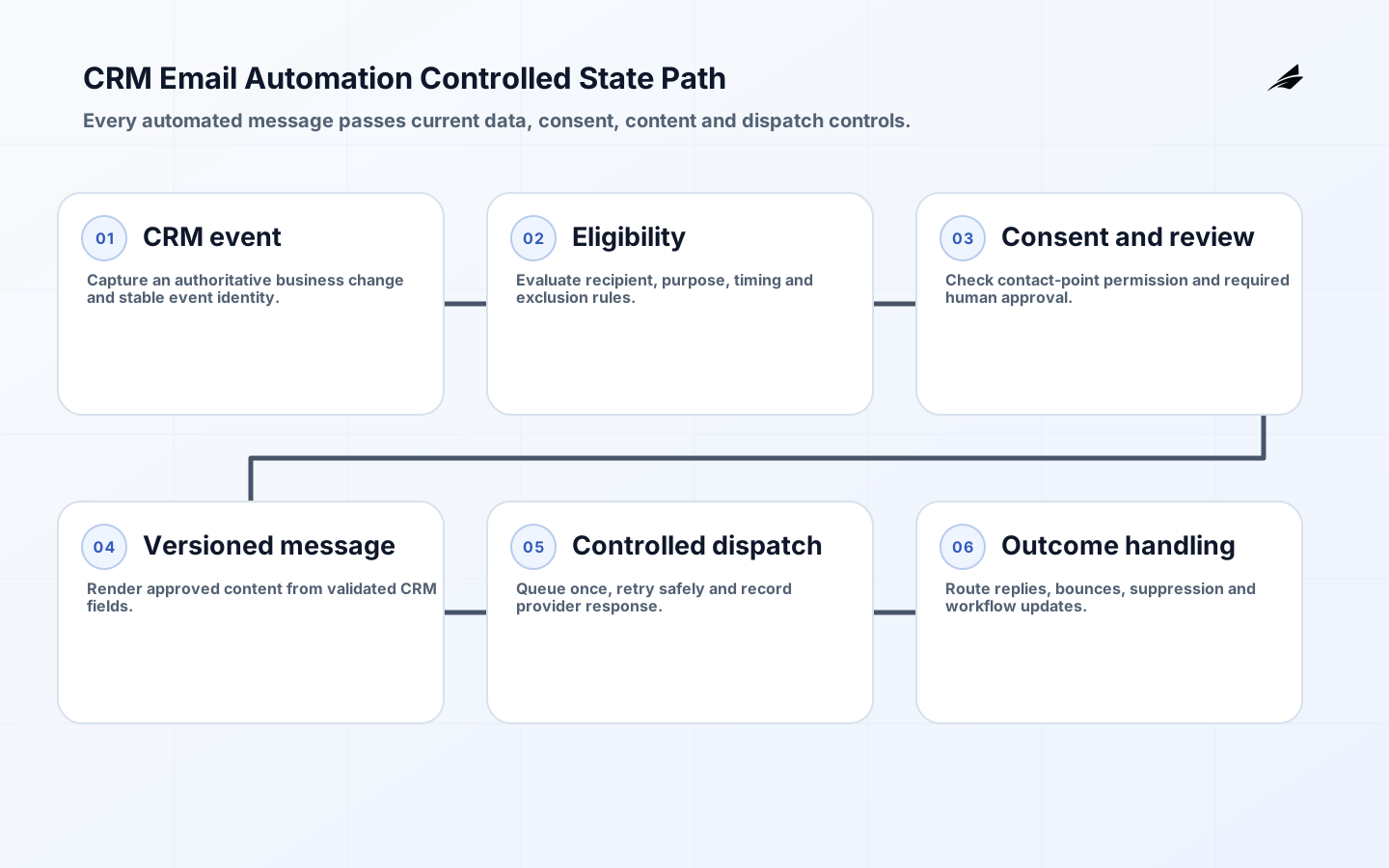
CRM email automation turns a record change into a customer communication, but that short description hides several business controls. The system must know whether the record is authoritative, whether the recipient may be contacted for the stated purpose, which identity is allowed to send, what content is current, and what happens after a bounce, reply or conflicting update. A useful design treats email as one step in a governed customer workflow rather than an isolated campaign shortcut.
This guide treats crm email automation: a controlled workflow guide for business teams as a set of decisions that can be reviewed and tested. The aim is not to prescribe one vendor or promise a universal result. It is to help business and technical owners define boundaries, preserve evidence, expose failure behavior and decide when the work is ready to expand.
Choose a narrow communication decision
Begin with a repeated event that has a clear recipient, purpose and owner: an appointment reminder, case acknowledgement, renewal notice or requested follow-up. Avoid mixing transactional service messages with promotional outreach under one vague automation.
Document the trigger, eligibility rule, consent purpose, sender, template owner, suppression conditions, expected response and escalation. State which records are excluded and which cases require human review.
| Workflow state | Meaning | Permitted next action |
|---|---|---|
| Eligible | Rule matched using current CRM data | Recheck consent and prepare exact content |
| Queued | Immutable send request accepted | Dispatch, cancel or expire |
| Sent | Provider accepted the request | Await outcome; do not resend automatically |
| Suppressed | Policy, consent or quality rule blocked contact | Record reason and route only if review is allowed |
| Failed | Attempt ended without accepted dispatch | Classify retry, review or permanent stop |
Replay historical examples without sending mail. Review false eligibility, duplicate contacts, shared addresses, missing owners and records that change between trigger and dispatch.
Turn "Choose a narrow communication decision" into a working control by naming one accountable owner, one maintained artifact and one review forum. The exit standard for this part of crm email automation: a controlled workflow guide for business teams is concrete: Replay historical examples without sending mail. Review false eligibility, duplicate contacts, shared addresses, missing owners and records that change between trigger and dispatch. For this decision boundary, name the accountable owner, supporting evidence, exception route, and next measurable check.
Design a state model before a flow
A reliable workflow needs explicit states such as eligible, awaiting approval, queued, sent, delivered, bounced, replied, suppressed, failed and cancelled. State transitions should be idempotent so retries cannot create repeated customer contact.

Choose the CRM record that owns communication intent and link each attempt to a template version, recipient address, consent evidence, sender identity and originating business event. Do not infer final business status merely from message dispatch.
Use transition tests for repeated triggers, late consent withdrawal, address change, owner reassignment, provider timeout and reply arrival. Every outcome should leave an understandable record.
Turn "Design a state model before a flow" into a working control by naming one accountable owner, one maintained artifact and one review forum. The exit standard for this part of crm email automation: a controlled workflow guide for business teams is concrete: Use transition tests for repeated triggers, late consent withdrawal, address change, owner reassignment, provider timeout and reply arrival. Every outcome should leave an understandable record. Within this design choice, name the accountable owner, supporting evidence, exception route, and next measurable check.
Enforce consent, purpose and sender identity
Consent is not a generic boolean. Store the contact point, communication purpose, capture source, status, timestamp and applicable policy context. Check it at the last responsible moment before sending because records can change after entry into a journey.
Approve sender mailboxes or queues and apply least privilege. Separate template editing, rule approval, sender administration and exception handling when the communication has financial, regulatory or reputational consequence.
Turn "Enforce consent, purpose and sender identity" into a working control by naming one accountable owner, one maintained artifact and one review forum. The exit standard for this part of crm email automation: a controlled workflow guide for business teams is concrete: Negative tests should prove that suppression, withdrawn consent, unapproved senders, invalid domains and missing purpose block dispatch. Audit logs need the evaluated state, not only a final sent flag. When implementing this control, name the accountable owner, supporting evidence, exception route, and next measurable check.
Govern templates as executable business content
Templates contain claims, dates, links and conditional fields that can become wrong independently of code. Give each template an owner, purpose, approved variables, locale, accessibility checks, review date and version.
Preview realistic long names, empty optional fields, unusual dates and plain-text alternatives. Keep critical action and contact information understandable without images, and prevent user-entered HTML from becoming executable content.
Approval evidence should connect a released rule to an exact template version. Periodically sample delivered messages against source records and current policy language.
Turn "Govern templates as executable business content" into a working control by naming one accountable owner, one maintained artifact and one review forum. The exit standard for this part of crm email automation: a controlled workflow guide for business teams is concrete: Approval evidence should connect a released rule to an exact template version. Periodically sample delivered messages against source records and current policy language. Before releasing this part of the system, name the accountable owner, supporting evidence, exception route, and next measurable check.
Build queues, retries and human recovery
Use an observable queue between eligibility and dispatch. Classify failures as retryable, permanent or requiring review; cap attempts and use idempotency keys so a temporary provider error cannot multiply sends.
Route replies and bounces to owned work queues. Define how a customer response updates the CRM, when automation pauses, and how staff can cancel or correct queued communication without editing database records directly.
Monitor queue age, repeated attempts, bounce categories, orphaned replies, suppressed sends and manual overrides. Exercise provider outage and backlog recovery before a high-volume event.
Turn "Build queues, retries and human recovery" into a working control by naming one accountable owner, one maintained artifact and one review forum. The exit standard for this part of crm email automation: a controlled workflow guide for business teams is concrete: Monitor queue age, repeated attempts, bounce categories, orphaned replies, suppressed sends and manual overrides. Exercise provider outage and backlog recovery before a high-volume event. While operating this operating step, name the accountable owner, supporting evidence, exception route, and next measurable check.
| Risk | Control | Operational evidence |
|---|---|---|
| Duplicate email | Business-event idempotency key | One communication record per qualifying event |
| Wrong recipient | Authoritative contact lookup at send time | Address and record linkage in audit history |
| Invalid consent | Purpose-specific contact-point check | Evaluated consent record and timestamp |
| Stale template | Versioned approval and review date | Released template linked to every attempt |
| Lost reply | Owned inbound queue and correlation | Reply-to-case linkage and queue-age alert |
Roll out with shadow and limited-send stages
Start by evaluating rules in shadow mode and comparing eligible records with staff judgment. Then allow a small, observable cohort with clear rollback before expanding by message type or business unit.
Train users on states and exception queues, not only on template creation. Publish support ownership, emergency stop, rollback and evidence-retention procedures before unattended schedules begin.
Review sample messages, recipient complaints, false sends, missed eligible events, queue latency and staff interventions. Expansion requires predictable exceptions, not merely a high dispatch count.
Turn "Roll out with shadow and limited-send stages" into a working control by naming one accountable owner, one maintained artifact and one review forum. The exit standard for this part of crm email automation: a controlled workflow guide for business teams is concrete: Review sample messages, recipient complaints, false sends, missed eligible events, queue latency and staff interventions. Expansion requires predictable exceptions, not merely a high dispatch count. When changing this part of the system, name the accountable owner, supporting evidence, exception route, and next measurable check.
Measure workflow quality and customer impact
Delivery rate alone cannot show whether the right person received the right message for the right purpose. Combine system reliability with process outcomes and customer signals, while avoiding causal claims the workflow cannot support.
Track eligible-to-send conversion, suppression reasons, duplicate prevention, queue age, provider outcomes, reply routing time, manual correction and completion of the underlying service step. Segment results by message purpose and version.
Use review findings to refine eligibility and content. A lower send count may represent better control if invalid or unnecessary messages are being suppressed.
Turn "Measure workflow quality and customer impact" into a working control by naming one accountable owner, one maintained artifact and one review forum. The exit standard for this part of crm email automation: a controlled workflow guide for business teams is concrete: Use review findings to refine eligibility and content. A lower send count may represent better control if invalid or unnecessary messages are being suppressed. During support for this evaluation, name the accountable owner, supporting evidence, exception route, and next measurable check.
Key takeaways
- Model CRM email as a governed state machine, not a loose chain of triggers.
- Recheck purpose-specific consent and recipient data immediately before dispatch.
- Version templates and connect every send attempt to its exact rule and content.
- Use queues, idempotency, bounded retries and owned exception handling.
- Judge success by correct workflow outcomes as well as technical delivery.
Frequently asked questions
Which CRM emails are easiest to automate first?
Choose repetitive, requested or clearly transactional messages with unambiguous source records and ownership. Avoid emotionally sensitive, high-value or legally complex communication until review and exception paths are proven.
Should a failed email be retried automatically?
Only when the failure is classified as transient and the send remains timely and valid. Cap attempts, retain one business-event identity and stop on permanent addresses, consent changes or expired usefulness.
Can staff edit an automated message before sending?
Yes, when the use case warrants review, but preserve the approved template and the final sent content. Editing rights and approval state should be explicit so personalization does not bypass policy.
How should replies be handled?
Use a monitored mailbox or service that correlates the reply to the CRM record and assigns an owner. Automation should pause where a human response or changed customer intent makes further scheduled messages inappropriate.
Conclusion
Good CRM email automation makes communication more dependable because it clarifies why a message exists, which record authorized it, and who handles exceptions. A state model, current consent check, versioned content and observable queue provide that clarity. Begin with one bounded purpose, inspect the misses as carefully as the sends, and expand only after recovery is ordinary work rather than an emergency.