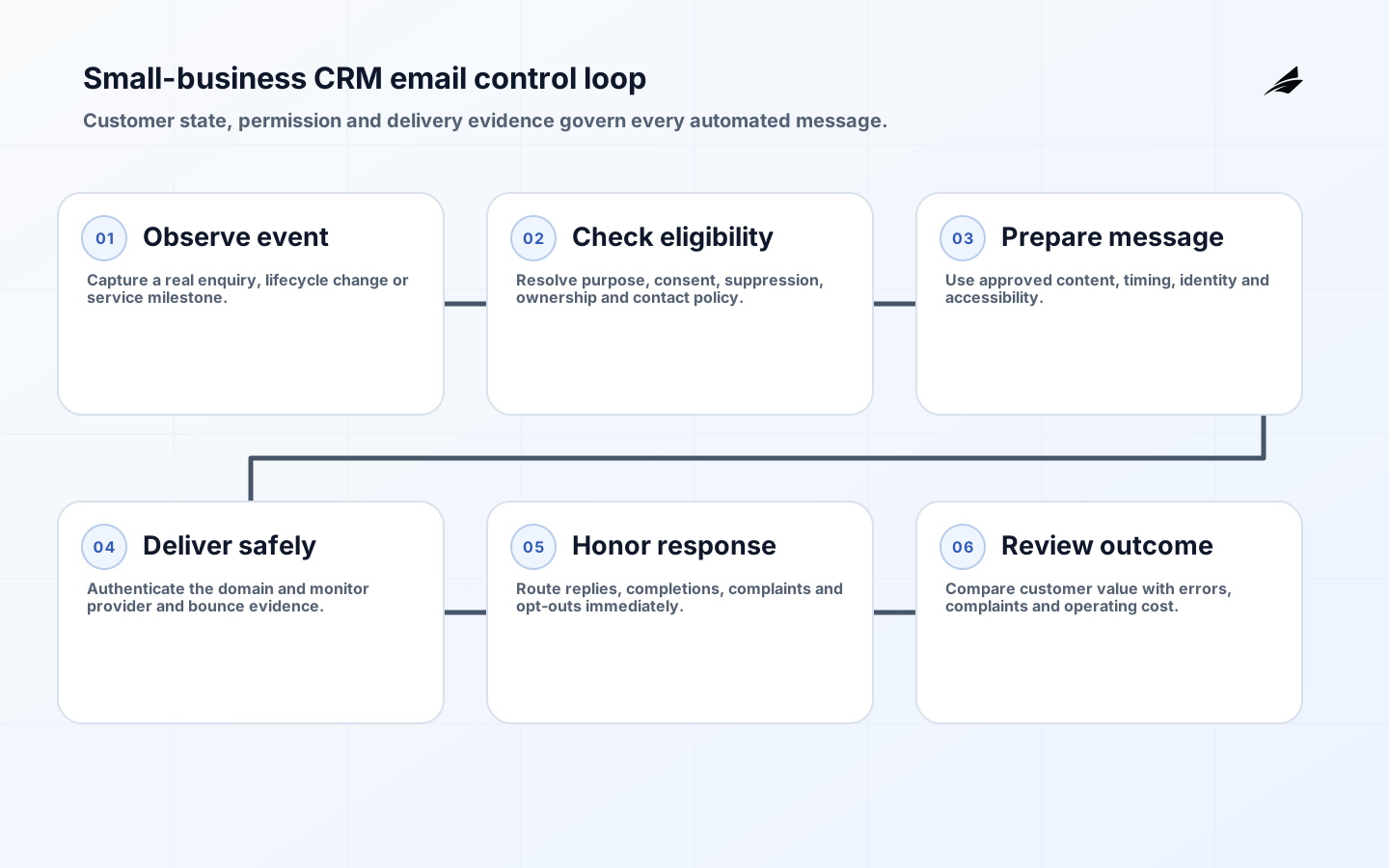
CRM email automation for small business is useful when it helps a known customer or prospect receive a timely, relevant message because something meaningful changed. It becomes risky when a contact list, a collection of triggers and an email tool are connected without a clear record of consent, purpose or ownership. A dependable design starts with customer state: who the person is, what relationship they have with the business, which messages they can receive, and what event should move them to a different stage. The automation then executes a policy the team can explain rather than sending whatever a campaign builder permits.
This FAQ addresses the questions that usually appear after a demo looks easy: which workflows to automate first, how CRM data should be structured, what separates promotional and transactional mail, how authentication affects delivery, and which numbers reveal genuine business value. Teams preparing a rollout can use the small-business CRM implementation checklist alongside the broader CRM automation delivery guide. Requirements vary by recipient location and message purpose, so legal interpretations should be confirmed for the markets served.
Which CRM email workflows are worth automating first?
Begin with a high-frequency event whose correct response is stable and whose owner is known. Strong candidates include acknowledging a genuine enquiry, reminding a customer about an unfinished onboarding step, confirming an appointment, following up after delivery, or alerting an account owner when a reply needs human judgment. Avoid automating ambiguous conversations simply because they consume time. A pricing objection, complaint, sensitive support case or unusual payment situation may need context that the CRM does not hold. The first workflow should be valuable enough to measure but bounded enough to stop without disrupting every customer interaction.
Write each workflow as an entry rule, message purpose, allowed audience, delay, suppression rule, exit condition and owner. For example, an onboarding reminder might enter when an invited user has not completed a required step after two days, suppress contacts with an open support case, exit after completion or opt-out, and escalate after the second failed attempt. This specification exposes missing data before launch. It also separates automation from copy: changing a subject line should not silently change who receives the message, and changing a lifecycle stage should not restart a completed sequence.
| Workflow | Required trigger evidence | Stop or handoff rule |
|---|---|---|
| Enquiry follow-up | Verified form submission and enquiry topic | Stop on reply; assign a person for complex requests |
| Onboarding reminder | Invitation, incomplete step and elapsed time | Stop on completion, support case or opt-out |
| Renewal notice | Active agreement and authoritative renewal date | Escalate delivery failure to the account owner |
| Re-engagement | Permitted marketing audience and inactivity window | Suppress recent buyers, complaints and unsubscribed contacts |
What data should the CRM treat as authoritative?
A CRM should not invent customer facts from scattered activity. Define one authoritative field for contact identity, relationship status, communication preference, lifecycle stage, owner and last meaningful event. Record the source and time of each consequential update. If billing owns subscription status, synchronize that status rather than asking a salesperson to maintain a duplicate checkbox. If a person uses two addresses, decide whether consent and suppression apply to an address, a person or an account. Merge rules need human review because an incorrect merge can expose one customer's history to another or revive an address that was intentionally suppressed.
Use explicit states rather than interpreting absence. “Consent unknown” is different from “consent withdrawn”; “email bounced” is different from “customer opted out”; and “no reply” is not evidence of disinterest. Keep promotional eligibility separate from operational notifications. Store the lawful or contractual basis, collection source and applicable notice where required, while minimizing unnecessary personal data. Every integration that changes eligibility should be idempotent and observable. A retry must not duplicate an enrolment, and an out-of-order event must not move a customer back to an obsolete stage.
How should consent, message purpose and opt-out work?
Classify messages before building journeys. Promotional mail encourages a commercial action; transactional or relationship mail completes or communicates an existing transaction or service. The label used inside the CRM does not determine the legal character of a message. The Federal Trade Commission requires accurate headers and subjects, a valid postal address, a clear opt-out mechanism and timely handling of opt-out requests for covered commercial mail. The UK Information Commissioner's Office provides separate guidance for electronic marketing under UK rules. A business serving multiple regions should map requirements to recipient location and purpose instead of applying one vague global flag.
Build suppression as shared infrastructure, not a campaign setting. An unsubscribe should reach the authoritative suppression record, propagate to every promotional sender and prevent later imports from reactivating the address. Keep a minimal audit record of the request and its processing without retaining unnecessary profile data. RFC 8058 defines one-click list-unsubscribe signaling used by mailbox providers for applicable list mail. Include a visible preference or unsubscribe link as appropriate, test it after deployment, and monitor processing latency. Transactional messages should not contain promotional material that changes their primary purpose or bypasses a person's stated preference.
What technical controls protect email deliverability?
Authenticate every sending domain and align visible sender identity with the authenticated domain. SPF identifies permitted sending infrastructure, DKIM signs message content, and DMARC states how receivers should handle alignment failures while providing reports. Modern sender guidance also expects valid forward and reverse DNS where applicable, standards-compliant formatting, encrypted transport, low spam complaint rates and one-click unsubscribe for qualifying promotional traffic. Use separate streams or subdomains for marketing and critical operational mail so a poorly performing promotion does not place password resets or invoices at the same reputational risk.
Warm a new sending configuration gradually with recipients who expect the mail. Remove hard bounces, investigate complaint spikes, and do not purchase lists. Monitor delivery by domain, message class and campaign version; a single overall delivery rate can hide failure at a major mailbox provider. Test plain-text and HTML parts, links, tracking domains, reply handling and accessibility. Keep the human-readable sender name stable and provide a monitored reply path unless the message has a justified no-reply design. Authentication proves domain control, not message quality, so relevance and list hygiene remain essential.
| Signal | What it can reveal | Operating response |
|---|---|---|
| Hard-bounce rate | Invalid addresses or a bad import | Suppress immediately and inspect collection source |
| Complaint rate | Unexpected, excessive or irrelevant mail | Pause the affected segment and review purpose |
| Unsubscribe latency | Broken propagation between tools | Repair the shared suppression path before sending |
| Reply or task conversion | Whether the workflow helped a real outcome | Improve timing and content; do not optimize opens alone |
| Authentication failures | DNS, alignment or unauthorized sender problems | Quarantine the stream and correct the sending setup |
How should a small business measure results?
Measure the business task first: qualified enquiries answered, onboarding steps completed, appointments attended, renewals confirmed, or support work avoided without reducing customer satisfaction. Opens are noisy because privacy features and automated scanning can record activity that did not represent attention. Clicks can also be generated by security systems. Use delivery, replies, completed workflow events and downstream outcomes together. Define a holdout or phased release where practical so seasonal demand is not mistaken for automation impact. Guardrail the experiment with complaints, opt-outs, support contacts and incorrect-state events.
Assign a monthly review even when the workflow appears stable. Sample records from entry to exit, inspect exclusions, test unsubscribe propagation and reconcile CRM state with authoritative systems. Review copy after product, pricing or policy changes. Retire journeys whose purpose is no longer clear. The best automation program is not the one with the most active sequences; it is the one where every sequence has a current owner, a measurable outcome, a lawful audience and a tested way to stop.
A controlled launch sequence
- Choose one stable customer event and define the desired outcome.
- Map authoritative fields, consent evidence, suppressions and ownership.
- Configure authentication and separate promotional from operational streams.
- Test entry, delay, reply, bounce, opt-out, duplicate and out-of-order cases.
- Release to a small expected audience with visible monitoring and a kill switch.
- Review outcome and guardrail evidence before increasing volume or adding journeys.

Key takeaways
- Automate a stable customer event, not an ambiguous conversation.
- Make eligibility and suppression authoritative across every sending tool.
- Treat authentication, list hygiene and relevance as one deliverability system.
- Measure completed customer outcomes alongside complaint and error guardrails.
- Keep a named owner and tested stop control for every active journey.
Frequently asked questions
Does a small business need a separate automation platform?
Not always. A CRM with reliable triggers, suppression, audit history and reporting may be sufficient for early workflows. Add a specialist platform when volume, segmentation, testing or channel orchestration creates a real operating need. Evaluate data ownership and exit before creating a second customer record.
Can AI write and send CRM emails automatically?
AI can help draft variants, summarize context or classify low-risk replies, but consequential sending rules should remain deterministic and reviewable. Do not place sensitive customer data into an unapproved model. Require human review for novel claims, pricing, regulated advice, complaints and messages whose incorrect tone could damage the relationship.
How often should automated emails be sent?
There is no universal frequency. Set a contact policy by message class, customer stage and urgency. Coordinate all campaigns so separate teams do not over-message the same person. Use preference data, engagement and complaints to reduce unnecessary volume, but never infer permission solely from an open or click.
Conclusion
Small-business CRM email automation succeeds when it turns accurate customer state into a useful, expected action. Build one bounded journey, protect consent and suppression, authenticate the sending domain, observe delivery and measure the customer outcome. That foundation makes later automation easier to govern and far less likely to trade short-term activity for long-term trust.