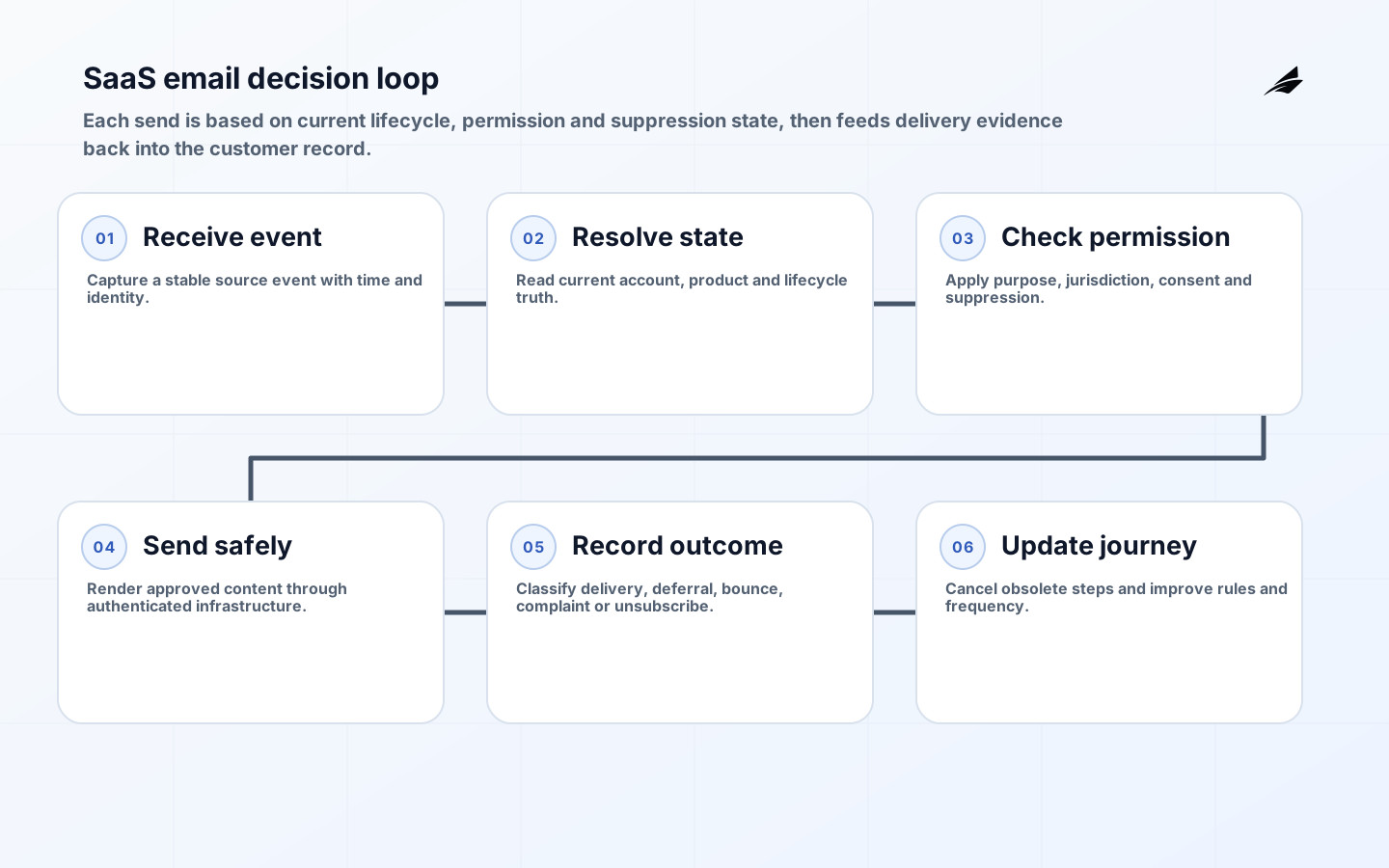
This CRM email automation for SaaS companies implementation checklist treats email as a governed customer-communication system, not a collection of timed campaigns. It must decide which message is appropriate for a person’s relationship, consent, product state and jurisdiction; send through authenticated infrastructure; record the outcome; and stop when a suppression or newer event makes the message invalid. The checklist covers that complete path for acquisition, onboarding, product education, billing, renewal, service notices and re-engagement.
Separate transactional or relationship messages from marketing before designing journeys. Legal classification depends on purpose and context, not the label selected in a CRM. The FTC explains that CAN-SPAM covers commercial messages, while other jurisdictions can require consent or apply different rules. Obtain legal advice for the markets and message types you operate. Engineering must then encode the approved policy as understandable rules, preserve evidence and prevent a growth experiment from bypassing organization-wide suppression.
Inventory senders, purposes, audiences and authorities
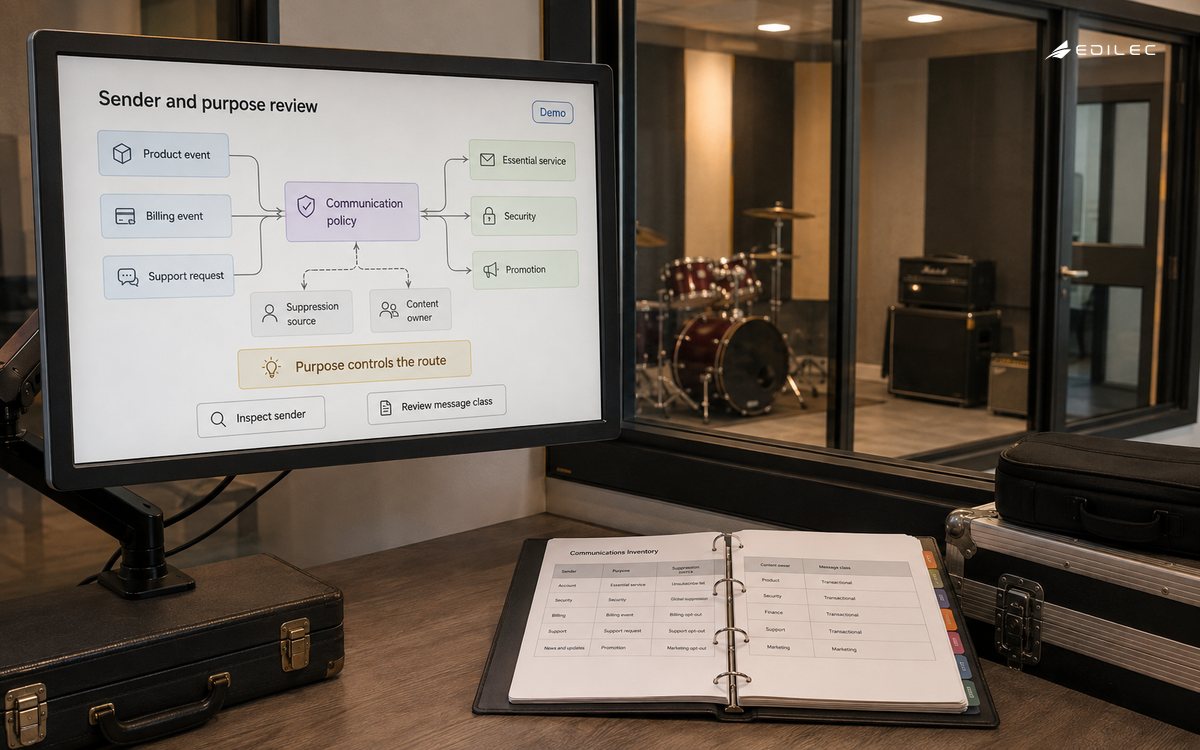
List every system that can send with the company’s domains: CRM, product backend, support desk, billing platform, data warehouse, sales tools and agencies. Record owner, provider account, return path, DKIM selector, message class, audience, lawful basis or permission model, data source and suppression source. Unknown senders weaken authentication, make complaints hard to investigate and can damage the reputation shared by legitimate messages. Remove obsolete keys and domains before adding automation.
Create a communication taxonomy with examples. Security codes and outage notices have different urgency and suppression rules from trial tips or promotional offers. Do not mix promotion into essential receipts merely to avoid an unsubscribe. Define who may approve copy, targeting, frequency and new data use. Give privacy, legal, security and customer-support teams a review threshold based on consequence; routine wording changes need less ceremony than a new behavioral segment or cross-border data feed.
| Message class | Primary trigger | Suppression behavior | Operational owner |
|---|---|---|---|
| Security/service | Account or incident event | Send only to necessary recipients; respect safe channel rules | Product/security |
| Billing/relationship | Subscription or invoice state | Stop when account or obligation changes | Finance operations |
| Onboarding | Verified product milestone | Stop on completion, opt-out or inactivity rule | Product growth |
| Marketing | Approved audience and permission | Apply global and purpose-specific suppression | Marketing operations |
| Sales-assisted | Documented business context | Honor objections and regional policy | Revenue operations |
Build an explicit customer and communication state model
Choose authoritative systems for identity, account, subscription, product usage, consent and suppression. A CRM may orchestrate communication without becoming the source of truth for every fact. Use stable person and account identifiers; do not join solely on mutable email address. Record the source time and processing time of events. Late events must not restart a completed sequence. Model membership as a decision with reason and version so support can explain why a person received a message.
Represent consent and objections with purpose, channel, jurisdiction, source, time and evidence. A single boolean cannot express product updates, marketing, partner offers and required service communications. Suppression should be checked at send time, not copied once when a journey begins. Make unsubscribe and preference updates idempotent and propagate them to every sender within the required operational target. Preserve a minimal suppression record even when other profile data is deleted, subject to applicable policy.
Configure authentication and unsubscribe before volume
Publish and verify SPF, sign with DKIM, and use DMARC reporting to find unauthorized or misaligned senders. Google’s current sender guidelines require SPF or DKIM for all senders to personal Gmail accounts and SPF, DKIM, DMARC, domain alignment and one-click unsubscribe for qualifying bulk senders, alongside DNS, TLS and format requirements. Treat those as delivery prerequisites, not a guarantee of inbox placement. Keep marketing, transactional and corporate mail streams operationally separable so one stream’s reputation does not obscure another.
For subscribed and marketing mail, support a visible unsubscribe in the message and the standards-based one-click mechanism described by RFC 8058 where applicable. Test the headers after every provider or template change. The endpoint must authenticate the request as designed, avoid requiring a login and update the authoritative suppression state promptly. Protect it from accidental list-wide action while not adding friction that defeats the standard. Monitor complaint, bounce and unsubscribe signals as customer feedback, not merely deliverability metrics.
Design automation as a deterministic, interruptible workflow
For each journey, document entry, delay, decision, message, exit and re-entry rules. Evaluate the current account state before each step. A user who upgraded, churned, opened a support incident or completed onboarding should not receive copy based on stale state. Use event IDs and send idempotency to prevent duplicate mail during retries. Put frequency caps across journeys, not only inside one campaign. Define priority when essential communication and marketing would arrive together.
Make failure visible. Distinguish temporary deferral, permanent bounce, provider rejection, template error and suppressed send. Retry only transient failures with limits and jitter. A dead-letter queue needs an owner and customer-impact rule. Avoid silently substituting a different address or channel. When a workflow cannot determine the correct audience, stop the send and open an exception rather than treating uncertainty as permission.
| Acceptance area | Test case | Required result |
|---|---|---|
| State change | Upgrade arrives during trial sequence | Next outdated step is cancelled |
| Suppression | One-click unsubscribe during queued campaign | All marketing senders stop within target |
| Retry | Provider times out after accepting request | Idempotency prevents duplicate |
| Identity | Email address changes or merges | History and preferences attach to correct person |
| Deliverability | New domain or provider is introduced | Authentication and gradual warm-up pass before scale |
Test content, rendering and decisions independently
Use versioned templates with approved variables and sensible fallbacks. Escape or sanitize user-controlled content and prevent sensitive values from entering subject lines, preview text, URLs or analytics. Test plain-text and HTML parts, mobile layout, dark mode, keyboard operation, meaningful links and image alternatives. Do not hide key terms in images. Localize meaning rather than substituting words, especially for dates, prices, cancellation and legal text.
Test the decision layer with synthetic profiles covering jurisdiction, plan, role, consent, lifecycle and edge states. Contract-test CRM, warehouse and product events. Run seed-list delivery checks, but rely on provider response and aggregate reputation data rather than assuming one inbox predicts all delivery. Before launch, reconcile a sample from source event through audience decision, rendered message, provider ID and CRM timeline. Support should be able to trace that path without unrestricted database access.
Operate deliverability and customer trust together
Monitor authentication pass, delivery, deferral, bounce, complaint, unsubscribe, send latency and workflow exceptions by stream and domain. Open and click rates are incomplete and can be distorted by privacy protections; connect communication to product and customer outcomes without using deceptive tracking. Set stop conditions for complaint or error spikes. Increase volume gradually after domain, provider or message-structure changes, following mailbox-provider guidance.
Run a recurring sender review. Reconcile authorized infrastructure, rotate keys, inspect DMARC reports, test unsubscribe, retire dormant journeys and sample message decisions. Review frequency and customer-support evidence. Keep an incident plan for accidental audience expansion, exposed data, spoofing or wrong-content sends, including who can pause providers and communicate correction. The operational goal is not maximum mail; it is the smallest set of timely messages that customers can trust.
Launch in controlled cohorts with explicit stop conditions
Begin with internal and test recipients, then a small cohort of recently engaged users whose state and permission can be sampled manually. Increase volume gradually while watching provider responses, authentication, complaints, bounces, unsubscribes and workflow exceptions. Separate a new domain, provider or template structure from other major changes so failure has an identifiable cause. Define who can pause a journey and how queued messages are cancelled; disabling a user interface toggle may not remove work already handed to a provider.
After each expansion, compare a sample of intended recipients with actual sends and current CRM state. Review support tickets and message content, not only aggregate rates. Require sign-off before adding a new region, data source or high-volume segment. Preserve a rollback that stops future sends without erasing evidence needed to investigate what already happened. This controlled release habit is especially important because an audience error can affect thousands of people before ordinary application monitoring reports a technical fault.
Publish an internal launch record containing the approved audience definition, message and template version, sending domain, expected volume, owner, monitoring window and stop thresholds. Link it to the CRM workflow and provider campaign IDs. This modest record makes post-launch comparison and incident investigation much faster than reconstructing intent from screenshots and chat messages.
Key takeaways
- Classify message purpose and authority before building journeys.
- Use explicit consent, suppression and lifecycle state at send time.
- Authenticate domains and implement standards-based unsubscribe before scaling.
- Make workflows interruptible, idempotent and observable.
- Measure customer outcomes and trust alongside delivery metrics.
Frequently asked questions
Should the CRM be the source of truth for consent?
It can be, if every channel updates it reliably and it preserves purpose, provenance and history. In many architectures a dedicated preference service is authoritative while the CRM consumes decisions. Choose one model and test propagation to all senders.
Is double opt-in always required?
Requirements vary by jurisdiction and context. Confirm policy with qualified counsel. Double opt-in can provide stronger evidence and list quality even where it is not mandatory, but the implementation must also handle existing customers, corrections and withdrawal.
Should transactional and marketing mail use different subdomains?
Separation can improve operational clarity and reputation isolation, but it is not a substitute for good consent, authentication and sending practice. Maintain clear brand alignment and monitor each stream.
Conclusion
Reliable SaaS email automation combines customer-state correctness, permission, authenticated delivery and recoverable operations. A journey is ready when the team can explain every entry, cancel an obsolete step, honor suppression across senders and trace a message to its source event. Build that control plane first; campaign creativity can then move quickly without spending customer trust.