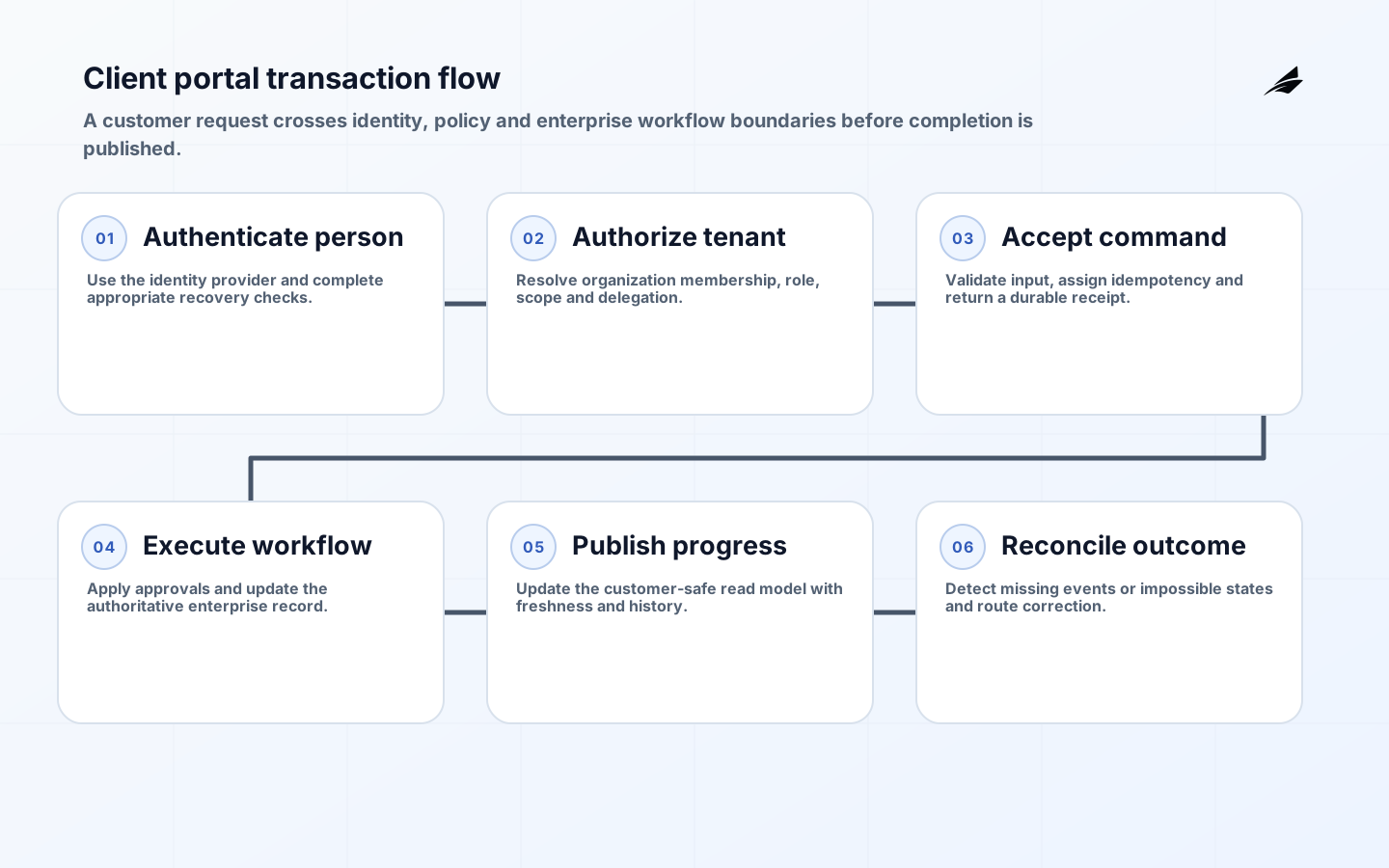
Client portal architecture for operations must make an external promise without creating a second, conflicting version of the business. Customers expect current status, documents and dependable self-service; internal teams need approvals, exceptions and corrections to remain controlled in ERP, CRM or case systems. The architecture succeeds when every portal display has a named source, every submitted command has an accountable workflow, and every failure leaves the customer and operator with a clear next step.
This tutorial covers portals for projects, orders, cases, procurement or managed services. It complements the case management systems guide and role-based operations guide. Begin with one complete customer journey rather than a broad dashboard. A portal that shows many records but cannot explain freshness, ownership or exceptions increases support work instead of reducing it.
Define the portal service contract
List the decisions and tasks the portal should improve: check delivery status, approve a proposal, upload evidence, raise a request, change a contact or retrieve an invoice. For each, specify eligible account types, the authoritative internal record, expected completion time and escalation path. Mark information that is internal-only, customer-visible after review, or safe for immediate publication. These classifications become API policy and workflow states, not just design notes.
Write display language from the customer's perspective while preserving a mapping to operational states. A warehouse status such as ALLOCATED_PARTIAL may need a clear sentence and estimated next action rather than exposing a code. Define freshness beside meaning: real-time, event-driven, scheduled or manually published. If an integration is delayed, show the last successful update and avoid presenting stale data as current. Give each visible status an internal owner who can correct the underlying record.
| Portal capability | System of record | Write behavior |
|---|---|---|
| Organization and contacts | CRM or master-data service | Validated change request with approval for sensitive fields |
| Order or project status | ERP or delivery system | Read model fed by events or controlled queries |
| Documents | Document repository | Malware-scanned upload plus classified publication |
| Service request | Case or workflow platform | Create command with receipt and status history |
| Invoice and payment view | Finance system | Read-only record with secure payment handoff |
Design identity, tenancy and delegation together
Use a standards-based identity provider rather than implementing passwords in the portal. OpenID Connect defines authentication on top of OAuth 2.0 and conveys end-user claims through an ID token. Follow current NIST digital identity guidance to select assurance, authenticator and recovery practices appropriate to risk. Enterprise portals often need federation, multifactor authentication and auditable recovery, while lower-risk customer access may use passkeys or other phishing-resistant options supported by the chosen provider.
Authentication identifies a person; authorization decides which customer resources and actions that person may use. Model organization membership, role, resource scope and delegation explicitly. A customer administrator may invite colleagues but should not assign internal roles or cross legal entities. Evaluate authorization on every API request using server-known tenant context. Test guessed identifiers, exports and administrative functions because the OWASP API Security project highlights object- and function-level authorization as recurring API risks.
Build a controlled read and command boundary
Do not expose ERP or CRM tables directly to the browser. Put a portal API or backend-for-frontend between the user interface and enterprise services. It should enforce tenancy, shape customer-safe data, aggregate only what the journey needs and shield the interface from internal schema churn. Define the contract using the OpenAPI Specification, then test it against consumers. Keep credentials and privileged integration logic server-side.
Separate reads from commands. Reads can use a purpose-built portal projection updated from events, change data capture or scheduled synchronization; every field needs provenance and freshness. Commands should validate authorization and business preconditions, assign an idempotency key, create a durable request and return a receipt. The workflow service then performs internal updates and publishes progress. This prevents a browser timeout from duplicating a request and gives users an honest pending state for work that cannot finish synchronously.
| Integration condition | Preferred pattern | Customer-visible behavior |
|---|---|---|
| Fast authoritative query | Synchronous API with timeout | Result or explicit temporary failure |
| Slow multi-step change | Durable command and workflow | Receipt, pending state and progress |
| High-volume status display | Customer-safe read projection | Freshness timestamp and stable labels |
| Unreliable legacy dependency | Queue, retry and operator exception | Request retained; no false completion |
| Document exchange | Direct secure transfer plus metadata workflow | Upload validation and publication status |
Make every self-service action explainable
A consequential action needs a state model: submitted, validated, awaiting approval, in progress, completed, rejected or cancelled. Preserve actor, represented organization, request payload or immutable reference, time, decision and outcome. Show the customer a concise history, while keeping sensitive internal notes separate. Notifications should point back to the authenticated portal instead of placing confidential details in email. Use a correlation identifier that support can search across portal, workflow and systems of record.
Provide operators with bounded correction actions. They may retry a failed synchronization, request missing information, reassign a case or publish a corrected document, but they should not repair portal state through direct database edits. Each tool needs role checks and an audit record. Design the support path alongside customer self-service; otherwise difficult cases leave the portal and become invisible conversations. The procurement workflow planning guide offers related patterns for approvals and exceptions.
Design for trust, accessibility and interruption
Use WCAG 2.2 as the accessibility baseline. Ensure keyboard operation, visible focus, labelled fields, useful validation, adequate contrast and programmatically determinable status messages. Do not rely on color to communicate an order or case state. Make authentication and account recovery usable with assistive technology. Test with representative users and browsers because conformance cannot be established by automated scanning alone.
Plan for expired sessions and interrupted work. Save drafts where appropriate, warn before losing substantial input and return users to a safe context after reauthentication. For uploads, show size and type constraints before transfer and provide scanning or processing status. Empty, delayed, denied and partial-success states need designed language. Avoid a generic error page when the platform knows whether a dependency is delayed, permission is missing or the command is still safely queued.
Implement one portal journey in six stages
- Map the customer task, internal owners, authoritative records and exception path.
- Define organization membership, roles, delegated administration and recovery.
- Specify customer-safe read models and durable command contracts.
- Build the journey with receipts, history, notifications and operator tools.
- Test tenancy isolation, accessibility, dependency failure and reconciliation.
- Pilot with selected accounts and expand only after support evidence is stable.

Measure task completion and operational load
Measure successful completion of the target task, time to completion, abandonment by step, stale-data incidents, failed commands, repeated submissions and support contacts. Segment by customer type and accessibility needs where lawful and useful. A login count is not adoption if customers still call for the answer. Compare the portal journey with its previous channel and inspect whether internal rework moved rather than disappeared.
Define reliability objectives around user outcomes: successful authenticated sessions, freshness of critical status, command acceptance and time to final resolution. Reconcile portal projections against authoritative systems and alert on missing events or impossible states. Review permission changes, large exports, repeated denials and administrative actions as security signals. Give each alert an owner and response; avoid dashboards that nobody is expected to use.
Treat customer onboarding and offboarding as architectural workflows. A new account needs verified organization identity, nominated administrators, role setup, terms, initial data and a support contact. Offboarding needs membership revocation, active request handling, export, retention and eventual deletion without breaking statutory or contractual records. Test mergers, renamed entities, departed administrators and users who represent more than one organization. These lifecycle events expose weak tenant models more reliably than the initial happy path and should be included in reconciliation and access reviews.
Set explicit API and workflow versioning rules for external integrations. Give consuming customers notice, migration guidance and a supported overlap period when a contract changes. Measure use of deprecated versions and contact owners before removal. This keeps portal evolution from turning a customer-facing improvement into an unplanned integration outage.
Key takeaways
- Tie every portal field and action to an authoritative owner and freshness rule.
- Model identity, customer tenancy, roles and delegation as separate concerns.
- Use customer-safe read projections and durable commands instead of direct database access.
- Expose receipts and progress while preserving internal-only notes.
- Test accessibility, tenant isolation, failed dependencies and reconciliation before expansion.
Frequently asked questions
Does a client portal need real-time data?
Only where the decision requires it. Many project and service statuses can be event-driven or refreshed on a documented schedule. Real-time integration adds coupling and failure modes. State the last update and choose freshness from customer harm, operational cost and source-system capability.
Should an organization buy or build the portal?
Buy when a platform fits identity, tenancy, workflow, accessibility, integration and data-residency requirements. Build when the differentiating journey or legacy boundary cannot be represented safely. In both cases, the organization still owns data contracts, authorization decisions, support and exit planning.
How should document downloads be secured?
Authorize every request against current tenant membership, use short-lived download grants, scan uploads, classify documents and log consequential access. Avoid permanent public URLs or trusting an object key supplied by the browser. Define retention and withdrawal when a document is replaced or published incorrectly.
Conclusion
A client portal should be a trustworthy operating boundary, not a decorative window onto enterprise databases. Build around one customer task, explicit identity and tenancy, customer-safe reads, durable commands and visible progress. When failures are recoverable and records reconcile, self-service can reduce uncertainty for customers without weakening internal control.