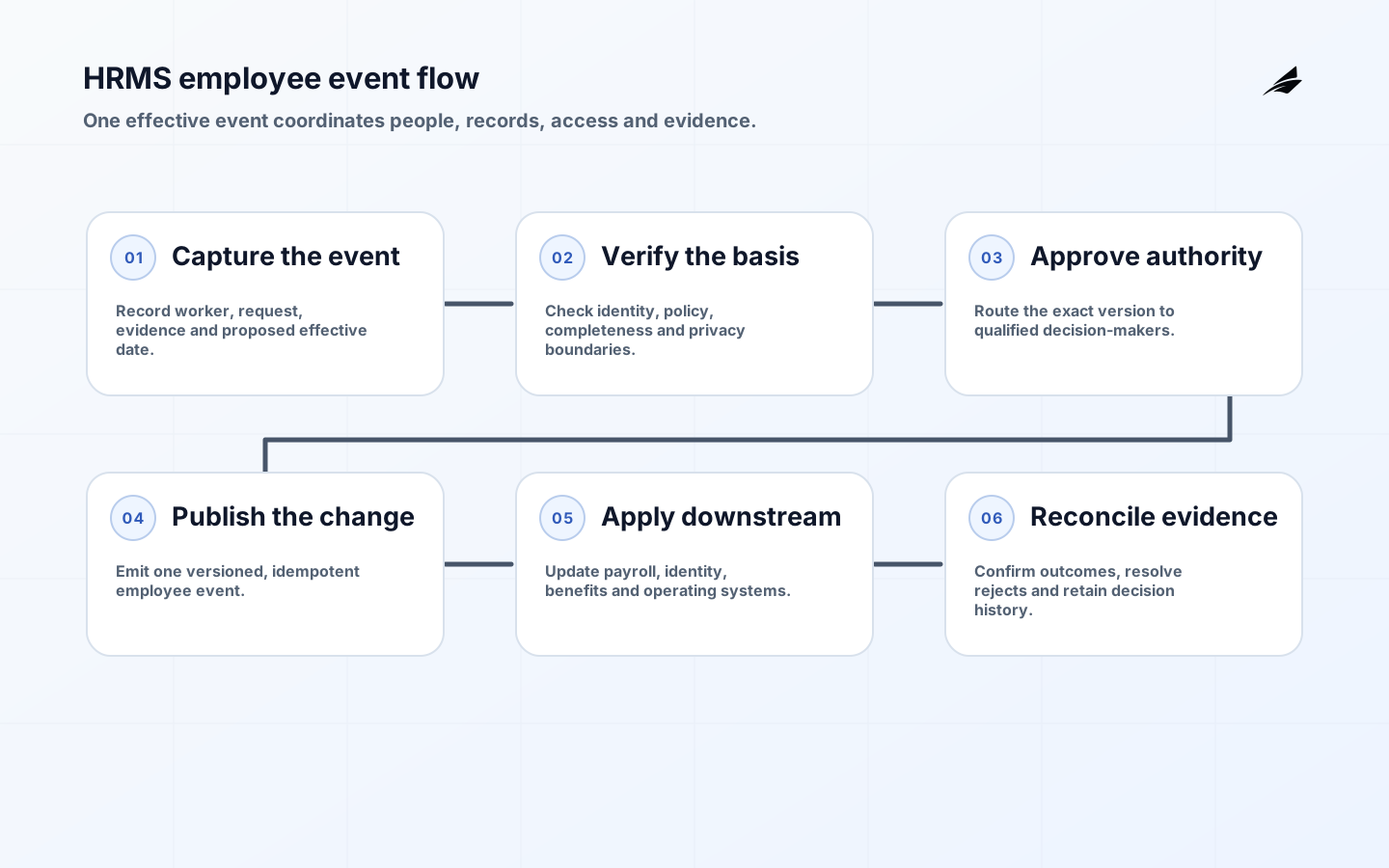
HRMS workflows turn hiring, employment changes, leave, payroll inputs and departures into coordinated work across people, systems and deadlines. Reliability means more than a form reaching an approver. The employee record must be accurate, access must reflect current duties, sensitive evidence must remain protected, downstream systems must reconcile and exceptions must reach someone who can act before pay or employment rights are affected.
The checklist below is an operating design guide, not jurisdiction-specific legal advice. Employment, tax, benefits, privacy and records obligations vary by workforce and location. Build an applicability register with qualified HR, payroll, privacy and legal owners. Official US examples such as Department of Labor wage recordkeeping requirements show why data purpose, accuracy and retention cannot be afterthoughts.
Related Edilec resources cover HRMS security review, founder decisions for HRMS workflows, and the move from HRMS project to production. Use them to deepen control and ownership planning.
Key takeaways
- Model employee events and effective dates before automating forms.
- Give each sensitive field a purpose, access policy, retention rule and correction path.
- Separate request, recommendation, approval and record-posting authority.
- Design payroll, identity and benefits handoffs as acknowledged transactions.
- Test late changes, cancellations, duplicate requests and unavailable approvers.
Start with employee events, not screens
List the events that change a person's relationship with the organization: candidate created, offer accepted, worker hired, manager changed, compensation changed, leave started, return confirmed, location changed and employment ended. For each event, define requested date, approved date, effective date and posting date. Those dates are not interchangeable. A promotion approved in June but effective in July should not change June payroll or permissions prematurely.
Name the authoritative record for person identity, employment, position, organizational assignment, compensation, time, benefits and system access. HRMS can be authoritative for employment state without owning every downstream account. Use durable employee and position identifiers; email addresses and display names change. Record event versions so a corrected hire date or cancelled transfer can be reconciled instead of silently overwriting history.
| Workflow | Authoritative event | Critical handoff | Completion evidence |
|---|---|---|---|
| Onboarding | Employment accepted and effective | Payroll, identity, equipment, training | Required accounts and records active by start date |
| Job change | Position or manager change effective | Access, compensation, cost center | Old entitlements removed and new duties enabled |
| Leave | Approved leave period | Time, payroll, benefits, manager planning | Leave status and pay treatment reconcile |
| Offboarding | Employment end confirmed | Identity, payroll, assets, records | Access revoked, final inputs posted, assets tracked |
| Data correction | Approved correction with reason | All affected consumers | Before-and-after values and acknowledgements retained |
Apply privacy by purpose and field
Map who needs each data element and why. A manager may need an employee's work location and leave availability without seeing medical evidence, bank details or investigation notes. The NIST Privacy Framework offers a risk-management vocabulary for identifying processing, governing it, controlling data and communicating with people. Translate that into field-level access, purpose limits, audit events and lifecycle rules.
Keep especially sensitive case material in appropriately restricted stores rather than broad employee profiles. Minimize exports, mask values in non-production environments and prevent free-text fields from becoming informal repositories for health or disciplinary detail. Give employees a clear way to review and correct applicable information. Retention must be specific: the EEOC's recordkeeping requirements illustrate how record type, employment action and active proceedings can alter the period.
Define approval and posting authority
An approval chain should represent a decision right, not organizational ceremony. Specify who may request, verify, recommend, approve and post each change. Compensation may require budget and HR policy review; a legal-name correction may require evidence verification but not a manager's discretion. Configure alternates with equivalent authority and time limits. Do not allow a broad administrator role to collapse all stages for convenience.
Show approvers the exact change, effective date, policy basis, material downstream effects and conflicts. Preserve the version they approved. If the request changes afterward, invalidate or re-run the affected approval. For high-impact actions, use step-up authentication aligned with current identity guidance such as NIST SP 800-63B, and alert on unusual administrator behavior.
Make downstream handoffs recoverable
Treat every integration as a contract. Define event schema, identifier, effective-time semantics, required fields, allowed states, authentication, retry behavior and acknowledgement. Idempotency is essential: replaying an onboarding event must not create a second payroll record or duplicate equipment order. Keep a correlation ID from the originating HR event through each consumer so support can trace partial completion.

A queue message being delivered is not business completion. Capture whether payroll accepted the compensation change, identity applied the entitlement update and benefits acknowledged eligibility. Route rejected or stale events to an owned work queue with the original evidence. Reconcile critical populations daily: active workers without accounts, terminated workers with access, payroll employees absent from HRMS and future changes nearing cutoff.
| Control point | Normal rule | Exception example | Required response |
|---|---|---|---|
| Identity match | One durable worker ID across systems | Rehire collides with old account | Hold provisioning and resolve identity |
| Effective date | Consumer applies change at defined time | Payroll cutoff already passed | Show impact and route correction |
| Approval | Current authorized role approves | Manager left during request | Reassign with logged authority |
| Delivery | Consumer acknowledges event version | Benefits rejects missing code | Repair data and replay idempotently |
| Termination | Access ends to policy deadline | Offline system cannot receive event | Escalate and execute manual revocation |
| Retention | Record follows classified schedule | Investigation creates legal hold | Suspend deletion for scoped material |
Example: a manager change with real consequences
Suppose an employee moves from sales operations to finance on 1 August. The request records old and new positions, cost center, manager, location and effective date. HR verifies policy; finance approves the position; the employee acknowledges applicable terms. At the effective time, HRMS publishes one versioned event. Identity removes sales-system access before granting finance permissions, payroll changes allocation and reporting updates the organizational hierarchy.
The workflow is not complete when HRMS displays the new manager. It closes when critical consumers acknowledge the same effective version, incompatible access is gone and any rejected handoff has an owner. A cancellation on 30 July should supersede the pending event without producing compensating chaos. Testing that scenario reveals whether the design represents employment truth or merely routes a form.
Test the workflow before employee impact
- Run joiner, mover, leaver, rehire and concurrent-employment cases.
- Exercise midnight, timezone, payroll-cutoff and retroactive effective dates.
- Cancel an approved future change and verify downstream withdrawal.
- Replay an event and prove that consumers remain idempotent.
- Remove an approver during an active request and test delegation.
- Attempt unauthorized field access and inspect the audit record.
- Simulate an unavailable payroll or identity system and recover the backlog.
- Reconcile a sample employee from source evidence through every critical system.
Operate with service and people metrics
Track completion by business deadline, not average workflow duration alone. Useful measures include starters ready by day one, access revoked within policy, payroll-impacting changes accepted before cutoff, exception age, duplicate person records, manual corrections and privacy-access exceptions. Segment by workflow and location; a healthy global average can hide a failing jurisdiction or acquired business.
Review employee experience too. Count requests returned for unclear reasons, repeated data entry, status inquiries and unresolved corrections. A workflow that is technically fast but forces employees to disclose information repeatedly is not reliable. Maintain runbooks for payroll cutoff incidents, compromised accounts, integration backlog and legal holds, with named business and technical incident leads.
Keep evidence ready for audit and employee questions
Retain a readable decision history: who requested a change, which evidence was verified, which policy applied, who approved, what version was posted and which downstream systems acknowledged it. Audit logs should be protected from ordinary editing and understandable without reconstructing application internals. Restrict sensitive evidence within the audit trail; an investigator may need proof that a document was verified without broad access to the document itself.
Test evidence retrieval with realistic questions. Can HR explain why an employee's pay changed, when a manager assignment became effective and why access remained during garden leave? Can an employee correction be traced across payroll and benefits? Recordkeeping rules are not uniform, and active claims can change preservation duties; for example, EEOC background-check guidance describes retention and secure disposal considerations in that context. Translate applicable duties into classified records and verified lifecycle jobs.
HRMS workflow FAQ
Should HRMS be the source of every employee-related field?
No. It should be authoritative only for defined domains. Payroll, identity, learning or benefits platforms may own their operational details. Publish a record-authority map and reconcile shared identifiers and state.
Which HR changes should never be fully automatic?
Keep accountable human judgment where law, policy, material employment impact or ambiguous evidence requires it. Automation can validate completeness, gather evidence and route work without making every decision.
Can the same retention period apply to the whole employee file?
Usually not. Record categories, locations, disputes and legal holds can require different treatment. Maintain a classified schedule and test deletion as well as preservation.
Conclusion
Reliable HRMS workflows preserve the meaning of an employee event across approval, effective time, payroll, access and evidence. Model authority and dates, minimize sensitive data, require acknowledged handoffs and rehearse exceptions before they affect a person. That turns HR automation from form routing into dependable employee operations.