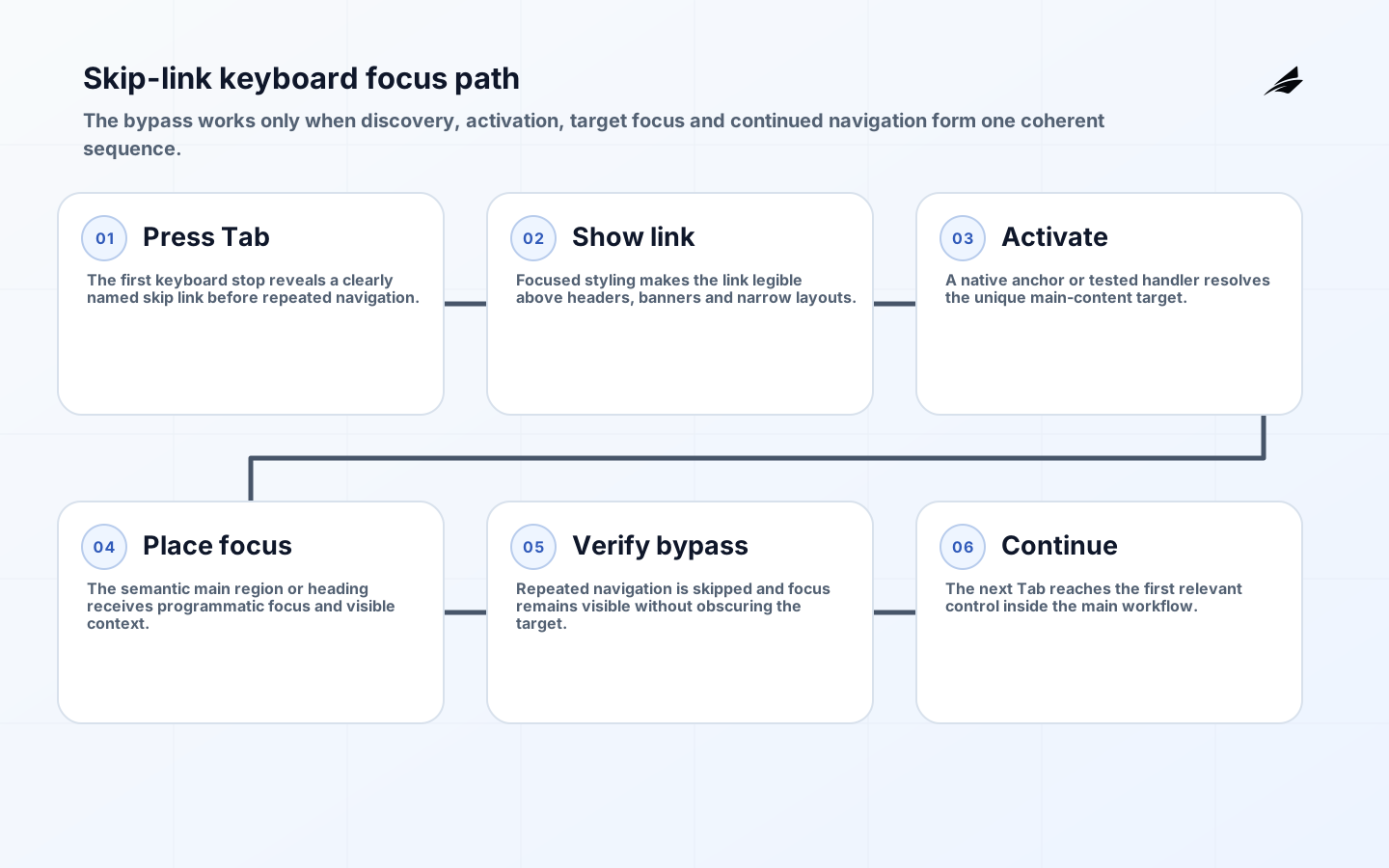
A “Skip to main content” link lets people who navigate sequentially move past repeated headers, menus and other blocks to the page's primary content. It is especially useful to keyboard and screen-reader users who would otherwise encounter the same controls on every page. WCAG 2.2 Success Criterion 2.4.1 requires a mechanism to bypass repeated blocks; a working skip link is a direct and widely understood technique.
This skip to main content FAQ covers implementation and testing rather than treating the link as a compliance badge. Read it with the practical main-content skip guide and main-content skip implementation checklist. Teams building content retrieval interfaces may also apply the navigation principles in the RAG knowledge-base readiness checklist.
What problem does a skip link solve?
Keyboard focus normally follows document order. On a site with a logo, utility links, search and a large navigation menu, reaching the article or application task may require many Tab presses on every route. Sighted pointer users can jump visually and physically to the center; sequential users cannot. A first-page link that moves focus to main content shortens that repeated path without removing navigation for anyone.
Other mechanisms can help satisfy bypass blocks, including appropriate headings and landmarks, but they are not equally available through every browser and assistive-technology workflow. Use semantic structure and a skip link together. The WHATWG main element represents content dominant to the document and should not be nested inside article, aside, footer, header or navigation elements. A page should expose one relevant main landmark to users.
| User need | Mechanism | Expected behavior | Failure |
|---|---|---|---|
| Bypass repeated header | First focusable skip link | Activates target before main content | Link appears after navigation |
| Identify primary region | One relevant main landmark | Landmark list names main area | Several unlabeled main regions |
| Know current focus | Visible focus indicator | Target or next control is apparent | Viewport moves but focus stays |
| Understand destination | Clear link text | Purpose is obvious out of context | Ambiguous “Skip” label |
| Use every route | Shared template and route handling | Works after navigation | Only home page target exists |
How should the link and target be marked up?
Place a normal anchor near the beginning of the body, before repeated interactive content. Point its href to a unique ID on the main region, for example href="#main-content" and <main id="main-content">. Use visible text such as “Skip to main content.” Native anchors preserve expected browser behavior and provide a destination even when script fails. Keep the ID stable across templates.
The target must receive programmatic focus or allow the user's next Tab press to continue inside main content. Browser behavior differs for non-interactive targets, so test the supported combinations. One common technique is tabindex="-1" on the main element and explicit focus when needed; this allows scripted focus without adding the region to the normal tab sequence. Do not use a positive tabindex, which creates a separate and fragile focus order.
<a class="skip-link" href="#main-content">Skip to main content</a>
<header>...</header>
<main id="main-content" tabindex="-1">
  <h1>Account settings</h1>
  ...
</main>
Can the skip link be visually hidden?
It can be positioned off screen until keyboard focus, provided it becomes clearly visible when focused. W3C's easy check notes that a hidden-until-focus pattern is acceptable when the link is highly visible on focus. Do not use display: none, visibility: hidden or the hidden attribute for the resting state; those remove it from keyboard and accessibility navigation. Avoid clipping patterns that remain clipped on focus.
When focused, place the link above surrounding content with strong contrast and enough space, without covering another essential control. Keep its focus indicator visible. Test zoom and narrow screens: fixed headers can obscure either link or target. Prefer a small, predictable CSS rule in the shared layout instead of route-specific positions. The link may always remain visible if that fits the design.
| Check | Keyboard action | Pass result | Common defect |
|---|---|---|---|
| Discovery | Reload and press Tab once | Skip link receives focus | Cookie control or logo comes first |
| Visibility | Inspect focused link at zoom | Text and focus are legible | Link remains off screen |
| Activation | Press Enter | Viewport and focus reach main | Only URL fragment changes |
| Continuation | Press Tab again | Next relevant control follows target | Focus returns to header |
| Routes | Repeat on varied templates | Unique target works everywhere | Duplicate or missing ID |
How does it work in a single-page application?
A skip link on the application shell can target the current route's main container. Client-side navigation creates another focus problem: the URL and content change without a full document load, so focus may remain on the navigation link or a removed element. Establish a route-change policy. For page-like navigation, update the document title and move focus to the new route's main heading or main container at an appropriate time.
Do not move focus for every dynamic update. Filtering a table, expanding disclosure or receiving a notification is not necessarily a new page. Unexpected focus movement interrupts typing and orientation. Announce relevant status changes with suitable semantics and retain focus unless the interaction model requires relocation. Test route transitions, loading states, error boundaries, modals and restored browser history separately.
What about multiple navigation blocks or application panels?
The first link should normally target the dominant content. Complex applications may add links such as “Skip to filters” or “Skip to results” when repeated regions are substantial and destinations are stable. Keep choices short; a long skip-link menu becomes another block to traverse. Give repeated landmarks accessible names, such as primary and account navigation, so assistive-technology users can distinguish them.
Dashboards with persistent sidebars still need a coherent document order. Responsive CSS must not create a visual order that contradicts focus order. Avoid using the skip link to compensate for fundamentally scrambled markup. Modals and overlays require their own focus management: a hidden page skip link should not become reachable while a modal correctly contains interaction.
How should teams test and maintain skip links?
- Reload a representative route without using a pointer and press Tab once.
- Confirm the link is visible, readable and named for its destination.
- Activate it with Enter and verify viewport and programmatic focus.
- Press Tab again and confirm focus continues within the main workflow.
- Repeat at high zoom, narrow width and with sticky banners or headers present.
- Use a screen reader to inspect link purpose, landmarks and target context.
- Test static pages, application routes, errors, authenticated layouts and localization.
- Add automated checks for target existence and duplicate IDs, while retaining manual keyboard tests.

Include the component in the design system and shared layout so new routes inherit it. Unit tests can confirm href and target IDs; browser tests can verify focus movement. Automated accessibility tools may catch missing landmarks or duplicate IDs but cannot fully judge whether the link is first, visible in the actual layout, or lands at the useful start of content. Make keyboard acceptance part of normal release review.
Which implementation failures are most common?
Common failures include a missing or duplicate target, link placed after navigation, focus styling removed, target hidden under a sticky header, JavaScript preventing default without restoring focus, and a route that reuses a stale ID. Another subtle failure scrolls the viewport but leaves keyboard focus in the header; the next Tab press then continues through navigation. Test focus, not only scroll position.
Do not label the link with internal jargon. Keep localized text concise and ensure the destination remains meaningful in that language. Avoid pointing to a generic wrapper that still precedes breadcrumbs, alerts and another menu when the intended main task starts later. If a consent banner legally or operationally must precede the page, test and document how it affects first focus.
Example: fix a sticky application shell
Consider an application with a global banner, product navigation, account menu and persistent filters before every report. Place the skip link first in the application shell and target the route's main report region. On activation, move focus to that region and account for the sticky header's scroll offset. After client-side navigation to another report, update the title and focus its heading; after an in-page filter update, retain focus and announce the result count instead.
Regression tests should cover a route with loading, a permission error, an empty report and a modal opened from the header. This example shows why the link cannot be assessed in isolation: route rendering, overlays, sticky positioning and status updates all affect whether sequential navigation remains coherent.
Key takeaways
- Put a normal skip link before repeated interactive content.
- Target one stable, semantic main region with a unique ID.
- Make the link highly visible on keyboard focus.
- Verify focus movement and the next Tab destination, not only scrolling.
- Define separate focus behavior for client-side route changes.
Frequently asked questions
Does a main landmark remove the need for a skip link?
Not automatically. Landmarks are valuable and may provide a bypass mechanism for some users, but a visible-on-focus skip link offers a direct browser-level path. Using both supports more navigation preferences and makes the bypass easy to discover.
Is a skip link useful on mobile?
Yes for people using an external keyboard, switch access or screen readers. Responsive layouts can still contain repeated navigation. Test mobile screen-reader gestures and keyboard focus, while ensuring the focused link fits the small viewport.
Should the target be the main element or the H1?
Either can work when it starts the primary content and focus behavior is reliable. Targeting main provides a stable landmark across templates; targeting the H1 can announce immediate page context. Choose one convention, avoid duplicate IDs and test supported browser and assistive-technology combinations.
Conclusion
A skip to main content link is small interface infrastructure with a clear job: bypass repetition and place sequential users at the meaningful start of the page. Native markup, semantic landmarks, visible focus and manual route testing make it dependable. Maintain it in the shared layout so accessibility does not vary by template.