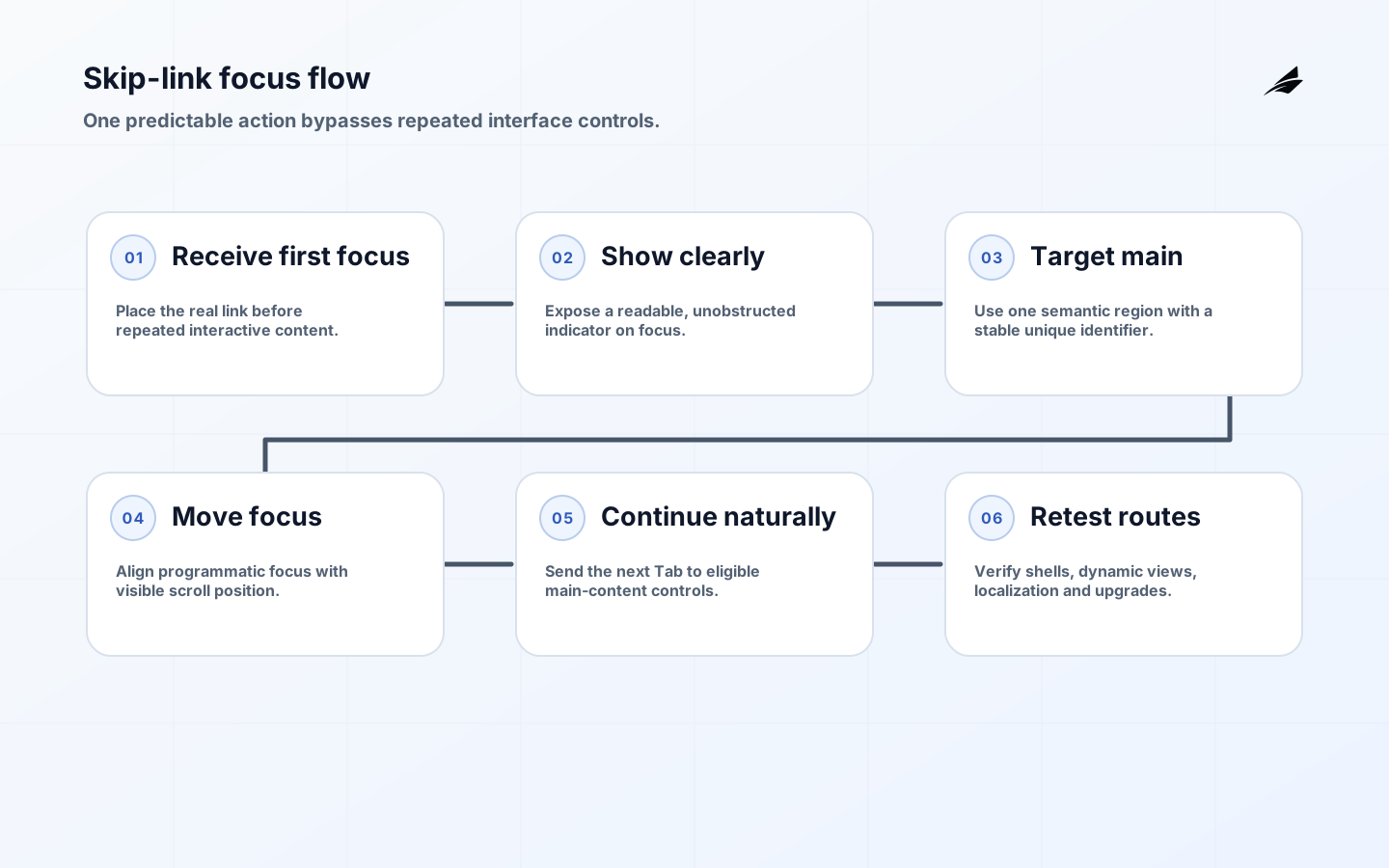
A skip-to-main-content link lets keyboard and other sequential-navigation users bypass repeated headers, menus and controls. Implementation is small, but details matter: the link must be reached first, become visible, name its destination, move focus to the actual main content and continue working across routes and layouts. This checklist covers markup, styling, framework behavior, testing and release controls for websites and web applications.
Read the skip-to-main-content practical guide for the user and business case and the skip-link FAQ for design questions. Teams implementing accessibility in dynamic products can reuse the governance habits in the RAG implementation readiness checklist: define the user outcome, test the exact interface and keep a human-verifiable acceptance record.
1. Confirm the bypass requirement and page pattern
WCAG 2.2 Success Criterion 2.4.1 requires a mechanism to bypass blocks repeated across pages. The W3C understanding document explains that sequential users otherwise encounter repeated navigation before primary content. A skip link is a direct, understandable mechanism and is especially useful when pages have one principal content area. Headings and landmarks also support navigation, but do not assume every user or browser will invoke them the same way.
Inventory templates: marketing pages, articles, search, authenticated dashboards, checkout, error pages, embedded experiences and modal routes. Identify repeated blocks and the first meaningful content for each. A dashboard may need “Skip to workspace” rather than a target above persistent filters. Keep wording consistent unless the destination genuinely differs. Define whether the link is always visible or appears on focus; both can work, but visibility on focus is mandatory for a visually hidden implementation.
| Page pattern | Destination | Likely label | Special check |
|---|---|---|---|
| Article | Article heading or main container | Skip to main content | Sticky header must not cover heading |
| Search results | Results heading and list region | Skip to search results | Filter changes must preserve target |
| Dashboard | Primary workspace | Skip to workspace | Sidebar and toolbar are bypassed |
| Checkout | Current step heading | Skip to checkout | Validation summary remains discoverable |
| Error page | Error heading and recovery action | Skip to main content | Global shell does not trap focus |
2. Implement a real link and a stable target

Place an anchor near the start of body, before repeated interactive content. Point it to a unique fragment ID on the main content container. Use the semantic main element where appropriate; the HTML Standard defines it for content dominant to the document’s central topic or functionality. Do not place site-wide navigation, repeated banners or footers inside main. Most pages should expose one active main landmark.
undefinedA fragment link should update location and bring the destination into view. tabindex="-1" can make the main container programmatically focusable without adding it to normal tab order, improving consistency where browsers or client-side routing do not move focus as expected. Test before adding JavaScript. If script is needed, respond to activation, focus the target without suppressing default link semantics and avoid focus routines that fire on every render.
3. Make focus visible and unobstructed
A common pattern positions the link just outside the viewport and moves it into a high-visibility position on focus. Do not use display:none, visibility:hidden or a hidden attribute, because these remove it from focus navigation. Give it strong foreground/background contrast, a distinct focus indicator, sufficient target size and a reliable stacking level. Keep it usable at zoom and in forced-colors mode. The link should not be clipped by an ancestor with overflow restrictions.
undefinedAccount for sticky headers with scroll-margin-block-start or equivalent layout spacing so the target heading remains visible. Avoid hard-coded offsets when header height changes across breakpoints; use a design token or layout variable. Test right-to-left layout and long translated labels. The link must remain readable over every background and must not sit beneath cookie banners, app bars or modal overlays.
4. Verify focus, scroll and continued navigation
W3C Technique G1 describes a link that is the first focusable control, communicates the destination, is visible or visible on focus, and moves focus to main content. Test those conditions manually. Load the page without using a mouse, press Tab once, inspect visibility, activate the link and confirm both visual scroll and programmatic focus. Press Tab again; focus should move to the first eligible control after the main target, not return to the header.
Test in representative browser and assistive-technology combinations according to the product’s support policy. Screen-reader users may navigate directly by landmarks or headings, so ensure those structures are correct too. The WAI landmark regions guidance recommends using landmarks to communicate page organization and labels when multiple regions of the same type exist. Prefer native HTML landmarks before adding ARIA roles.
5. Handle client-side routes and dynamic layouts
Single-page applications can retain focus in the clicked navigation item after replacing the main view. Decide a route-change focus policy: move focus to the new main heading or main container after navigation completes, while preserving focus for updates that do not represent a new page. Update the document title and announce important loading or error states separately. The skip link target ID must exist immediately or activation should wait for a deterministic mount, not a guessed timeout.
Mount the skip link in the shared application shell, but test pages with alternative shells, portals and embedded microfrontends. Prevent duplicate main IDs and multiple active main landmarks. When a modal opens, focus belongs inside the modal; the underlying skip link should not be reachable until the modal closes. After close, return focus according to the dialog pattern. Virtualized content must still provide a stable target and sensible next focus.
6. Make the pattern a governed component
Put the link, target convention, focus style and route behavior in the design system. Document required DOM order, naming and target ID in developer-facing component guidance. Add lint or integration checks for duplicate IDs, missing main landmarks and missing targets. Do not let consumers override the class in ways that remove focus visibility. Version changes and test them against every shell before release.
Automated accessibility tools can catch missing targets, duplicate IDs and some landmark problems, but they cannot fully judge whether the destination is the meaningful start of content or whether focus appears coherently after activation. Keep a short manual keyboard script in acceptance criteria. Include it in regression testing after header, routing, focus-management and layout changes.
Create a component contract that names the shell owner, the page owner and the evidence each release must preserve. The shell owns first-focus placement and visible styling; the page supplies exactly one stable main target; the router owns page-transition focus. In a microfrontend deployment, reject a child application that introduces another active main landmark or reuses the target ID. This division prevents accessibility responsibility from disappearing between platform and feature teams.
| Check | Method | Pass condition | Failure example |
|---|---|---|---|
| First focus | Reload and press Tab | Skip link receives focus before header controls | Browser chrome aside, menu receives focus first |
| Visible state | Inspect at 200 and 400 percent zoom | Entire label and indicator are visible | Link is clipped or behind sticky header |
| Destination | Activate with Enter | Main target is focused and visible | Page scrolls but focus stays on link |
| Continuation | Press Tab after activation | Next main-content control receives focus | Focus cycles back to global navigation |
| Route change | Navigate through client router | New view has title, target and deliberate focus | Old target remains or duplicate IDs appear |
| Structure | Inspect accessibility tree | One active main landmark with useful headings | Nested or multiple unlabeled main regions |
7. Add release and maintenance checks
Make keyboard acceptance part of the definition of done for every new shell. Run template-level automated tests and a small end-to-end test that tabs, activates and checks focus. Avoid brittle pixel assertions for visibility; check bounding box, computed visibility and unobstructed placement, then supplement with visual review. Include no-script or server-rendered behavior when the product supports it. Record tested browser and assistive-technology versions.
Monitor accessibility feedback and support issues. When a header redesign adds a banner or navigation group, re-evaluate the bypass target and stacking. When localization changes label length, test fit. When a framework upgrade alters focus or hydration, test initial and client-side routes. The skip link is infrastructure: small, shared and easy to break far from the component itself.
Key takeaways
- Place a real skip link before repeated focusable content.
- Target a unique semantic main region with a stable ID.
- Make the link highly visible on focus and account for sticky headers.
- Verify scroll, programmatic focus and the next Tab destination.
- Define route-change focus separately from in-page updates.
- Combine automated checks with manual keyboard testing.
Skip-to-main-content FAQ
Must the skip link always be visible?
WCAG does not require constant visibility when the link becomes visible on keyboard focus. Constant visibility can still benefit switch, magnification, voice and collaborative users. Choose deliberately and ensure the focused state is unmistakable.
Should the main element have tabindex minus one?
Use it when needed for reliable programmatic focus and verify behavior in supported browsers. It does not add the element to normal tab order. Avoid positive tabindex values, which create a fragile custom focus order.
Is a main landmark enough without a skip link?
Landmarks provide powerful structural navigation, but a visible first-focus skip link offers a straightforward mechanism that works without requiring users to know landmark commands. Many products should provide both correct semantics and the direct link.
Conclusion
A skip-to-main-content link succeeds when one predictable action carries a user past repeated interface chrome into meaningful work. Implement native markup first, make focus visible, handle application routes intentionally and test with a keyboard. Keeping the pattern in the shared shell and design system prevents a small accessibility feature from becoming a recurring defect.