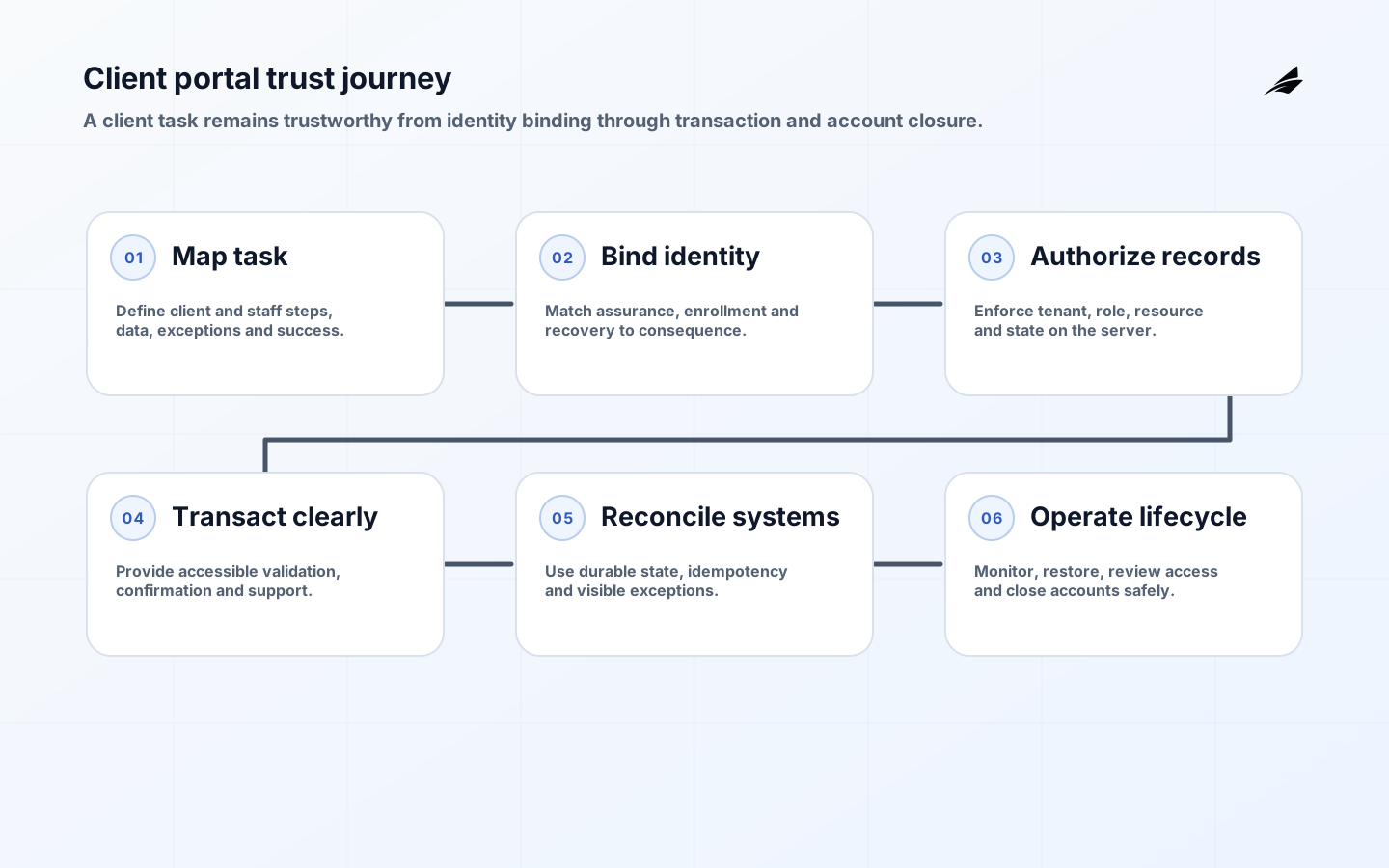
This client portal development FAQ focuses on the system clients actually need: a secure, understandable place to complete important work with an organization. A portal may expose documents, messages, invoices, cases, approvals, bookings or reports. Its quality depends less on the number of dashboard tiles than on accurate identity, record-level authorization, reliable integration, accessible task design and a support model that can correct mistakes without exposing another client’s data.
NIST’s 2025 Digital Identity Guidelines cover risk-based identity proofing, authentication and federation, while OWASP ASVS provides testable web-application security requirements. WCAG 2.2 supplies the accessibility baseline. Use the client portal implementation checklist after scoping, and the enterprise portal architecture guide for larger organizations.
What should the first portal release include?
Choose one or two complete client journeys with measurable pain, such as retrieving approved documents and submitting a request. Map initiation, identity, data, decisions, exceptions, notifications, support and completion. Include internal staff steps because a polished form connected to an unresolved queue does not improve service. Define what remains in email, phone or an existing system and how those channels reconcile during transition.
A first release needs production behavior: enrollment, account recovery, permissions, audit, accessibility, integration failure, data correction, monitoring, support and deletion or closure. Avoid building a generic shell and postponing the hard workflow. Limit scope by client cohort or task, not by omitting safety and operation. Name a product owner, system owner, data owners and support owner before development begins.
| Journey element | Decision to make | Acceptance example |
|---|---|---|
| Enrollment | Who is eligible and how identity or organization is linked | Valid client succeeds; ambiguous match reaches reviewed exception |
| Access | Which person may act on which account, record and field | Cross-tenant and delegated-access tests deny correctly |
| Transaction | What constitutes submission and official receipt | Client sees immutable reference and system of record agrees |
| Exception | What happens when integration or validation fails | Work remains visible with owner and recovery action |
| Closure | How access, records and exports change when relationship ends | Revocation, retention and export procedure completes |
How should identity and account recovery work?
Select identity assurance from harm if the wrong person is bound to an account, authentication is compromised or federation fails. NIST SP 800-63 Revision 4 separates identity, authentication and federation assurance and adds customer-experience and redress considerations. Not every portal needs documentary proofing. A low-risk public account may use verified contact details; access to sensitive financial or health records can require stronger proofing and phishing-resistant authentication.
Design enrollment, authenticator change, recovery and help-desk override as one threat surface. Recovery should not be weaker than normal sign-in. Support staff need a controlled, audited route for legitimate exceptions, with segregation for high-risk changes. For business clients, support delegated administrators, joiners, movers and leavers without sharing credentials. Notify users of important account events and provide a way to report unauthorized change.
How is client data kept separate?
Enforce authorization on the server for every record and action. Do not trust hidden fields, URL IDs, UI state or a tenant claim supplied by the browser. Derive client context from the authenticated session and verified relationship, then check role, resource, action and relevant state. Administrative and support impersonation needs explicit purpose, approval where appropriate, visible indication, audit and restricted fields.
Test horizontal access between clients, vertical access between roles, bulk export, search, attachments, notifications, cached pages and direct object URLs. Include deleted, archived and recently transferred records. OWASP ASVS can anchor verification requirements, but the portal’s business authorization model must come from real relationships. Keep a permission matrix and automated tests synchronized with workflow changes.
| Failure mode | Design control | Operational signal |
|---|---|---|
| Cross-client record exposure | Server-side object authorization and tenant-scoped queries | Denied-access events and security alert |
| Duplicate or lost submission | Idempotency key and durable transaction state | Reconciliation queue and aged exception |
| Document malware | Type validation, scanning and isolated storage | Quarantine event and review outcome |
| Inaccessible critical task | WCAG-tested flow and assisted alternative | Completion and support results by channel |
| Notification leaks sensitive data | Minimal message with authenticated deep link | Template review and delivery audit |
How should integrations and documents be designed?
Name a source of truth for each field and state. Use explicit API contracts, versioning, timeouts, idempotency and retry rules. The OpenAPI Specification provides a language-agnostic description for HTTP APIs, but schema alone does not define ownership or failure semantics. Decide whether a client action is synchronous, queued or manually reviewed and show that state honestly. Never display success before the authoritative transaction is durable.
For files, define permitted types, size, scanning, encryption, preview, versioning, retention, legal hold, download authorization and deletion. Store metadata and content with the same tenant boundary. Avoid exposing storage URLs that outlive portal permissions. Generate receipts with stable references and checksum or version evidence where integrity matters. Test large files, interrupted uploads and malicious names or embedded content.
What does accessible portal delivery require?
WCAG 2.2 should guide design and testing across keyboard access, focus, labels, errors, status messages, contrast, reflow, zoom, time limits and authentication. Complex tables, document viewers, multi-step forms and drag-and-drop uploads need special attention. Accessibility cannot be postponed to a scanner at launch; task flow, components, content and third-party identity or payment services all affect the journey.
Use plain language and show what clients need before they start. Preserve entered data after validation errors, explain the correction next to the field and provide a review step for consequential submissions. Offer an assisted channel with equivalent authority and response expectations. Test with disabled users and assistive technologies appropriate to the audience, then include accessibility defects in normal ownership and release management.
Which security controls belong in the baseline?
Threat-model enrollment, session handling, authorization, uploads, exports, messaging, APIs, administrative tools and dependencies. Use secure cookies, CSRF protection, output encoding, input validation, rate controls and secrets management. Follow current OAuth security guidance when using delegated authorization, including protections against authorization-code interception and redirect misuse. Patch dependencies and produce releases through an SSDF-aligned development process.
Log authentication, recovery, permission, data access, export, document, administrative and high-value transaction events with actor, target, time and outcome. Avoid sensitive content in logs. Protect the audit trail from ordinary mutation and define retention. Test incident response for compromised account, cross-tenant exposure and integration manipulation. A privacy notice and security policy do not compensate for missing technical enforcement.
How should a portal be delivered and launched?
- Map one client journey, internal processing, source systems, data, exception paths and success baseline.
- Design identity assurance, account lifecycle, record-level authorization, audit, accessibility and support together.
- Specify APIs and transaction states; build idempotency, reconciliation and document controls before UI polish.
- Test functional, cross-tenant, security, accessibility, performance, recovery and support scenarios with realistic roles.
- Pilot with a bounded client cohort, reconcile every transaction and monitor completion, errors and support themes.
- Expand gradually, review permissions and dependencies, rehearse incidents and retire duplicated channels only after acceptance.

Run production-like load and dependency-failure tests. Define service indicators for sign-in, page and API latency, transaction success, queue age, notification and support. Establish backup and restore at the application and record level, then reconcile restored data with connected systems. Publish maintenance and incident communication routes. Give support diagnostic views that reveal state without granting unnecessary content access.
What determines cost and timeline?
Cost follows workflow and assurance complexity: identity proofing, delegated access, legacy integration, data cleanup, documents, payments, accessibility, migration, security testing, support and compliance. Include discovery, product design, build, environments, licenses, messaging, monitoring, penetration testing, training and ongoing operation. A portal with two reliable journeys may create more value than a broad dashboard built on inconsistent data.
Estimate by increment with assumptions and ranges. Resolve the highest-risk integration and identity questions early through a production-shaped slice. Track total cost per completed client task, support demand and avoided manual handling, while watching whether digital-only design shifts burden to clients. Budget account lifecycle and content ownership permanently; portals decay when no one owns stale instructions, roles or integrations.
Complete a privacy review of field collection, analytics, session replay, support access and exports. Collect only what the journey needs, set retention by record purpose and give clients accurate notices and correction routes. Disable sensitive values in telemetry and third-party analytics. Privacy controls must cover administrative screens and troubleshooting tools as well as the public portal.
Key takeaways
- Scope the first release around complete client and staff journeys, including exceptions.
- Choose identity assurance from risk and make recovery at least as well controlled as sign-in.
- Enforce tenant and record authorization on every server-side action and data path.
- Design API failure, documents, accessibility, support and audit as core portal behavior.
- Measure completed, reconciled client outcomes rather than accounts created or pages viewed.
Frequently asked questions
Should we buy a portal product or build one?
Buy when workflows and identity needs match a supported product and configuration can remain maintainable. Build when differentiation or integration demands justify ownership. Evaluate the complete journey, accessibility, authorization, APIs, data export, extension limits and recurring cost. A hybrid product with custom services is common but needs clear support boundaries.
Does a client portal need a mobile app?
Not automatically. A responsive, accessible web portal often serves the first need with one release surface. Native apps can add device features or offline operation but increase identity, security, distribution and support work. Choose from client context and task evidence, not perceived prestige.
Can email notifications include portal data?
Minimize sensitive content because inbox access and forwarding are hard to control. Notify the client that an authenticated action or message is available and link to the portal. Apply communication preferences and legal requirements, and test that links do not bypass authorization.
Conclusion
Client portal development succeeds when trusted identity, precise authorization and honest transaction state support a useful client journey. Security, accessibility, integration and operations are the product, not launch chores. Enterprise teams can continue with the enterprise portal implementation checklist and enterprise portal FAQ for larger delegated-access and governance needs.