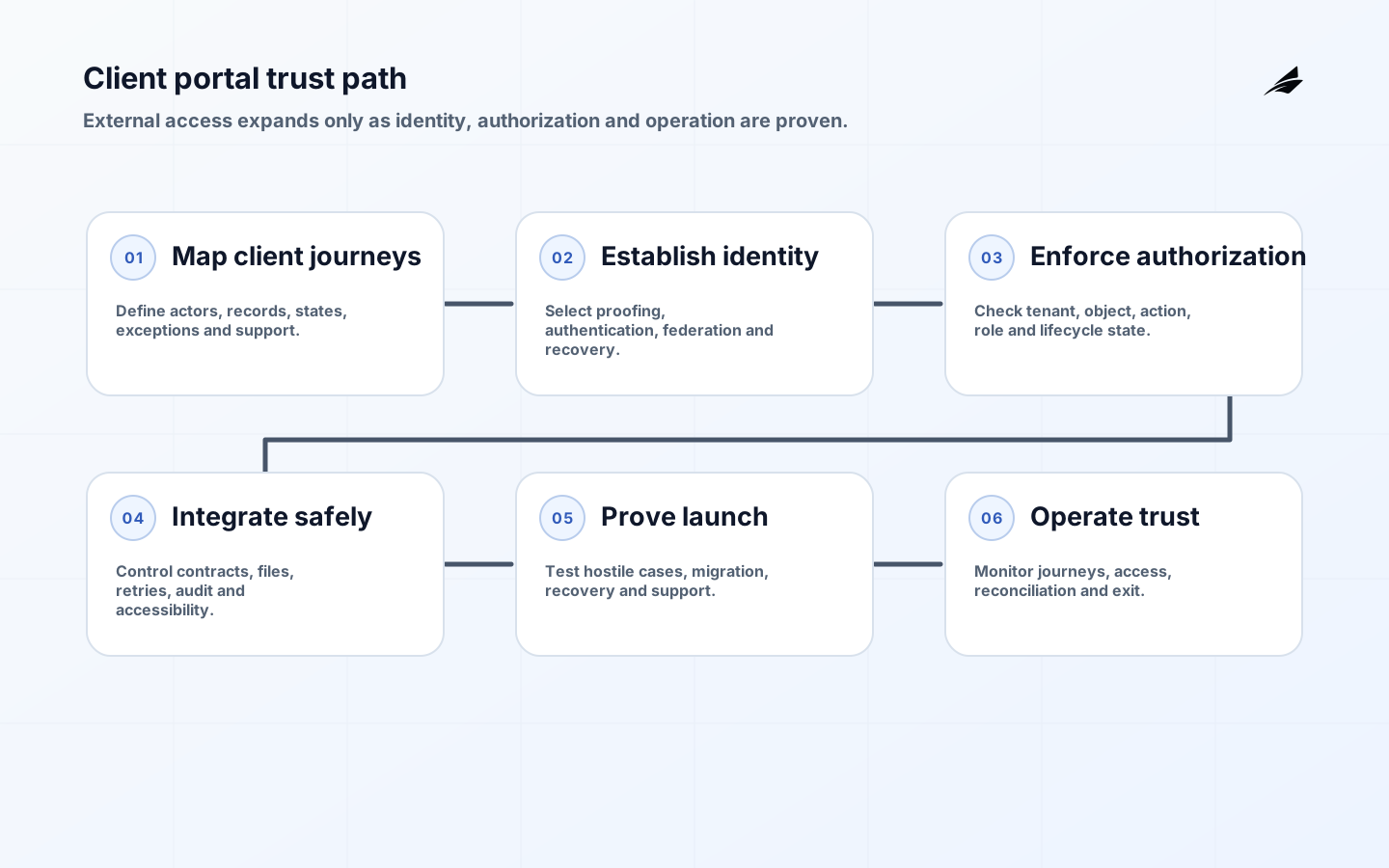
Client portal development succeeds when external users can complete sensitive work without losing trust in identity, records or support. A portal may expose documents, cases, invoices, approvals, messages and account administration across organizational boundaries. That creates risks different from an employee application: uncertain identity, delegated access, accessibility needs, hostile traffic and long account lifecycles. This client portal development implementation checklist turns those concerns into acceptance evidence.
Use it with the client portal practical guide, client portal FAQ and customer portals enterprise guide. Start with the work clients need to finish and the authoritative business systems behind it. A polished dashboard is not useful if permissions are wrong, status is stale, uploads disappear into a queue or the service desk cannot recover an account safely.
1. Define client journeys and the system boundary
Document the highest-value journeys from invitation or registration through task completion, notification, correction and offboarding. For each, name the client role, business owner, source of truth, state transitions, service target, evidence and exception path. Include less convenient realities: a client changes employer, an adviser serves several organizations, a legal hold blocks deletion, a payment is reversed, or a document is rejected after upload.
Separate portal presentation from record authority. Decide whether a submitted change updates the core system immediately, creates a reviewed request, or enters an asynchronous workflow. Show users the resulting state accurately. Map dependencies such as CRM, case management, document storage, billing, identity provider, email and analytics. Set timeout, retry, idempotency and reconciliation rules so a partial outage cannot create duplicate instructions or contradictory status.
| Journey control | Implementation decision | Acceptance evidence |
|---|---|---|
| Enrollment | Invitation, proofing, domain rules, consent and duplicate handling | Representative successful and rejected enrollments |
| Delegation | Who grants, scopes, reviews and revokes access for an organization | Role matrix and tested delegation scenarios |
| Transaction | Authoritative record, state model, validation and confirmation | End-to-end trace with reconciliation |
| Document exchange | Type, malware handling, classification, retention and versioning | Upload, rejection, retrieval and deletion tests |
| Support | Recovery evidence, staff authority, privacy and escalation | Observed service-desk exercise |
| Offboarding | Session revocation, retained records, export and notifications | Timed revocation and closure record |
2. Design identity and account recovery

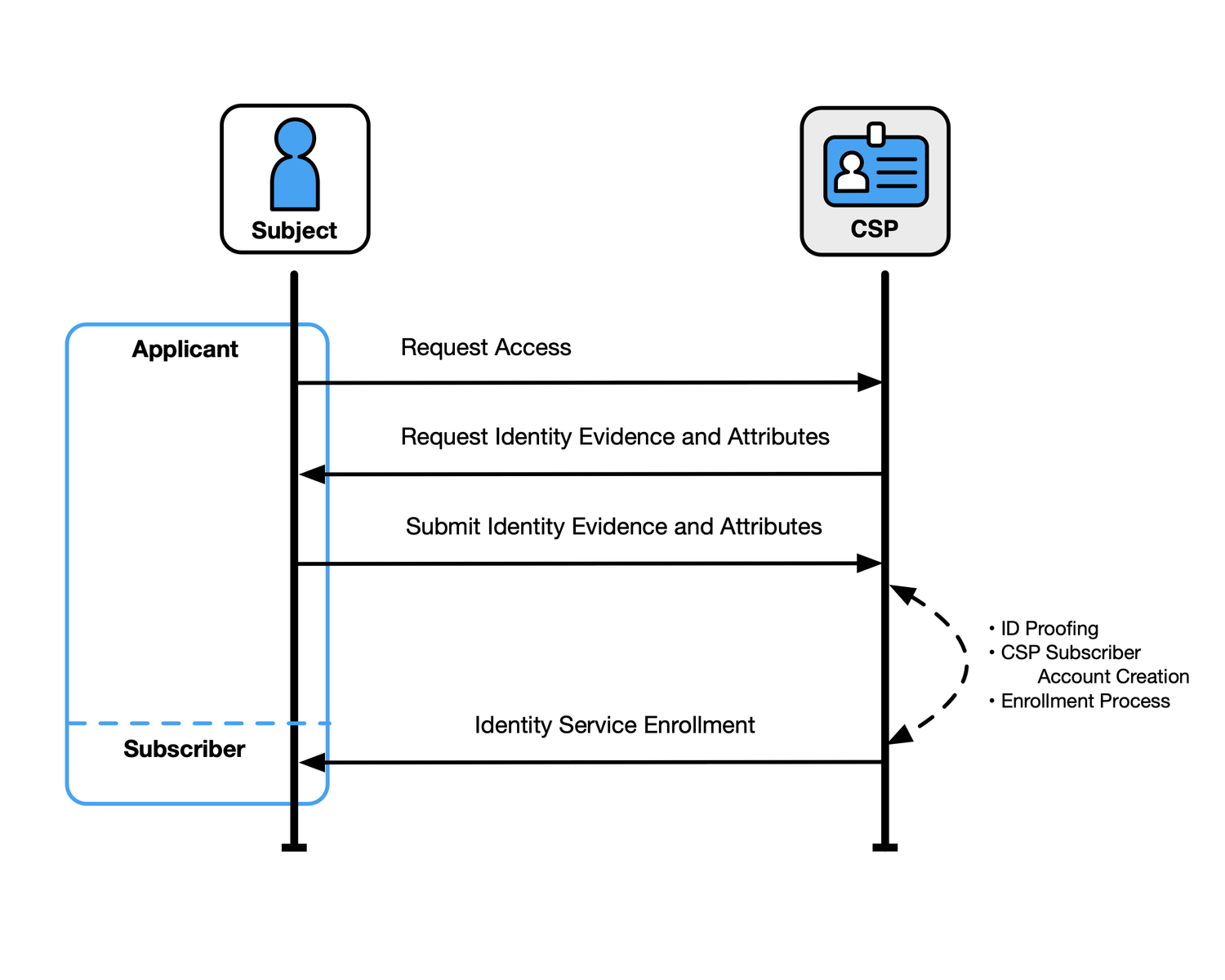
Choose assurance by consequence. Reading a public guide, downloading a confidential report, changing bank details and authorizing another person need different confidence. The NIST Digital Identity Guidelines separate identity proofing, authentication and federation, allowing teams to design each step proportionately. Do not collect more identity evidence simply because the portal can store it.
Prefer federation for organizational users where it reduces duplicate credentials, but preserve a route for smaller clients and recovery. Current NIST authenticator guidance should inform phishing resistance, authenticator lifecycle and recovery. Test lost devices, changed phone numbers, compromised inboxes, locked accounts and deceased or departed administrators. Support agents must not bypass controls under pressure; give them a documented, auditable escalation path.
3. Enforce tenant and object authorization
Model permissions as business actions on specific resources, not only screen visibility. Check authorization server-side on every request and background job. Include tenant, organization, relationship, role, record state and purpose where relevant. Deny by default, use opaque identifiers only as defense in depth, and prevent search, exports, notifications and support tools from crossing the same boundary. Administrative impersonation needs approval, visible indication, narrow scope and an immutable audit record.
Use the OWASP Application Security Verification Standard as a requirements and verification catalog, tailoring level and controls to risk. Create negative tests: change an object identifier, reuse an expired invitation, access a former employer’s case, submit a hidden field, enumerate accounts and replay an approval. Review cached responses, shared links and analytics events for data that bypasses normal authorization.
4. Build secure, accessible workflows
Define schemas and contracts for every integration. Validate input on the server, encode output for its context, scan and isolate untrusted files, protect against request forgery, limit rates and avoid exposing internal errors. Encrypt transport and stored sensitive data, manage keys and secrets outside code, and record security-relevant events without logging credentials or document contents unnecessarily. Follow the NIST SSDF across requirements, development, build and vulnerability response.
- Design keyboard, screen-reader, zoom, focus, error and timeout behavior from the first component, using WCAG 2.2 as the baseline.
- Write plain labels and confirmations that identify the record, action, effective time and next state.
- Use resumable or safely repeatable operations for large files and long-running client tasks.
- Send notifications that reveal minimal sensitive information and direct users to an authenticated record.
- Provide export and correction routes aligned to business, privacy and records obligations.
- Instrument journey completion, authorization denial, integration lag, support escalation and abandoned tasks without covertly collecting unnecessary data.
5. Test with representative roles and hostile cases
Create a test matrix crossing tenant, role, record ownership, lifecycle state, platform and assistive technology. Automate stable permission, API contract and critical journey checks; add exploratory, usability, accessibility and penetration testing. The OWASP Web Security Testing Guide offers a broad web testing framework covering identity, authentication, authorization, session management, input validation, error handling and other attack areas. Tie findings to owned remediation and retest evidence.
Use production-like scale and privacy-safe data. Test simultaneous edits, duplicate events, expired sessions, clock boundaries, unavailable dependencies, slow networks, large files and queue backlogs. Verify audit events contain who, what, target, result, time and correlation without becoming another sensitive data store. Have business users validate that reconstructed histories answer disputes. Security teams can prove a control executed; record owners must prove the result makes operational sense.
| Acceptance area | Representative test | Pass condition |
|---|---|---|
| Tenant isolation | Attempt direct, search, export and cached access across tenants | No cross-boundary data or metadata disclosure |
| Recovery | Recover accounts with lost factors and hostile social-engineering attempts | Authorized users recover; attackers and support shortcuts fail |
| Integration | Timeout and replay a transactional request | One valid business outcome with reconciled state |
| Accessibility | Complete critical journeys by keyboard and screen reader | Agreed WCAG criteria and task outcomes pass |
| Resilience | Disable a dependency during submission | User sees accurate state; retry or rollback is safe |
| Audit | Reconstruct delegation and a material transaction | Complete, ordered evidence is available to authorized reviewers |
6. Migrate, launch and operate the portal
Rehearse identity and record migration with signed totals, samples and exception reports. Communicate enrollment and support through verified channels; an unexpected portal invitation resembles phishing. Roll out by bounded client cohort, monitor completion and support, and retain rollback or read-only access until authoritative records reconcile. Name a launch commander with authority to pause expansion when identity, data or service thresholds fail.
In operation, monitor journey success, authorization denials, failed recovery, integration lag, security signals, accessibility defects, support demand and record reconciliation. Review privileged and delegated access periodically. Patch dependencies and preserve a vulnerability disclosure and response route. Test restore and client communication, not only backup creation. Keep an export and closure plan so clients can retrieve appropriate records and the organization can revoke access without destroying required evidence.
Key takeaways
Practical example: a consultancy launches a portal for clients to exchange reports and approve changes. The pilot includes a client administrator, ordinary member, external adviser and departed user across two tenant organizations. Testers attempt to retrieve reports through direct identifiers, search, exports, old links and support impersonation. An approval request is deliberately replayed after an integration timeout, and the team verifies one authoritative change with a complete audit trail. Keyboard and screen-reader users complete invitation, document review and rejection without support. The first cohort launches only after account recovery resists social engineering, the core system reconciles every portal state and staff can revoke the departed administrator within the target.
- Model complete client work, state and exceptions before designing dashboard components.
- Select identity proofing, authentication and recovery strength according to transaction consequence.
- Enforce authorization at tenant, object and action level in every interface and background process.
- Build accessibility, safe integration, audit and privacy into reusable portal components.
- Test hostile cross-tenant cases and realistic dependency failures alongside normal journeys.
- Launch by cohort and operate identity, reconciliation, support, security and exit as one service.
Frequently asked questions
Should a company build or buy a client portal?
Buy or configure when a product fits the workflow, identity, data boundary and integration needs without harmful customization. Build when the client experience or operating model is differentiating and the organization can sustain security and support. Compare lifecycle cost, export, vendor change and control evidence, not only launch speed.
Does every portal user need multifactor authentication?
Authentication strength should follow risk and applicable requirements. High-impact transactions and administrative roles generally warrant stronger, phishing-resistant options. Avoid excluding users: provide accessible enrollment and secure recovery alternatives. Document the risk decision rather than applying one mechanism blindly to every journey.
Can support staff impersonate clients for troubleshooting?
Only under a narrowly designed control if the business need justifies it. Require separate authorization, explicit reason, short duration, visible mode, prohibited sensitive actions and detailed audit. Prefer viewing diagnostic state or a consented screen-sharing flow when full impersonation is unnecessary.
Conclusion
The production acceptance record should identify the portal version, in-scope tenants, identity and integration configuration, migration totals, unresolved exceptions, security and accessibility results, restore exercise, support staffing, rollback trigger and decision owners. Review notification templates and status pages because they become part of the service during failure. Confirm the customer can export authorized records and that administrators know how to revoke a compromised client organization without disabling unrelated tenants. This final cross-functional review catches gaps that component sign-offs miss and gives incident responders an accurate picture of the launched boundary.
A trustworthy client portal combines usable self-service with explicit record authority, strong identity, fine-grained authorization and observable operations. Design around real journeys and exceptions, verify the hostile cases, and launch only after recovery, reconciliation, accessibility and support work under pressure. That is what turns a web interface into a dependable client service.