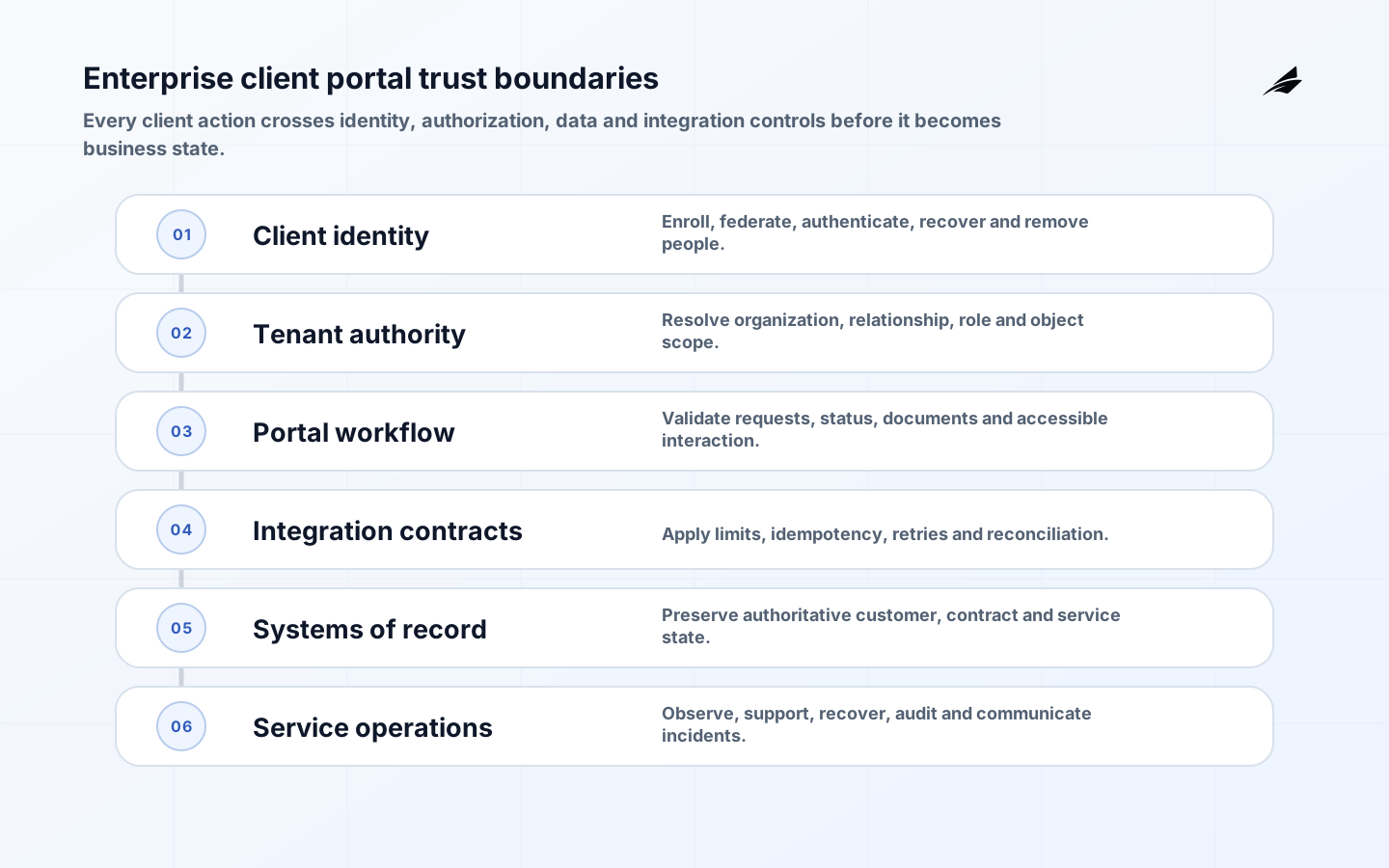
Enterprise Client Portal Development: Implementation Checklist requires more than selecting tools or assembling a feature list. The implementation must connect a defined business outcome to data, authority, failure behavior and permanent ownership. This guide explains the decisions a buyer, product leader and delivery team should settle before committing the full build. It uses current primary standards where they define a useful control, while keeping the architecture proportional to the actual workflow and consequence.
The practical goal is an operable service: people can complete the intended work, understand state and exceptions, and recover when a dependency or decision fails. Scope therefore includes discovery, design, integration, security, delivery, rollout and support. The sections below can be used for proposal review, architecture workshops and acceptance planning. Related reading includes Client Portal Development for Enterprise Teams: Architecture, Security and Delivery, Client Service Portals: Architecture, Security and Delivery Guide, Client Portal Development: Practical Guide for Business Teams.
Define client jobs and service boundaries
List the client jobs the portal must complete: retrieve documents, submit requests, approve work, monitor service, manage users, exchange data or resolve issues. Trace each job across portal, internal team and system of record. Name what the portal will not do. A home page full of links is not a service boundary. Establish response and fulfillment expectations for every submitted request and show status users can understand. Prioritize jobs by client value, internal handling cost, risk and readiness of source systems rather than by how quickly a screen can be designed.
Create service blueprints showing client action, portal response, internal work and completion evidence. This exposes requests that the portal can accept but the organization cannot fulfill predictably. Define a consistent case or request identifier across channels. If clients can start work by email and continue in the portal, establish ownership and deduplication. Design status from the client’s decision needs, not internal department names.
Choose identity assurance and lifecycle
Decide how organizations and people are invited, proofed, authenticated, recovered, suspended and removed. NIST Digital Identity Guidelines Revision 4 separates identity proofing, authentication and federation assurance; use the concepts proportionately rather than treating login as one control. Support enterprise federation through standards such as OpenID Connect where appropriate, but retain a controlled path for smaller clients. Prefer phishing-resistant authentication for privileged roles. Recovery must not be weaker than enrollment. Test employee departure, administrator loss, domain change and organization transfer.
Maintain an organization registry and verified relationship owner. An email domain alone is weak evidence of authority, especially after mergers or contractors. Define invitations, approval and claim mapping for federated clients. Detect dormant and impossible-travel patterns proportionately, and notify users about material account changes. Recovery should include rate limits, notification and review for privileged administrators. Periodically ask client administrators to attest active access.
| Area | Decision | Evidence |
|---|---|---|
| Portal boundary | Design question | Acceptance test |
| Identity | How is a person linked to an organization? | Enrollment and recovery preserve assurance |
| Authorization | Which action is allowed on which object? | Cross-tenant negative tests fail closed |
| Data | Which source owns each field and document? | Displayed state reconciles with authority |
| Integration | What happens when a dependency is unavailable? | Core work degrades visibly and recovers |
| Accessibility | Can the complete task be finished with assistive technology? | Manual and automated journey tests pass |
Model organization and object authorization
B2B access typically depends on tenant, organization relationship, account, contract, project, geography and role. Define permissions as actions on business objects, not pages in a menu. Enforce policy server-side on every read, search, export and write. Prevent identifiers from becoming authorization. Separate customer administrators from internal support impersonation, and require purpose, approval and audit for exceptional access. Test cross-tenant access with automated negative cases. Keep cached and indexed data within the same policy boundary as the source API.

Express policy using a centralized service or shared library and test it at the API boundary. UI hiding improves usability but provides no security. Include field-level and action-level cases such as viewing an invoice versus changing bank details. Avoid long-lived broad tokens in browser storage. Review delegated support access and export permissions separately. Policy changes need versioning, rollout and impact analysis across active sessions.
Expose authoritative data with honest freshness
For each field and document, identify its system of record, update path, permitted audience, retention and freshness. Show when data was last synchronized where delay matters. Queue portal writes safely and reconcile accepted state; do not imply success after only placing a message on a queue. Version downloadable documents and preserve which version the user saw or approved. Search indexes, analytics and notification payloads need the same classification as primary records. Minimize copied personal data and provide an operational process for correction and deletion obligations.
Define an error-correction workflow that identifies source ownership and tells clients when a dispute is resolved. If the portal combines several systems, show why values differ instead of choosing one silently. Documents should carry business identifiers, issue date, status and replacement relationship. Download links need authorization at request time and short expiry. Data exports should preserve filters, generation time and schema version for later interpretation.
Build accessibility into complete client journeys
Use WCAG 2.2 as a testable baseline, including keyboard operation, focus visibility, target size, status messages, errors and accessible authentication. Test the complete process across responsive layouts, not isolated components. Documents uploaded by clients or generated by systems also need accessibility consideration. Provide labels, instructions and recovery that do not rely on color or memory. Include people using assistive technologies in research and acceptance. Accessibility defects in account recovery, approval or payment can prevent clients from completing consequential work even if the marketing pages conform.
Include accessibility requirements in component definition and design review, then verify with manual testing. Automated scanners cannot judge task clarity, focus order or usable authentication alone. Avoid timeout behavior that loses entered work; warn users and permit extension where security policy allows. Error summaries should link to fields and preserve prior input. Test generated PDFs and spreadsheets used in the same journey because inaccessible exports can block review.
| Area | Question | Control |
|---|---|---|
| Rollout evidence | Measure | Go/no-go rule |
| Client activation | Invited users complete secure enrollment | No unresolved identity ambiguity |
| Task completion | Users finish priority jobs without support | Errors and abandonment within agreed threshold |
| Data trust | Disputes and reconciliation differences | No unexplained material mismatch |
| Operations | Incidents diagnosed and recovered from runbook | Permanent team completes exercise |
| Security | Authorization and session tests | No unresolved critical control failure |
Design integrations and notifications for failure
Define API contracts, limits, retries, idempotency, reconciliation and ownership for CRM, ERP, billing, document, identity and support systems. Keep the portal available for read-only or queued work when a noncritical dependency fails, and show specific degraded state. Notifications should link users to authenticated portal context without exposing sensitive details. Deduplicate messages and honor preference, locale and channel rules. Trace a client action across systems while keeping secrets and personal content out of general logs. Rehearse certificate, token and webhook failures.
Use a portal-facing orchestration boundary rather than exposing internal APIs directly. It can normalize error behavior, enforce client policy and shield clients from system changes. Keep its own data minimal. For long-running requests, return a stable job status and notify on completion. Reconcile orphaned or stuck jobs. Rate limits should consider organization and user so one integration client cannot exhaust capacity for all portal users.
Prove operation before enterprise rollout
Start with a small set of clients and representative account structures. Migrate users through verified invitation rather than bulk-created weak credentials. Run security verification against an OWASP ASVS profile, accessibility testing, load and rate-limit tests, backup restoration, export controls and incident exercises. Establish client support, status communication and internal escalation. Measure task completion, time to fulfillment, support demand, access failures and data disputes. Expand only after client administrators and internal operators can recover accounts, explain status and reconcile actions without engineering intervention.
Prepare tenant-level feature controls and a client communication plan. Pilot clients need a route to report identity or data problems outside the affected portal. Monitor login, task completion, failed authorization, document generation and integration latency without collecting unnecessary content. Schedule access reviews after onboarding. At general availability, publish support hours and service expectations, and retain a tested emergency path for widespread federation failure.
Key takeaways
- Design the portal around complete client jobs and service obligations.
- Treat identity lifecycle and object authorization as separate controls.
- Expose authoritative state, freshness and degraded behavior honestly.
- Test accessibility, security, recovery and operations before broad rollout.
Frequently asked questions
Does enterprise SSO remove the need for portal access controls?
No. Federation authenticates a person and carries claims; the portal must still link them to the correct organization and authorize each business object and action.
Should customers manage their own users?
Usually, with bounded administrator permissions, auditable invitations and safeguards for administrator recovery. High-risk roles may require provider approval or stronger proofing.
Does an enterprise portal need a mobile app?
Only if mobile-specific workflows, offline operation or device capabilities justify it. A responsive accessible web portal often covers review, document and status tasks with lower lifecycle cost.
Conclusion
Enterprise client portal development is successful when clients can complete important work with trustworthy identity, precise authorization, current data and predictable service. The implementation checklist must cover the systems and operations behind the interface: integration failure, document history, accessibility, recovery, support and audit. Proving those behaviors with a small client cohort creates a safer route to scale. Repeat access, accessibility and recovery assurance whenever major clients, identity providers or source systems change. Client feedback and service incidents should feed the portal backlog alongside product analytics so reliability and comprehension improve together. Document unresolved limitations and give every limitation an accountable owner, risk decision and review date.