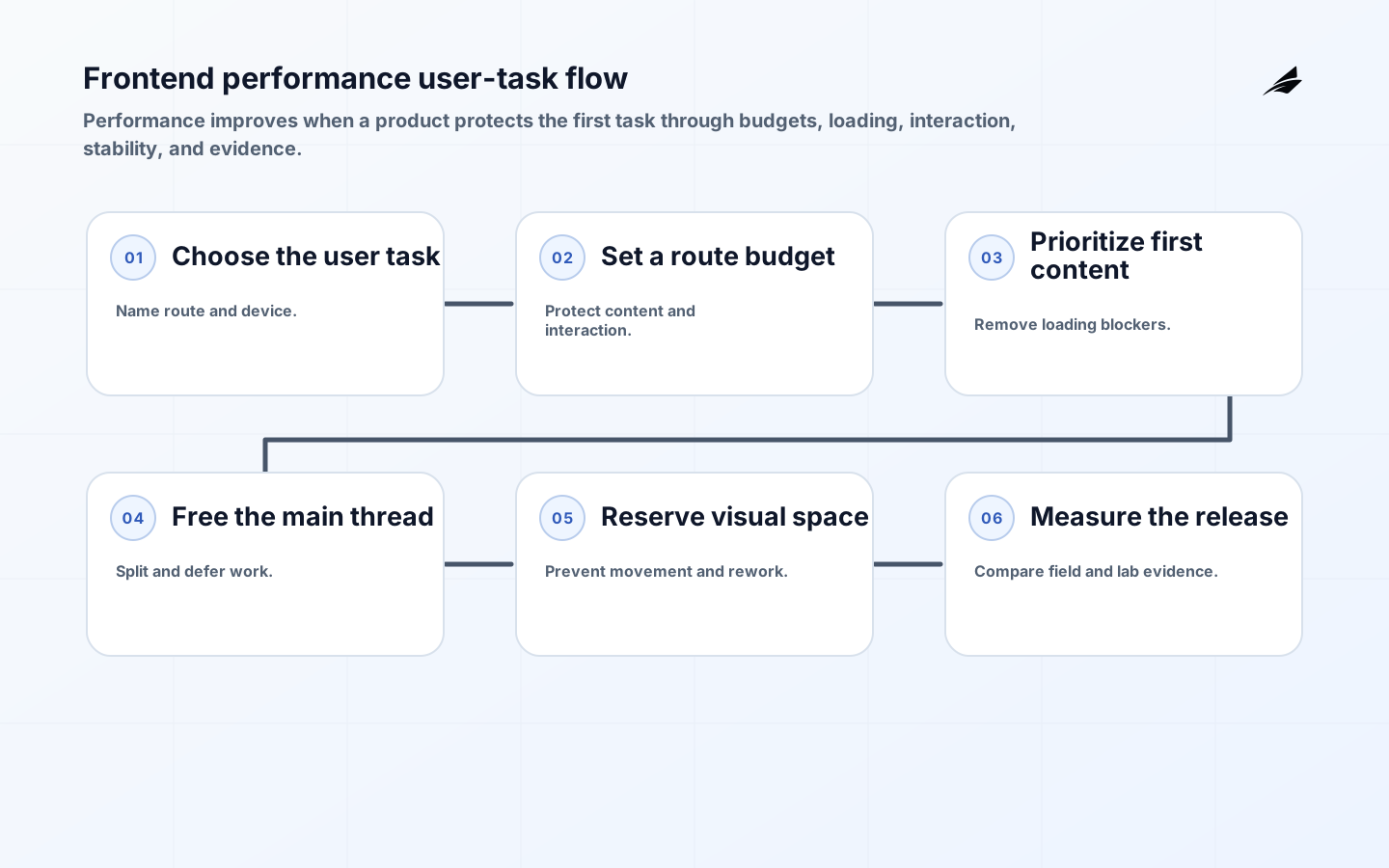
Frontend performance is the time and stability a person experiences while trying to complete a task in a browser. It is not a single score and it is not solved by making every asset as small as possible. A page can load quickly and still feel broken because the main content arrives late, a button ignores input, or the layout moves under the user’s hand. Founders can make the work manageable by choosing one important journey, setting a few budgets, measuring real conditions, and fixing the bottleneck that affects that journey before expanding the optimization effort.
Start with the action that creates value: read a product page, search a catalogue, submit an application, open a dashboard, or complete checkout. Then connect performance to the architecture choices that shape it. React state design, caching strategy, design systems, and internal tool UX can either reduce repeated work or create more work on the critical path.
Tie performance budgets to the first user task
Choose a route, device class, network condition, user state, and task that the team will protect. Include server response, HTML, critical CSS, fonts, images, JavaScript, hydration, data requests, third-party code, interaction, and layout. Avoid a vague promise such as fast page; say which content must be visible, which control must respond, and which movement is unacceptable. Web Vitals provides a user-centered vocabulary for loading, interactivity, and visual stability, but each product should translate those signals into a route-specific target and an owner.

| User concern | Engineering question | Evidence to keep |
|---|---|---|
| First view | What content must be visible first? | Priority route and LCP sample. |
| Input | When can the user interact confidently? | Long-task and interaction trace. |
| Stability | What space must remain reserved? | Layout dimensions and shift sample. |
| Navigation | Which route transitions must stay responsive? | Navigation timing and task trace. |
| Trust | Which third parties or fallbacks can delay or alter the task? | Dependency owner and failure behavior. |
Set budgets around a task, not an abstract number
A budget can cover transferred bytes, JavaScript execution, image weight, server response, long tasks, interaction delay, layout shift, or a specific Web Vital. Set it for a route and device profile, then give every large dependency an owner. A budget should trigger a decision: remove a script, defer a widget, resize an image, split a bundle, reserve dimensions, or accept a trade-off with a written reason. Do not punish a team for a metric it cannot influence. Performance budgets work when they are close to the code and linked to a user outcome.
Protect the loading path users can see
Find the element that represents the first useful content and follow its path from server response to paint. Optimize LCP recommends investigating whether the resource is discovered early, prioritized correctly, delivered efficiently, and delayed by render-blocking work. Do not preload everything; priority hints are only helpful when they match the user’s first task. Reduce redirect chains, slow server work, oversized images, render-blocking styles, and JavaScript that must execute before meaningful content can appear. A skeleton that replaces real content for too long may hide a delay rather than solve it.
Keep the main thread available for interaction
JavaScript competes with input, layout, paint, and accessibility work on the browser’s main thread. Break up long tasks, defer nonessential code, avoid repeated renders, and move suitable computation away from the interaction path. A component can be visually complete and still ignore a click because a parser, analytics bundle, or data transformation occupies the thread. Measure the task that matters rather than optimizing a synthetic loop that no user performs. If a feature adds work, make its cost visible in the route budget and decide whether it belongs before or after the first action.
- Which event started the work and which user action was delayed?
- Was the delay network, JavaScript, layout, rendering, or a dependency?
- Can the work be split, deferred, cached, or performed on a worker?
- Did a state update cause an avoidable render or data request?
- Does the interaction remain usable with a slower device or assistive technology?
- What evidence shows the fix helps the real route rather than only a local trace?
Reserve space and respect visual stability
Layout shift often comes from images without dimensions, late fonts, injected banners, ads, or components that discover their size after the page is visible. Reserve the space the content needs, choose fallback behavior, and avoid moving a user’s target after interaction begins. A stable layout is not merely aesthetic: movement causes errors, repeat clicks, and loss of trust. Test with real content lengths, localization, validation messages, slow images, and feature flags. Review the largest shifts by element and owner instead of treating the aggregate score as a mystery number.
Use the network and cache deliberately
Choose what should be server-rendered, prefetched, cached, streamed, or requested only after the task begins. A cached response can reduce latency but may be wrong for a user, tenant, or permission context; apply the same key and freshness discipline described in caching strategy. Use responsive images, modern compression, stable asset names, and a sensible font strategy. Measure transfer, decode, execution, and connection time separately so a bytes-only fix does not move the bottleneck to CPU or layout.
Make third-party cost an explicit trade-off
Analytics, chat, experimentation, video, payment, and advertising scripts can be useful while competing for network and main-thread time. Give each dependency a business owner, loading condition, data boundary, failure behavior, and budget. Defer nonessential code until after the first task when the product allows it. If a vendor must load early, measure its cost on the route and define what happens when it fails or is blocked. A third-party script with no owner is not free simply because the product team did not write it.
Measure real experience and diagnose the cause
Use lab traces to reproduce a change and field data to see how the route behaves across devices, networks, geographies, and user states. The browser Performance API provides marks, measures, resource timings, and navigation data; Navigation Timing Level 2 defines the navigation timing model. Add custom marks for the task’s meaningful milestones, such as usable search, first dashboard data, or successful form validation. Keep privacy boundaries clear, sample responsibly, and join the signal to a route and release so a team can act.
| Failure mode | Likely cause | Practical control | Signal |
|---|---|---|---|
| Late main content | Resource discovered or delivered too late. | Prioritize and reduce render blockers. | LCP and request chain. |
| Blocked input | Long task or excessive rendering. | Split or defer work. | Interaction latency and task trace. |
| Layout shift | Unknown dimensions or late insertion. | Reserve space and stable fallbacks. | CLS and shifted element. |
| Slow transition | Large route or serial data requests. | Prefetch, stream, or split by task. | Navigation timing. |
| Third-party slowdown | Early script uses network or CPU. | Owner, budget, and defer rule. | CPU, bytes, and route impact. |
Release performance fixes as reversible product changes
Ship one meaningful change at a time: image priority, bundle split, server response, state reduction, font strategy, or third-party deferral. Compare route performance and task completion before and after, including slower devices and real content. Use a feature flag or progressive rollout when a change affects rendering or navigation broadly. Keep a rollback condition tied to user harm, not only a score regression. When a fix improves one route but increases work for another, document the trade-off and choose the journey that matters most for the current product stage.
Make the trade-offs visible
Server rendering can reduce time to content while increasing server work and cache complexity. Client rendering can simplify a dynamic application while delaying the first useful view. Prefetching can make navigation feel instant while consuming data and battery. More image quality can help a product page while increasing transfer and decode. There is no universal winner; the right choice follows the user, device, network, content, and consequence. Record why a trade-off was chosen, what budget protects it, and when the decision should be revisited.
Key frontend performance takeaways
- Protect a named user task and route before choosing a metric.
- Set budgets for content, bytes, CPU, interaction, and layout with owners.
- Make the first useful content discoverable and keep the main thread available.
- Reserve visual space and test real content, localization, and slow devices.
- Treat caches and third parties as explicit correctness and ownership decisions.
- Use lab evidence to diagnose, field evidence to prioritize, and reversible releases to learn.
Frontend performance FAQ
Which performance metric should a founder watch first?
Start with the metric that explains the first important task: loading the main content, responding to input, or keeping the layout stable. Use Web Vitals as a shared vocabulary, then add a product-specific milestone such as search usable or checkout ready.
How should a team set a frontend budget?
Choose a route, device, network, and user state first. Set a target for the work that affects the task, give dependencies an owner, and use a threshold that triggers a decision. Revisit it when product scope or traffic changes.
Can caching fix frontend performance by itself?
It can reduce repeat work, but it cannot fix an oversized route, a blocked main thread, unstable layout, or a wrong cache key. Pair caching with freshness, authorization, and task-level evidence.
Should every third-party script be removed?
No. Keep a third party when its customer or operational value justifies its cost, then give it a loading rule, owner, failure behavior, and budget. Defer it when it does not help the first task.
Conclusion: make frontend performance dependable
Frontend performance becomes manageable when it is described as a user task with a budget, an owner, a measurable bottleneck, and a reversible improvement path. Protect what people need to see, do, and trust first. Then use standards-based signals and real experience to decide which optimization deserves the next engineering hour. That plain-language discipline keeps performance connected to product value as the interface grows.