The Plain-language Guide to Internal Tool Ux
Internal tool UX is easiest to get wrong before a team has built anything, because early decisions often become invisible defaults in data, code, and operating routines. The useful starting question is not which platform or framework to buy. It is whether a person handling operational work can find the right case, understand its state, take an authorized action, and recover from an error. That question gives the team a testable boundary for the first release. It also prevents a polished interface, a dashboard, or a service endpoint from being mistaken for evidence that the underlying work can be understood, operated, and corrected under real conditions.
Start internal tool UX with a decision boundary
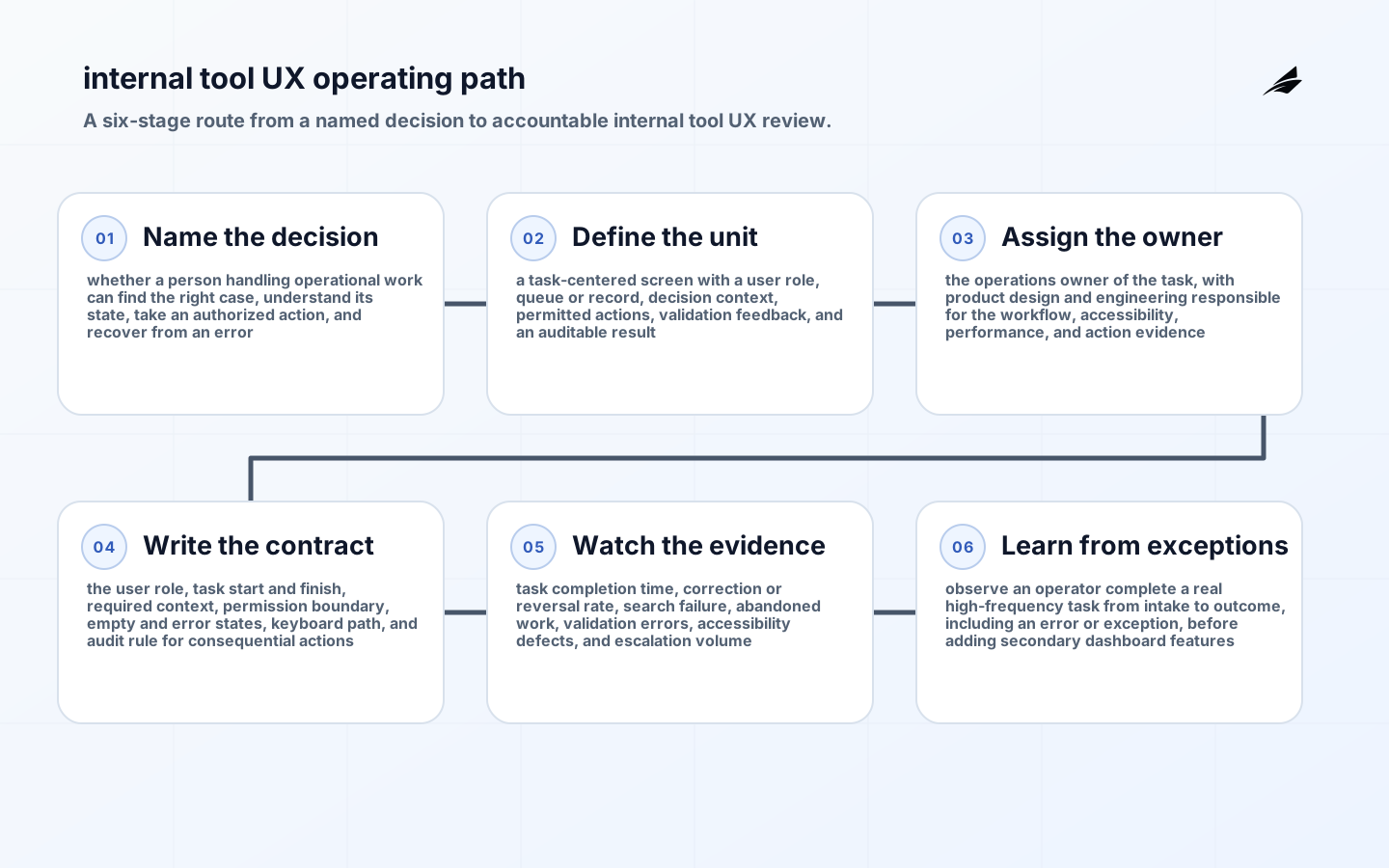
Write the decision in ordinary language, then name the unit of evidence that can support it: a task-centered screen with a user role, queue or record, decision context, permitted actions, validation feedback, and an auditable result. The boundary should state who is included, which moment or period matters, what a provisional result means, and what happens when the evidence is incomplete. For internal tool UX, a vague goal such as improve visibility is not enough. A person should be able to point to a record, explain how it was produced, and say whether it is strong enough for the next action. That makes disagreement productive: teams can examine a concrete definition instead of arguing from screenshots or remembered intent.
| Boundary element | What to decide before build | Evidence to keep |
|---|---|---|
| Decision | whether a person handling operational work can find the right case, understand its state, take an authorized action, and recover from an error | A plain-language statement and named decision owner |
| Working unit | a task-centered screen with a user role, queue or record, decision context, permitted actions, validation feedback, and an auditable result | Identifier, timing rule, scope, and version where relevant |
| Accountability | the operations owner of the task, with product design and engineering responsible for the workflow, accessibility, performance, and action evidence | Owner, technical steward, and escalation route |
| Status | What internal tool UX can prove now versus what remains provisional | Visible state, exception reason, and next review |
Clarify scope before implementation
Scope is a safety mechanism, not a lack of ambition. Establish the first customer, role, tenant, service, or workflow that the design will serve and write down the cases it deliberately excludes. This matters especially when a familiar label hides different meanings across teams. The definition of a task-centered screen with a user role, queue or record, decision context, permitted actions, validation feedback, and an auditable result needs an inclusion rule, an exclusion rule, and a time boundary. Those choices allow later reporting, support, engineering, and governance conversations to start from the same observable fact rather than from a broad interpretation of what the feature was meant to do.
Make the internal tool UX contract explicit
The contract for internal tool UX is the user role, task start and finish, required context, permission boundary, empty and error states, keyboard path, and audit rule for consequential actions. Put that commitment where builders, operators, and affected readers can review it. Contracts are not documentation theatre; they turn a future surprise into a choice the team can make before a dependency hardens. The Web Content Accessibility Guidelines 2.2 provides useful common language for this kind of boundary, while GOV.UK Design System shows why stable names and attributes matter when evidence crosses systems. Keep the contract small enough to test on the first path, but specific enough that two teams cannot implement materially different meanings without noticing.
- State the purpose and the decision that internal tool UX is intended to support.
- Define a task-centered screen with a user role, queue or record, decision context, permitted actions, validation feedback, and an auditable result and identify the attributes that change its meaning.
- Name the owner, reviewer, and escalation route before the first incident.
- Version changes that alter a reader interpretation or a consumer behavior.
- Record the privacy, access, and retention limit that applies to the evidence.
Design the first internal tool UX operating path
Build one complete path rather than a broad but partial capability. For internal tool UX, the owner should be able to start with a real trigger, follow the relevant record or action through the system, see its current state, and recover from a known failure. The design needs a direct answer for building a polished data viewer that leaves staff to infer priority, permissions, next action, and the consequence of a mistaken click. That answer may be a validation rule, an approval, an idempotency check, a visible annotation, or a temporary pause. The important point is that the response is available to the person who must act, not buried in a future implementation note.
Use the first path to test the difference between intent and operation. Observe an operator complete a real high-frequency task from intake to outcome, including an error or exception, before adding secondary dashboard features. Capture the identifiers, timestamps, versions, and reasons that make the path reconstructable later, but resist collecting detail that has no decision purpose. The OWASP Application Security Verification Standard is a useful reference for assessing risk and limiting unnecessary data. A system becomes easier to improve when its evidence is both sufficient for investigation and proportionate to the people it affects.
| Operating moment | Control for internal tool UX | Useful evidence |
|---|---|---|
| Create or trigger | Check the rule in the user role, task start and finish, required context, permission boundary, empty and error states, keyboard path, and audit rule for consequential actions | Source, actor or service, timestamp, and contract version |
| Process or decide | Apply the permitted action and retain its result | Outcome, validation result, and affected scope |
| Publish or hand off | Show status and meaningful context to the next reader | Current state, owner, and correlation identifier |
| Correct or replay | Make the exception visible and preserve the reason | Before-and-after state, notice, and closure proof |
Make handoffs visible
Handoffs are where a sound local design loses its meaning. The next person or service needs to know the status, the relevant constraint, the owner, and the identifier that connects this result to prior evidence. Do not make a reader infer whether a value is final, whether an action was approved, or whether a correction is still underway. For internal tool UX, a visible handoff supports faster diagnosis and reduces accidental rework. It also makes it possible to distinguish a genuine operating failure from a misunderstood boundary, which is a much better starting point for improvement.
Measure what can change an action
Start with signals that route a person to a decision. For internal tool UX, watch task completion time, correction or reversal rate, search failure, abandoned work, validation errors, accessibility defects, and escalation volume. A number without a response path is merely a report; a threshold earns attention only when it answers who investigates, what is contained, and how readers are informed. Compare technical signals with the decision cadence. A fast-moving queue may need a current status; a monthly reconciliation may need a durable correction history. The OpenTelemetry semantic conventions offers a practical starting point for reasoning about the surrounding practice, but the local operating rule still needs to fit the consequence of a wrong action.
Design internal tool UX for exceptions
Exceptions expose the assumptions that happy paths hide. Decide in advance which failures pause work, which can continue with a visible qualifier, who can override a control, and what evidence closes the exception. In internal tool UX, the dangerous shortcut is building a polished data viewer that leaves staff to infer priority, permissions, next action, and the consequence of a mistaken click. A clear exception state protects both the customer and the delivery team: it stops a tentative result from being treated as settled, and it gives investigators a shared account of the event. Review exception patterns by materiality and recurrence rather than treating every alert as equally urgent.
- Show the affected scope and current status where the next decision is made.
- Route ownership to a named person or team with authority to resolve the issue.
- Preserve the reason, timeline, and downstream impact of a correction.
- Notify the people who might act on an invalid or incomplete result.
- Turn recurring exceptions into a contract, workflow, or test improvement.
Set a review cadence for internal tool UX
Review internal tool UX with the people who use it, operate it, and change it. The review should ask whether the decision boundary still matches the product or delivery model, whether controls are catching consequential failures, and whether readers can interpret the output without private context. This is also the point to retire stale fields, measures, screens, or checks. Scope should expand only after the original path has survived ordinary change, a real correction, and an ownership hand-off. That discipline keeps a promising first build from becoming an expensive collection of undocumented commitments.
Internal tool UX implementation checklist
- Name the decision: whether a person handling operational work can find the right case, understand its state, take an authorized action, and recover from an error.
- Define the working unit: a task-centered screen with a user role, queue or record, decision context, permitted actions, validation feedback, and an auditable result.
- Assign accountability: the operations owner of the task, with product design and engineering responsible for the workflow, accessibility, performance, and action evidence.
- Publish a testable contract for the user role, task start and finish, required context, permission boundary, empty and error states, keyboard path, and audit rule for consequential actions.
- Instrument or retain the signals: task completion time, correction or reversal rate, search failure, abandoned work, validation errors, accessibility defects, and escalation volume.
- Exercise an exception, correction, or rollback before widening scope.
- Connect the work to related guides: The Plain-language Guide to Code Review Systems, REST API Contracts That Hold Up Under Change, Monorepo Structure: Cost, Ownership and Scaling Guide.
Internal tool UX takeaways
- Internal tool UX begins with a decision boundary, not a tool selection.
- A small, explicit contract is more durable than assumptions spread across teams and screens.
- Useful evidence includes status, ownership, and the reason for a correction or exception.
- Monitoring should lead to a proportionate response, not just a larger collection of metrics.
- A recurring review keeps the first design aligned with how people actually use and operate it.
Internal tool UX FAQ
What is the smallest useful first release? It is one complete path that supports whether a person handling operational work can find the right case, understand its state, take an authorized action, and recover from an error, with a task-centered screen with a user role, queue or record, decision context, permitted actions, validation feedback, and an auditable result, a named owner, and an exception response. Who should own it? The operations owner of the task, with product design and engineering responsible for the workflow, accessibility, performance, and action evidence. When is it ready to expand? Expand after the team can show the contract, evidence, correction route, and review outcome for real operating cases rather than only a successful demonstration.
Sources
- Web Content Accessibility Guidelines 2.2
- GOV.UK Design System
- OWASP Application Security Verification Standard
- OpenTelemetry semantic conventions
Conclusion: make internal tool UX dependable in use
The important early decision in internal tool UX is to make meaning, ownership, and evidence visible before scale makes them costly to change. Start with whether a person handling operational work can find the right case, understand its state, take an authorized action, and recover from an error; keep the unit and contract precise; then make exceptions and review part of the operating design. This produces a first build that can be questioned, corrected, and improved without guessing. The related reading, The Plain-language Guide to Code Review Systems, REST API Contracts That Hold Up Under Change, Monorepo Structure: Cost, Ownership and Scaling Guide, can help extend the work while preserving the same attention to decision boundaries and accountable delivery.