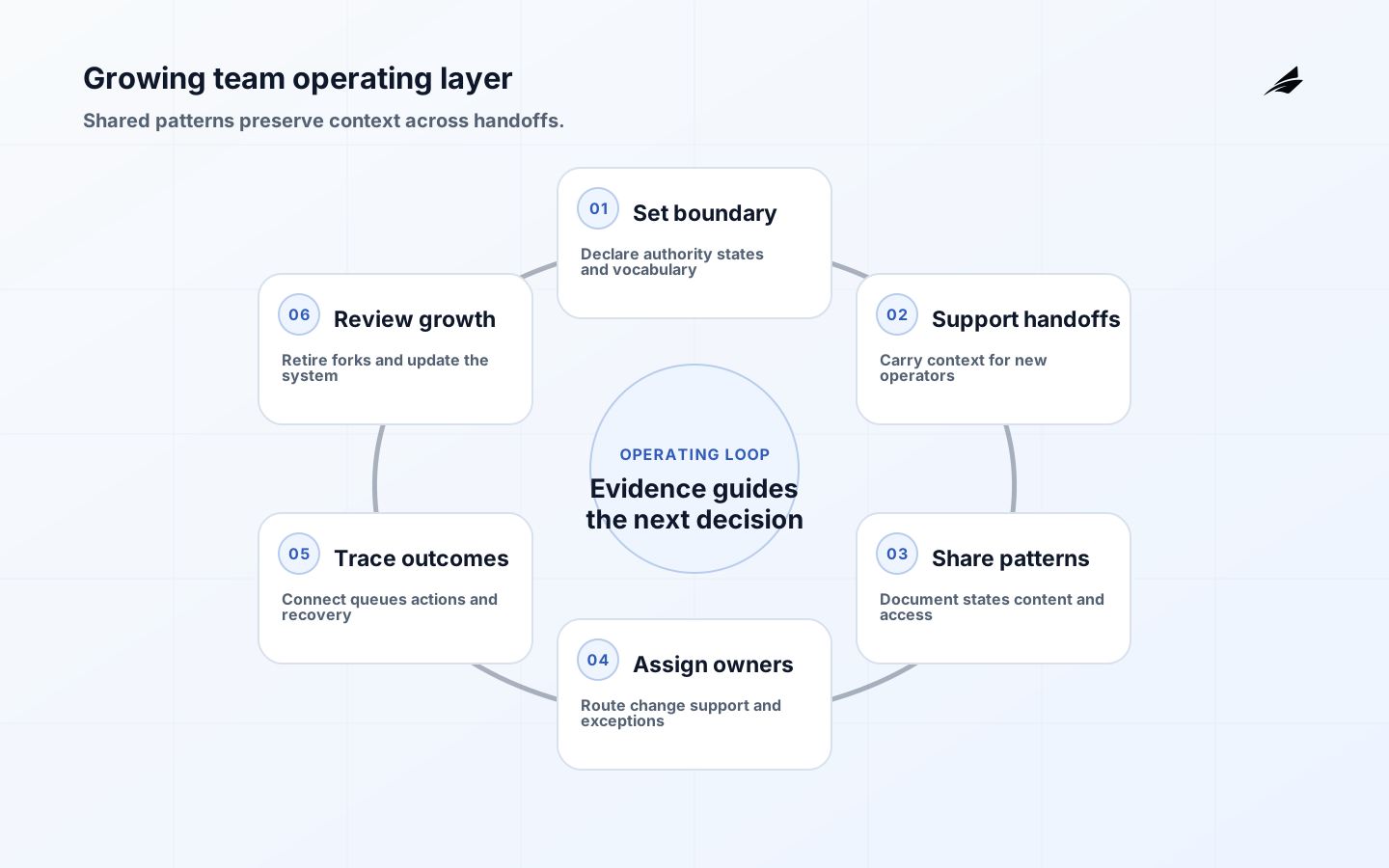
An internal tool that works for five people can fail at fifty without any single bug becoming obvious. More roles use it, records arrive from more systems, exceptions increase, a supervisor needs visibility, and a new operator has to learn decisions that once lived in hallway conversations. Internal tool UX for a growing team is therefore an operating-layer problem: preserve context, make ownership explicit, support accessible work, and give people a safe way to recover when dependencies disagree.
Growth does not require a giant platform on day one. It requires a few durable boundaries. Every important workflow should have a named outcome, authoritative record, state model, permission rule, support route, and evidence trail. Reusable components and patterns should reduce accidental variation, while domain teams retain enough control to match their work. The system becomes valuable when a handoff no longer loses the reasoning behind a decision.
Read this with Edilec's internal tool UX guide for custom software, pre-build decisions guide, code review systems field guide, and background jobs field guide. These connect interaction choices to delivery and asynchronous work as the organization expands.
Set the operating boundary
Start by naming the decisions the tool owns and the decisions it only displays. A case-management tool may own assignment and escalation, while a billing platform owns invoice state and a customer system owns contact identity. If the interface merges these facts without showing authority, teams will create competing edits and argue over which screen is right. Keep an authority map beside the workflow so a maintainer can understand which service or team may change each field.
Define the smallest shared vocabulary that crosses teams: case, owner, due time, severity, approval, pending, resolved, and corrected. Do not normalize away meaningful differences. An incident, request, review, and exception can share a record shell while retaining distinct states and evidence. Consistency is useful when it reduces interpretation; it is harmful when one generic status hides four different responsibilities.
| Operating boundary | Shared rule | Local variation allowed |
|---|---|---|
| Identity | Stable record and owner fields | Role-specific display and lookup |
| State | Named transitions and terminal meaning | Different queues or approval steps |
| Permission | Server-enforced action policy | Role-specific explanations and shortcuts |
| Evidence | Operation, actor, time, and reason | Domain-specific attachments |
| Recovery | Correction owner and escalation route | Different service-level targets |
Design for handoffs and mixed experience
As a team grows, the original expert is no longer present for every case. The interface must carry enough context for a new or occasional operator to act safely. Show why an item is in a queue, what has already been checked, which evidence is stale, who owns the next step, and what a supervisor can change. A handoff should not require a private message that says “you know the usual exception.”
Design for different speeds and abilities. A frequent operator may need keyboard-efficient bulk work; a new operator may need definitions and examples; a reviewer may need a clear comparison of old and new values. WCAG 2.2 provides testable requirements that support keyboard use, focus visibility, readable labels, contrast, reflow, and error recovery. Treat these as workflow reliability, not a separate compliance lane.
Create a small pattern language
A growing team benefits from a small set of trusted patterns: record header, status timeline, owner selector, evidence panel, approval dialog, bulk action preview, permission message, empty state, error summary, and correction history. Each pattern needs usage guidance, content rules, accessibility behavior, supported states, and an owner. A component that only documents colors and spacing is not enough for an operational decision surface.

Use the U.S. Web Design System components as an example of combining components, design tokens, accessibility, and implementation guidance. Reuse the foundation while preserving domain context. A queue pattern can be shared, but its sorting, urgency, and escalation semantics belong to the workflow owner. This balance lets teams move independently without creating ten incompatible versions of “pending” or “confirm.”
| Pattern | Minimum contract | Common misuse |
|---|---|---|
| Status badge | State, meaning, owner, transition | Color without text or action |
| History timeline | Event source, time, actor, correction | Mixed system and business time |
| Bulk action | Selection, exclusions, preview, result | Hidden items or unbounded effect |
| Error summary | Cause, field, recovery, operation ID | Generic failure with no next step |
| Approval dialog | Decision, evidence, authority, audit | Confirmation that changes nothing |
Make ownership scale with the code
Ownership should follow the workflow and pattern, not remain in the memory of a founding designer or engineer. Name a product or policy owner for the decision, a technical owner for the implementation, and an operations owner for support and exception handling. GitHub's code owners documentation illustrates a practical mechanism for routing review responsibility. Apply the principle to design patterns and critical workflow definitions as well as source files.
Set review triggers rather than relying on a calendar alone. New roles, new data sources, bulk actions, regulatory requirements, significant incidents, or a rising correction queue should reopen the design. Keep temporary overrides and manual queues visible with an expiry date. A growing team needs a way to say “this is intentionally local” and “this must become shared,” otherwise every exception becomes a permanent fork.
Represent asynchronous work honestly
Background jobs, integrations, and approvals create a distance between the operator's action and the final business effect. Show operation identity, queue state, last update, expected next step, and the person or service that can intervene. Do not let a success toast imply that a downstream system has accepted the change when the request only created a job. If a job fails, preserve the original intent, error type, retry status, and correction route so an operator does not re-enter it from scratch.
Use consistent state vocabulary across the UI and backend: requested, accepted, processing, waiting, completed, rejected, and needs review may be enough if transitions are defined. Pair visible status with metrics for queue age, failure rate, retries, and final outcome. A workflow that looks fast because it hides pending work will create more support tickets as volume grows.
Measure outcomes and recovery
Track completion quality, time to decision, rework, exception volume, correction age, handoff delay, approval wait, support escalation, and accessibility defects. Segment by role and case type. A low average completion time may conceal a queue where new operators cannot find the source record, or a role whose keyboard path is unusable. Review a small sample of real cases alongside aggregate data so teams can connect a measure to a design choice.
Connect visible workflow state to service evidence. The OpenTelemetry observability primer shows how traces, metrics, and logs provide different views of one operation. Use an operation ID and bounded attributes to explain a pending or failed item across queues and dependencies without logging sensitive values. The support view should answer what happened, who acted, which version ran, and what is safe to do next.
Keep growth from widening access accidentally
New roles and integrations are common sources of over-permission. Test record-level, field-level, bulk, export, search, and delegated support access. Show when an operator can view but not change a record, and avoid leaking protected values through counts, autocomplete, or error messages. Threat-model the workflow as it expands rather than assuming internal users are a single trusted group.
Security practice should be integrated into delivery. NIST's Secure Software Development Framework is useful for connecting design, requirements, implementation, testing, and response. For an internal tool, record the threat, control, test, owner, and review trigger. A one-time approval cannot substitute for testing when a new bulk action or data source changes the blast radius.
Scale contribution without centralizing every decision
Create a lightweight contribution path: describe the workflow, show current and proposed states, identify reused patterns, provide accessibility and permission evidence, and name the owner after launch. A central design or platform group can review shared primitives and risky boundaries, while domain teams own local content and operations. This reduces review bottlenecks and keeps the system connected to people doing the work.
Retire patterns as deliberately as you add them. If a component creates repeated confusion, a state is no longer valid, or a manual fallback has become the real path, record the change and migrate consumers. Consistency is maintained by removing weak choices, not only by publishing more guidance. Keep release notes and examples current so new teams do not copy an obsolete workflow from a screenshot.
Run a quarterly operating review
Review a representative normal case, a recent exception, a permission denial, a handoff, and a correction. Include operators from different experience levels, support, policy, design, engineering, and security. Look for repeated manual steps, unclear ownership, stale data, unannounced state changes, inaccessible interactions, and patterns that have forked. Turn findings into a small decision list with owners and evidence rather than a broad redesign backlog.
The review should also ask whether the current operating model still fits the team. A workflow used by one group may now be shared across regions or legal entities. A pattern built for synchronous work may now front an asynchronous queue. A new integration may have changed the authoritative source. Revisit the boundary before adding another screen. That discipline keeps growth from turning local assumptions into organizational infrastructure.
Key takeaways for growing teams
- Treat internal tool UX as an operating layer that preserves context, ownership, and recovery across handoffs.
- Define authority and state vocabulary before sharing components across teams.
- Build a small pattern language with content, accessibility, permission, and lifecycle guidance.
- Represent asynchronous work honestly so pending, rejected, and completed effects are distinct.
- Measure completion quality, rework, exception age, accessibility, and support effort by role and case.
- Scale contribution through named owners, review triggers, and evidence rather than a single central team.
Growing team internal tool questions
What changes when an internal tool is used by a growing team?
More roles, data sources, handoffs, exceptions, accessibility needs, and support expectations appear. The tool needs explicit authority, state, permissions, reusable patterns, operation evidence, and ownership that survives the people who built the first version.
How can teams keep tools consistent without slowing delivery?
Share accessible primitives, workflow patterns, content rules, and review checkpoints. Let domain teams contribute through a lightweight path that names local owners and supplies evidence. Centralize risky foundations and cross-team rules, not every screen or wording decision.
What should be measured after an internal tool launches?
Measure the business task: completion quality, time to decision, rework, exception and correction age, handoff delay, approval wait, support escalations, and accessibility defects. Pair those measures with case reviews so a healthy average does not hide a blocked role or a harmful edge case.
Conclusion: scale context and ownership
Growing teams do not need internal tools to become more complicated; they need them to become more explicit. Define authority, states, ownership, patterns, accessibility, permissions, asynchronous behavior, and recovery before scale turns informal knowledge into hidden infrastructure. With an operating review and an evidence-based contribution path, internal tool UX can preserve the speed of a small team while giving a larger organization the clarity to hand work over safely.