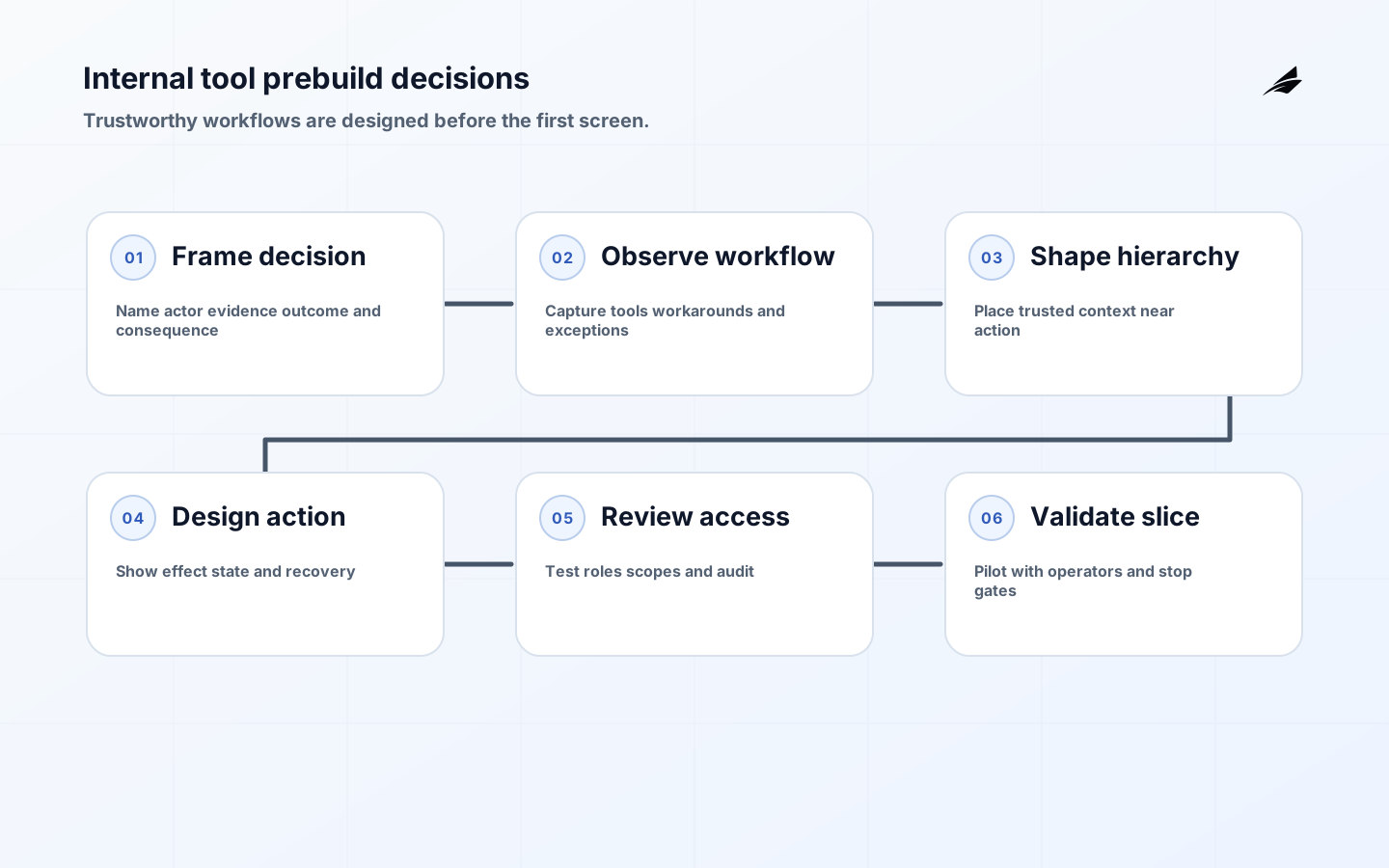
The most expensive internal-tool decisions are usually made before anyone calls the work UX. Internal tool UX before development means deciding on a table shape, status vocabulary, approval shortcut, permission model, and notification pattern while those choices are still easy to examine. Once operators depend on them, the assumptions are difficult to unwind. Before the first build, the goal is to make the workflow understandable enough that design, engineering, security, and operations can agree on the same promise.
Internal users are not a single persona. A dispatcher, finance reviewer, support specialist, and administrator may touch the same record with different authority, time pressure, and consequences. Plan for the complete task, including stale data, delayed services, duplicate work, reassignment, correction, and audit. A good first tool removes uncertainty from one important decision; it does not pretend to automate an entire department before the team understands the boundaries.
For implementation context, connect these decisions to Edilec's internal tool UX guide for custom software, React state design checklist, and plain-language design systems guide. The shared theme is explicit state: people can only act safely when the interface and underlying system agree on what is happening.
Name the decision and its consequence
Begin with a decision, not a screen. “Review suspicious payout” is more useful than “build an operations dashboard” because it identifies the actor, evidence, action, and consequence. Write what starts the work, what must be true before action, what the system changes, who receives the result, and what happens when evidence is incomplete. This framing exposes whether the tool is a queue, a record editor, an approval surface, or a control room, each of which needs different interaction and audit choices.
Choose a representative case and a high-cost exception. A normal case shows the shortest useful path; an exception reveals the real design. If an analyst cannot verify a payout because a supplier feed is late, should the tool hold the item, show a pending state, allow escalation, or permit a documented override? Capture the policy owner and the person who can correct the result. A design that only answers the happy path is not ready for a consequential workflow.
| Pre-build question | Concrete answer | Design implication |
|---|---|---|
| Who acts? | Named role and context | Permission and terminology fit the operator |
| What is authoritative? | Record, source, and freshness | Show trusted values and provenance |
| What changes? | State, side effect, and downstream owner | Confirm the consequence and outcome |
| What can be unknown? | Pending, missing, or conflicting evidence | Show uncertainty instead of inventing a value |
| How is it corrected? | Owner, reversal, and audit evidence | Provide a safe recovery path |
Observe work before choosing the interface
Shadow the task where it actually happens. Note tools, copy-paste steps, private spreadsheets, informal approvals, and moments when the operator asks another person to interpret a record. Those workarounds may be evidence of missing data, an unclear policy, or a necessary control the product team has not modeled. Interview the person who receives the consequence of a mistake, not only the person who currently clicks the button.
Turn observations into acceptance cases. Include a complete record, a missing field, a duplicate request, a stale status, a permission change in another tab, an unavailable dependency, and a correction after completion. Write expected system state and user-visible feedback for each case. A prototype can then test decision clarity and recovery before the team spends time on integration plumbing. Research is valuable when it changes a requirement, a state model, or an ownership decision.
Design the information hierarchy around risk
Put the evidence needed for the next safe decision near the action. An operator reviewing a customer refund may need original amount, reason, prior adjustments, current balance, approval threshold, and the last event time before seeing a large button. Secondary history can remain available without competing with the decision. Avoid a dense table that displays every field equally; importance, freshness, and consequence should determine hierarchy.
Use labels that describe business meaning, not database names. Define units, timezone, status vocabulary, and source in plain language. If data is calculated, say how; if it is delayed, say when it was last refreshed. WCAG 2.2 includes requirements for headings, labels, contrast, focus, errors, and reflow that are especially important in dense operational screens. Accessibility also improves scanability for everyone working quickly or on a small display.
Make actions safe, reversible, and specific
Use action labels that name the effect: approve payout, send for review, cancel export, or reopen case. A generic “Submit” leaves the operator unsure what will happen. Show the affected record, the target state, the downstream effect, and any approval requirement before a consequential action. When the operation is reversible, make undo or correction easy to find. When it is not, require a reason and preserve the evidence needed for review.
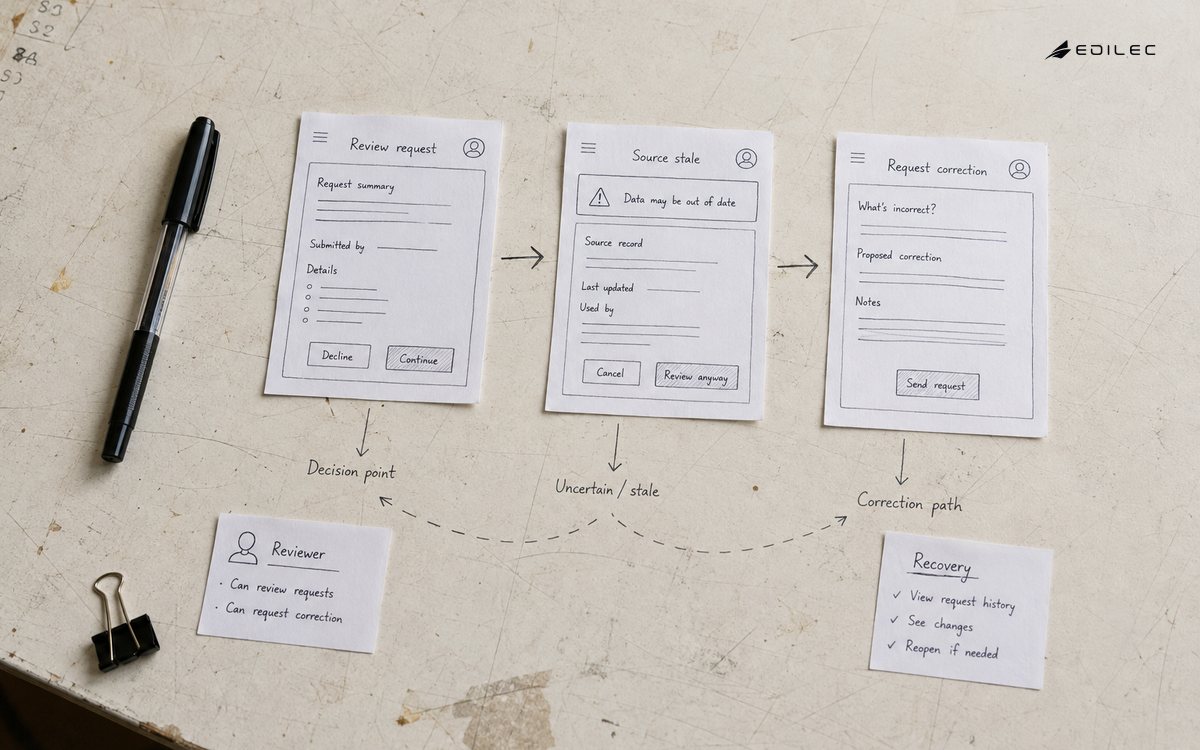
Do not represent a queued request as completed. A button may succeed in creating a job while the business effect remains pending. Show operation ID, progress or queue state, expected next update, and a way to return to the item. Use clear empty, loading, partial, error, and success states. The ARIA Authoring Practices Guide offers patterns for dialogs, disclosure, grids, and live regions; use native controls where possible and test the actual task rather than adding ARIA by imitation.
| Action type | Required context | Safe feedback |
|---|---|---|
| Reversible update | Record, old value, new value | Saved state plus undo or correction |
| Irreversible effect | Consequence, reason, approval | Confirmation and durable audit reference |
| Queued work | Operation ID and expected lifecycle | Pending state and final outcome |
| Bulk action | Selection count, filters, exclusions | Preview, bounded execution, result summary |
| Blocked action | Permission or policy reason | Clear route to resolve or request access |
Make permission boundaries understandable
Decide whether access depends on role, tenant, record ownership, geography, approval state, or a combination. Design the UI to explain allowed, unavailable, and not-yet-approved states without revealing protected data. A hidden action can be appropriate, but an operator who cannot understand why work is blocked will create a workaround. For sensitive actions, show the acting identity, affected account, required approval, and audit consequence.
The server remains authoritative. Test direct requests, bulk endpoints, stale sessions, delegated support access, and role changes while a page is open. OWASP ASVS provides a verification vocabulary for authentication, access control, validation, and logging. Incorporate its concerns into the workflow design: a permission error should be safe, diagnosable, and recoverable, not a generic red banner that forces the operator to guess.
Share foundations without flattening the workflow
Choose accessible primitives, tokens, table patterns, form behavior, feedback components, and navigation rules that teams can reuse. Then allow the internal workflow to differ where density, role, or decision cost requires it. The U.S. Web Design System components are a useful example of combining components, accessibility guidance, and implementation practice. Reuse should reduce accidental variation and testing cost; it should not force a finance approval screen to behave like a marketing landing page.
Create a small pattern inventory for the first workflow: record header, status badge, history panel, confirmation dialog, error summary, empty state, permission message, and bulk result. Document when each pattern is safe and which states it supports. A component without usage guidance becomes a visual shortcut that can hide important semantics. Include content examples and keyboard behavior so designers and developers do not interpret the pattern differently.
Threat-model the task before launch
Walk through misuse as well as ordinary operation: a user selects the wrong account, a shared link exposes a record, a bulk action includes an excluded item, a stale tab overwrites a newer decision, or a support user sees more data than needed. Record the control, owner, and evidence for each risk. NIST's Secure Software Development Framework recommends integrating secure practices throughout the lifecycle; for internal tools, that means design review and test cases, not only a scan before deployment.
Protect the diagnostic trail. Operation IDs, user identity, affected resource, old and new state, reason, and approval can support accountability, but logs must avoid secrets and unnecessary personal data. Define retention and access for audit history. A screen that shows sensitive information because “only employees use it” has not defined a threat model. Internal users are still callers with different privileges, devices, and opportunities for error.
Build and validate one narrow path
Build the smallest path that completes a real decision from intake through final state and correction. Keep representative records, realistic latency, and real terminology. Run a usability walkthrough with operators, a keyboard and screen-reader pass, a permission test, and a failure tabletop before expanding. Storybook's accessibility testing guidance can support automated checks, but automated results should be paired with task-based review because a page can pass a rule scan and still confuse an operator.
Release to a bounded group with a support owner, a manual fallback, and a stop condition. Compare expected completion, exception, and correction behavior with production evidence. Do not widen scope simply because the first happy-path demo looks clean. Expand when the team can explain failures, fix data safely, and show that the interface reduces the intended operational burden without creating a new hidden queue.
Review the decision before expanding the backlog
A pre-build review should end with a bounded decision: which workflow is in scope, which users and records it covers, what is authoritative, what remains manual, what evidence is required, and what would stop the rollout. Include a product or policy owner, an operator, design, engineering, security, and support. Ask each person to describe the same case and compare their language. Differences often reveal an unresolved state or authority boundary.
Keep the decisions in a versioned record and link them to tests and support procedures. Add a review trigger for new roles, data sources, bulk actions, or downstream effects. A good early record does not predict every future feature; it gives a later team a clear basis for challenging an assumption. That is how internal tools avoid accumulating invisible policy in a sequence of quick buttons.
Key takeaways before an internal tool build
- Start from one consequential decision and its complete workflow, not a broad dashboard concept.
- Observe workarounds and exceptions because they reveal missing data, policy, or recovery design.
- Place trustworthy context near the action and make state, freshness, ownership, and consequence explicit.
- Use accessible semantic controls and test keyboard, focus, zoom, assistive technology, and errors.
- Keep authorization server-enforced while making blocked and pending states understandable.
- Release a narrow path with real operators, measurable evidence, a fallback, and an explicit expansion gate.
Pre-build internal tool questions
What should be decided before building an internal tool?
Define the user and business decision, authoritative records, normal and exceptional states, permissions, accessible interaction needs, audit evidence, correction route, and first-release boundary. These decisions are more valuable than a long list of screens because they determine what the interface must make safe.
How do you keep a tool from becoming a collection of shortcuts?
Give each shortcut a policy owner, explicit state transition, audit outcome, and review or exit condition. Design the underlying workflow so operators can finish safely without relying on private spreadsheets, undocumented approvals, or a single expert who knows how to undo mistakes.
Should an internal tool use the same design system as a customer product?
Share accessible foundations, tokens, and proven primitives when they fit. Keep workflow patterns, density, terminology, and permission treatment specific to the operator's job. Consistency should remove accidental variation, not erase the context needed for a safe business decision.
Conclusion: make the first path trustworthy
Internal tool UX decisions made before the first build determine whether the product will clarify work or hide complexity behind a faster click. Name the decision, observe the real journey, model uncertainty, design accessible and permission-aware actions, threat-model the task, and validate one narrow path with operators. The result is a foundation that can grow because its states, evidence, and ownership are explicit from the start.