Internal tools coordinate the work customers rarely see: reviewing applications, correcting records, scheduling jobs, approving exceptions, reconciling payments and responding to incidents. Early versions often serve a small expert group and a forgiving workload. Growth introduces more roles, queues, data and consequences. A tool scales with operations when it preserves clear authority, fast routine work and recoverable exceptions as volume and organizational complexity increase, not merely when its servers handle more requests.
Study the operating system around the screen
Observe people doing real work across a normal day, a peak period and a difficult exception. Record triggers, information sources, handoffs, deadlines, approvals, corrections and side channels. A request that appears to be one row may involve an email attachment, a policy check, a call and a finance update. If the design captures only the happy path, users will rebuild the missing process in notes and spreadsheets.

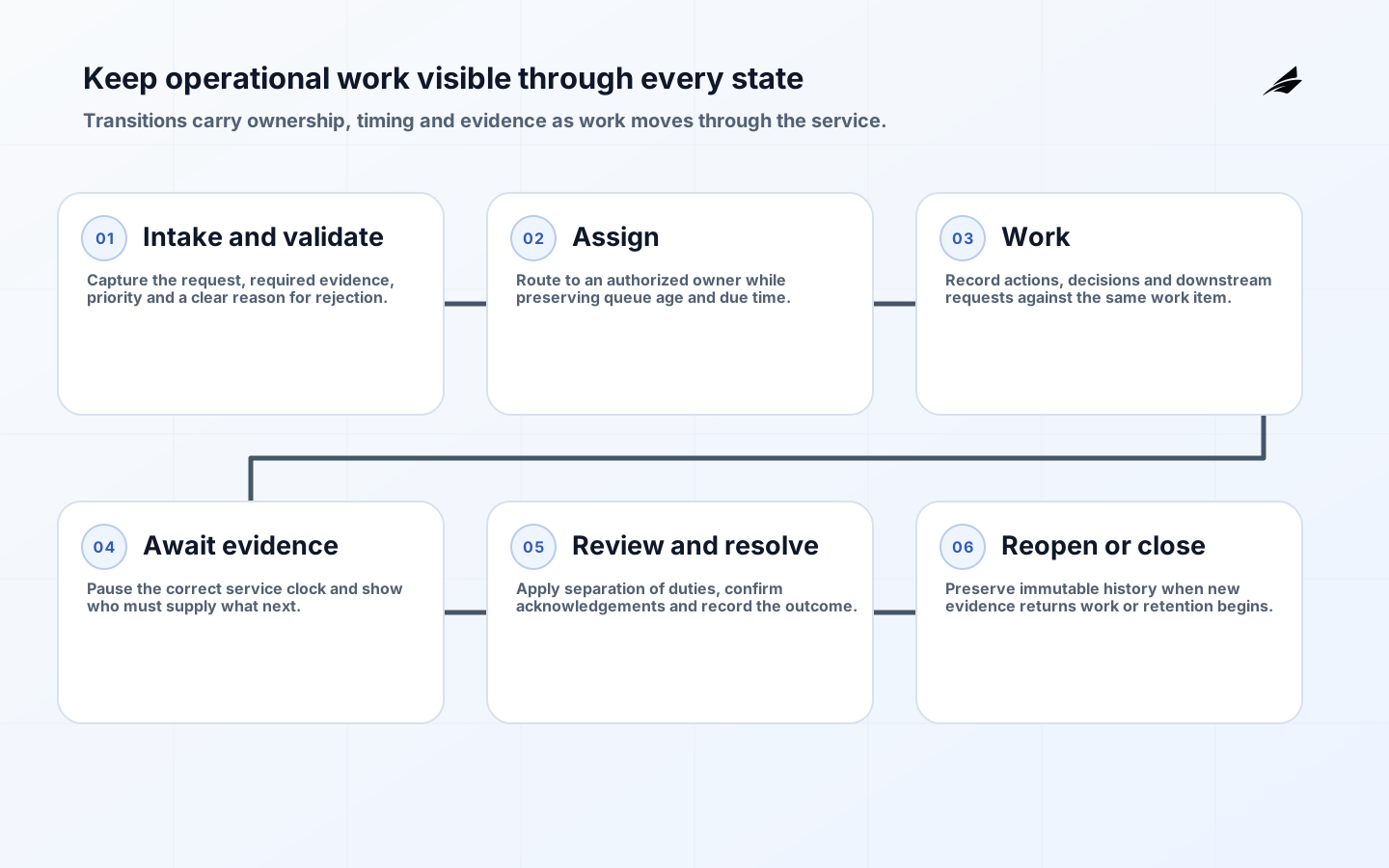
Define the unit of work and its lifecycle. Give each item a stable identifier, owner or queue, state, priority, due rule and history. Separate business state from interface labels: 'awaiting evidence' should mean the same thing in dashboards, APIs and reports. Model permitted transitions and reasons for cancellation, reopening or correction. This creates a foundation for automation and measurement without hiding exceptions.
| Operational question | Design decision | Evidence |
|---|---|---|
| What is the work item? | Stable identity and record boundary | Representative cases |
| Where can it go? | States, transitions and terminal outcomes | Lifecycle map |
| Who may act? | Role, assignment, delegation and separation rules | Permission matrix |
| What is urgent? | Priority and due-date policy | Service commitments |
| What can fail? | Exception, retry and escalation paths | Incident and correction history |
| What proves completion? | Required fields, evidence and downstream acknowledgement | Acceptance and reconciliation rules |
Optimize information architecture for repeated work
The primary view should help a role answer what needs attention now. Provide stable filters, saved views, sorting, counts and search that match operational vocabulary. On the record page, place current status, next action, critical context and recent history before secondary detail. Keep identifiers copyable and links durable. Preserve filter and page state when a user returns from a record so reviewing a queue does not become repetitive navigation.
Efficiency features need safeguards. Keyboard navigation, bulk selection, templates and inline edits can reduce handling time, but users must see scope and consequences before committing. Use previews for bulk changes, clear confirmation for destructive actions and resumable server-side jobs for large operations. Show partial success at item level instead of reporting a misleading green banner. WCAG 2.2 is relevant even for internal audiences: keyboard access, visible focus, labels, error identification and accessible authentication support reliable work.
| Growth pressure | Tool response | Avoid |
|---|---|---|
| More records | Indexed search, pagination and saved filters | Loading an entire dataset in the browser |
| More roles | Policy-based permissions and role-focused views | Scattered one-off condition checks |
| More repetitive work | Safe bulk jobs and templates | Unreviewed client-side loops |
| More exceptions | Owned queues and structured reason codes | Free-text notes as the only record |
| More teams | Explicit ownership and handoff history | Shared queues with no claim model |
| More reporting | Defined metrics from governed events | Operational queries against changing screen tables |
Make permissions and audit history part of the domain
Internal does not mean low risk. These tools often expose broad customer data and powerful actions. Authenticate through the organization's identity provider where appropriate, require stronger controls for privileged roles and authorize every server-side operation. Model scope as well as role: a regional manager may view records for an assigned region but not every region. Test denied paths and object-level access; hiding a button is not authorization.
Create an append-oriented history for important actions: actor, time, target, action, previous and new state, reason and correlation to downstream work. Protect logs from ordinary editing and limit sensitive payloads. Audit evidence should answer a business question without reconstructing application logs. Define a separate correction mechanism rather than allowing direct database changes; emergencies still need authorization, recording, review and reconciliation.
NIST's SSDF and OWASP ASVS help turn secure development into owned practices and verifiable requirements. Apply threat modeling to privileged actions, protect source and deployment credentials, validate inputs, manage dependencies and maintain a vulnerability response path. Internal tools still require session security, cross-site request protections, safe file handling and rate limits, especially when they integrate with customer-facing systems.
Use architecture that keeps workflow and integration visible
Keep business rules in tested server-side services rather than distributing them across pages, database triggers and scheduled scripts. A modular application is often sufficient: separate workflow, permissions, integration and reporting concerns without incurring distributed-system overhead. Use background jobs for exports, bulk changes and remote calls that may take time. Jobs need idempotency, progress, retry limits, cancellation policy and an operator-visible outcome.
Treat surrounding systems as owned contracts. Define the system of record for customers, money, documents and workflow state. OpenAPI can describe HTTP interfaces, while events or managed files may fit other exchanges. In every pattern, record correlation identifiers and reconciliation rules. A tool should not report 'done' merely because it sent a request; distinguish queued, accepted and completed states when the downstream outcome matters.
Scale data and performance around operational demand
Measure queue queries and record pages under realistic data sizes and permission filters. Index around actual access patterns, select only needed fields and move expensive analytics away from transactional paths. Define retention and archival so the primary store does not grow without purpose. Cache reference data carefully, but avoid caching permission decisions or mutable status without a clear invalidation model. Capacity testing should include peak imports, bulk jobs and reporting, not only interactive page requests.
Dashboards need stable definitions. Document the numerator, denominator, time boundary, exclusions and owner for measures such as backlog, completion and age. Use immutable or reconstructable events where historical reporting matters; a current-state table cannot always explain what was true last month. Give operations the ability to trace a total back to work items so disputes become reviewable rather than philosophical.
Example: scaling a refund review tool
Imagine a small team reviewing refund requests in a shared list. Growth adds fraud review, finance approval and regional policies. The scalable design gives each request a lifecycle, monetary fields with currency, evidence references, policy version and assignment history. Standard requests can move through a concise review screen; high-value or inconsistent requests enter a specialist queue. Finance receives an idempotent payment instruction and returns an acknowledgement and final status.
A bulk action can assign requests but cannot approve payment. Managers can reassign across teams with a recorded reason, while direct record edits remain restricted. Dashboards show age by actionable state rather than one overall average. During rollout, one region runs the new process while totals, approval outcomes and payment acknowledgements are reconciled with the existing register. The old list is retired only after open items and links are migrated or closed.
Manage scaling risks before they become operational debt
| Risk | Control | Signal |
|---|---|---|
| Hidden process outside the tool | Observe work and support structured exceptions | Side spreadsheets keep multiplying |
| Permission leakage | Central policy and object-level negative tests | Unexpected access across teams |
| Unsafe bulk action | Preview, limits, background job and item results | Large correction or rollback |
| State inconsistency | Validated transitions and downstream reconciliation | Items stuck between systems |
| Slow queues | Query budgets, realistic tests and indexing | Growing tail latency at peak |
| Untrusted metrics | Defined events and traceable calculations | Teams maintain competing totals |
| Ownerless product | Business and technical lifecycle owners | Backlog and incidents have no decisions |
A rollout plan for an internal operations tool
- Frame the work unit, roles, volume, service commitments, risks and baseline measures.
- Observe routine and exceptional work; model lifecycle, authority, data and handoffs.
- Prototype dense workflows with representative users, including keyboard and accessibility testing.
- Build one vertical slice with permissions, audit, integration, deployment and telemetry.
- Migrate a bounded queue or team, reconcile results and provide direct support.
- Expand role by role while monitoring task outcomes, service reliability and correction reasons.
- Retire old lists, scripts, access and duplicated reports after open work is accounted for.
Use product and service measures together: completion and correction rates, queue age, handoff delay, support demand, accessibility defects, latency and availability. Google SRE guidance recommends indicators tied to what users care about, while DORA metrics can reveal whether changes are flowing safely. Segment measures by workflow and role; an overall average can hide one queue becoming unusable.
Key takeaways
- Model the work item, lifecycle, authority and exceptions before optimizing screens.
- Design dense interfaces for repeated work with accessibility and safe bulk behavior.
- Enforce server-side permissions and preserve business-readable history for privileged actions.
- Use durable jobs, explicit integration states and reconciliation for work outside the request cycle.
- Roll out by bounded team or queue and retire side systems only after open work is resolved.
Frequently asked questions
Should we buy or build an internal tool?
Buy when the workflow is common and a supported product fits permissions, data and integration needs. Build when differentiated rules or operational constraints justify ownership. Compare configuration, migration, recurring operation and exit cost, not licenses alone.
When has a spreadsheet outgrown the job?
Warning signs include conflicting copies, complex permissions, fragile scripts, unclear history, simultaneous edits and work that must trigger reliable downstream action. A spreadsheet can remain useful for analysis while a governed system owns the operational record.
What should an internal tool audit?
Record security and business-significant actions such as access changes, approvals, overrides, exports, corrections and state transitions. Capture actor, time, target, reason and outcome while minimizing unnecessary sensitive content.
Scale the operating model, not only the software
An internal tool becomes durable when routine work stays fast, exceptional work stays visible and powerful actions remain accountable. Clear state, policy, integration and measurement let the application evolve with the operation. The result is not a larger admin panel; it is an operating system teams can trust under pressure.