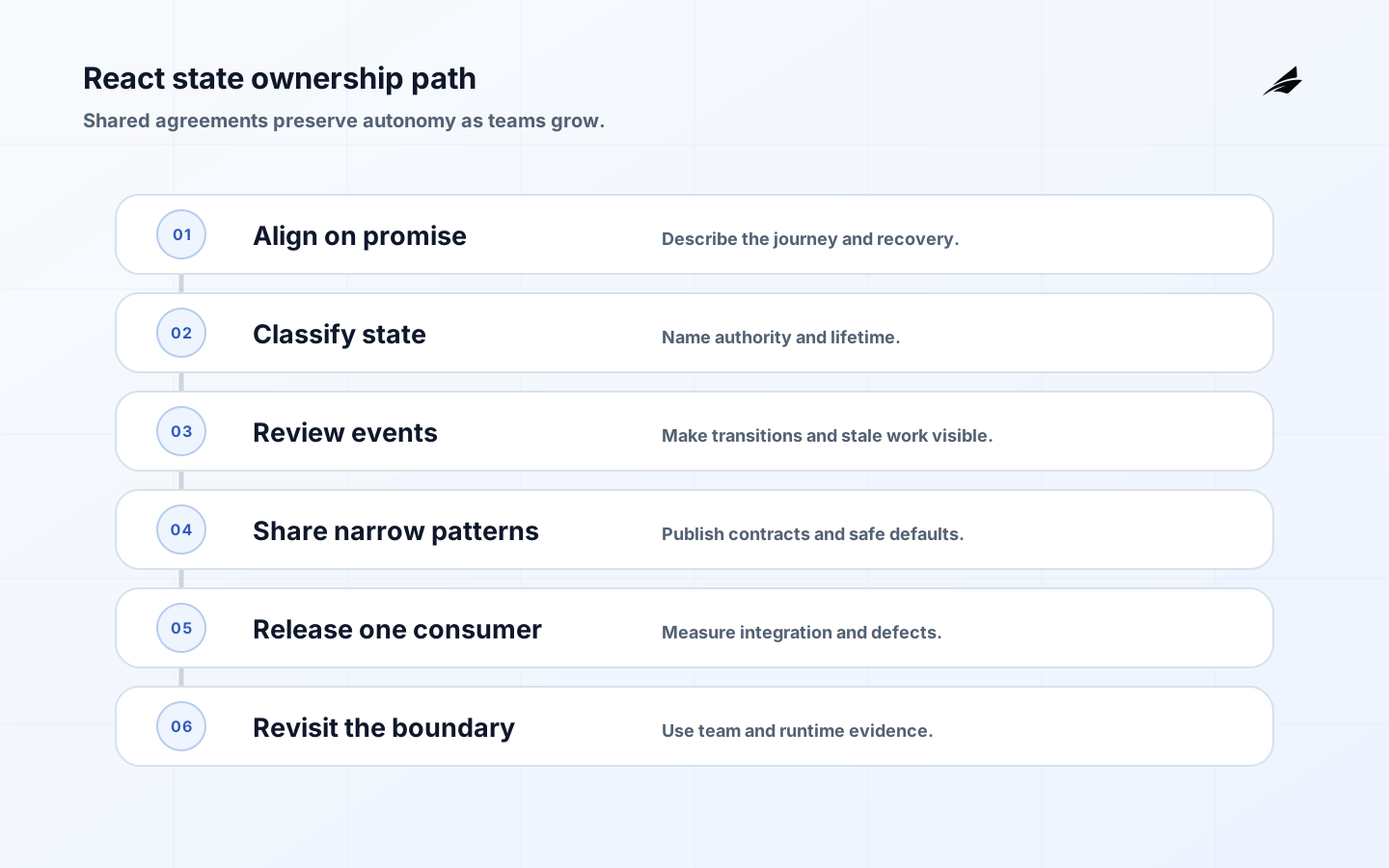
React state design becomes a team capability when more than one person must reason about a screen, a request, or a shared workflow. The risk is rarely that developers cannot store a value. It is that different contributors give the same value different owners, lifetimes, reset rules, or failure meanings. One feature treats a stale record as current, another resets a draft on every route change, and a third uses an effect to copy a derived value into a global store. The result is a system that is locally understandable but collectively unpredictable. A growing team needs agreements that preserve autonomy while making important boundaries inspectable.
Align the team on the promise the state must keep
Choose one representative flow and describe what a user may rely on. A support operator filters tickets, opens a record, edits a note, submits it, and sees whether the save is complete. Ask which information may be stale, which action is permissioned, what happens on a lost connection, and whether the user can safely retry. React’s Managing State documentation helps classify local and shared values, but the team still has to name the product promise and recovery behavior.
Capture the decision in a short working agreement: authority, lifetime, ownership, update events, reset triggers, error states, accessibility expectations, and observability. Link it to adjacent work such as the Node APIs field guide when client and server need matching pending or idempotency semantics. The agreement should be easy to revise; its value is that a new contributor can challenge a choice with the same vocabulary as the original author.
Classify state before choosing a shared tool
Use the smallest category that explains the value. Component interaction state includes open menus, focus, and local selection. Form state includes draft, touched, validation, and submission status. URL state includes filters and pagination that should survive reload or sharing. Server state includes remote records, freshness, invalidation, and optimistic changes. Workflow state includes durable steps, approvals, reconciliation, and human intervention. A global store can hold any of these, but moving everything there removes useful boundaries.

| Category | Owner question | Team convention |
|---|---|---|
| Component interaction | Which component can change it and when should it reset? | Keep local unless another consumer needs the same lifetime |
| Form and draft | What survives validation, navigation, or a retry? | Name draft authority and preserve user input through recoverable failures |
| URL and navigation | Should another person or a reload reproduce the view? | Parse, validate, normalize, and keep sensitive data out of the URL |
| Server data | What is authoritative and when is it fresh enough? | Use a cache boundary with invalidation, stale status, and error semantics |
| Workflow | What durable outcome must an operator reconcile? | Use an operation identity, explicit states, and an owner for exceptions |
Make ownership visible in code and review
Name state by the decision it supports rather than by its component location. A value called selectedItem may hide whether it is a temporary row selection, a route parameter, or the latest server record. Prefer explicit types and functions that express events: draftChanged, queryChanged, saveRequested, saveConfirmed, or refreshFailed. This makes review questions concrete and prevents a setter from becoming an unbounded escape route.
Review events, not only values
For each important transition, ask who can initiate it, what evidence is required, what state is visible during the transition, and which older event must be ignored. The event model is especially valuable when a team shares a reducer, query cache, or form abstraction. It creates a place to define authorization, validation, telemetry, and recovery without scattering the rule across components.
Prefer derivation over copied state
If a value can be calculated from the current authoritative inputs, derive it. A team should not store both rows and filteredRows, both line items and total, or both selected ID and selected object unless the synchronization rule is explicit. The You Might Not Need an Effect guidance is important here: effects are for synchronizing with external systems, not for making React state agree with itself after every render.
When derived computation is expensive, profile first and memoize with a defined invalidation boundary. Do not use memoization to hide a missing owner. Add tests for partial data, permissions, empty results, and values that change while a transition is pending. A readable derived selector often gives a team more confidence than another store.
Share patterns with contracts, not clever helpers
A shared hook or state utility should document inputs, outputs, lifecycle, error behavior, cancellation, and accessibility consequences. Keep the abstraction narrow enough that a product team can understand what it owns. A data-fetching helper that silently retries, transforms errors, and writes to several caches is difficult to govern; split the concerns or expose the policy explicitly. Use examples with long labels, slow responses, and permission changes before calling a pattern reusable.
Build a small library of tested state patterns: route filters, draft persistence, optimistic update with rollback, paginated results, and operation status. Each pattern should state when not to use it. The team can then share an approach without forcing every product surface into one global model. The TypeScript architecture checklist is a useful companion for keeping types aligned with module boundaries.
Control asynchronous work and identity changes
A growing team needs one standard for late responses. Include query or entity identity in the request, cancel obsolete work, and compare the response with current intent before committing it. When an account or permission context changes, invalidate or isolate data that belongs to the old context. React’s Preserving and Resetting State guidance helps explain component identity, but a team must additionally define when domain identity changes require a reset.
| Event | Risk | Required team rule |
|---|---|---|
| User changes account | Old record or draft appears under the new account | Reset or migrate by explicit identity; never rely on visual continuity |
| Search response arrives late | Older query replaces the current result | Key responses by query and discard stale intent |
| Save times out | User repeats a non-idempotent action | Show uncertain state and use server operation identity or status lookup |
| Refresh fails | A blank screen hides usable older data | Keep stale data visible with a retry and freshness label |
| Permission is revoked | A cached control remains actionable | Recheck authorization at the server and update the client state visibly |
Include accessible transitions in the agreement
A state convention is incomplete if it describes data but not the person using the interface. Require a plan for focus after route errors, field-level validation, status announcements, disabled and busy semantics, and keyboard access when content changes. Use WCAG guidance as the baseline, then test the actual transition with assistive technology. Treat an inaccessible shared pattern as a release blocker when its reuse would multiply the defect.
Keep sensitive state out of convenient places
Do not put secrets, private form values, or unbounded personal data into URLs, long-lived browser storage, or telemetry merely because those surfaces are easy to inspect. Define redaction and retention for state snapshots and error reports. The NIST secure software framework is useful context for integrating security practices into development rather than treating state privacy as a late audit.
Release shared state changes in evidence-bearing slices
Start with one consumer and one failure path. Measure integration time, test gaps, support questions, and defects. If a shared hook changes request timing or cache behavior, release it behind a bounded route or cohort and compare outcomes. Keep an escape route for consumers while the contract settles. A large migration that changes every screen at once produces too much noise to tell whether the state model helped.
Review the slice with someone outside the original team. Ask them to explain the owner, trigger a slow response, switch identity, and recover from an uncertain result. If they need private knowledge or browser inspection, the boundary is not yet ready for broad adoption. Keep the next change small enough that the team can still trace a defect to a state decision.
Measure state health as team work expands
Useful signals include defects caused by stale or duplicated values, time to diagnose race conditions, number of shared abstractions with no owner, test flake around asynchronous transitions, accessibility defects in common patterns, and time required to onboard a new contributor. Track the cost of coordination as well as runtime behavior. A state model that reduces render count but requires every team to ask one central maintainer for changes may not be an improvement.
As the product grows, shared state can also cross workflow boundaries. A background jobs field guide is useful when a screen starts polling an operation, and the database schema production guide matters when a client model begins to mirror durable records. Review those transitions explicitly. A UI cache should not silently become a second authority, and a durable status should not be treated as a transient spinner merely because the first consumer was simple.
React state design takeaways for growing teams
- Begin with a user promise and a representative journey.
- Classify state by authority and lifetime before selecting a shared tool.
- Prefer derived values and explicit events over synchronized copies.
- Standardize late-response, identity-change, accessibility, and privacy behavior.
- Release shared patterns through one consumer, measure the result, and revise the contract.
Questions from growing React teams
When should state become global?
Make state shared when several consumers need the same authority, lifecycle, or coordinated transition. If the only reason is convenience, keep it local and pass a deliberate interface. Global state without a clear owner makes reset and permission behavior harder to reason about.
What convention helps control effects?
Require an effect to name the external system, input dependencies, cleanup behavior, and failure state. Derived values and user-event work should not be placed in an effect just to avoid choosing an owner.
What should an IT manager review?
Review who owns facts, how stale and pending states are communicated, how identity changes reset data, what tests prove the transitions, and which production signals show a race or privacy problem. These questions reveal architecture risk without prescribing a library.
Conclusion: share decisions, not confusion
Growing teams need React state design that survives handoffs. Define authority and lifetime, make events and failure states explicit, share narrow patterns with contracts, and release changes through evidence-bearing slices. The result is a team that can move quickly without making every new contributor reverse-engineer hidden synchronization rules.