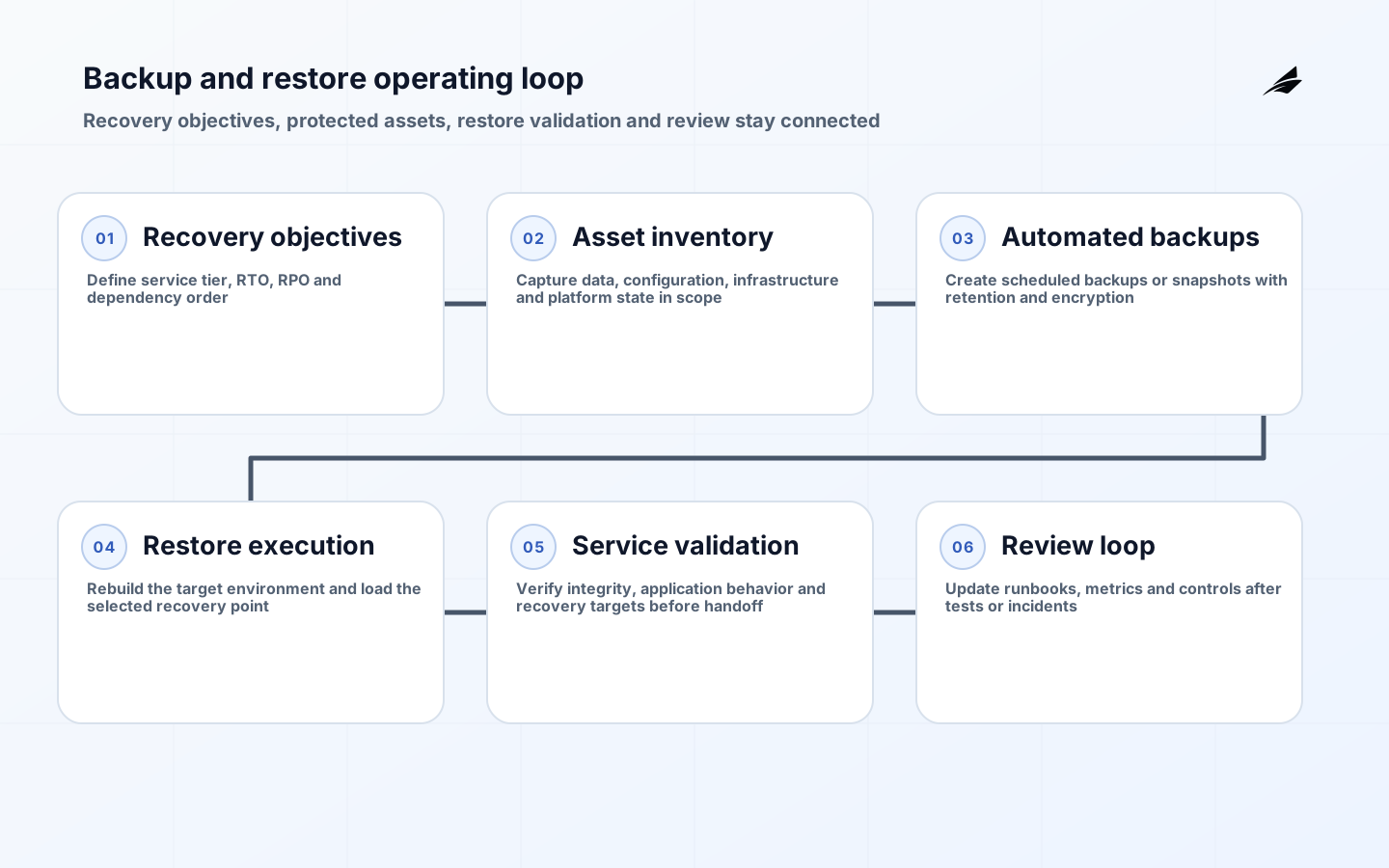
Backup and restore is useful only when the restore side is real. Many teams can point to retained snapshots or scheduled jobs, but fewer can show that a service can be rebuilt with the right data, configuration and permissions inside the promised recovery window. A backup program is judged by whether the business can recover a working system with acceptable data loss after deletion, corruption, operator error or platform failure.
An operations playbook turns that requirement into repeatable decisions. It defines which workloads deserve which recovery objectives, what must be backed up, how restore steps are verified and who owns the evidence after tests or incidents. This guide treats backup and restore as an operating loop because the hardest failures usually come from missing dependencies, unclear sequencing or untested assumptions.
Define recovery objectives and service tier
Start with recovery time objective and recovery point objective for each service tier, not with a storage setting. RTO answers how quickly the workload must be usable again. RPO answers how much data loss is acceptable between the last good recovery point and the failure. Those numbers should come from business impact, user commitments, legal requirements and dependency order. A customer-facing billing system, an internal analytics sandbox and a source code mirror can all be important, but not equally important in the first hours of an outage.
The service tier also determines the restore style. Some workloads need rapid in-place recovery. Others can be rebuilt into a clean target environment before traffic moves. Some can tolerate point-in-time data loss if logs or upstream systems can replay the missing actions. Others cannot. When teams skip this classification, they end up paying for premium retention and test effort everywhere, or worse, promising aggressive recovery times that the architecture never supported in the first place.
| Decision | Question to answer | Failure if not settled |
|---|---|---|
| Service tier | How critical is this workload during the first hours of disruption | Every system receives the same expensive backup treatment |
| RTO | How quickly must a working service return | Restore plans cannot be tested against a real target |
| RPO | How much recent data can be lost | Backup frequency is chosen by habit instead of need |
| Dependency order | Which systems must recover before this one is useful | Teams restore components that still cannot serve traffic |
| Validation owner | Who confirms the restored service is actually usable | Recovery ends when infrastructure is up, not when the service works |
Identify what must be backed up
Data is only one part of the recovery surface. A complete backup and restore playbook includes application data, machine or workload state where required, configuration, infrastructure definitions, credentials or secret references, DNS or routing dependencies, deployment metadata and the access needed to operate the restored system. For Kubernetes-based services, that can include control-plane state in etcd and persistent volume data for stateful workloads. For database-driven applications, it may include full backups, differential data, transaction logs and the configuration needed to replay them correctly.
This is where many teams discover silent gaps. A database may be backed up while application configuration lives only in a manually edited server path. A Kubernetes workload may have persistent volume protection but no clear plan for cluster state or manifest provenance. Good recovery operations inventory what must exist, in what order and from which source of truth before the workload is operational again.
| Asset class | Why it matters during restore | Common miss |
|---|---|---|
| Primary data | Restores customer or operational records | Only one datastore is protected while linked records are not |
| Configuration | Restores connectivity, feature flags and runtime behavior | Config exists outside version control and backup scope |
| Infrastructure definitions | Rebuilds networks, compute and storage consistently | Recovery depends on remembered console steps |
| Secrets and identity dependencies | Allows the restored service to authenticate safely | Credentials are missing or ownership is unclear |
| Cluster or platform state | Restores orchestration metadata and stateful platform control | Persistent volumes are protected but control-plane state is ignored |
Design backup paths and retention
Once the recovery set is clear, choose backup methods that fit the workload rather than forcing one pattern everywhere. Some databases need full and log backups to support point-in-time restore. Some file or volume workloads fit scheduled or incremental snapshots. Some applications can recreate parts of their state from upstream systems, which changes what must be retained directly. Retention should match both operational reality and compliance needs: short retention for fast rollback, medium retention for operational recovery and longer retention where legal or business continuity requirements demand it.
Automation matters here because manual backup execution is fragile and difficult to audit. Scheduled jobs, policy-based retention and isolated storage targets reduce the chance that backups exist only when a careful operator remembered to run them. At the same time, automation should not hide design choices. Teams still need to decide where backups live, whether they are encrypted, whether deletion protection exists, how replication interacts with corruption and how cost grows as backup frequency and retention expand.
| Workload pattern | Backup approach | Tradeoff to manage |
|---|---|---|
| Transactional database | Full plus log or point-in-time capable backup | Finer recovery often increases management complexity |
| Stateful volume workload | Automated volume snapshots with defined retention | Snapshot convenience can hide application consistency needs |
| Configuration-driven service | Versioned infrastructure and configuration repositories plus data backups | Code is recoverable only if runtime dependencies are also mapped |
| Kubernetes control plane | Protected etcd snapshots and cluster rebuild procedure | Control-plane recovery still requires secure handling of sensitive state |
| Mixed cloud platform | Policy-based backups by service tier with isolated retention targets | Convenience across services can obscure different restore semantics |
Make restore procedures operable
A usable restore procedure is ordered, specific and environment-aware. It states where the recovery point comes from, where the data is restored, what infrastructure must exist first, which credentials are required, how applications reconnect to dependencies and how traffic returns safely. That sequence is often more important than the backup job itself. A good backup with a vague restore plan still produces a prolonged outage because teams lose time arguing about target environments, routing changes, DNS updates, certificate status or post-restore validation.

Restore documentation should also separate infrastructure recovery from service recovery. Bringing a VM or cluster online is not the same as returning a service to users. Operations teams need explicit validation checks for data integrity, application start-up, dependency connectivity, queue health, scheduled jobs and user-visible behavior. The playbook should define who signs off on each step and what evidence proves the service is healthy enough to exit recovery mode.
| Restore step | What must be verified | Evidence to capture |
|---|---|---|
| Select recovery point | The chosen point matches the incident timeline and retention policy | Recorded timestamp, source and operator decision |
| Provision target | Network, compute, storage and identity prerequisites are ready | Environment checklist and dependency status |
| Restore data or state | The backup loads without corruption and with expected completeness | Restore logs and integrity checks |
| Reconnect application | Configuration, secrets and service dependencies are valid | Application health checks and dependency test results |
| Return service | Users or downstream systems can complete critical actions | Business or service owner sign-off |
Test recovery routinely
Periodic recovery tests are what convert backup from assumption to evidence. The test program should cover more than file restore mechanics. It should verify that the recovered data is complete, usable, accessible and recent enough to satisfy the workload's RPO. It should also measure whether the end-to-end process meets RTO when performed by the people and automation that will actually handle an incident. A test that restores data but never exercises application behavior may confirm storage integrity while still missing the real service risk.
Use different test depths for different tiers. Routine spot checks can verify common restore tasks quickly. Scheduled game days can validate complex recovery sequences, dependency order and human coordination. After platform changes, schema changes or new retention rules, rerun the relevant recovery tests because backup validity can drift quietly when the production architecture evolves. The goal is not ceremonial testing. It is recurring proof that the current system can still be restored by the current team with the current tooling.
| Test type | What it proves | Typical trigger |
|---|---|---|
| Spot restore | A recent recovery point is usable | Recurring operational cadence |
| Application validation test | The restored service can complete critical user flows | After major application or dependency changes |
| Tier-one game day | RTO, coordination and recovery order hold under pressure | Planned resilience exercise |
| Post-change regression test | Backup and restore still work after platform modifications | Schema, platform or policy changes |
| Incident replay | The team learns from a real failure and improves the playbook | After a meaningful outage or near miss |
Secure backups against deletion and drift
Backups are part of the attack surface. If the same identities that administer production can silently delete recovery points, or if retention settings can be changed without review, the organization may discover the weakness only after a disruptive event. Protect backups with encryption, separation of duties, reviewed retention policy, deletion safeguards and limited administrative scope. The team should also know how replication behaves during corruption events so that a bad state is not simply copied faster to every recovery location.
Drift is the quieter threat. Manual infrastructure changes, undocumented credentials, altered retention rules or untracked application dependencies can make a once-valid restore guide wrong over time. The control set should therefore treat backup configuration, restore documentation and validation evidence as living operational artifacts. If they are not reviewed when the service changes, the backup program gradually becomes a record of how the system used to work instead of how it can be recovered now.
| Threat | Control | Signal to watch |
|---|---|---|
| Malicious or accidental deletion | Deletion safeguards, limited admin scope and reviewed policy changes | Unexpected retention or vault configuration updates |
| Corrupted recovery points | Regular restore verification and integrity checks | Restore failures or unreadable snapshots |
| Configuration drift | Versioned infrastructure and reviewed restore documentation | Recovery steps that depend on undocumented console actions |
| Credential gaps | Managed secret references and ownership for recovery access | Restores delayed by access requests during incidents |
| Unbounded cost growth | Retention by service tier and periodic cost review | Backup spend rising without corresponding resilience gain |
Run backup and restore as an operating loop
Reliable recovery is maintained, not declared. The operating loop includes scheduled backups, retention review, restore testing, metric review, documentation updates and decision-making after incidents or near misses. One owner should be responsible for the loop even when platform, database and application teams each manage part of the technical path. Without that owner, backup events happen but learning does not. The result is a system that stores data diligently yet still surprises the business when recovery is needed.
The review cadence should link backup and restore to broader service operations. Recovery findings should influence release planning, architecture decisions, dependency cleanup and service-level commitments. If a restore test shows that a service cannot meet its promised RTO because a downstream dependency rebuild takes too long, that is not just a backup issue. It is a design and operating model issue. Treating backup and restore as part of service reliability keeps those lessons connected to the decisions that caused them.
| Metric | Why it matters | Bad assumption if ignored |
|---|---|---|
| Restore success rate | Shows whether recovery points are actually usable | Assuming scheduled backups equal successful recovery |
| Measured recovery time | Shows whether the workflow meets RTO in practice | Treating estimated recovery time as proof |
| Recovery point age at restore | Shows whether the achieved result meets RPO | Believing backup frequency alone guarantees acceptable data loss |
| Runbook freshness | Shows whether procedures still match the live system | Relying on documentation that predates architecture changes |
| Exception and drift backlog | Shows whether known recovery gaps are being closed | Letting unresolved weaknesses become normal |
Key takeaways
- Define RTO, RPO and service tier before choosing backup cadence or retention settings.
- Back up the full recovery surface, including configuration, infrastructure definitions, identity dependencies and platform state where needed.
- Design restore procedures as ordered operational workflows, not as a single storage action.
- Test recovery regularly enough to prove that current backups still satisfy current architecture and commitments.
- Treat backup and restore as a reliability operating loop with ownership, metrics and drift control.
Frequently asked questions
Are RPO and RTO the same thing?
No. RTO is how fast the service must return. RPO is how much data loss the business can tolerate. A team can meet one and miss the other, so both need explicit design and testing.
How often should restore tests run?
The cadence should match service tier and change rate. Critical systems need frequent spot restores and periodic full recovery exercises. Lower-tier systems can test less often, but meaningful architecture changes should trigger a fresh validation.
Are storage snapshots enough on their own?
Usually not. Snapshots can protect data blocks effectively, but the service may still depend on configuration, credentials, platform state, routing and application validation steps that snapshots do not solve by themselves.
What about Kubernetes control-plane recovery?
Teams should account for etcd snapshots and the procedure to rebuild or restore cluster control-plane state, especially when stateful workloads depend on the cluster's metadata and orchestration history. Persistent volume protection alone does not cover that control-plane layer.
Conclusion
Backup and restore becomes dependable when the team can prove what will recover, how fast it will recover and who will validate the result. That requires objective setting, recovery-set design, restore practice and drift control. The playbook is less about owning a backup tool and more about owning a recovery system that still works when production does not.