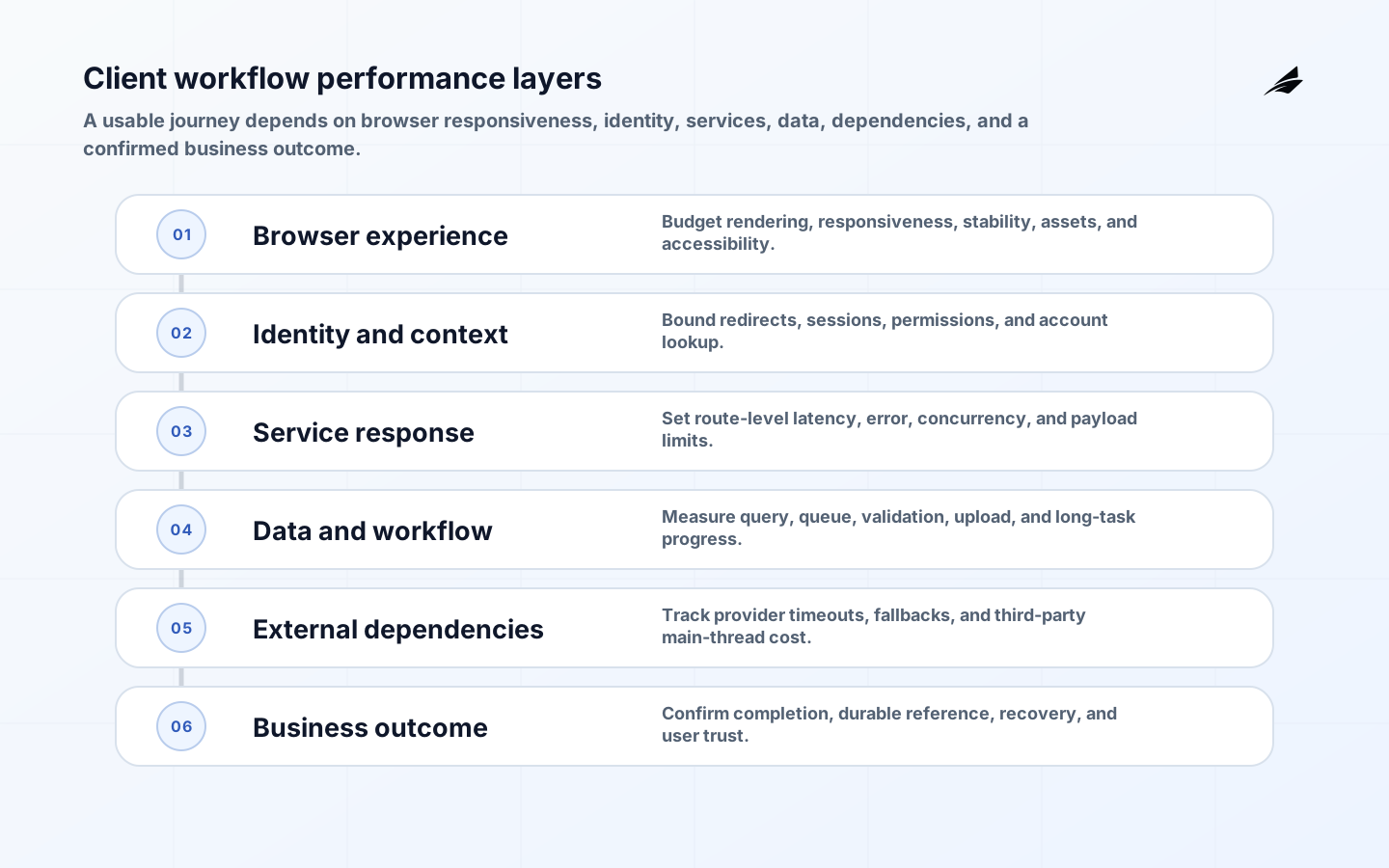
Web app performance planning should protect a customer’s ability to complete a valuable task, not merely produce a high laboratory score. A page can paint quickly and still fail the workflow because an identity check blocks, a search returns slowly, a third-party widget monopolises the main thread, or a submission gives no reliable outcome. Start with the journeys that matter, define budgets across browser, network, API, data, and external dependencies, and measure both controlled tests and real users. Core Web Vitals provide useful experience signals, but they do not replace transaction success, error recovery, accessibility, or service objectives. This guide shows how to build an evidence-based performance plan for client-facing workflows and use it in design, delivery, release, and capacity decisions.
Use Google’s Web Vitals guidance for common experience signals, the OpenTelemetry specifications for correlated service evidence, WCAG 2.2 for accessible interaction, and Google’s Site Reliability Engineering book for service objectives and error-budget thinking. The Edilec guides to maintainable React applications, workflow-first web applications, and quality assurance across teams connect those measures to engineering decisions.
Allocate a budget across the complete customer workflow
Treat the end-to-end budget as a set of owned envelopes rather than one response-time promise. For an insurance claim submission, for example, the first route should become usable quickly, identity and policy lookup need a bounded server response, document processing must show honest progress, validation must not freeze interaction, and the final commit must return a durable claim identifier. The current Web Vitals guidance defines Largest Contentful Paint, Interaction to Next Paint, and Cumulative Layout Shift as stable user-experience measures. Use their recommended “good” thresholds at the 75th percentile as a common reference, then add journey-specific limits for search, upload, validation, commit, and confirmation. A budget should say where time may be spent and who acts when an envelope is exceeded.
Segment real-user monitoring carefully. Device capability, network, geography, browser, account size, route, release version, and third-party availability can hide very different experiences behind one median. Preserve privacy by collecting proportionate performance context rather than page content or personal data. Correlate the browser journey with server traces using a safe request or trace identifier, and sample enough detail to investigate without making telemetry itself a performance burden. Review regressions against recent deployment and dependency changes. When a budget fails, the response may be to optimise code, reduce data, defer nonessential work, reserve capacity, change a provider, or simplify the workflow. The important point is that the threshold triggers an owned product decision rather than a report that gradually becomes normalised.
| Workflow stage | Example budget or signal | Likely owner |
|---|---|---|
| Initial route | LCP, INP, CLS and critical asset weight | Frontend team |
| Identity and context | Authentication redirect and account lookup latency | Identity and API teams |
| Search or calculation | Server duration, payload size and result usability | Service and data owners |
| Upload or long task | Start latency, progress freshness, completion and retry | Workflow team |
| Commit | Idempotent submission latency and durable result | Transaction owner |
| Confirmation | Visible outcome, reference, notification and recovery option | Product and operations |
Key takeaways
- Choose customer workflows before choosing performance metrics.
- Set segmented budgets for visible milestones and critical actions.
- Trace browser, service, and dependency work with shared context.
- Test changes against accessibility, errors, and task completion.
- Prioritize the slowest consequential customer slice.
Client workflow performance
Define a performance budget for each important route and interaction. Include the user-visible milestone, the population to measure, the percentile, device and network segments, and the owner who can act. Core Web Vitals offer useful common measures for loading, responsiveness, and visual stability, but they do not replace task-specific evidence. A quickly painted page that cannot submit an order is not a fast experience. Record server latency, client processing, asset weight, and dependency time separately so an alert points toward a plausible cause rather than an undifferentiated slow page.
| Planning element | Decision to make | Accountable role |
|---|---|---|
| Customer task | Name the outcome and its visible completion point. | Product owner |
| Experience budget | Set route, percentile, device segment, and target. | Performance owner |
| Technical breakdown | Separate browser, server, and dependency time. | Engineering lead |
| Business signal | Track completion, duplicate work, and support impact. | Operations owner |
Design the web app performance planning operating boundary
Make performance choices at architecture boundaries. Render the information needed for the initial decision early, defer nonessential work, and avoid asking the browser to reconstruct data the server can deliver in a stable form. Use caching only when freshness and invalidation are understood; a fast but stale entitlement or price can create a more expensive failure. Set limits for JavaScript, images, fonts, and third-party code, then review changes that exceed them. For authenticated flows, model the loading, empty, denied, and retry states so visual stability and accessibility are part of the experience rather than late polish.
Build controls and evidence
Performance telemetry must be safe enough to operate continuously. Use OpenTelemetry conventions or an equivalent correlation approach to join browser signals, request traces, and downstream calls without placing personal content into diagnostics. Set alerts on user-impacting symptoms and on resource exhaustion that threatens them. Treat client-side errors, failed submissions, and retries as performance-adjacent signals: people often perceive an unreliable wait and a slow wait the same way. Test budget checks in continuous integration, but retain real-user monitoring because controlled test conditions cannot represent every device or network.
| Condition | Control or test | Owner |
|---|---|---|
| Large bundle slows route | Enforce asset budget and inspect route-level payloads. | Frontend lead |
| API latency rises | Trace query, cache, and downstream timings. | Service owner |
| Third party blocks interaction | Set timeout, isolate loading, and monitor impact. | Vendor owner |
| Cache shows stale state | Define freshness boundary and invalidation test. | Data owner |
Roll out with real work
Improve one constrained journey at a time. Establish a baseline, make a hypothesis about the limiting work, and release behind a cohort or feature control where results can be compared. Verify that a faster interaction has not changed conversion, error, or accessibility outcomes. A CDN change, cache policy, or new analytics tag can affect different regions and browsers unevenly, so inspect segmented evidence before expanding. Build a rollback plan for assets and configuration; some performance regressions appear only under production load or after cache expiry.
Measure and improve
Use a balanced scorecard: route-level user experience measures, successful task completion, server and dependency latency, client errors, and support contacts related to waiting or duplicate work. Review the slowest slice rather than only a global median, especially for lower-powered devices. The cost of a performance initiative should be compared with its durable effect on the journey; shaving a few milliseconds from a noncritical screen may be less valuable than preventing a delayed confirmation that drives calls. Keep budgets current as the product’s customer promise changes.
Build a baseline that people can trust
Before changing the system, capture a baseline across a meaningful period and label the release, traffic mix, device groups, and known incidents. A single synthetic run cannot distinguish a regression from normal variation. Pair field data with controlled tests so the team can reproduce likely bottlenecks without assuming the lab is the customer. Store the baseline where design and release teams can find it. When an improvement lands, compare like with like and explain any segments excluded from the decision. This discipline prevents teams from celebrating a faster average while a critical population has become slower.
Budget third-party work explicitly
Third-party tags, identity widgets, support tools, and payment components deserve the same performance review as first-party code. Record their purpose, owner, load behaviour, data implications, timeout policy, and failure fallback. A vendor script that is harmless on a marketing page may block a critical form or cause layout movement in an authenticated workflow. Test slow and unavailable third parties, especially on constrained connections. Remove integrations that do not justify their customer value. This is a practical way to recover responsiveness without a major rewrite.
Connect performance planning to capacity
Performance has a capacity dimension: a route that is acceptable at ordinary load may degrade sharply during a campaign, batch process, or regional incident. Identify the shared resources that can saturate, set headroom expectations, and exercise traffic or queue behaviour before a predictable peak. Define which product functions can degrade gracefully and which must remain available. Include support and communications in the capacity plan, because a partial outage can generate a surge of duplicate customer actions. Capacity evidence turns a performance plan into a broader reliability commitment.
Set an operating cadence
Performance ownership should include a triage habit for regressions. When a budget breaches, first determine whether it is a real-user issue, which routes and segments are affected, and whether the change coincides with a release, dependency event, or traffic shift. Capture a trace or session-safe diagnostic before making speculative fixes. Decide whether to roll back, mitigate with configuration, or investigate under an agreed time limit. This response discipline avoids two common traps: treating every synthetic alert as a customer incident, and waiting for a global average to deteriorate before acting. Customers experience the slow route in front of them, not the median dashboard.
Practical acceptance example
Practical example: document upload completion is slow for mobile users in one region. Traces show that file transfer is acceptable but the confirmation endpoint waits on a synchronous antivirus dependency. The team changes the workflow to store the upload durably, show a clear processing state, and complete scanning asynchronously with an owned exception path. Acceptance evidence includes successful uploads under constrained-network tests, no increase in unscanned-file exposure, a measurable reduction in time to user confirmation, and support guidance for processing delays. The decision criterion is customer truthfulness: the interface may be fast only when its status accurately represents the work still underway.
Final acceptance check
Also verify the recovery path on the customer device: canceling or retrying must not create another upload, and a completed background task must be discoverable after a refresh. These checks turn a performance improvement into a dependable customer workflow rather than a faster-looking interface.
Implementation checklist
- Choose customer workflows before choosing performance metrics.
- Set segmented budgets for visible milestones and critical actions.
- Trace browser, service, and dependency work with shared context.
- Test changes against accessibility, errors, and task completion.
- Prioritize the slowest consequential customer slice.
Frequently asked questions
Are Core Web Vitals enough for a performance plan? They are a valuable shared vocabulary, but no. Add transaction-specific measures such as time to confirmed submission, availability of a critical action, and error recovery success. A plan should explain what customers are trying to do and how the team will detect when that task is degraded.
When should a team optimize the frontend rather than an API? Use traces and real-user evidence to locate the dominant wait. A large client bundle, an unbounded API query, a slow identity provider, and a third-party script need different remedies. Guessing based on a development machine often sends effort to the wrong layer.
Conclusion
Performance planning is product engineering with a stopwatch and a trace. Anchor budgets to customer tasks, instrument the whole path, and release improvements with enough evidence to preserve correctness and access.