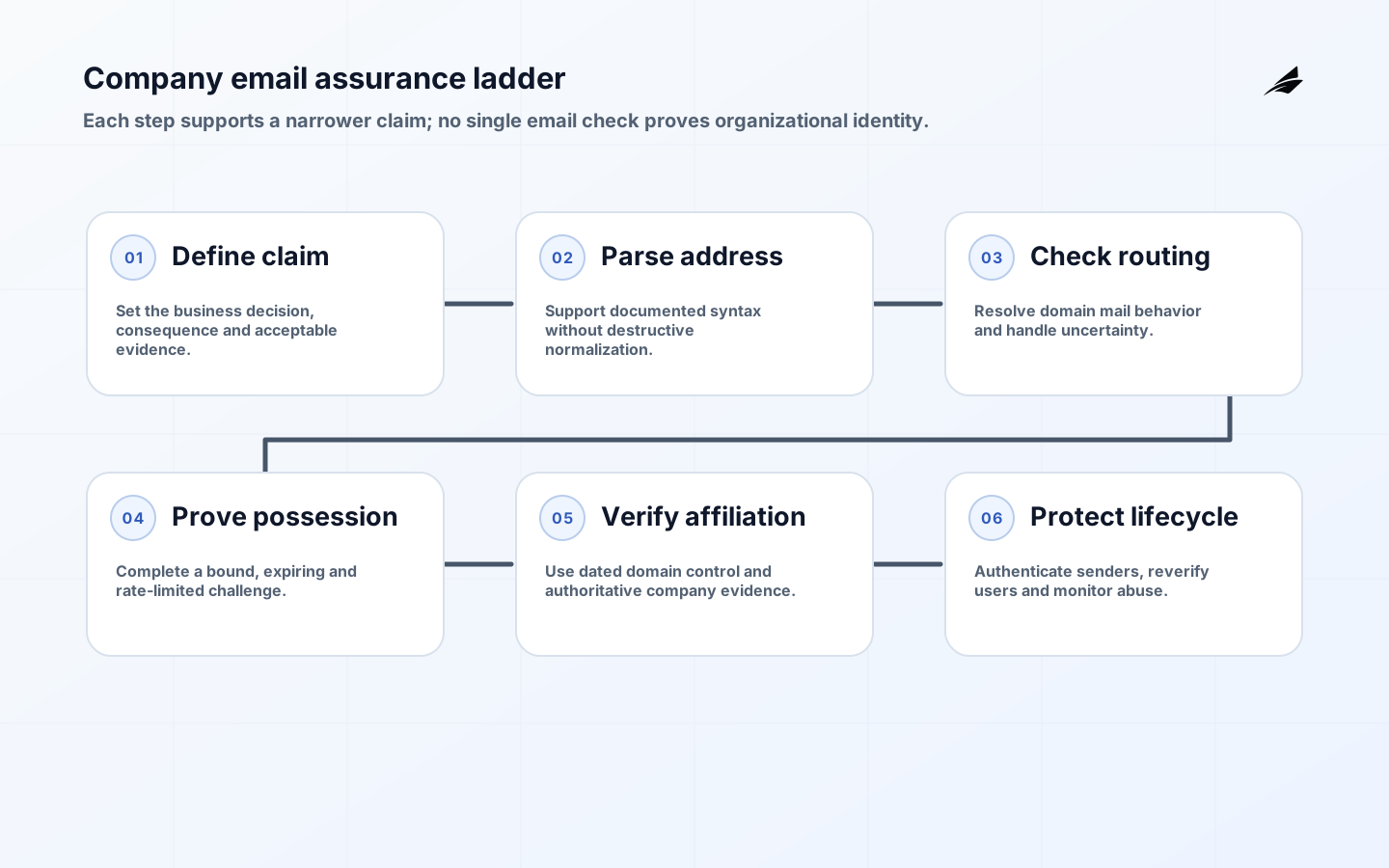
A valid company email can mean at least five different things: the address has permitted syntax, its domain can receive mail, the mailbox exists, the user can access it, or the address represents an authorized person at a particular organization. No single check proves all five. A safe implementation names the assurance needed for the business decision and collects proportionate evidence without blocking legitimate international addresses or claiming certainty it does not have.
This valid company email implementation checklist complements the company email scope and risk plan and valid company email FAQ. If verification triggers an automated workflow, the AI automation implementation checklist helps govern downstream decisions. Email validation should be a bounded identity signal, not an invisible employee or company scoring system.
1. Define the assurance level and user journey
Start with the decision. A newsletter form may need only deliverability and consent. A business discount may need domain affiliation. Administrative access or a regulated transaction requires stronger identity proof outside email. Document the consequence of false acceptance and false rejection, expected user populations, privacy basis, retention and a recovery path. Decide whether personal addresses, contractors, sole traders, subsidiaries, universities or public domains are acceptable.
State results precisely: syntax valid, domain mail-configured, challenge completed, domain controlled or organization independently verified. Avoid a binary label such as 'employee verified' when the evidence is only a clicked link. Mailboxes are forwarded, shared and compromised; employment changes faster than DNS. Require re-verification for high-value actions or long-lived accounts and provide a manual route for legitimate exceptions.
| Assurance claim | Minimum evidence | What it does not prove |
|---|---|---|
| Address parseable | Standards-aware syntax parser | Mailbox exists |
| Domain mail-capable | DNS and mail-routing result | Specific user receives mail |
| Mailbox possession | Time-limited challenge completed | Real-world identity |
| Domain control | Approved DNS or administrator challenge | Employment of every user |
| Organization affiliation | Possession plus authoritative business evidence | Future authorization |
2. Parse and normalize without damaging addresses
Use a maintained mail-address parser aligned with the formats your system supports. SMTP addressing and message formatting are defined separately in IETF RFC 5321 and RFC 5322. Do not replace them with a restrictive regular expression. Decide explicitly whether internationalized domain names and SMTPUTF8 local parts are supported, then test Unicode normalization, punycode display, right-to-left text and homograph risk.
Trim surrounding interface whitespace, but do not silently alter the local part. Domain names are case-insensitive; mailbox local-part comparison is defined more cautiously, even though many providers treat it case-insensitively. Do not remove dots or plus tags globally because those behaviors are provider-specific. Preserve the user-entered address for display and an intentional comparison form for account matching. Return neutral errors that do not disclose whether an account already exists.
3. Check domain routing and prove mailbox possession
Resolve the domain according to the mail behavior your sending infrastructure supports and handle DNS timeout distinctly from a negative answer. An MX record is useful but does not prove that a mailbox exists or accepts your message. Avoid SMTP recipient probing as a general validation method: servers may accept all recipients, defer decisions, tarpitting scanners or treat probes as abuse. Use the actual confirmation delivery and bounce handling as the operational evidence.
Send a single-purpose, time-limited link or code. Bind it to the account request, address, nonce and intended action; store a digest where practical; expire it and invalidate it after use. Rate-limit creation and attempts by account, address and risk signal. Do not put secrets or sensitive profile data in URLs. The confirmation page should explain the organization and requested action so a recipient can decline an unsolicited or mistaken request. Log enough for investigation without retaining message content unnecessarily.
4. Establish company affiliation proportionately
Maintain a versioned policy for consumer-mail providers, disposable domains, shared service domains, subsidiaries and known education or government domains. Third-party domain classifications can be stale and should contribute a reason code rather than a silent rejection. Compare the claimed company with authoritative registries, the organization's published domains or administrator-approved mappings. Normalize legal names and track evidence dates. A website string match is too weak for consequential access.

For enterprise onboarding, let an authorized administrator prove domain control through a DNS token or equivalent provider-supported mechanism, then assign that domain to a tenant through a conflict process. Prevent one customer from claiming a shared platform or government domain. Require additional review for acquisitions, franchises and delegated IT. Domain control supports tenant configuration but does not prove that every address is a current employee; authorization still belongs in the organization's user lifecycle.
5. Authenticate mail sent from company domains
Inbound address verification and outbound domain authentication solve different problems. SPF, specified in RFC 7208, authorizes hosts for an SMTP identity. DKIM, in RFC 6376, attaches a domain signature to message content. DMARC, in RFC 7489, evaluates alignment with the visible From domain and publishes receiver policy and reporting. None alone proves that a message is truthful.
Inventory every legitimate sender before tightening policy: workforce mail, marketing, support, invoicing, applications and vendors. Configure aligned SPF or DKIM, protect signing keys, rotate them and monitor authentication results. The FTC's email authentication guidance gives a practical overview for domain owners. Move DMARC enforcement progressively based on reports and tested forwarding behavior. Keep lookalike-domain monitoring and user anti-phishing controls because authentication cannot stop every impersonation.
- Define the business assurance claim and acceptable address populations.
- Parse with standards-aware libraries and preserve the original address.
- Check domain behavior and send a bounded possession challenge.
- Evaluate organization affiliation using dated authoritative evidence.
- For owned domains, deploy and monitor aligned SPF, DKIM and DMARC.
- Record reason codes, support appeals and re-verify when risk changes.
6. Operate validation with privacy and abuse controls
Instrument attempts, delivery outcomes, challenge completion, bounces, complaints, rate limits, manual reviews and account takeover signals. Separate temporary delivery problems from permanent failure. Use suppression lists carefully and protect them because they contain personal data and can reveal customer relationships. Set retention by purpose. Limit vendor access and contract for security, deletion and incident notice when a validation or delivery provider processes addresses.
Test enumeration, mass sign-up, token replay, domain takeover, stale employee access and administrator compromise. Give support staff evidence-based reason codes but avoid exposing internal fraud thresholds. Monitor false rejection by domain and user segment. If a model classifies company domains, document training sources, update cadence, confidence and human review; do not use opaque scores for high-impact eligibility decisions.
| Operating metric | Decision supported | Risky interpretation |
|---|---|---|
| Challenge completion | Journey friction and delivery | Identity certainty |
| Bounce by category | Routing or list-quality correction | Fraud label |
| False rejection appeals | Policy and provider-domain gaps | User error |
| Authentication pass and alignment | Sender configuration health | Message truthfulness |
| Stale affiliation removals | Reverification effectiveness | Total employee turnover |
7. Build an acceptance and regression test suite
Create test cases for common, quoted, long, internationalized and deliberately malformed addresses within the formats the product claims to support. Include domains with MX, implicit address routing, null results, DNS timeouts and internationalized names. Test case-preserving display and intentional account comparison. Keep examples synthetic. A public list of unusual addresses can improve parser coverage, but production acceptance must match the documented support boundary and sending infrastructure.
Exercise challenge creation, resend, expiration, replay, address change, concurrent requests and cancellation. Verify that tokens are bound to the intended account and action, and that logs and analytics do not capture secrets. Simulate delivery delay, temporary bounce and provider outage. Confirm that the interface gives a useful recovery path without revealing whether another person has an account. Run accessibility checks on form errors and confirmation flows.
For organization claims, test subsidiary mappings, shared domains, domain transfer, administrator departure and competing tenant claims. For outbound authentication, test each sender and alignment path, key rotation, forwarding and policy progression using reports. Add incident exercises for compromised mailboxes and DNS changes. Run the suite after parser, DNS resolver, mail provider, identity or policy changes. Email behavior is an external dependency, so regression evidence must continue after launch.
Document operational ownership between product, identity, security, messaging and support teams. Specify who can change parser policy, claim a domain, release a suppressed address, rotate DKIM keys and respond to authentication reports. High-risk overrides should require reason and expiry. Review privileged actions and domain mappings regularly. Clear ownership prevents a support workaround from silently becoming a company-wide identity policy.
Key takeaways
- Name the exact assurance claim before selecting email checks.
- Use standards-aware parsing and preserve legitimate address diversity.
- Treat possession, domain control and organization affiliation as different evidence.
- Deploy SPF, DKIM and DMARC for outbound domain protection, not mailbox verification.
- Provide reasoned exceptions, privacy limits and re-verification for changed risk.
Frequently asked questions
Does an MX record prove an email address is valid?
No. It shows mail-routing configuration for a domain. It does not prove that a particular mailbox exists, that delivery will succeed or that the person controls the address. A time-limited confirmation is stronger evidence of possession.
Should free email domains always be rejected?
No. Sole traders, contractors and legitimate small businesses may use them. Reject or require stronger evidence only when the business decision needs organizational domain affiliation, and provide an alternative verification path.
Does DMARC stop spoofing?
It helps receivers handle messages that misuse an exact domain when SPF or DKIM alignment fails. It does not stop lookalike domains, compromised accounts or deceptive content sent through authenticated infrastructure. Use it as one layer of email security.
Conclusion
A valid company email is an assurance statement, not one technical test. Parse correctly, assess domain routing, prove mailbox possession, verify organizational claims proportionately and protect owned domains with authenticated sending. When the system states what each signal proves, preserves privacy and supports legitimate exceptions, email becomes a useful onboarding control without becoming a source of fabricated certainty.