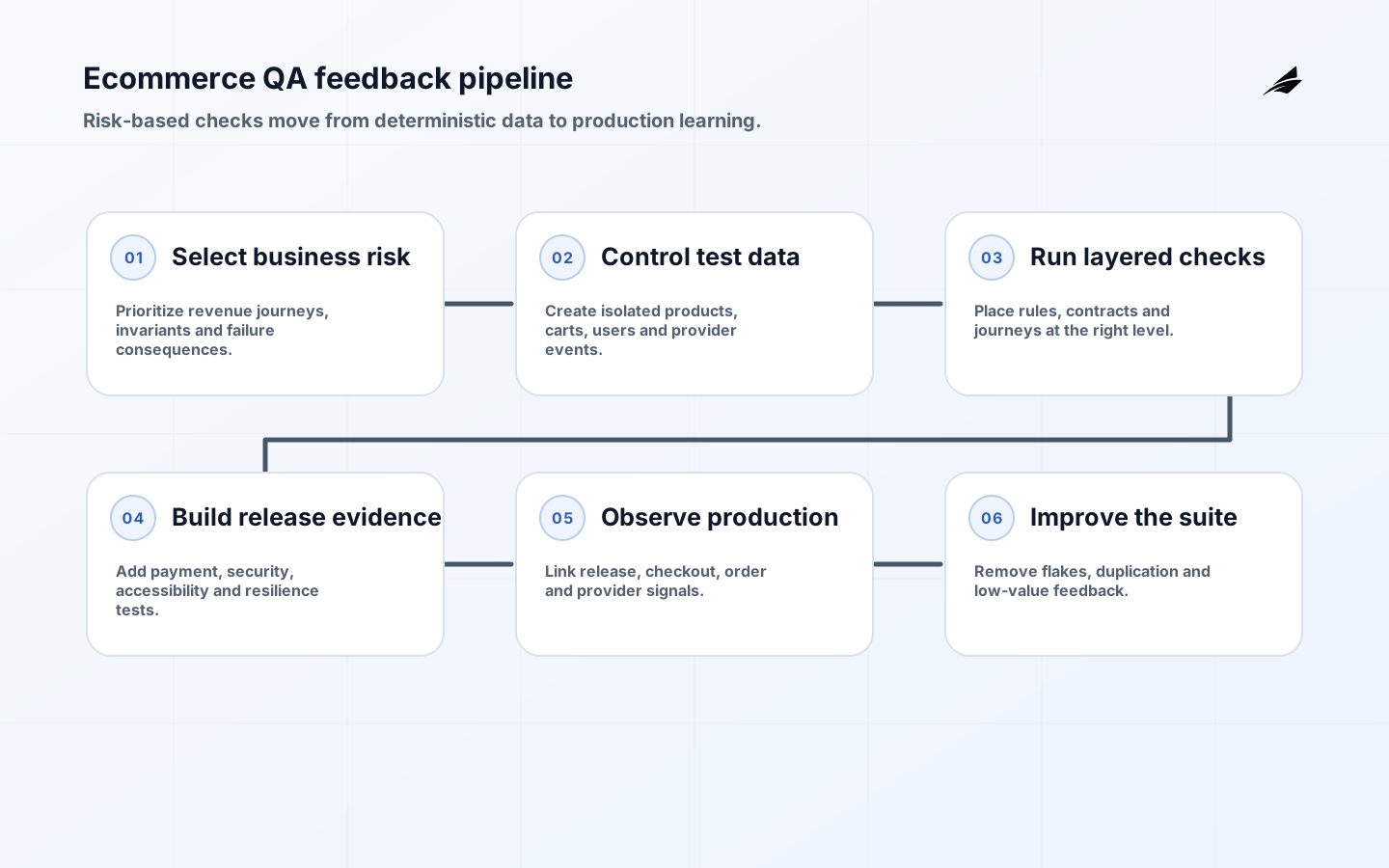
QA automation for SaaS ecommerce protects revenue journeys that change frequently and depend on browsers, catalog data, identity, pricing, inventory, tax, promotions, payment providers, fulfillment and customer communication. A useful strategy does not automate every manual script. It places fast, reliable checks at the right layers, preserves evidence for failures and leaves human exploration for risks that are difficult to encode. The result is faster releases with clearer business confidence.
This guide complements the SaaS ecommerce QA implementation checklist, the SaaS ecommerce QA FAQ and the broader QA automation consulting delivery plan. Start from the money, data and trust at risk, then choose automation that gives the team actionable feedback.
What should ecommerce QA automation cover?
Map complete customer and operator journeys: discovery, search, product details, configuration, cart, promotion, address, shipping, tax, payment, confirmation, fulfillment, cancellation, return, refund, subscription and support. Include account, guest, admin and integration behavior. For each journey, identify business rules, systems, data, jurisdictions, devices, accessibility needs, fraud controls and financial reconciliation. Rank scenarios by impact, change frequency, defect history and detectability.
Build a test portfolio, not one browser suite. Unit tests cover calculation and state logic; component tests cover UI behavior in isolation; API and contract tests cover service rules and integrations; browser tests cover a small number of critical journeys; performance, security and accessibility need specialized checks. Production monitoring validates what pre-release environments cannot fully reproduce. The ideal mix returns specific feedback quickly and reserves slower integrated checks for risks only they can observe.
| Test layer | Best use | Example ecommerce risk |
|---|---|---|
| Unit or property | Pure rules and boundary values | Rounding, discount precedence, quantity and tax calculations |
| Component | Interactive states and validation | Cart drawer, coupon errors and disabled checkout |
| API or contract | Business workflows and provider interfaces | Inventory reservation, order creation and payment status mapping |
| Browser journey | Critical user-visible integration | Guest checkout from product page to confirmation |
| Nonfunctional | Security, accessibility, performance and resilience | Payment script integrity, keyboard flow, peak sale and gateway timeout |
| Production check | Real configuration and dependency health | Synthetic purchase, webhook delay and confirmation delivery |
Build a risk-based coverage model
Create a matrix across journey, persona, market, browser or device, payment method, fulfillment path, promotion type and account state. Do not execute every combination. Select representative partitions and high-risk interactions, then generate focused data for boundaries. Always include zero, one and maximum quantities; expired and conflicting promotions; low stock; duplicate submission; stale price; address variants; tax-exempt cases; payment decline; timeout; retry; cancellation and partial refund where supported.
Define expected outcomes from authoritative business rules, not the implementation being tested. For financial flows, verify order, payment, ledger or settlement reference and customer communication agree. Use idempotency keys and test duplicate callbacks. Reconcile totals across line items, discounts, tax, shipping, authorization, capture and refund. A green confirmation page can hide a duplicated order, missing inventory decrement or payment captured against a failed checkout.
Design stable browser automation

Test user-visible behavior and keep each test isolated. Playwright’s current best practices recommend resilient user-facing locators, isolated tests, web-first assertions and control over test data. Prefer roles, names and explicit test contracts over DOM structure or styling classes. Let the framework’s actionability and retry behavior wait for meaningful conditions; fixed sleeps are slow and still fail when environments vary.
Create domain-focused helpers for actions such as building a cart, not a large page-object hierarchy that hides assertions and couples every test. Seed data through supported APIs or fixtures, and use the UI for the behavior under test. Give each parallel worker unique accounts, carts and orders. Make cleanup safe and idempotent. Freeze clocks or inject deterministic time where promotions and subscriptions depend on it. Keep secrets outside code and redact them from test artifacts.
- Give products, promotions, customers, orders and provider events stable test identifiers and ownership.
- Use user-facing locators and accessible names so automation reinforces usable interface contracts.
- Control first-party state through APIs or fixtures and mock only external behavior outside the purpose of the test.
- Capture traces, screenshots, console, network and application correlation IDs for failed integrated tests.
- Quarantine a flaky test only with an owner, reason and expiry; repair the race, data collision or environment defect.
- Run a minimal critical path on every change and broader browser, market and resilience coverage on a deliberate cadence.
Test payments and checkout safely
Use payment-provider test environments and documented test instruments; never place real cardholder data in automated fixtures, logs, screenshots or traces. Model authorization, authentication where applicable, capture, cancellation, refund, chargeback signals and webhook retries. Test redirect, embedded frame or hosted-field behavior according to the actual integration. Verify customer refresh, back navigation and double-click cannot create duplicate charges or inconsistent orders.
OWASP’s payment functionality test guidance emphasizes understanding the integration and validating business logic and security. The PCI SSC’s 2025 SAQ A clarification explains that affected merchants need confirmation their site is not susceptible to script attacks that could affect embedded payment forms. Compliance scope depends on architecture; involve a qualified assessor or payment specialist rather than inferring it from test automation.
Integrate security testing without duplicating a penetration test
Automate high-value controls in CI: dependency and secret checks, secure configuration, authorization tests, input and output handling, session behavior, security headers and abuse limits. Exercise account enumeration, cart manipulation, price or quantity tampering, coupon reuse, insecure direct object reference, refund authorization and webhook signature validation. The OWASP Web Security Testing Guide provides a structured framework across development, deployment and maintenance. Use expert manual testing for complex business logic and chained attacks.
Treat test infrastructure as sensitive. A browser trace can contain session cookies, addresses and order details. Set artifact retention, access and redaction, and do not upload unreviewed traces to public services. Use least-privilege service accounts and separate test from production payment credentials. Validate that debug endpoints, feature flags and synthetic orders cannot be abused in production. Test fraud and security controls without training them to trust predictable automation identities.
Make accessibility part of the release path
Set an accessibility target with legal and product owners, then include semantic structure and keyboard behavior in component acceptance. W3C recommends WCAG 2.2 for current applicability and defines testable success criteria. Automate checks for detectable issues, but manually test keyboard order, focus after dynamic cart changes, error identification, form labels, status announcements, zoom, reflow and authentication. Include assistive-technology and disabled-user evaluation for critical checkout journeys.
Accessible locators improve test resilience because they reflect how users and assistive technologies identify controls. Do not add names only to satisfy automation; verify they are accurate and understandable. Test validation errors without relying on color, ensure focus is not obscured, and let users review and correct order data. Third-party payment and support widgets remain part of the customer journey, so obtain conformance evidence and test the integrated experience.
Test performance and dependency failure
Model workload from real traffic and campaign forecasts: browse-to-buy ratio, search mix, cart size, checkout concurrency, webhook bursts and admin activity. Test gradual load, expected peak, sudden spikes and sustained periods. Measure user-facing percentiles, errors, queue depth and saturation, not only averages. Preserve test data volume and index shape. Establish capacity and autoscaling limits before a sale, and run the test far enough ahead to fix the constraint.
Inject controlled failures for catalog, inventory, tax, shipping, promotion, identity, payment and messaging dependencies. Define timeout, retry, circuit-breaker, fallback and customer-message behavior. Verify retries are bounded and idempotent. Test delayed webhooks, out-of-order events and provider recovery. Confirm support can find a transaction from a customer reference and safely resume or refund it. A graceful, truthful failure is better than an ambiguous spinner that encourages repeated payment attempts.
| Release signal | Gate or trend | Required evidence |
|---|---|---|
| Critical journey | All approved paths pass in target configuration | Traceable run with order and payment reconciliation |
| Regression health | No unexplained flakes or quarantined critical checks | Failure owner, diagnosis and expiry |
| Accessibility | Target criteria and manual journey checks satisfied | Automated report plus documented human evaluation |
| Security | No unaccepted high-risk finding in changed scope | CI checks, threat review and specialist test as applicable |
| Performance | Objectives met at agreed production-shaped load | Percentiles, errors, saturation and test model |
| Recovery | Rollback or forward-fix and dependency fallback exercised | Runbook result and accountable release decision |
Use CI and production evidence together
Run lint, unit, component and focused API checks first; gate merge on fast deterministic feedback. Run critical browser journeys on each change and shard broader suites where isolation is sound. Pin browser and environment versions for reproducibility while testing supported current browsers on a scheduled matrix. Playwright recommends traces on the first CI retry; its Trace Viewer exposes action timelines, DOM snapshots, network and console evidence. Keep the first failure visible so retries do not conceal instability.
After release, watch checkout conversion, payment errors, order creation, webhook delay, inventory mismatch, page performance and customer contacts by release and cohort. Use synthetic transactions that are clearly identified and financially safe. Link client, API, order and provider correlation IDs. Define rollback and feature-disable thresholds before deployment. Production observation does not replace pre-release testing, but it detects real provider, geography, device and data behavior that test environments cannot fully duplicate.
Measure automation as a product
Track critical risk coverage, median and tail feedback time, flaky rate, failure diagnosis time, escaped defect impact, accessibility defects, recovery exercise success and suite operating cost. Do not use automated test count or line coverage as a goal. Delete redundant tests and move behavior down the test pyramid when possible. Survey developers and release owners: a technically green suite that teams distrust provides little decision value.
Give the test platform a roadmap, support owner and change policy. Review provider sandboxes, browsers, devices and test data regularly. Budget maintenance with product changes. A QA partner should leave readable tests, fixtures, CI configuration, dashboards, runbooks and training in customer-controlled systems. Price drivers include journey count, markets, devices, integrations, data setup, performance scale, accessibility depth, security scope and release frequency, not a promised number of scripts.
Key takeaways
- Prioritize automation from revenue, financial integrity, customer trust and change risk.
- Place tests at the lowest reliable layer and keep only critical integrated journeys in the browser suite.
- Control data and isolation, use resilient user-facing locators and preserve actionable failure evidence.
- Treat payments, accessibility, security, performance and dependency recovery as first-class release concerns.
- Combine CI evidence with production outcomes and continuously remove flakes, duplication and low-value checks.
Frequently asked questions
What percentage of ecommerce tests should be automated?
There is no defensible universal percentage. Automate repeatable, deterministic, high-value checks and retain human exploration for new, visual, usability and complex risk. Measure whether critical risks receive timely reliable evidence. A smaller trusted suite can support releases better than a large collection of slow, overlapping scripts.
Can automated tests run in production?
Yes, with safeguards. Use clearly identified synthetic accounts and products, safe payment methods, bounded frequency and cleanup or fulfillment controls. Exclude synthetic activity from business analytics and fraud learning where necessary. Never let a production test create real customer communication, inventory loss or financial settlement unexpectedly.
Should AI generate the browser suite?
AI can draft cases or locators, but business expectations, data safety, assertions and maintenance still need accountable review. Generated tests often mirror visible happy paths and miss reconciliation, authorization and failure semantics. Use generation as an assistant inside the same code review and evidence standards, not as a substitute for risk analysis.
Conclusion
QA automation for SaaS ecommerce is a feedback system for business risk. Start with complete journeys and financial invariants, distribute checks across the right layers, and make failures easy to diagnose. Add specialized payment, security, accessibility, performance and recovery evidence, then watch the real service after release. Automation earns its place when teams can act on it quickly and customers can complete commerce safely.