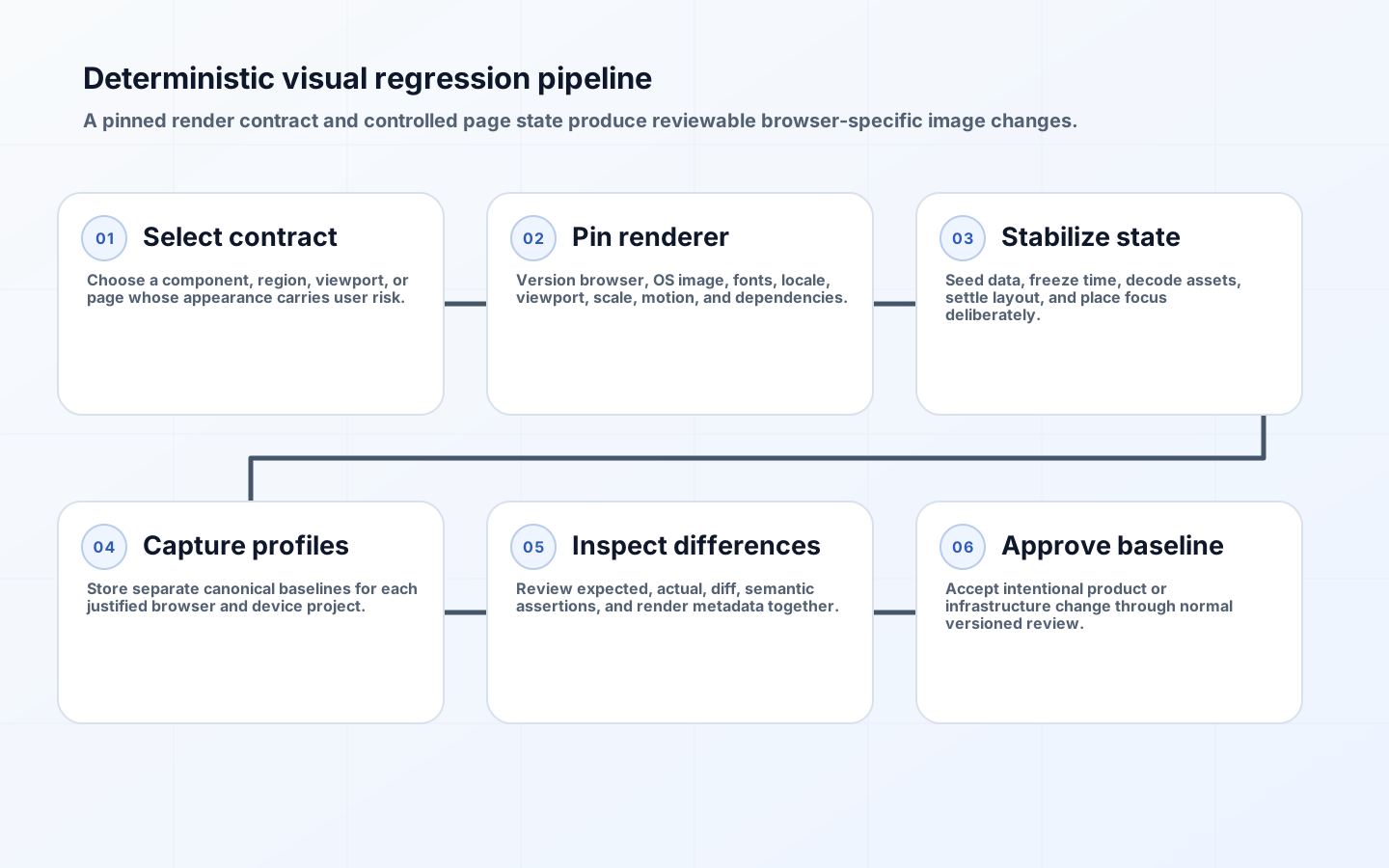
Visual regression testing CI compares a rendered page or component with an approved reference image. It can catch clipped text, missing icons, broken spacing, incorrect colors, hidden controls, and responsive layout changes that DOM assertions miss. The comparison is also sensitive to harmless differences in fonts, operating systems, browser builds, GPUs, animation frames, data, and time. Stability comes from controlling those inputs, not from making the pixel threshold so wide that defects disappear.
Playwright explicitly warns that browser rendering varies with host OS, version, settings, hardware, power source, and headless mode, and recommends generating and comparing screenshots in the same environment. That principle defines the architecture: each visual project has a reproducible render contract, its own baseline, deterministic application state, a narrow tolerance policy, and a human approval path for intentional change.
Select visual contracts worth maintaining
Do not screenshot every route and permutation. Choose surfaces where appearance carries user risk: navigation, forms, dense tables, invoices, localization, responsive breakpoints, design-system components, empty and error states, and critical brand assets. Pair each image with semantic assertions for essential text, role, focus, and interaction. A screenshot can show a button but cannot prove its accessible name, keyboard behavior, or submission result.
Decide whether the contract is a component, region, or full page. Component captures localize failures and run quickly. Region captures preserve useful context without unrelated page noise. Full-page images are appropriate for document-like layouts and a small number of end-to-end surfaces, but dynamic feeds and long pages produce large diffs. Name the user state and viewport in the test so reviewers understand what the reference promises.
| Capture scope | Best use | Stability advantage | Main tradeoff |
|---|---|---|---|
| Component | Design-system variants and state matrix | Small, focused render surface | May miss composition defects |
| Element or region | Forms, headers, charts, table panels | Excludes unrelated content | Selector and crop must be stable |
| Viewport | Responsive page composition | Matches first-screen experience | Sensitive to page chrome and data |
| Full page | Reports, documents, long editorial layouts | Catches downstream displacement | Large noisy diffs and scroll effects |
| Cross-browser subset | Engine-specific critical flows | Finds real rendering differences | Requires separate baselines and review capacity |
Define a reproducible render contract
Version the browser engine, operating-system image, Playwright package, system libraries, fonts, locale, time zone, color scheme, device scale factor, viewport, reduced-motion setting, headless mode, and relevant launch options. Put these values in configuration and build artifacts. A container helps pin userspace, but the browser package must match the image. Playwright's Docker guidance notes that version mismatch can prevent source mapping and affect operation; use a tested matching combination.

Generate baselines only in the canonical environment. A developer on another operating system may inspect a failure locally, but should not overwrite references from that host. Configure baseline paths to include the project or render profile. Playwright projects can run the same tests under Chromium, Firefox, WebKit, devices, or other settings; their outputs are different contracts and must not share one image file.
Make fonts and assets deterministic
Install exact font files and weights in the CI image, verify licenses, and fail setup when a required family is missing. Wait for the browser font-loading promise before capture. A fallback font changes glyph widths and can reflow an entire page while appearing superficially similar. Avoid reaching public font CDNs during tests; serve versioned assets from the application bundle or controlled test origin.
Wait for images and icons to decode, and use local deterministic fixtures for remote media. Preserve realistic dimensions and aspect ratios. Do not replace every image with a blank rectangle if image cropping or layout is part of the contract. Test broken-image behavior separately. Validate that SVG icon fonts, canvas charts, and CSS background assets complete before capture because ordinary network idle is not proof that application rendering has settled.
Control time, data, animation, and focus
Seed the backend with fixed records and stable ordering. Freeze the application clock when timestamps, greetings, countdowns, calendars, or relative dates appear. Fix locale and time zone explicitly. Stub randomness or use known seeds for generated colors, avatars, and sample values. Hide cursors, place focus deliberately, dismiss tooltips, and normalize scroll position. These controls define the expected state rather than cosmetically covering symptoms.
Disable or reduce animation through the test configuration and wait for transitions to finish. Pause video and animated images at a known frame or exclude them from the visual contract. Playwright screenshot assertions take repeated captures until consecutive images match, but application readiness still needs an explicit signal: a completed render marker, expected data, decoded assets, and stable layout measurements. A test should fail diagnostically when readiness never arrives.
Mask only truly nondeterministic regions
Mask a region when its content is deliberately variable and its layout is not under review, such as a third-party map tile or rotating user-uploaded media. Prefer replacing it with a deterministic fixture if size, crop, or fallback behavior matters. Keep masks narrow and visible in review. Broad overlays can conceal missing components, overflow, and accidental movement around the masked area.
A screenshot stylesheet can hide volatile elements or force stable caret and animation behavior; Playwright exposes stylePath for this purpose. Version that stylesheet next to the tests and review changes as carefully as baseline images. Do not use it to repair production CSS or hide known defects. Every rule should identify the instability it neutralizes and the separate assertion, if any, that protects the removed behavior.
Set thresholds from observed noise and risk
Begin with exact comparisons in the pinned environment. Run unchanged tests repeatedly and inspect any residual pixels. If a small stable class of antialiasing differences remains, set a bounded pixel count or ratio at the assertion or project level and document why. Playwright supports options such as maxDiffPixels; the right value depends on capture size and defect risk. One global percentage is especially dangerous because it permits more changed pixels on larger pages.
Treat color, geometry, and content risk differently where tooling permits. A one-pixel shadow change may be harmless, while a one-pixel focus indicator loss can violate an interaction contract. Maintain semantic checks for text and controls so pixel tolerance cannot erase them. Monitor the distribution of diff sizes; rising near-threshold passes often indicate environment drift that should be fixed before the limit is raised.
| Noise source | Deterministic control | Acceptable fallback | Bad response |
|---|---|---|---|
| Font substitution | Install and verify exact fonts | Separate baseline for a supported platform | Raise global pixel tolerance |
| Animation frame | Reduce motion and wait for completion | Capture a defined paused frame | Sleep for an arbitrary duration |
| Dynamic data | Seed stable records and clock | Narrow mask with semantic assertion | Mask the entire panel |
| Browser engine difference | Per-project baseline | Test only justified engine subset | Compare all engines to Chromium image |
| Host drift | Pinned image and matching browser package | Regenerate after reviewed upgrade | Approve recurring unexplained diffs |
Choose browser coverage by rendering risk
Run broad functional tests across supported browsers, but reserve pixel comparisons for a representative matrix the team can review. A common strategy uses one primary engine for the full visual suite and smaller critical subsets for other engines or devices. Expand where CSS, fonts, form controls, canvas, printing, or past defects show engine-specific risk. Browser market share alone does not identify which layouts are likely to diverge.
Keep project names, viewport, device emulation, and browser channel stable in baseline paths. A branded browser and bundled engine can differ. Mobile emulation is not a physical-device screenshot; it proves a configured viewport and user-agent behavior within the engine. Use real-device or platform-specific testing separately when native text rendering, virtual keyboards, or hardware composition are acceptance requirements.
Govern baseline updates as product changes
A baseline update is an approval, not cleanup. CI should attach expected, actual, diff, render-contract metadata, route, state, and changed code. Reviewers need to zoom and compare every affected profile. Separate intentional product changes from environment-wide churn; hundreds of unrelated image updates after a dependency bump indicate that the render environment changed and deserve their own controlled rebaseline.
Require product or design review for intentional visual changes and test-infrastructure review for canonical image changes. Commit references with the code, as Playwright recommends for snapshots, or use a service with equivalent immutable revision linkage. Reject blanket approval commands in an untrusted pull request. Preserve the previous baseline through version control so a mistaken update can be reverted without regenerating images from a different environment.
Build a diagnostic CI workflow
Run a small smoke set before the parallel visual matrix to detect broken fixtures, missing fonts, or application startup failures. Shard by historical duration while keeping each test's baseline profile intact. Upload artifacts only on failure or according to retention policy, and redact sensitive application state. Include a command or job that regenerates candidates in the canonical image, but require normal code review before they become accepted references.
Track false-diff rate, review time, repeated failure signatures, masked area, baseline churn, and defects caught. Quarantine an unstable visual case only with owner and expiry, just like any flaky test. If most failures stem from one host pool or browser upgrade, stop reapproving images and restore the render contract. Stable tests create confidence because a visual failure is unusual and inspectable.
Example: stabilize a multilingual invoice
An invoice screenshot changes across CI hosts because one lacks the required bold font and formats the date in its default time zone. The test also uses the current order number. The team installs and verifies licensed font files in a pinned image, sets locale and zone per project, freezes the invoice date, seeds a fixed order, waits for fonts and logo decode, and captures only the printable document region.
References are separated for Chromium and WebKit because print rendering differs. Exact comparison passes repeatedly, so no tolerance is added. The test keeps semantic assertions for invoice number, total, currency, and payment status. When a design change widens the totals column, reviewers approve two focused images rather than accepting environment-wide churn. The contract now detects clipping without reacting to host accident.
Key takeaways
- Pin the complete render contract, including browser, OS image, fonts, locale, viewport, and motion.
- Generate and compare references in the same canonical environment.
- Control application state and readiness before changing pixel thresholds.
- Use separate baselines for browser and device projects.
- Mask narrowly and protect important behavior with semantic assertions.
- Treat every baseline update as a reviewed product or infrastructure decision.
Frequently asked questions
Should pixel tolerance always be zero?
Start at zero in a pinned environment. Add the smallest local tolerance only after repeated unchanged runs demonstrate irreducible noise. Investigate rising near-threshold passes as environment drift.
Can developers update baselines on laptops?
Only when the laptop runs the exact canonical render environment. Otherwise generate candidate images in the controlled CI image or container and review them through version control.
Must every page run in every browser?
No. Cover supported browsers functionally, then select visual subsets based on engine-specific layout risk, critical workflows, and review capacity. A smaller maintained matrix is more useful than an ignored flood of images.
Conclusion
Reliable visual testing is an exercise in reproducible rendering and governed change. A pinned environment, deterministic page state, article-specific capture scope, separate browser references, conservative thresholds, and deliberate approval make screenshot failures meaningful. With that foundation, the suite can catch real layout regressions without turning normal CI variation into daily image maintenance.