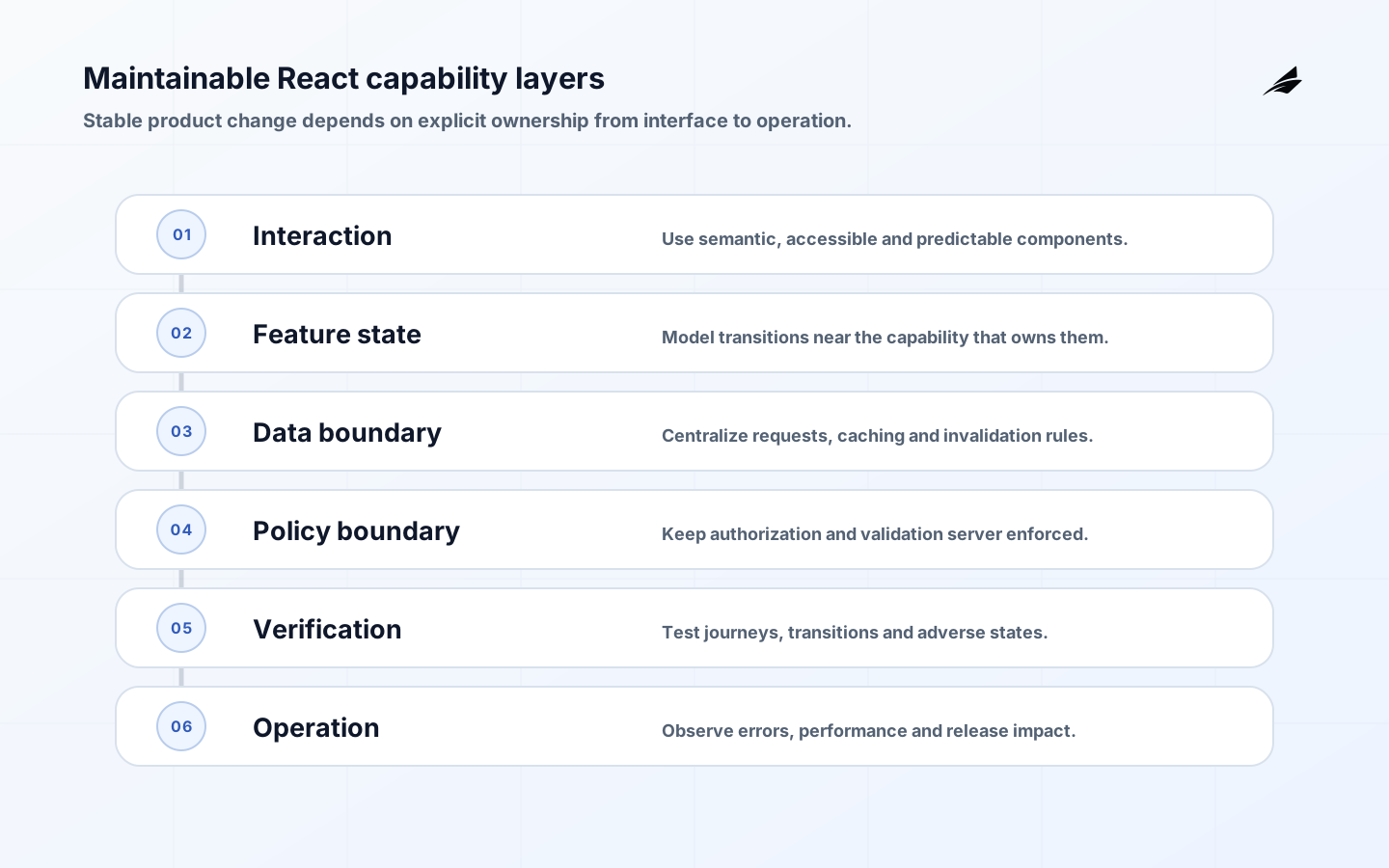
Maintainable React applications let teams change business capabilities without tracing incidental state through an entire frontend. Maintainability does not come from a preferred folder tree or a component count. It comes from explicit feature boundaries, clear ownership of server and client state, stable interaction contracts, accessible primitives, observable user journeys and a release process that reveals regressions before customers do.
Use this checklist with Edilec's React application planning guide, custom-system quality assurance checklist and software support playbook. Architecture, verification and operations need to describe the same product behavior.
Organize React around capabilities and state ownership
Start with product capabilities such as subscription management, case review or account administration. Give each capability an entry point, domain vocabulary, data-access boundary, state transitions, UI composition and tests. Keep reusable visual primitives independent of business rules. A shared component should express a stable interaction contract; it should not accumulate dozens of flags because unrelated screens happen to look similar. Review dependencies so a low-level component does not import feature state or a feature bypass the application’s authorization and telemetry boundaries.

| Frontend concern | Ownership decision | Acceptance evidence |
|---|---|---|
| Server data | Query boundary, cache key and invalidation rule | Stale, loading, error and mutation tests |
| Form state | Field model, validation timing and submission lifecycle | Keyboard, error-summary and retry tests |
| Shared client state | Smallest scope that genuinely shares the value | Render and transition tests across consumers |
| Component API | Required semantics and supported variation | Usage examples and accessibility checks |
| Navigation | Route ownership, permission response and recovery | Deep-link, back-button and denied-access tests |
| Observability | Journey, release and error context without sensitive data | Traceable failure and field-performance evidence |
The React guidance on choosing state structure recommends avoiding redundant and contradictory state, while reducer and context guidance shows one way to centralize complex screen transitions. These are tools, not mandates: remote data often belongs behind a query boundary, URL state should remain linkable, and short-lived interaction state should stay close to its component. Test the resulting interface against WCAG 2.2 and user-centered Web Vitals. Use the OWASP Application Security Verification Standard to verify that frontend convenience never substitutes for server-side access control, validation or session protection.
Create boundary tests that survive refactoring. Verify what a user can perceive and do, then add narrower tests for reducers, formatters and adapters whose contracts are important. Instrument route transitions, failed requests, controlled error boundaries and critical interactions without recording personal content. Track bundle and interaction budgets by capability. When a feature grows, split it along ownership or release boundaries rather than moving files for symmetry. A maintainable React codebase makes a change’s scope legible to reviewers, operators and future developers.
Key takeaways
- Classify state by authority and lifetime before choosing a store.
- Design capabilities around customer work and stable boundaries.
- Make loading, empty, denied, and error states consistent.
- Treat accessibility and backend authorization as delivery requirements.
- Migrate in slices with user-facing and technical evidence.
Maintainable React application
Organize the application around product capabilities and stable UI boundaries, not a generic folder taxonomy that forces unrelated features to share hidden state. A capability should own its route-level composition, user-facing behaviour, tests, and adapter to server data. Components should expose intent through their inputs and events; avoid passing large mutable objects through many layers just to reach one control. React’s official documentation is a useful reference for keeping state minimal and lifting it only to the common owner that truly needs it. Establish conventions for errors, loading, empty states, and permissions so each feature does not invent a private user experience.
| Planning element | Decision to make | Accountable role |
|---|---|---|
| State category | Classify server, URL, local interaction, or derived state. | Feature team |
| Capability boundary | Own route composition, behaviour, and server adapter. | Product engineering |
| Shared primitive | Provide accessible, stable interaction pattern. | Frontend platform |
| Protected command | Enforce authorization in the backend service. | Service owner |
Design the maintainable React applications operating boundary
Keep data fetching and mutation semantics explicit. Server data needs a freshness, invalidation, retry, and error policy appropriate to the consequence of being wrong. Interaction state such as an open panel or draft filter can remain local until another route genuinely needs it. Put shareable navigation state in the URL when a colleague should be able to reproduce the view. Treat optimistic updates as a contract with reconciliation: describe what the user sees if the server rejects the action or an event arrives out of order. These choices reduce the accidental coupling that makes a growing UI hard to change.
Build controls and evidence
Accessibility and authorization are part of maintainability because both are cross-cutting requirements that otherwise become expensive patches. Use semantic controls, keyboard operation, visible focus, understandable errors, and stable status communication in line with WCAG 2.2. The frontend can guide users away from unavailable actions, but the service must enforce access on every protected command and record. Add client telemetry that captures route transitions, rendering errors, and task failures without leaking sensitive content. Correlate it with backend traces so a support report does not require reconstructing a customer journey by guesswork.
| Condition | Control or test | Owner |
|---|---|---|
| Optimistic update fails | Reconcile server result and explain next action. | Feature owner |
| Route state is not shareable | Move meaningful view state into the URL. | Frontend lead |
| Shared module grows unchecked | Define ownership and split by capability boundary. | Platform owner |
| Client error rises | Correlate route event with backend trace and release. | On-call engineer |
Roll out with real work
Improve a mature React application in slices. Choose one high-change capability, characterize its current behaviour, define a boundary, and migrate it while preserving user-visible contracts. Feature controls can protect incremental adoption, but remove them after a deliberate decision; forgotten flags multiply states and confuse testing. Review bundle size, rendering work, accessibility, and error rates in the same release discussion. A tidy component tree that slows a critical workflow or hides an error is not maintainable in the way a SaaS team needs.
Measure and improve
Assess maintainability through delivery and product signals: time to make a safe feature change, defect recurrence in a capability, client error rate, accessibility findings, interaction latency, bundle growth, and the number of unowned shared modules. Combine these with code review observations about unclear state and boundary violations. Do not reward component count or abstraction density. The aim is a UI that can express new customer work while retaining predictable behaviour for existing customers.
Set boundary tests for frontend capabilities
A component boundary is credible only when behaviour at that boundary is tested. For each capability, cover the visible task, data states, accessibility expectations, protected actions, and failure recovery. Use component tests for interaction logic, contract-oriented tests for API adapters, and a small number of browser journeys for critical integration. Test errors and loading deliberately rather than leaving them as incidental branches. This gives teams freedom to refactor internal structure while preserving customer contracts. It also exposes when an apparently reusable component has become coupled to a particular feature or backend assumption.
Plan design-system governance
Shared UI primitives can improve consistency, but they need ownership, documentation, accessibility testing, and a deprecation path. Do not turn every feature component into a design-system candidate; promote patterns only after they are genuinely stable across contexts. When changing a primitive, assess visual, keyboard, screen-reader, performance, and analytics effects across consumers. Version or migrate breaking behaviour deliberately. A design system is a product for internal users, and its backlog should reflect evidence from those users rather than an abstract drive for uniformity.
Limit frontend operational risk
Frontend releases can create broad customer impact through a route configuration, feature flag, asset cache, or client-side error. Include these mechanisms in change review and incident response. Know how to disable a problematic feature, roll back an asset, invalidate an unsafe cache, and communicate a client-version issue to support. Monitor error changes by release and route, not only globally. This operational preparation lets a SaaS team move quickly while keeping customer-facing failure modes understandable and reversible.
Set an operating cadence
A growing SaaS UI benefits from a deliberate dependency policy. Record which libraries are approved for routing, forms, server-state access, telemetry, and accessible primitives, and require an owner for additions that create a broad shared dependency. Evaluate maintenance activity, bundle impact, licensing, accessibility, security response, and migration cost before standardizing. This does not forbid experimentation inside a capability, but it prevents short-term convenience from imposing a silent platform obligation on every feature team. Periodically remove unused packages and consolidate overlapping patterns when evidence shows a real shared need.
Practical acceptance example
Practical example: a SaaS team adds a bulk-edit panel for account managers. Draft selections stay local to the panel, the filter is encoded in the URL so a manager can share it, and submitted changes are reconciled with the server response. A denied update leaves the row visible with an accessible explanation rather than silently removing it. Acceptance evidence includes keyboard tests for the panel, a server authorization test, a browser test for a rejected mutation, and route-level telemetry for task failure. The decision criterion is whether state ownership and failure behaviour remain understandable when the feature is used by different roles at scale.
Final acceptance check
Review the feature with a slow device and a screen reader before broad release. The acceptance bar is that the bulk operation remains understandable while data is loading, a selection changes, or the server rejects one item. That evidence protects the interaction contract across the conditions customers actually encounter.
Implementation checklist
- Classify state by authority and lifetime before choosing a store.
- Design capabilities around customer work and stable boundaries.
- Make loading, empty, denied, and error states consistent.
- Treat accessibility and backend authorization as delivery requirements.
- Migrate in slices with user-facing and technical evidence.
Frequently asked questions
When should state be global in a React application? Use a wider owner only when several distant parts of the current experience need the same authoritative interaction state. Server data should normally remain governed by its fetch and invalidation policy, while transient state should stay near the component that uses it. Global state is not a substitute for deciding ownership.
How can a team improve accessibility without stopping feature delivery? Include accessible acceptance criteria and automated checks in normal work, then schedule focused manual testing for keyboard flows, assistive technology, and complex interactions. Fix reusable primitives first, but verify each customer workflow because a correct button does not guarantee an understandable process.
Conclusion
Maintainable React work is deliberate boundary work: keep business authority on the server, interaction state close to use, and cross-cutting qualities visible in everyday delivery evidence.