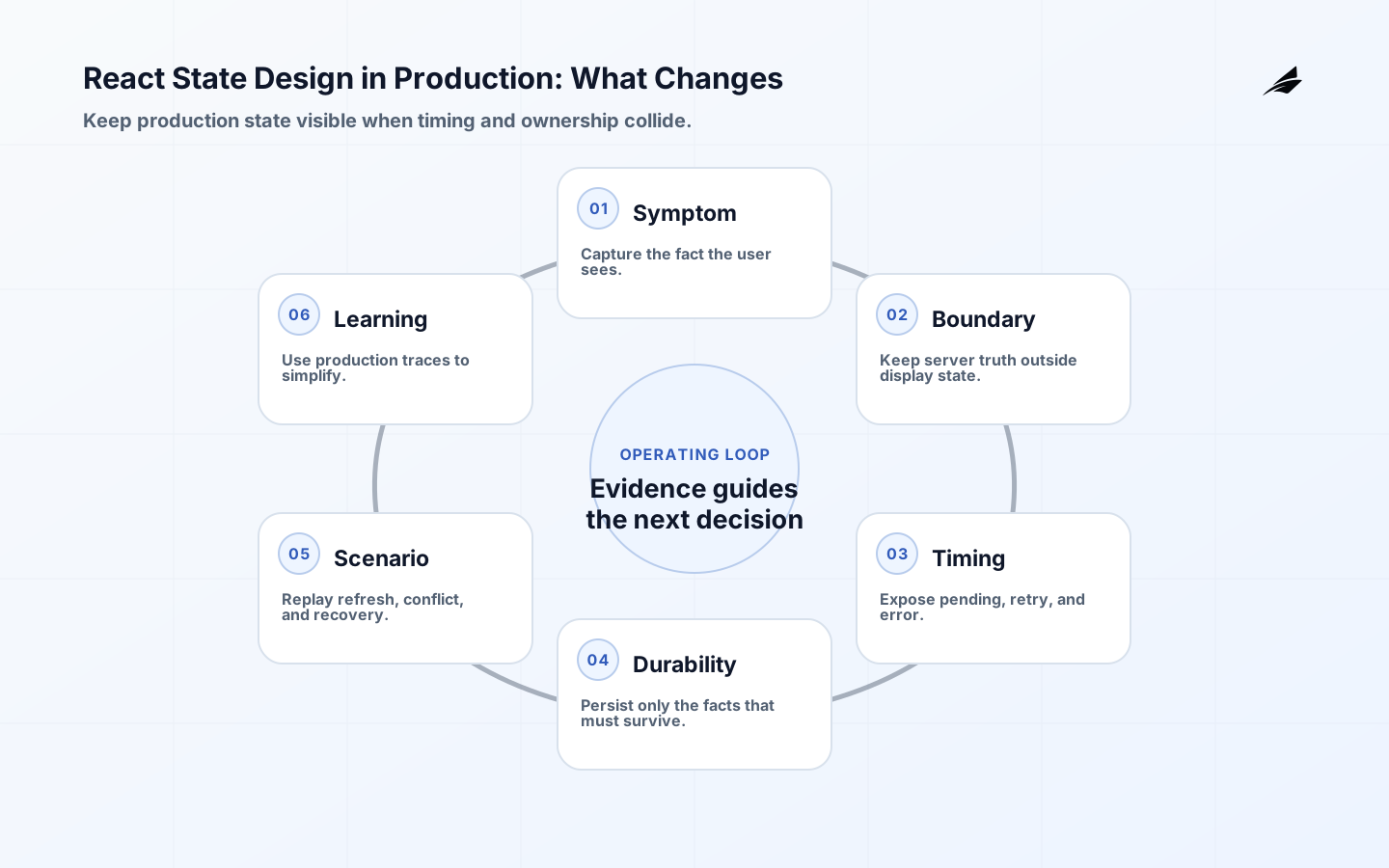
React state design changes in production because the interface has to represent more than a successful click. It must explain loading, stale information, permissions, validation, concurrent actions, a failed network request, and the result of a retry. State is not a place to store every value the screen can display; it is the smallest changing information from which the interface can be rendered consistently. When teams duplicate derived values, mix server records with local edits, or let several components mutate the same concept, they create combinations that users can reach but nobody designed. Production state design starts by describing the user-visible states and the transitions between them before choosing a store, hook, or library.
Model React state around user-visible decisions

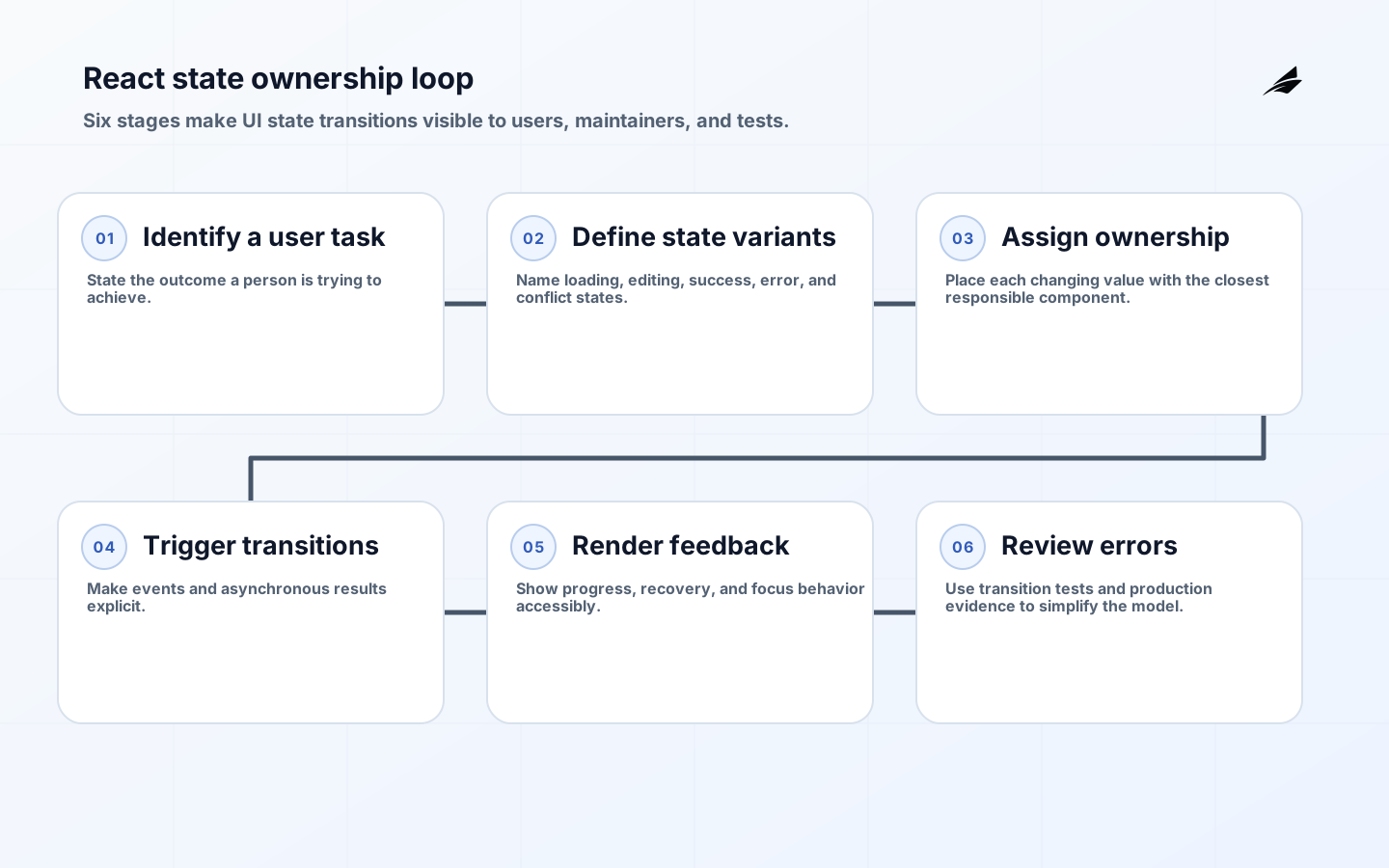
For each task, list what a user can see and do: initial entry, editing, submitting, success, field error, service failure, empty result, and access denied. Then identify the minimum source of truth for those views. React's guidance on state structure is direct: avoid contradictions, redundant values, duplicated values, and deeply nested structures that are difficult to update. A submit button's disabled state, for instance, can usually be derived from validation and submission status instead of stored independently. Prefer a discriminated status such as idle, editing, submitting, succeeded, or failed when the states are mutually exclusive. That makes impossible combinations harder to render and gives testing a meaningful matrix.
| Information | Where it belongs | Why |
|---|---|---|
| Server record | Query or server-data layer | It has a remote authority and freshness rules |
| Unsaved form values | Closest feature owner | They are local to a user task |
| Selected row ID | Common parent or route | Several children need the same selection |
| Derived totals | Computed during render | Storing them risks drift from the source |
Assign ownership before introducing shared state
State should live with the closest component that needs to coordinate it. Lift it to a shared parent when sibling components must agree, use context for broadly needed stable information, and choose a feature-level store only when a coherent workflow truly spans the tree. Global state is not a cure for prop drilling; it can make dependencies invisible and updates harder to trace. Separate remote server data from client interaction state because their lifecycles differ. Remote data may be invalidated, refreshed, or changed by another actor. A local draft may be intentionally temporary. Make the boundary explicit: show freshness, preserve a draft deliberately, and decide what happens when a server update conflicts with an edit in progress.
- Which component is responsible for changing this value?
- Which components render from it, and what is their closest common parent?
- Is the value authoritative locally, remotely, or only derived for display?
- What should happen when the route changes, the user changes, or the request is retried?
- Can a new developer find the transition without searching unrelated folders?
Design asynchronous state and recovery explicitly
An asynchronous mutation is a small state machine. Prevent duplicate submission where it would create duplicate effects, show progress without trapping keyboard users, retain enough context to explain an error, and make retry semantics clear. Do not replace useful content with an endless spinner when a stale but labeled value remains safe to show. For destructive or high-consequence actions, distinguish a request accepted by the client from a result confirmed by the service. Cancellation, optimistic updates, and background refreshes also need a stated policy. An optimistic update is reasonable when failure is rare, correction is clear, and the previous value can be restored; it is a poor fit for actions where a mistaken confirmation would mislead the user or create an irreversible external effect.
| State scenario | Interface behavior | Implementation concern |
|---|---|---|
| Initial load | Explain pending content without shifting focus | Avoid duplicate requests |
| Refresh failure | Keep safe stale data and show a retry path | Track freshness and error cause |
| Form submission | Prevent accidental repeat and preserve input | Handle idempotency at the API |
| Permission change | Remove unsafe actions and explain next step | Re-evaluate authorization from the server |
Test transitions and accessible feedback
Tests should exercise transitions, not only static snapshots. Verify that validation blocks an invalid command, a network failure keeps a recoverable draft, a user cannot send the same action twice, and a late response does not overwrite a newer choice. Use realistic loading and error states in design review, because those states reveal whether focus, announcements, and controls still make sense. W3C accessibility guidance is relevant here: status messages, errors, and changes of context must be perceivable and operable. Node.js APIs in production supplies the server-side half of this contract. A clear React state machine cannot compensate for an API that has ambiguous result states or unsafe retries.
Keep state decisions visible during delivery
State complexity often appears gradually through reasonable feature requests. Protect the model during delivery with a state-transition sketch for complex screens, realistic fixtures for empty and failure views, and tests that name user actions rather than implementation hooks. Review changes for duplicated sources of truth, asynchronous updates that can arrive out of order, and controls whose enabled state contradicts the displayed status. Product and support colleagues improve this review because they recognize confusing wording or missing recovery paths that a component test cannot. When an interface needs a temporary exception, place it next to the transition it affects and set a review point. This is a way to keep a growing interface understandable when the original author is no longer the only person changing it.
Review React state against real interaction
- Walk through loading, empty, denied, validation, offline, retry, and completed states with the same keyboard and assistive-technology expectations as the happy path.
- Verify that derived values are calculated from one source of truth and that no component can render a contradictory combination such as completed and still submitting.
- Simulate a slow request followed by a newer user action to ensure a late response cannot overwrite a draft, selection, or status that has already changed.
- Confirm that server refreshes, optimistic updates, and local edits have a stated conflict rule rather than relying on whichever response happens to arrive last.
- Test that focus remains useful after an error, navigation, modal close, or replacement of a keyed component, especially when an action changes the visible layout.
- Review analytics and error events for user-meaningful state transitions so a production problem can be understood without recording sensitive form values or session details.
A state model is ready for production review when a designer, support specialist, and engineer can all explain the same awkward case: what the person sees, which action remains safe, whether work is still running, and how the system returns to a usable state. That shared explanation is more durable than a clever hook arrangement and often reveals a missing product decision before it becomes an incident.
Primary React state references
React's guides to choosing state structure, managing state, and state as a snapshot explain the core mental model behind these decisions. The Web Content Accessibility Guidelines 2.2 provide a practical standard for reviewing feedback, focus, and interaction. Use the references to make a concrete workflow understandable; no client-side pattern can substitute for product decisions about what a user should see when work is pending or fails.
React state design takeaways
- Stores minimal changing information and derives the rest.
- Gives each shared value a clear owner.
- Separates remote authority from local drafts and interaction state.
- Defines loading, failure, retry, and conflict behavior before implementation.
- Tests transitions with accessible user feedback, not just the happy path.
React state design FAQ
When is context appropriate? Use it for information many descendants need, such as a stable session or feature configuration, not as a default location for every mutable value. Should server data go in a global store? It can, but its cache, invalidation, and freshness semantics should remain explicit rather than becoming indistinguishable from local UI state. How do reducers help? They make complex transition logic central and testable when several events affect the same state. Should optimistic updates be standard? No. They are a product decision based on failure consequences, reversibility, and how clearly the interface can correct an error.
Production changes the cost of ambiguity
In a prototype, an incorrect refresh or duplicated flag may look like a small annoyance. In production, it can hide a failed payment, show stale permissions, or make a destructive action appear complete. React state design therefore needs an explicit freshness rule: when was the value read, who may mutate it, and how will another tab or request invalidate it? Keep the source of truth close to the system that owns it, and derive display state from that source rather than storing every visual consequence.
Make failure part of the normal path
A production interface needs a deliberate answer for timeout, authorization loss, validation rejection, and partial success. Preserve enough context for a retry, but do not replay an unsafe mutation automatically. Announce state changes accessibly, keep focus usable, and log a correlation identifier that lets support connect the UI event to the server record.
Operate React state after launch
A production-state decision example
Review a production state transition with one request identifier, one stale response, one visible error, and a recovery action. For production React state, for React state design, the review is complete only when a teammate can explain what happened from the evidence without relying on memory in the takeaway. Record the request-state invariant, trace identifier, review date, and recovery signal that would trigger intervention. For production React state, keep the transition evidence beside the user-visible result so an incident can be reconstructed without relying on a browser screenshot alone. For production React state, preserve the request identifier, stale-response case, visible error, and recovery action beside the production-state decision so the decision remains reviewable.
| Check | Example question | Evidence |
|---|---|---|
| Boundary | What is deliberately out of scope? | Decision record |
| Ownership | Who can change the behavior? | Named owner |
| Failure | What happens after rejection or timeout? | Test and runbook |
| Review | What signal changes the decision? | Metric or audit |
Frequently asked questions about React state design
What should a team decide first about React state design?
Production React state should begin with a visible fact and a freshness rule. Keep server truth, transient input, URL state, and derived presentation separate enough that a permission change or background refresh cannot silently overwrite a user decision.
How should React state design be introduced safely?
Ship the production path with explicit pending, stale, failure, and recovered states, then replay refresh and concurrent-update scenarios. Widen the state model only after production traces show that timing, persistence, and recovery remain understandable under real traffic. For production React state, preserve the request identifier, stale-response case, visible error, and recovery action beside the safe-introduction check so the decision remains reviewable.
What is a useful review signal for React state design?
Use a production-state signal tied to the promise: stale response rate, recovery completion, ambiguous status, or repeated mutation. Read traces with user-visible cases so a healthy average does not conceal a cohort that cannot tell whether its action succeeded. For production React state, preserve the request identifier, stale-response case, visible error, and recovery action beside the review-signal check so the decision remains reviewable.
Production React state references
Continue with What Changes When Node.js APIs Move into Production, Background Jobs in Production: Delivery, Retries, and Recovery, TypeScript Architecture Decisions That Matter before the First Build. Use the linked guides to connect production React state with Node API, background-job, and TypeScript architecture decisions.
Conclusion: give every state a reason to exist
A reliable React interface is not defined by where state happens to be stored. It is defined by whether the user can understand the current state, recover from a failure, and trust the next action. Model that deliberately, then let the implementation follow.