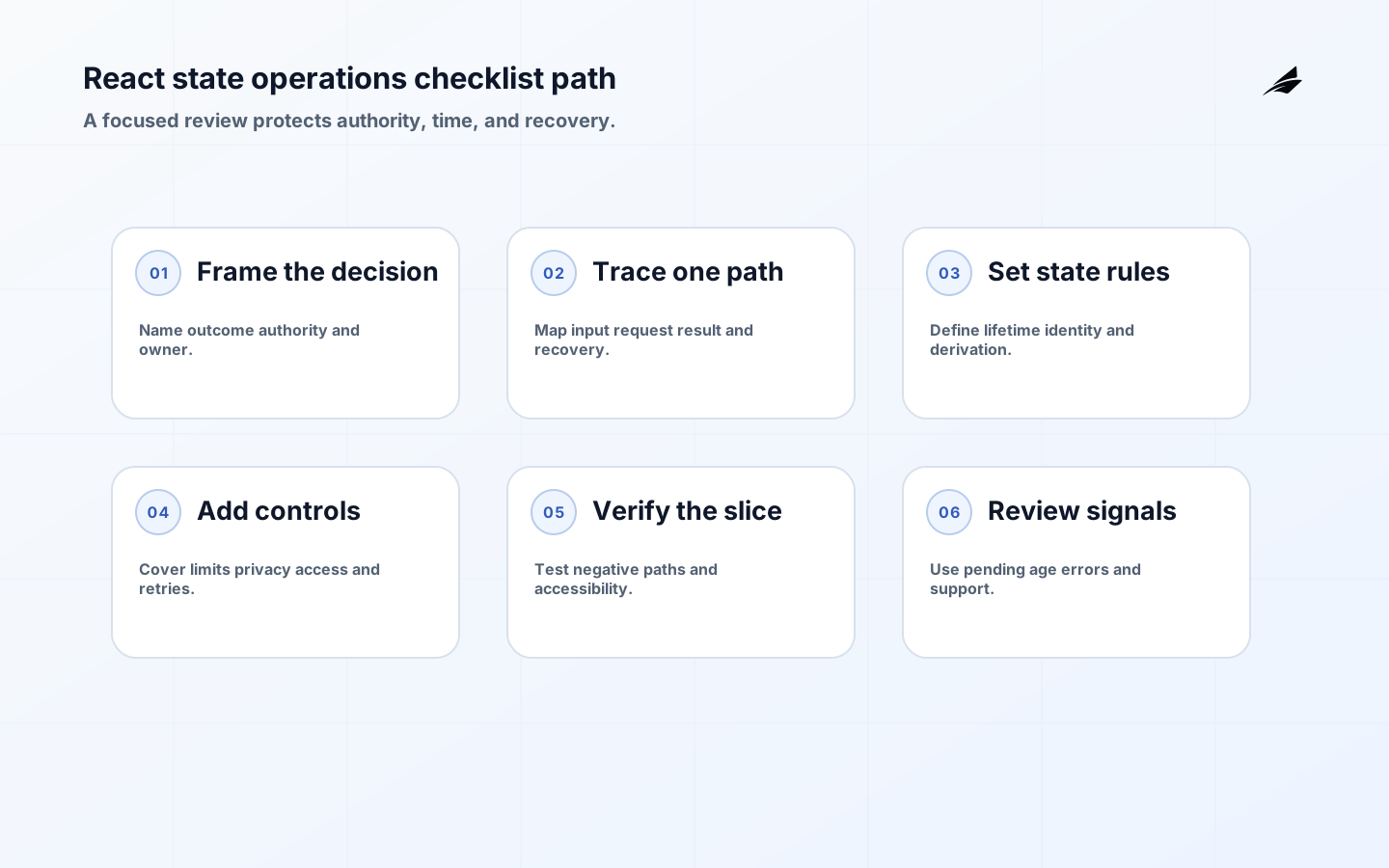
A React state design checklist is valuable when it prevents a team from treating a working demo as a complete operating model. Digital operations often combine a remote record, URL filters, local edits, asynchronous commands, permissions, and human recovery. If those concerns are left implicit, the interface can show a plausible answer while the underlying action is pending, stale, unauthorized, or duplicated. This checklist turns the review into concrete questions about authority, lifetime, failure, and evidence. It is deliberately tool-neutral: React’s Thinking in React guidance helps discover component boundaries, while the system contract determines what users can trust.
Define the React state design decision
Write the decision in one paragraph. Name the journey, the actor, the important outcome, the authoritative source, and the worst plausible wrong result. For a maintenance console, the outcome may be a technician knowing that a work order is assigned, saved, and visible to the next shift. For a customer portal, it may be knowing that a request is received even when a provider is slow. Include the owner for an exception and a review date.
Use a decision record to separate required behavior from preferences about stores or hooks. A reviewer should be able to ask why a filter belongs in the URL, why a draft is local, or why a workflow status is durable. Link the checklist to the TypeScript architecture checklist when type boundaries and state boundaries need to evolve together.
Plan one narrow operational path
Trace the smallest journey that contains real risk. List the input, validation, identity, request, domain rule, persistence or provider call, response, and visible result. Mark which steps are synchronous and which become pending. Do not begin with a full-screen component map; begin with the decision a person needs to make and the evidence that supports it.
| Checklist area | Question | Minimum artifact |
|---|---|---|
| Outcome | What should the person know or be able to do? | User story with success, pending, and failure meaning |
| Authority | Which record or service wins when values disagree? | Authority map and identifier or version rule |
| Lifetime | What survives reload, navigation, identity change, or retry? | State lifetime and reset decision |
| Recovery | How is an uncertain or failed result checked or corrected? | Operation status, reconciliation, or human runbook |
| Evidence | Which test and signal proves the contract? | Test cases, telemetry fields, owner, and release gate |
Set the state boundary and evidence contract
Classify each value as local interaction, form draft, URL state, server data, or durable workflow. Then identify duplication. The same customer record may appear in a list, detail panel, form, and global cache; decide which representation is authoritative and how updates invalidate or reconcile the others. React’s Choosing the State Structure guidance supports avoiding redundant and contradictory state, but a production checklist must also capture freshness and permission.

Treat identity changes as a first-class transition
Account, tenant, role, record, and query identity can change while a component remains mounted. Define what resets, what can be migrated, and what must be revalidated. Never let a response for an old identity populate the current view. If a draft is intentionally retained, show its association and do not silently submit it in a new context.
Implement the smallest state model that explains behavior
Prefer a minimal set of source values plus derived selectors. If the UI needs a total, filtered list, validation summary, or disabled decision, derive it from current inputs. Keep event-specific work in event handlers and use effects for external synchronization. Name transitions rather than exposing general setters so validation, permissions, and telemetry have a stable place.
Use HTTP Semantics when translating server outcomes into client state. A successful request, accepted asynchronous work, validation failure, authorization failure, conflict, and server error have different meanings. The UI should not treat every non-error response as completed business work or every timeout as a known failure.
Add controls for security and misuse
Client state is not an authorization boundary. The server must check the authenticated principal, resource, tenant, and action. Treat IDs and status values from the browser as untrusted input. Keep secrets and sensitive drafts out of URLs, long-lived storage, and logs. The OWASP API Security Project is a useful reference for authorization and object-level access risks that a React state review should surface.
Add limits for large lists, expensive filters, retries, and polling. A state model that lets a user trigger unlimited concurrent requests may be correct in a toy example and harmful in production. Make back-pressure visible and give the user an action that explains whether work is queued, running, or complete.
| Failure or edge case | Required state | Verification |
|---|---|---|
| Late query response | Current query identity plus stale-response handling | Rapid input test with out-of-order responses |
| Timeout after command | Unknown or pending operation, not a false failure | Repeat request and reconciliation test |
| Permission loss | Read-only or denied state with safe explanation | Role change and server negative test |
| Partial data | Independent panel state with known omissions | Dependency failure isolated to one panel |
| Large result set | Pagination, bounded rendering, and loading behavior | Performance and keyboard test on realistic data |
Ship state boundaries with controlled change
Build one slice that includes a normal path and one uncomfortable state. Keep the route observable and easy to roll back. Add contract, component, integration, and user-journey tests according to risk. Use a feature flag or small cohort when the change affects shared caches, navigation state, or irreversible commands. Define the pause condition before release: unexpected duplicate actions, increased stale data, error boundary events, or support reports are all possible gates.
Use NIST secure software guidance to place threat modeling, verification, and remediation in the delivery workflow. Do not attach security as a final checklist box after state ownership has already made sensitive information easy to leak. Review storage, telemetry, authorization, and recovery together.
Measure operating signals, not only test counts
Track response latency, stale-response drops, retries, pending age, failed transitions, error boundaries, accessibility defects, and time to recover a user’s work. Interpret the signals with context. A high retry count can indicate a network problem or a misleading button state; a high pending age can indicate a provider issue or an operation whose status contract is missing. Give each signal an owner and an action threshold.
Avoid familiar checklist failures
Do not mark an item complete because a type exists, a mock passes, or a screen looks stable in one browser. Do not copy a server record into local state without a freshness plan. Do not hide a pending operation behind an indefinite spinner. Do not store an authorization decision solely in the client. Do not let a temporary workaround survive without an owner and a review date. A concise checklist is stronger when every item points to an artifact or an observed behavior.
Review the decision as the workflow changes
Revisit the model when a workflow gains a new actor, provider, data source, retry path, or irreversible action. Ask whether the previous authority and lifetime still hold. Review a failure with someone who did not build the feature and ask them to identify the current state, the safe next action, and the correction owner. A checklist should evolve from evidence rather than become a ritual that no longer describes the product.
Use the checklist alongside the boundaries that supply and consume state. The internal tool UX decision guide helps test whether an operator can interpret pending and recovery states, while the API versioning field guide helps align a client transition with a changing server contract. These links are useful because reliable state is a cross-layer promise: a screen cannot communicate certainty that the API or durable record does not support.
A useful review ends with a handoff that another person can execute. Give the operator a route to identify the current record, the client a stable response category, and the delivery team a test that reproduces the transition. For a screen used by internal staff, compare the state contract with the internal tool UX field guide. For a service boundary, compare it with the API versioning field guide. This is how a checklist becomes shared operational knowledge instead of a one-time approval artifact.
Before closing a review, have someone outside the implementation team follow the path from an input change to the visible result and then to recovery. Ask them where authority lives, which state is stale, and what action is safe after a timeout. If they cannot answer without inspecting private code, keep the boundary narrow and add evidence before sharing the pattern. A checklist earns its place when it shortens a real handoff and makes a failure easier to correct.
React state checklist takeaways
- Name the user outcome, authority, owner, and harmful failure.
- Classify state by lifetime and eliminate unneeded copies.
- Define pending, stale, denied, partial, and uncertain states.
- Test identity changes, late responses, retries, and recovery.
- Instrument outcomes and review the boundary when dependencies or users change.
React state design checklist questions
What should be decided before selecting a state library?
Decide the outcome, authority, lifetime, actors, failure states, and recovery path. A library can implement those decisions, but it cannot choose which record is authoritative or what a timeout means for the business.
How should a checklist handle retries?
Record whether the action is repeatable, assign an operation identity or idempotency key, show pending or uncertain status, and test a retry after a timeout. Never use a generic retry button for a command whose outcome is unknown without reconciliation.
What is evidence that the checklist is complete?
A reviewer can trace the critical path, reproduce its negative cases, explain its accessible transitions, inspect its signals, and find the correction owner. Completion is evidence and recovery, not the presence of a document.
Conclusion: use the checklist to protect decisions
React state design is reliable when the interface tells the truth about authority, time, permission, and recovery. Use the checklist to expose those decisions before the code spreads them across components, then verify the result with real failure paths and production signals. A small, honest state model is easier to operate than a large one that only describes the happy path.