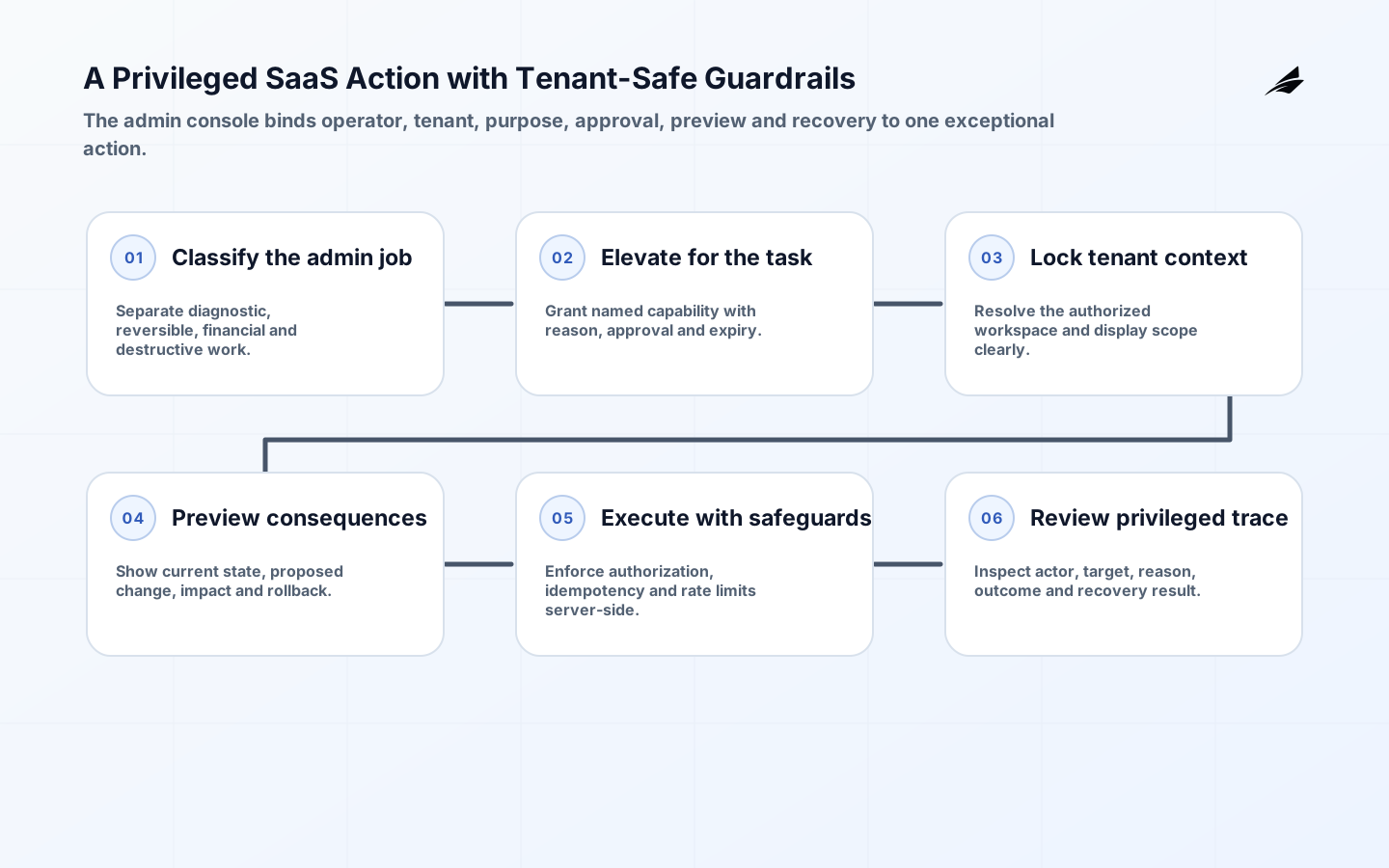
Admin consoles exist for work the customer-facing product cannot safely or conveniently expose: investigating incidents, correcting data with approval, reconciling billing state, handling account recovery, or operating a platform service. Because the people using them can change consequential records, these consoles deserve more design attention than an internal shortcut. The aim is not to give staff broad power quickly. It is to make the right exceptional action possible with clear scope, evidence, and accountability.
Why Admin Consoles Matter
A generic 'admin' role is usually too broad. A support agent who must inspect an export failure does not need the ability to change subscription terms; a finance operator who adjusts an invoice does not need to browse all customer files. When capabilities are bundled into an all-powerful console, teams compensate with shared accounts, informal approval chats, and undocumented database edits. Those shortcuts make incidents harder to resolve and customer trust harder to defend.
Start by classifying administrative jobs, not screens. List the request that triggers the work, the resources involved, the permitted action, the approving role, the evidence required, and the recovery path. This gives engineers a basis for task-focused permissions and gives operators an interface that matches the actual workflow. It also makes it easier to decide that an action should be automated or moved into the customer product instead of remaining a manual staff task.
Classify Administrative Work
Divide actions by consequence. Read-only diagnostics may be broadly available but still tenant-scoped. Reversible changes can require a reason and an audit event. Irreversible, financial, or privacy-sensitive changes may require a second approver, a hold period, or a tightly controlled service workflow. The classification should be visible near the action; people make better decisions when the interface tells them what will change and whether the action can be undone.
| Action class | Example | Recommended safeguard |
|---|---|---|
| Diagnostic read | Inspect job status for one workspace. | Tenant scope, purpose, and access logging. |
| Reversible correction | Retry a failed import. | Reason, before-and-after evidence, rollback route. |
| Commercial adjustment | Grant a temporary billing concession. | Approval, expiry, and reconciliation record. |
| Destructive change | Delete retained customer data. | Strong confirmation, policy check, and dual control. |
Model access as a specific capability against a specific tenant or platform resource. Staff should authenticate with individual accounts, use strong phishing-resistant factors where appropriate, and obtain elevated access for only as long as the task requires. Impersonation is sometimes useful for reproducing a customer experience, but it must state the target workspace, purpose, expiry, and visible banner. It should never silently inherit a customer session or obscure who performed a downstream action.
Design the Administrative Control Plane
Keep the console's backend separate enough that permissions, audit events, and rate limits cannot be bypassed by a convenient internal endpoint. The service should enforce the same tenant isolation principles as the customer product and add administrative policy checks. Do not trust a UI route to prevent a privileged request. A well-designed API takes the actor, target tenant, action, reason, and approval reference, then produces a durable decision record.
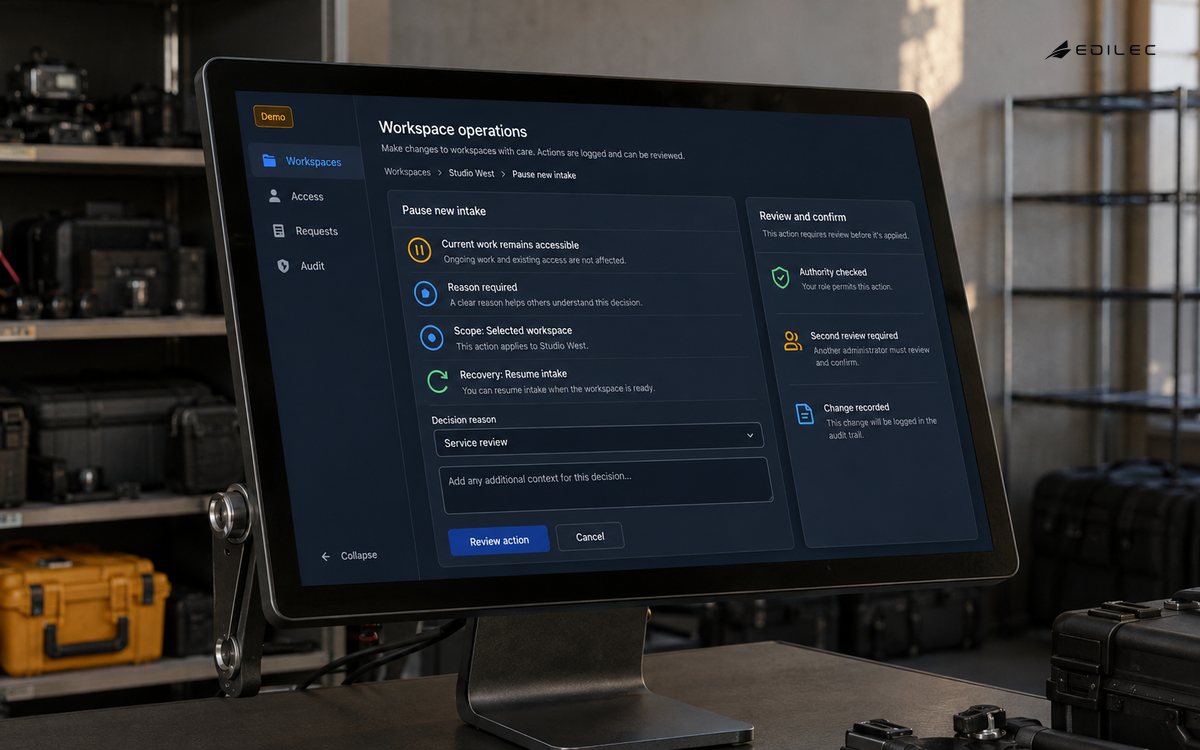
Give high-risk actions a preview. Before applying a correction, show the current state, proposed change, affected resources, policy impact, and rollback option. For a data repair, a dry run can estimate affected records. For an entitlement override, the screen can reveal its expiry and priority relative to provider events. This reduces accidental broad changes and gives the approver something concrete to evaluate, rather than a vague request in a chat thread.
Build Audit and Recovery
Audit events should answer who did what, to which target, when, from which authorized context, why, and what changed. Record references or hashes for sensitive inputs instead of copying their content indiscriminately. Make audit information searchable by customer, request, actor, and action type, with access controls of its own. A good audit trail supports customer support, security investigation, and operational learning; it is not just a compliance export generated once a year.
| Design question | Weak answer | Stronger answer |
|---|---|---|
| Who can use this? | Anyone with the admin URL. | Named roles with task-specific permissions. |
| What changed? | A free-text note after the fact. | Structured before-and-after event with a reason. |
| How is scope set? | Operator types a customer ID. | Authorized lookup plus visible tenant context. |
| How is recovery handled? | Ask an engineer to repair it. | Preview, reversal, or documented escalation. |
Test the console as an adversary and as an exhausted operator. Try direct API calls without the screen, stale elevated sessions, a tenant switch during an action, duplicate submissions, malformed resource IDs, and a slow network after confirmation. Then test keyboard navigation, clear focus, readable error messages, and compact operational screens. Internal users still benefit from accessible, predictable interaction; rushed staff are more likely to make a mistake when information is hidden or controls move unexpectedly.
Run a Review Loop
Monitor privileged access duration, denied admin requests, emergency actions, actions without a linked ticket, failed reversals, and repeated requests for the same manual fix. Review a sample of sessions with support, engineering, and security. Repetition is a product signal: perhaps a customer-facing control is missing, a data model needs repair, or an approval rule is too unclear. The console should reveal that work instead of becoming the permanent place where product defects are silently patched.
Example: Correcting a Failed Job
A customer reports that a scheduled report did not arrive. A support operator opens a tenant-scoped job diagnostic, sees the failure reason and redacted input reference, and selects a retry action. The console previews the affected job, prevents the retry if the tenant's integration is disconnected, and writes an audit event with the support ticket. If a data correction is needed, the action routes to an approved repair workflow instead of exposing a generic database editor. The customer receives a clear status update, not an unexplained duplicate email.
The admin console design guide offers further planning questions for this kind of tool. Start with the most common high-consequence support request and make its scope, evidence, action, and recovery path visible end to end.
Review Privileged Work
Run a quarterly sample review of privileged actions and compare the audit record with the original customer need. Look for actions that used a broad role when a narrower one would suffice, changes without a linked request, repeated emergency elevation, and operations that staff perform so often they deserve an automated workflow. Discuss findings with the people who use the console. A control that adds friction without protecting a real decision will be bypassed; a well-designed control gives operators context that helps them act correctly.
Prepare incident access before an incident. Define who may request emergency elevation, how the request is approved, what evidence must be captured, when access expires, and how the session is reviewed afterward. Test this path under a realistic outage so it does not depend on a single unavailable identity provider or an undocumented administrator. Emergency access should be fast enough to restore service and constrained enough that it does not create an unbounded second incident.
Design console changes with the same release discipline as customer features. New actions need authorization tests, audit assertions, tenant-boundary tests, error handling, and a preview of the operator experience. Use staged rollout for high-impact capabilities and keep a way to disable a new action without removing essential diagnostics. A console is often used during the worst moments in production; an untested convenience button can turn a recoverable service defect into a broad customer-data problem.
Separate operational data views from action controls when that improves safety. A read-only diagnostic page can be available to a wider support role, while a correction action requires elevation and an approval reference. This reduces both the attack surface and the cognitive burden on staff: they can investigate most questions without navigating a screen full of destructive choices. Design the escalation boundary deliberately, and make it clear to the operator why an action is unavailable and who can perform the next safe step.
Use realistic training scenarios for new operators, including a mistaken tenant selection and a request that requires escalation. Practice helps people recognize the console's guardrails before a stressful customer incident makes every control feel like an obstacle.
Protect the console from becoming a shadow product. When operators need the same bulk edit, customer note, workflow exception, or report every week, ask whether the capability belongs in a managed operations process or in the customer-facing application. Keep a queue of such patterns and review their customer impact. The answer is not always to expose the control externally, but repeated manual intervention deserves a product decision. This prevents a small internal interface from accumulating critical behavior that nobody outside the operations team understands.
Key Takeaways
- Design permissions around administrative jobs, not one broad admin role.
- Bind each action to actor, tenant, reason, approval, and audit evidence.
- Preview consequential changes and provide a recovery route.
- Use repeated manual work as evidence for product or process improvement.
Frequently Asked Questions
Should support agents be able to impersonate customers? Only for bounded, documented tasks with visible tenant scope, attribution, expiry, and audit records. Prefer a diagnostic view when it answers the question. When is dual approval worthwhile? Use it for irreversible, financial, privacy-sensitive, or unusually broad actions where one person's mistake would have significant consequences.
Conclusion
A mature admin console turns exceptional work into controlled work. Task-specific access, visible scope, structured evidence, and recoverable operations help staff solve customer problems without creating an untraceable back channel around the product.
Sources
Use the OWASP ASVS, NIST SP 800-207, AWS tenant isolation guidance, and WCAG 2.2 to validate controls and interaction details for an administrative surface.