A Field Guide to HRMS Workflows for Growing Teams
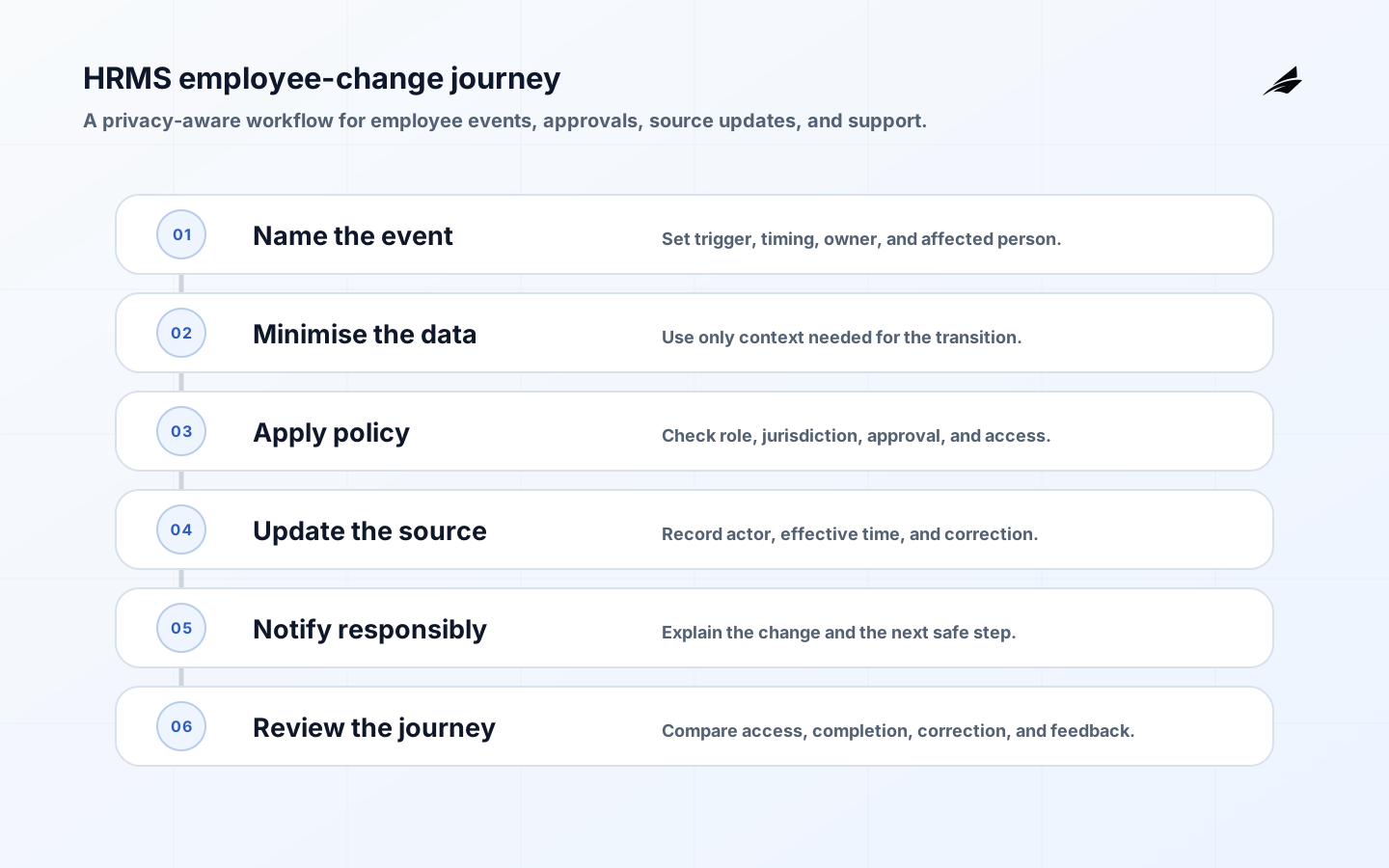
HRMS workflows turn sensitive employee changes into reliable, respectful operations. They cover onboarding, role and manager changes, leave, compensation events, access coordination, and offboarding. The challenge is not only data entry. Each change affects a person, may require confidentiality, and often triggers work in payroll, benefits, IT, facilities, finance, and management. Begin by identifying the point at which an employee experience or legal obligation can fail: a delayed start, an unrevoked account, a payroll error, or a manager acting on outdated information. Build a controlled handoff around that moment.
Define employee events and minimum necessary data
Treat a hire, transfer, leave, compensation change, and departure as distinct events with different authority and audience. For each one, record the effective date, legal entity or employing unit, accountable HR owner, approving manager, and downstream tasks. Limit information to the purpose of the workflow. A provisioning team may need a start date, role, manager, and location; it rarely needs a complete personnel file. This separation helps protect employees while improving accuracy because each team sees the information it is actually responsible to act on.

| Employee event | Operational handoff | Evidence to preserve |
|---|---|---|
| Hire | Create worker profile, payroll setup, equipment and access tasks. | Accepted offer, start date, owner, completion confirmations. |
| Transfer | Update manager, cost center, role, location, and access review. | Effective date, approving authority, old and new assignments. |
| Leave | Coordinate permitted status, payroll or benefits actions, coverage plan. | Approved request, access treatment, return review date. |
| Departure | End access, recover assets, update payroll and records. | Termination authority, effective time, completion evidence. |
Use purpose-limited access and accountable change
An HRMS should distinguish a person identifier from the attributes different teams use. HR may maintain employment history; managers may view team-relevant information; payroll may use tax and compensation data; IT may use role and lifecycle status to provision systems. Make changes through an authorized request with effective dates and audit history. Do not rely on a manager's informal message to alter pay, access, or employment status. Where corrections are necessary, retain the old value and the reason for the new one so payroll and compliance questions can be answered without exposing sensitive narrative broadly.
The NIST Privacy Framework supports purpose and risk-based treatment of personal data. NIST SP 800-53 provides useful access, audit, and account-management control concepts. EEOC Title VII is a primary legal reference relevant to employment practices in the United States, and W3C PROV-DM offers a way to think about evidence linking decisions and updates. These materials are not a substitute for legal advice; they reinforce careful, purpose-limited workflow design.
| Control | Why it matters | Test |
|---|---|---|
| Role-aware views | Limits sensitive information to justified audiences. | A manager cannot browse unrelated employee records. |
| Effective dating | Prevents future or backdated changes from silently applying now. | Downstream tasks use the intended local time and date. |
| Approval trail | Shows who authorized a material change. | A correction retains its source and approver. |
| Offboarding checklist | Coordinates time-sensitive access and asset actions. | A sample departure is traced across every required system. |
Pilot an employee journey with the people doing it
Choose onboarding or offboarding, because both cross multiple teams and reveal hidden handoffs. Map a recent real journey with HR, the manager, payroll, IT, and the employee-facing coordinator. Configure only the data and tasks needed for that path. Test an early start-date change, an international or multi-entity variation where applicable, an absent manager, a withdrawn offer, and a delayed equipment return. The workflow must make owners and deadlines visible without treating the employee as a ticket passed between departments.
- Give each task a responsible person, a due date tied to the effective event, and a clear completion condition.
- Use least-privilege access for workflow participants and review privileged HRMS roles regularly.
- Send employees and managers clear status updates that disclose only information they are entitled to receive.
- Reconcile key employee attributes with payroll and identity systems after material lifecycle changes.
Avoid treating people data as ordinary operational data
Employee data has a long afterlife: a casual note can be copied, a manager transfer can expose historic information, and a departure can leave access active in a forgotten system. Workflow speed must not override privacy, dignity, or local employment obligations. Avoid public task titles that reveal sensitive leave or performance details. Do not use automated reminders as a substitute for human review when a case involves accommodation, disciplinary action, or a contested employment decision. Design the system to prompt careful action, not to make it easier to avoid it.
Measure completion without losing the human signal
Track missed handoffs, late provisioning or deprovisioning, payroll corrections, duplicate profiles, access-review exceptions, and employee or manager feedback. Review a small sample of completed journeys to confirm that a checked task reflects a real outcome. For example, an account may be disabled while a shared credential remains active, or an onboarding task may be complete while the employee still lacks a necessary tool. Use the findings to improve coordination and clarity, not to create a surveillance score for individual administrators.
Integrate carefully across the employee lifecycle
As the organization adds payroll providers, identity systems, benefits, learning, expenses, and equipment tools, make the HRMS event the controlled trigger rather than allowing every application to edit core employment attributes. Specify which downstream failures block a change and which can be reconciled later. Preserve a correlation identifier and effective time in each integration. This keeps a person from being accidentally created twice or removed too soon when a correction arrives after a dependent system has acted.
Use adjacent workforce guidance only after the employee event and access boundary are clear; this guide stays centred on respectful, auditable HRMS transitions. See the employee access lifecycle guide and workflow audit checklist when setting the handoff and review boundary. Also compare the approval workflow field guide when testing authority and handoff evidence.
Name the employee change and its owner
An onboarding event should expose only the attributes each recipient needs for its task. The HR owner can retain the full employment record while a manager receives role, start date, and readiness items. Payroll needs the effective compensation fields; IT needs approved access and equipment details. This separation reduces accidental disclosure and gives the employee a defensible explanation of who receives what. Keep the event version and effective time with the transition so later corrections do not erase the original decision.
Apply policy at the transition boundary
HRMS workflows become dependable when an employee event has a named owner, effective date, approved audience, and visible downstream state. Keep the employee-facing meaning separate from the integration mechanics. A correction should preserve the prior event and explain what changed, who approved it, and when the new state takes effect.
Approve a transition with usable evidence
Review one onboarding or offboarding journey with HR, the manager, payroll, IT, and the employee-facing owner. Compare access logs, effective dates, notifications, and correction work. Treat late deprovisioning, duplicate profiles, and unanswered employee questions as boundary evidence, then assign a bounded fix.
- Name the HRMS workflows decision, owner, timing, evidence, and unacceptable failure.
- Distinguish current, provisional, blocked, corrected, and recovered states.
- Test normal, late, duplicate, denied, partial, and recovery outcomes before expansion.
- Keep source, identity, policy, version, and authority close to consequential actions.
- Review one real exception with operators and record the correction.
Key takeaways
Review one completed employee journey with HR, the manager, payroll, IT, and the employee-facing owner. Compare the stated policy with access logs, effective dates, notifications, and correction work. Record any unnecessary disclosure or stalled recipient as a boundary defect, then assign a bounded fix and repeat the journey after the change.
For HRMS workflows, make the next review concrete: select a recent exception, trace the record from its first source through every handoff, compare the stated rule with the action taken, and record the owner of the correction. Include timing, access, communication, and reconciliation rather than treating the technical result alone as success (for an HRMS employee transition). This compact evidence exercise reveals where the workflow is unclear and gives the team a measured basis for its next improvement (for an HRMS employee transition).
- HRMS workflows should coordinate employee events with minimum necessary data and clear ownership.
- Use effective dates, authorized change trails, and role-aware access for material employment records.
- Test employee journeys for exceptional conditions, not only the happy path between systems.
- Related reading: CRM automation, ticketing workflows, and approval workflows.
Frequently asked questions
Who owns onboarding workflow completion?
HR should own the employee event and the overall journey, while each receiving team owns the task it is qualified to complete. A manager is accountable for role and readiness decisions; payroll owns payroll setup; IT owns access and equipment tasks. The workflow owner must coordinate these roles and resolve stalled handoffs, rather than assuming a completed HR form proves all downstream work is done.
Can every manager see the same HRMS record?
No. Access should match role, purpose, and applicable policy or law. Managers need current information required to manage their teams, not unrestricted access to employment, leave, compensation, or case records. Design views and reports around the decision being made, review permissions after role changes, and keep sensitive processes in a limited-audience workflow.
Treat employee-facing communication as part of the control path. The person affected should know what changed, when it takes effect, what information was used, and where to ask for correction. This reduces avoidable rework and makes a sensitive workflow easier to review.
Make the support path visible as well: when a downstream task fails, the workflow should show the affected employee, current status, accountable team, and safe next action without exposing unrelated personnel detail. Review one completed journey with the employee-facing owner and the technical owner before changing the automation.
Conclusion: make employee changes dependable and respectful
HRMS workflows work when they make a sensitive change clear to the people responsible for it while protecting the person at the center of the record. Start with one employee journey, preserve the authorization and effective date behind every material update, and validate completion across downstream teams. That creates a more reliable employee experience and a more defensible operating system.