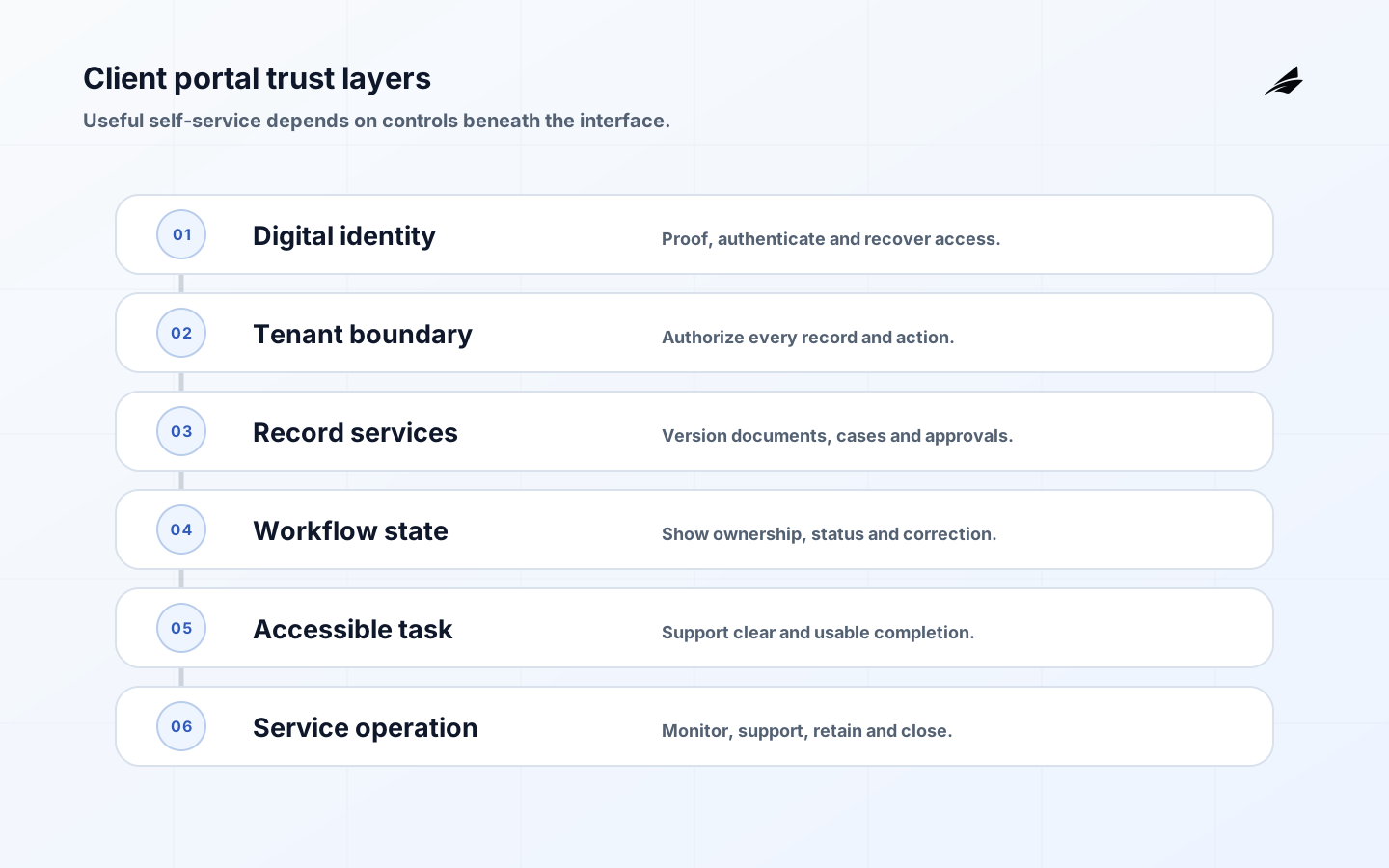
Client portal meaning is straightforward at first: a client portal is a private digital workspace where an organization and its customers exchange information, documents, requests, decisions and service status. The important distinction is that a portal is not merely a password-protected website. It participates in business workflows and therefore needs reliable identity, account boundaries, authorization, notifications, document handling, audit history, support and lifecycle management. A consulting portal might collect briefs and approvals; an accounting portal might exchange records; a SaaS portal might expose billing, usage and support. The design should start with the client task and consequence, then select features and assurance.
Define the portal boundary
Write down who the client is, which organization or account they represent, what records they may see, what they can submit or approve and which internal system remains authoritative. Distinguish public content, authenticated self-service and internal administration. A dashboard summarizes information; a portal carries controlled work. The admin panel versus dashboard guide clarifies those adjacent interface types. Avoid turning the portal database into an accidental master record when CRM, case, billing or document systems already own the truth.
| Portal capability | User outcome | Design obligation |
|---|---|---|
| Secure access | Reach the correct account without avoidable friction | Identity proofing, authentication and recovery |
| Document exchange | Send and retrieve the right version | Malware checks, access control and retention |
| Requests and cases | Know status and next responsibility | Explicit states, owner and service target |
| Approval or signature | Make a consequential decision | Authority, intent, timestamp and evidence |
| Notifications | Learn that action is needed | Preference, channel safety and deep-link authorization |
Choose identity assurance from risk
Not every portal needs the same proofing and authentication. NIST released SP 800-63 Revision 4 in 2025 with guidance for identity proofing, authentication and federation. Assess the impact of the wrong person gaining access, the wrong account being linked or an authenticator being lost. Use federation for enterprise customers where it improves lifecycle control, and support phishing-resistant options for higher-risk accounts. Recovery must not be weaker than login. NIST’s authentication assurance levels provide a structured way to match strength to impact.
Enforce authorization and tenant isolation
Authenticate the person, then authorize every object and action on the server. Model organization membership, role, engagement or matter, delegation and expiry. Do not rely on hidden navigation or client-supplied account identifiers. Administrative impersonation should be restricted, time-bound, disclosed where appropriate and logged. Test cross-tenant access with predictable and random identifiers. Use the OWASP Application Security Verification Standard as a verification baseline for authentication, session, access, file and business-logic controls.
| Risk | Control | Evidence to test |
|---|---|---|
| Account takeover | Strong authentication, protected recovery and session controls | Recovery and authenticator-change scenarios |
| Cross-client disclosure | Object authorization and tenant isolation | Negative tests across every record type |
| Unsafe upload | Type, size, content and malware validation | Rejected sample and isolated storage path |
| Stale access | Lifecycle sync and periodic membership review | Departure and contract-end revocation |
| Disputed approval | Clear intent and immutable decision history | Actor, record version, time and confirmation |
Design documents and workflows as records
Uploads need stable identifiers, version history, source, classification, retention and processing status. Store files outside the web root and serve them only after an authorization check. Make scanning and conversion asynchronous with visible states; never show “complete” before processing has succeeded. Requests, messages and approvals should have explicit lifecycle states and correction paths. The audit trail meaning guide explains how to retain evidence without logging every field blindly. Notifications should reveal minimal sensitive detail and recheck permission when the recipient opens the link.
Make secure access usable and accessible
Security that prevents legitimate clients from completing work creates support risk and unsafe workarounds. Apply WCAG 2.2 to navigation, forms, status messages, focus, errors, target size and authentication. WCAG 2.2 includes accessible authentication requirements that discourage cognitive-function tests without an alternative or assistive mechanism. Support password managers and paste, provide clear recovery, preserve form work across reauthentication and test keyboard and screen-reader journeys. Plain language should tell clients what is needed, why, who can see it and when they can expect a response.
- Show the client organization and role prominently after sign-in.
- Use explicit status labels instead of relying on color.
- Keep drafts when a session expires and recover safely after login.
- Provide downloadable records in accessible, durable formats.
- Give users a visible support and dispute route for important actions.
Operate the portal as a customer service
Assign product and service owners, publish availability and response expectations, and monitor sign-in failure, recovery, upload processing, queue age, authorization denial, notification delivery and abandoned tasks. Segment by client type, device and assistive technology without collecting unnecessary personal data. Exercise data export, account closure, restore and incident communication. The NIST Privacy Framework helps connect data processing with organizational risk. The SaaS support tooling checklist provides a related operating model for support queues and customer context.
Integrate without duplicating authority
Use APIs or events to move the minimum necessary data between the portal and systems of record. Define which system creates identifiers, owns state and authorizes correction. Make writes idempotent and show processing state when a downstream system is delayed. Avoid nightly copies for decisions that need current entitlement or balance. Reconcile portal and source populations, especially after retry or outage. Administrative tools should expose integration failures with client-safe messages and internal diagnostic context. A portal that silently displays stale or partial data can damage trust more quickly than one that clearly reports temporary unavailability.
Design safe and useful notifications
Choose email, SMS, push or in-portal messages from urgency, sensitivity and client preference. Keep confidential details out of external channels and use links that require current authentication and object authorization. Avoid long-lived bearer tokens. Let users control nonessential notifications while preserving contractual or security notices. Track delivery and bounce, but do not equate delivery with completion. Escalate time-sensitive tasks through an agreed route and show the same status inside the portal. Test notification timing, duplicate suppression and what happens when account membership changes after a message is sent.
Plan onboarding, support and account closure
Onboarding should verify the client organization, establish administrators, bind users to the correct account and teach the first valuable task. Support needs a safe way to diagnose session, document and workflow state without viewing more client data than necessary. At contract end, revoke access, finish or transfer open work, export records in a documented format and apply retention or deletion obligations. Preserve required decision and audit evidence separately from active portal access. Test closure before launch; a system that can create accounts but not end them safely has an incomplete identity lifecycle.
Worked scenario: a professional-services document request
A client administrator signs in through their organization’s identity provider and sees the active engagement, assigned team and two outstanding requests. They upload a tax document to a specific request. The portal saves the original, scans it in isolation, records version and uploader, then marks processing pending. Only after the document service confirms success does the request become ready for review. The adviser can return it with a precise reason without emailing a copy. The client receives a minimal notification and must authenticate again before opening the record.
When the adviser approves the document, the portal records actor, role, record version and time, then sends a controlled reference to the system of record. A timeout checks target status before retrying. Support can see processing state and correlation identifiers but cannot open the document without an authorized escalation. At engagement end, open requests are resolved, client access is revoked, an export is produced and retention policy governs the evidence. This example shows that portal value comes from trustworthy state and responsibility, not from assembling upload, chat and dashboard widgets.
Portal reporting should focus on successful client work and trust signals. Track completion time for key tasks, processing failures, recovery success, unresolved request age, cross-tenant authorization denials, support contacts and accessible-task defects. Avoid ranking clients by activity without context; a quiet portal may mean work is complete or that users abandoned it. Join quantitative signals with support and research, then review by client type and task. Keep security logs separate from broad product analytics and apply retention appropriate to each purpose.
Key takeaways
- A client portal is a private workspace for controlled customer work, not just gated content.
- Choose identity and authentication assurance from consequence.
- Authorize every record and action within an explicit tenant model.
- Treat documents, requests and approvals as versioned lifecycle records.
- Design accessibility, recovery, support and closure as core portal capabilities.
Frequently asked questions
Is a client portal the same as a CRM?
No. A CRM primarily helps the organization manage customer relationships and records. A portal is the client-facing interaction layer. It may read and write CRM data through controlled workflows, but the ownership boundary should remain explicit.
Should a company build or buy a portal?
Buy when standard identity, document and request workflows meet the need and integration or branding can be configured safely. Build when the client task, business rules or product experience are differentiating enough to justify lifecycle ownership. Compare exit and data portability in both cases.
Which features belong in the first release?
Start with secure access, one valuable end-to-end task, visible status, notifications, support and audit evidence. Add messaging, analytics and broad self-service only after the record and authorization model has proved reliable.
Conclusion
The practical meaning of a client portal is a trusted place where customers can complete controlled work. Strong identity, tenant isolation, accessible workflows and visible service ownership are what make that trust deserved.