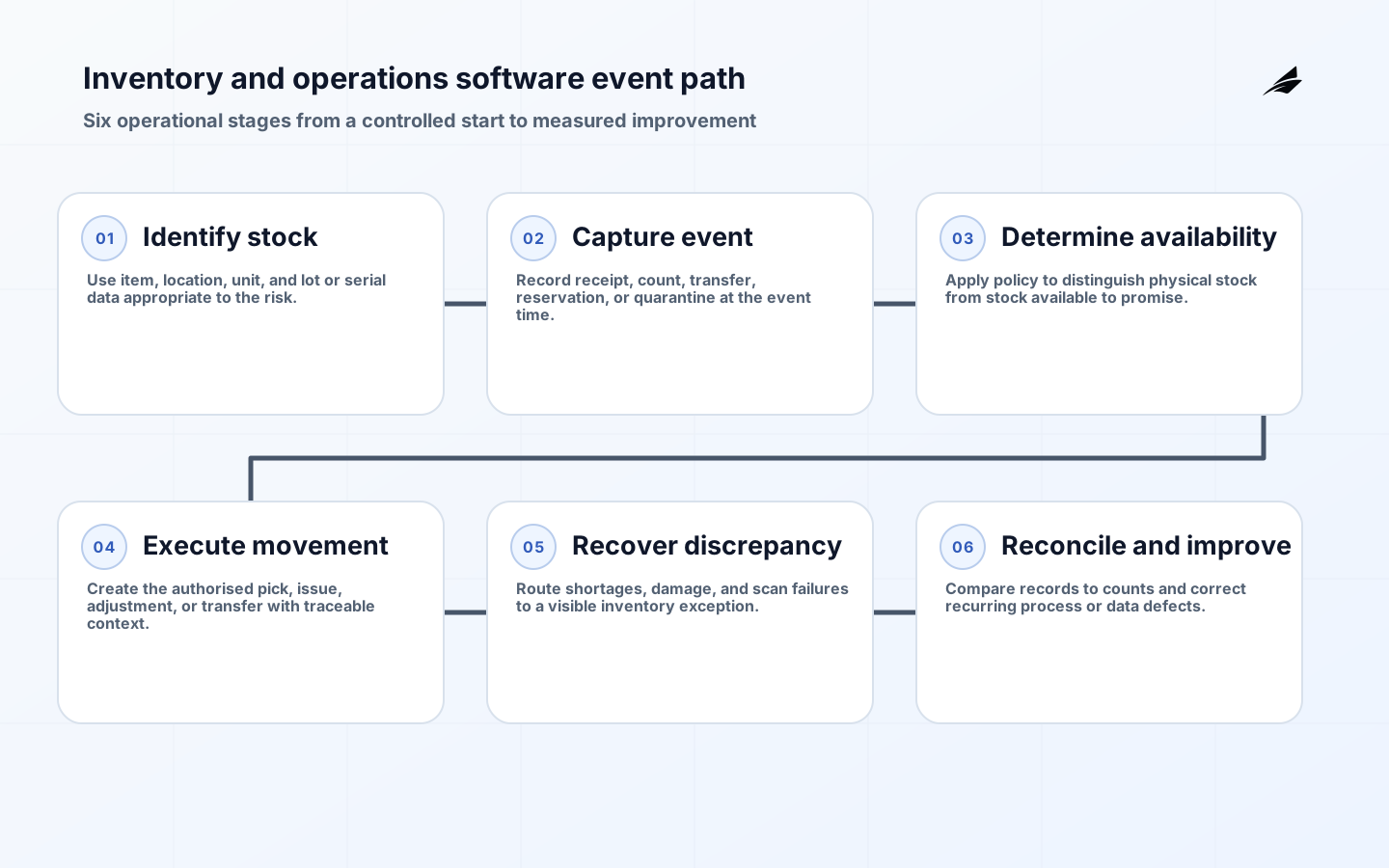
Inventory and operations software is dependable only when the people doing daily work can tell what is true, who may decide, and how a blocked case becomes visible. A workflow screen alone cannot provide that. The design has to connect records, authority, timing, and evidence across the business journey. Consider this case: A service depot receives a shipment with a short delivery, moves part of it into quarantine, and reserves the remaining stock for an urgent work order before the supplier's packing discrepancy is resolved. It is an ordinary operational event, but it exposes whether the system carries the necessary context or merely routes a task. The best first release makes the normal path quick while making uncertainty explicit. Teams planning connected operations can use the ERP, CRM and workflow integration guide to frame the boundaries before adding automation.
Start inventory and operations software with a bounded operating outcome
Write the outcome in terms of a completed business result, not a system feature. For inventory and operations software, the first journey should specify the trigger, completion test, accountable owner, required evidence, and what must happen when the evidence is incomplete. In the scenario above, available-to-promise stock must be derived from recorded events and policy, not from a clerk's memory or a spreadsheet correction. Interview the people closest to the work using recent cases, including the uncomfortable ones. Ask what starts the journey, which fact can change, which decision has financial, people, or customer impact, and who is allowed to repair an error. A good answer is concrete enough for an operator to challenge. It also prevents a project from stretching into every adjacent process before one useful route is proven.
| Decision area | Rule to agree | Evidence retained |
|---|---|---|
| Outcome boundary | State precisely when inventory and operations software begins, finishes, pauses, and hands work to another process. | Named outcome owner, representative cases, and acceptance criteria. |
| Business facts | Define authority and permitted changes for item, unit of measure, location, lot or serial identifier, receipt, reservation, adjustment, count, transfer, and quarantine status. | Stable identifier, source reference, effective time, and status history. |
| Decision rights | Give receiver, warehouse lead, planner, service coordinator, inventory controller, and supplier contact a distinct action; do not confuse being informed with being allowed to approve. | Role assignment, threshold or condition, delegation limit, and decision record. |
| Exception route | Specify the queue, service target, and closure rule when the normal evidence is missing or disputed. | Reason code, owner, next action, and resolution reference. |
Model records, authority, and time before configuring inventory and operations software
Most failures start when two tools appear to own the same fact, or when a correct fact has no effective date. Create a small authority register for item, unit of measure, location, lot or serial identifier, receipt, reservation, adjustment, count, transfer, and quarantine status. For every record, name the authoritative source, business owner, identifier used across boundaries, allowed changes, and whether a receiver keeps a read-only projection or may propose a correction. Record when an observation happened and when it became effective. This distinction matters when work is replayed, delayed, or corrected after a decision. A report can be useful evidence without becoming the source transaction. The provenance concepts in W3C PROV-O offer a useful mental model: retain the source, activity, and responsible actor that led to a result so a later reviewer can reconstruct the path.
Design inventory and operations software controls at every handoff
A handoff needs more than a field mapping. Define the trigger, required values, allowed state, source reference, duplicate behaviour, acknowledgement, and response to rejection. The receiver should know whether an incoming message is new, a correction, a cancellation, or a replay. Pair that contract with server-side authorization: the actor or service identity is verified, the action is limited to the necessary scope, and material decisions are logged without recording secrets or sensitive content unnecessarily. NIST guidance on system interconnection and OWASP authorization guidance both reinforce the same operating lesson: connectivity changes the control boundary. Tests must cover the boundary, not merely the happy-path interface. For inventory and operations software, physical event capture must be tied to item, location, and quantity so a later stock decision can be defended.

| Condition | Expected system behaviour | Accountable owner |
|---|---|---|
| Required context missing | Hold or reject with a specific, actionable reason; do not invent a default to keep the screen green. | Originating process owner |
| Duplicate or delayed delivery | Recognise the original business action through an idempotency key and preserve the earlier outcome. | Receiving system owner |
| Authority or policy conflict | Block the consequential action and route a decision with the relevant policy version and evidence. | Control or policy owner |
| Dependent system unavailable | Persist a visible recovery state, retry only safe work, and avoid claiming completion before confirmation. | Operations or integration owner |
Make exceptions in inventory and operations software operable, not invisible
The exception queue is part of the product. Each item should show the business identifier, failed step, reason, current owner, priority, source context, permitted next actions, and evidence created by repair. In this domain, the dangerous shortcut is posting a stock adjustment without a reason, count evidence, or link to the physical location and item identity. That may resolve a queue count, but it leaves no durable explanation for the customer, colleague, controller, or auditor who needs to understand the outcome later. Separate temporary dependency problems from policy conflicts, disputed data, and missing information because each needs a different response. A retry can be safe for a read operation yet risky for a payment, access change, stock movement, or message that creates a commitment.
Measure the operating result of inventory and operations software
Choose a compact scorecard before release and define its population, exclusions, calculation owner, and review rhythm. For this subject, useful signals include inventory accuracy by location, aged quarantine, adjustment reasons, count variance, reservation failures, and fulfilment delay. Pair aggregates with a monthly sample of completed, rejected, and repaired cases. That review often reveals an apparently efficient path that is simply moving work into email, spreadsheets, or an unowned queue. A metric should lead to a decision someone can make: change a rule, fix master data, train a role, adjust capacity, or remove a redundant step. Avoid treating throughput alone as success. More closed tasks are not better if evidence, access, or customer commitments are being compromised.
- Baseline five to ten real inventory and operations software cases, including a normal path, a late change, a duplicate, missing data, and an unauthorised request.
- Test the role boundaries for receiver, warehouse lead, planner, service coordinator, inventory controller, and supplier contact, including a departed user, a temporary delegate, and a service identity.
- Rehearse the recovery route: identify who notices the failure, who can decide, and what record proves the repair.
- Release to a contained group first, observe real queues and corrections, then widen scope only after the owners can explain results.
- Review access, data quality, and exception patterns on a fixed cadence rather than waiting for a major incident.
Implementation checklist for inventory and operations software
| Before build | During build | Before expansion |
|---|---|---|
| Name the outcome, owner, decision rights, and records that are in scope. | Validate state transitions, input contracts, authorization, logging, and repair permissions with realistic cases. | Compare measured outcomes with the baseline and keep an accountable owner for unresolved gaps. |
| Write the normal case and at least three adverse cases in plain language. | Make reason codes and evidence useful to the person resolving a queue, not only to developers. | Expand one workflow or role boundary at a time; revisit authority rather than copying rules wholesale. |
| Set a source of truth and effective-time rule for every material fact. | Use stable identifiers so support staff can follow a case across systems without a manual search. | Retire shadow spreadsheets only when the replacement has a proven recovery route and accessible history. |
Key takeaways
- Inventory and operations software should make a business outcome, current owner, and next permitted action visible.
- Record authority, effective time, and source references are prerequisites for trustworthy automation and reporting.
- A handoff contract must address validation, duplicates, rejection, delay, and safe recovery.
- Exception queues need their own owners, evidence, service targets, and controlled repair actions.
- Measure outcomes and quality together; activity volume does not prove that the operating model is healthy.
FAQ: Where should a first inventory and operations software release start?
Start with one frequent journey that crosses roles and contains a meaningful decision, but is still small enough to observe end to end. Do not choose it because it has the most screens. Choose it because the team can collect representative cases, identify the authoritative records, and name the person who owns the exception route. A first release should include the unhappy path from the beginning. That is the fastest way to learn whether the promised control is workable under actual operating pressure. In inventory and operations software, use the scenario's decision point as the release boundary so the team can observe both speed and control.
FAQ: What should remain human in inventory and operations software?
Keep a person accountable where evidence is uncertain, a decision changes money, access, employment, a customer commitment, or a material record, or where policy calls for judgement. Automation can collect facts, check complete inputs, calculate a threshold, route work, and prepare a decision view. It should not hide the rule, silently elevate authority, or make a consequential correction because an integration happened to succeed. The business workflow automation guide explains how to make this split explicit. In inventory and operations software, document the decision that requires accountable review and show the reviewer the evidence needed to make it.
Conclusion
Inventory and operations software becomes reliable when it is treated as an operating model: a bounded outcome, authoritative facts, clear decision rights, controlled handoffs, visible exceptions, and reviewable evidence. Build the first journey around a real case such as the one in this guide, rehearse its failure states, and use measured results to earn the next expansion. That discipline is less dramatic than a broad platform launch, but it produces systems people can use and trust.