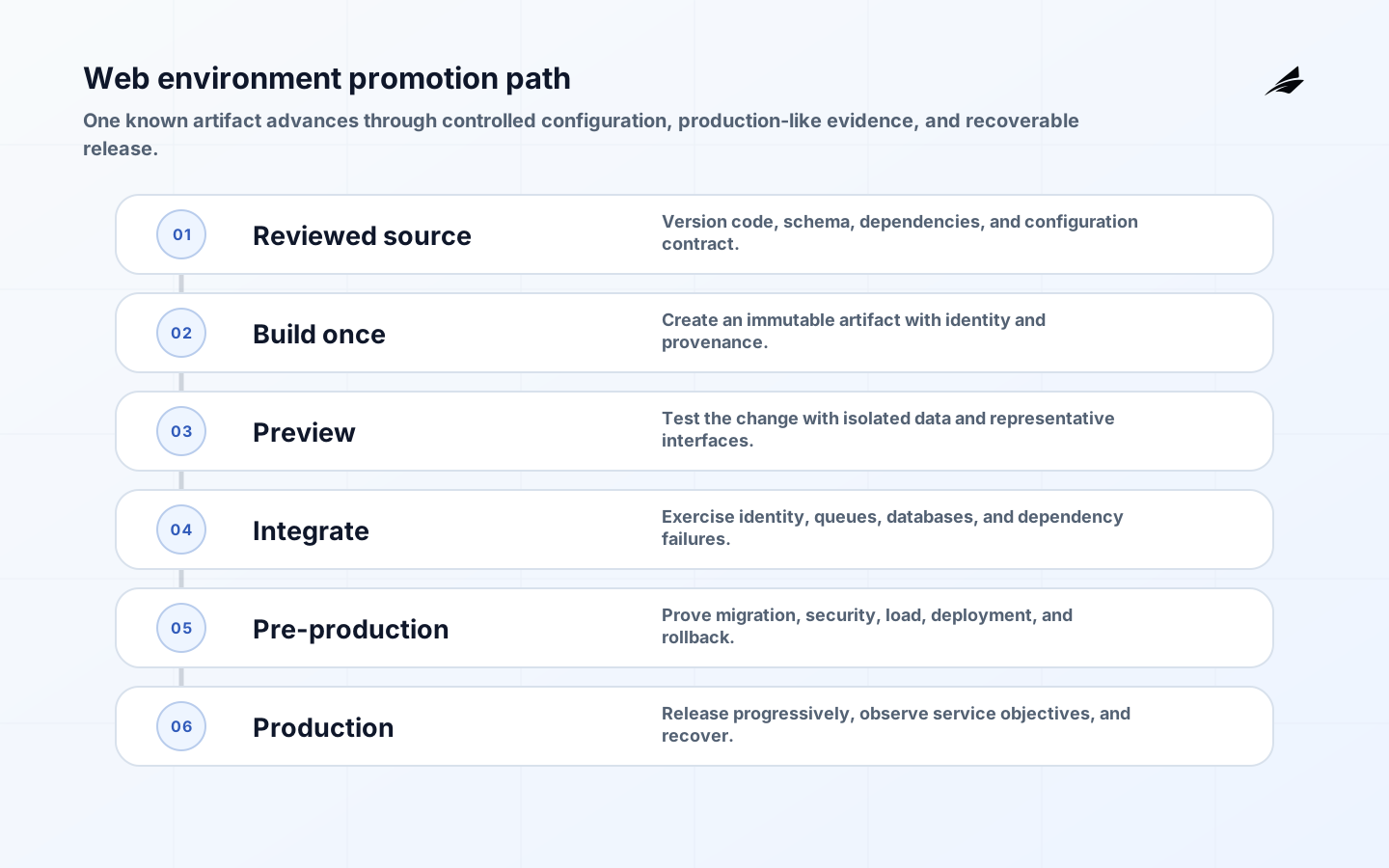
An environment strategy for web apps defines how a reviewed change becomes a production service without changing identity along the way. It covers more than development, staging, and production names: the strategy assigns a purpose to each environment, controls configuration and data, promotes a known artifact, tests production-relevant behavior, and preserves a recovery path. Growing companies need enough separation to protect customers and enough automation to prevent each environment becoming a handcrafted system that behaves differently under pressure.
Why this decision changes delivery outcomes
Key takeaways
- Treat environment strategy for web apps as an operating capability with named owners, not a tool purchase or one-time project.
- Make the important decision, its evidence and the conditions for pause or reversal visible before broad rollout.
- Use small, controlled changes to test technical behavior and the real support or operating path together.
- Keep security, access, reliability and recovery expectations inside ordinary delivery work.
- Review outcomes with the people who own the customer, service and financial consequences.
- Define the business outcome before selecting tools for environment strategy for web apps.
- Map the real workflow for internal operations, including exceptions and approvals.
- Identify the systems of record, integration points and data freshness needs.
- Decide which actions can be automated and which require human review.
- Create a measurement plan so the project is judged by adoption, quality and time saved.
Design the operating path before selecting tools
| Decision | What to define | Why it matters |
|---|---|---|
| Workflow boundary | Where environment strategy for web apps starts, pauses, escalates and finishes | Prevents the system from becoming too broad to launch |
| Data ownership | Which records are trusted and which fields can be updated | Reduces duplicate data and reporting conflicts |
| Access model | Roles, permissions and approval points for internal operations | Keeps sensitive actions controlled and auditable |
| Operating model | Who monitors, supports and improves the workflow after launch | Makes the system dependable beyond the first release |

Promote one artifact and vary controlled configuration
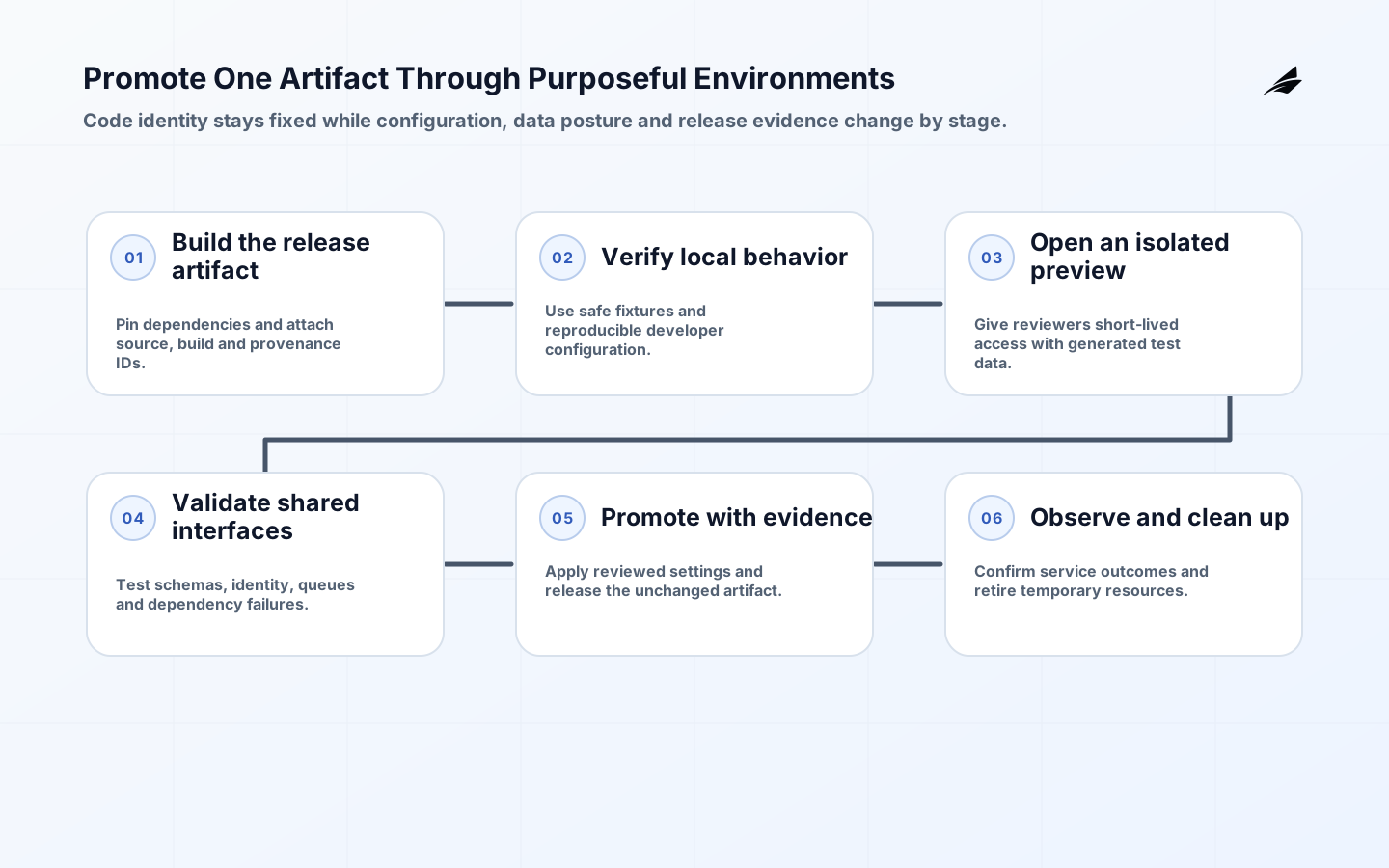
Build a deployable artifact once, attach provenance, and promote that immutable artifact through verification stages. Rebuilding from source for each environment can introduce different dependencies, toolchains, or generated output after the original review. The SLSA specification provides a vocabulary for provenance and build integrity; even a small team benefits from being able to identify which source, build process, and dependencies produced the running artifact. Environment-specific values should be injected through a controlled configuration path rather than compiled into separate binaries.
The Twelve-Factor App’s configuration guidance recommends keeping deploy-varying configuration outside code, while its dev/prod parity guidance argues for narrowing time, personnel, and tooling gaps. Parity does not require a full-size production clone. It requires that a test can exercise the same important interfaces, identity model, database behavior, queue semantics, and deployment mechanism. Use production-like contracts and representative scale where failure consequence justifies it; use ephemeral or shared environments for isolated changes where it does not.
| Environment purpose | Data posture | Exit evidence |
|---|---|---|
| Local or personal development | Synthetic or deliberately minimized fixtures | Fast tests and reproducible setup |
| Preview or ephemeral review | Generated data and isolated test identities | Feature and interface acceptance |
| Integration | Representative contracts across real dependencies | Schema, queue, identity, and failure-path tests |
| Staging or pre-production | Production-like shape with masked or synthetic data | Deployment, migration, security, load, and rollback evidence |
| Production | Authorized customer or operational data only | Service objectives, monitoring, recovery, and audit trail |
Controls that preserve speed and accountability
- Document the assumptions behind environment strategy for web apps before build begins.
- Keep audit trails for important state changes and automated decisions.
- Use clear fallback paths when data is missing, confidence is low or approvals are delayed.
- Review permissions and reports with real users before production rollout.
- Add internal links, schema metadata and media alt text so the page and assets can be crawled cleanly.
Measure the behavior that should improve
| Metric | Signal | Review cadence |
|---|---|---|
| Cycle time | How long the workflow takes before and after launch | Weekly during rollout |
| Error rate | How often records, approvals or handoffs need manual correction | Weekly until stable |
| Adoption | How many intended users rely on the system for real work | Monthly |
| Business impact | Time saved, revenue protected, cost avoided or visibility improved | Monthly or quarterly |
Environment strategy for web apps works best when the workflow is clear enough to operate and simple enough to improve.
Edilec Research
Choose a small, evidence-producing first step
If your team is evaluating environment strategy for web apps, create a one-page workflow map with users, records, decisions, permissions, risks and target metrics. That map becomes the starting point for scope, architecture, cost and delivery planning with Edilec.
Start with the real operating context
A growing company should test its environment strategy against one real release, including a database change and a failed dependency. The team should be able to identify the artifact, configuration version, migration state, approval evidence, service signals, rollback route, and accountable operator without reconstructing them from several tools. If that information is missing, adding another environment name will not make delivery safer; the priority is to repair the promotion and recovery path.
Make constraints and boundaries explicit
A strong architecture for environment strategy for web apps should include versioned infrastructure, automated checks, observable services, rollback paths and incident routines. The important data is build metadata, deployment state, service health, incidents, costs and customer-impact signals. These details sound small, but they decide whether the system can be tested, secured and improved after launch. If they are left vague, the product team ends up debating behavior through support tickets instead of through a shared model.
| Area | Decision to make | Delivery evidence |
|---|---|---|
| Workflow | What status tells a user what should happen next? | States, owners, handoffs and exception paths are visible |
| Data | Which record proves mean time to restore changed? | Fields, timestamps, lineage and source ownership are documented |
| Integration | What happens when a dependency fails? | Retry rules, visible queues and alert ownership are designed |
| Security | How does the system reduce unrehearsed rollback? | Role checks, policy review and audit events are part of the release |
Build through controlled increments
- Collect real examples of release and platform operations from current work, including normal cases and uncomfortable edge cases.
- Write the decision rules in plain language before turning them into screens, policies, prompts or services.
- Define the service dashboard before building the interface so permissions, data and reporting have a shared reference.
- Build the first release around one valuable path, including the unhappy path, the support path and the rollback path.
- Instrument mean time to restore, cloud cost per active user, open exceptions and manual bypasses from the beginning.
- Review feedback after launch and expand only when the first workflow is stable enough to operate.
Review quality with production in mind
| Risk | Control | What to monitor |
|---|---|---|
| unrehearsed rollback | Make ownership and review rules explicit in the product. | Unassigned items, blocked states and approval delays |
| manual deployment drift | Keep audit trails and source metadata close to the action. | Missing evidence, stale records and unresolved exceptions |
| shipping faster while making production harder to understand when something goes wrong | Design the product around repeated daily work instead of presentation alone. | deployment frequency, change failure rate, mean time to restore and alert quality |
Practical checklist
- Gather five real examples of the workflow before estimating the build.
- Name the users, reviewers, system owners and support owner.
- List the systems that must be connected in release one and the systems that can wait.
- Decide which report or metric proves the project is working.
- Document what happens when data is missing, stale or disputed.
- Keep deployment frequency, change failure rate, mean time to restore and alert quality visible during review so the team can improve the system after launch.
Put the operating decision into practice
An environment strategy for web apps establishes how code, configuration, data and dependencies vary across development, test, staging and production without making release behavior mysterious.
Use the fewest environments that answer a real validation question. Each needs a purpose, owner, access boundary, data rule and promotion path; otherwise it becomes an expensive copy of production that no one trusts.
Keep environment differences discoverable in versioned configuration rather than in people’s memory. A release should show the intended setting changes, the source of secrets and the version of dependent services it expects. This does not require identical infrastructure everywhere, but it does require teams to understand which differences are deliberate and which are accidental.
| Decision | Evidence to gather | Accountable owner |
|---|---|---|
| Scope | A defined user, service or workflow boundary and excluded work | Product or service owner |
| Risk and recovery | Failure modes, operating constraints and a tested response path | Engineering and operations leads |
| Readiness | Quality, security and support evidence appropriate to the change | Release decision owner |
| Outcome | A measurable service, customer or business signal after release | Named business owner |
Frequently asked questions
Does every web app need a staging environment?
Not necessarily. A staging environment is useful when it represents a meaningful pre-production test. For some products, short-lived preview environments plus controlled production exposure are more valuable.
Can production data be used outside production?
Only under a documented legal, security and privacy decision with appropriate minimization, access control and handling. Synthetic or carefully de-identified data is often safer for ordinary testing.
Where should configuration live?
Keep configuration separate from code, protect secrets with a purpose-built secret store and make non-secret settings reviewable and traceable through the same delivery workflow.
Conclusion
Review environments when teams repeatedly patch settings by hand, share credentials, cannot reproduce an incident or cannot explain why a release behaved differently. Those are design signals, not ordinary friction.