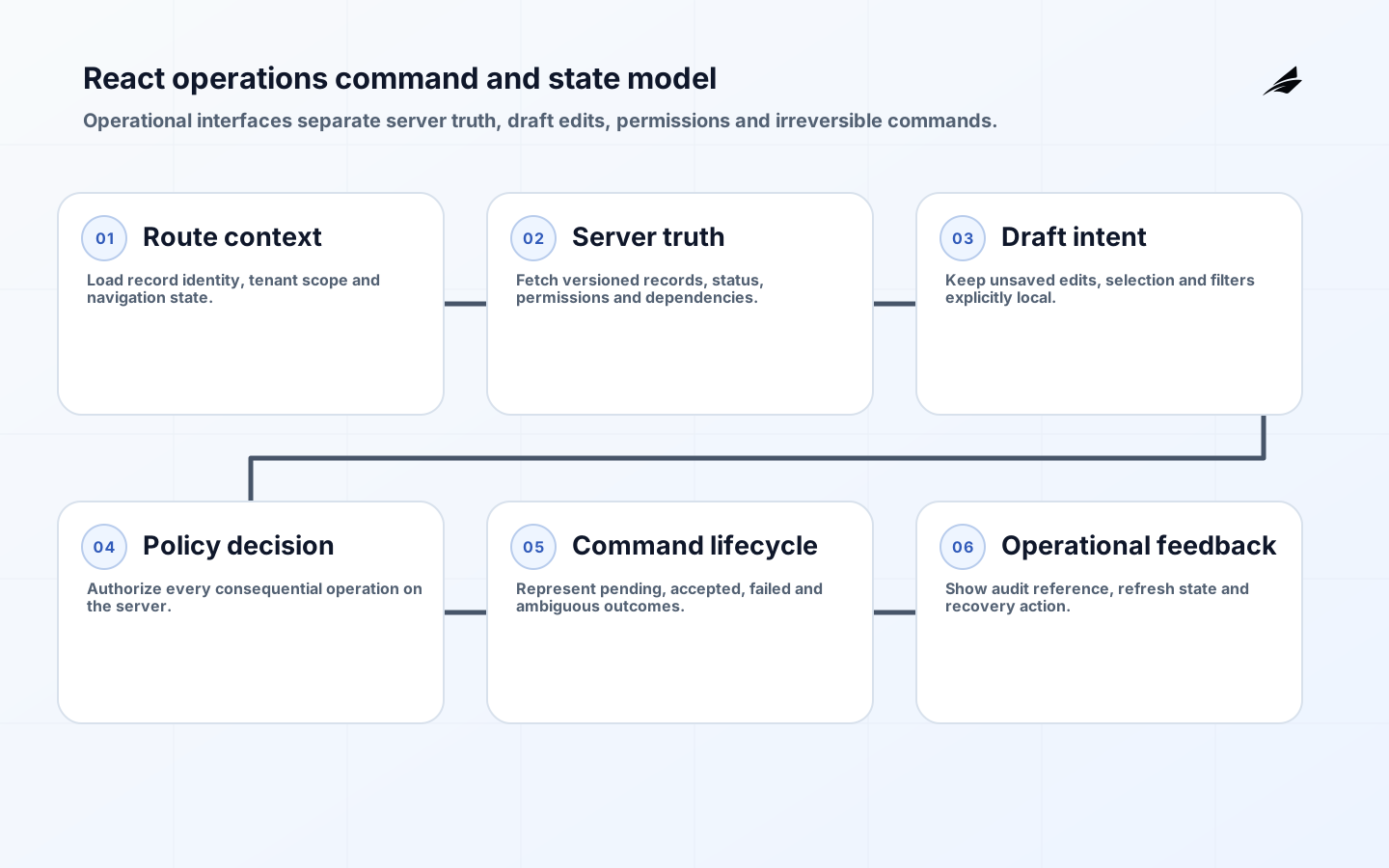
React application architecture for operations tools must support repeated, consequential work rather than optimize only for attractive screens. Operators search large datasets, compare records, change status, resolve exceptions, approve actions and recover from partial failures throughout the day. The frontend must show what the server currently knows, what the user has changed locally, which commands are pending, and what can safely happen next. Ambiguity creates duplicate work, unauthorized action and mistrust.
This guide focuses on architecture for admin consoles, support tools, fulfilment systems and internal workflow applications. It complements the TypeScript domain-model guide and the Node.js background-jobs guide. The central principle is simple: organize the application around domain tasks and state transitions, then choose React patterns that preserve those boundaries.
Organize the frontend around operational domain slices
Group route, components, queries, commands, validation and tests for a coherent business capability such as cases, orders, devices or approvals. Shared design-system components belong in a separate layer; generic API and authentication clients belong in platform code. Avoid a global folder containing every modal, hook and service. Domain slices help teams change one workflow without tracing hidden coupling across the whole application.
A route should establish record identity, tenant or organization scope, user intent and navigation context. Use nested routes when the URL represents stable subviews such as summary, activity and access. Put meaningful filters, sort and selected time range in the URL when operators need to bookmark or share the view. Keep ephemeral hover, open disclosure and draft input local. A reload should restore useful work context without resurrecting unsafe unsaved commands.
Separate server truth, local drafts and derived state
React’s state-structure guidance recommends avoiding contradictory, redundant and duplicate state. That matters acutely in operations tools. Do not copy a fetched record into multiple stores and update each by convention. Keep server data in a query cache with version and freshness behavior, keep unsaved edits in a form or local reducer, and derive display values from those sources. Store stable identifiers rather than duplicate objects when possible.
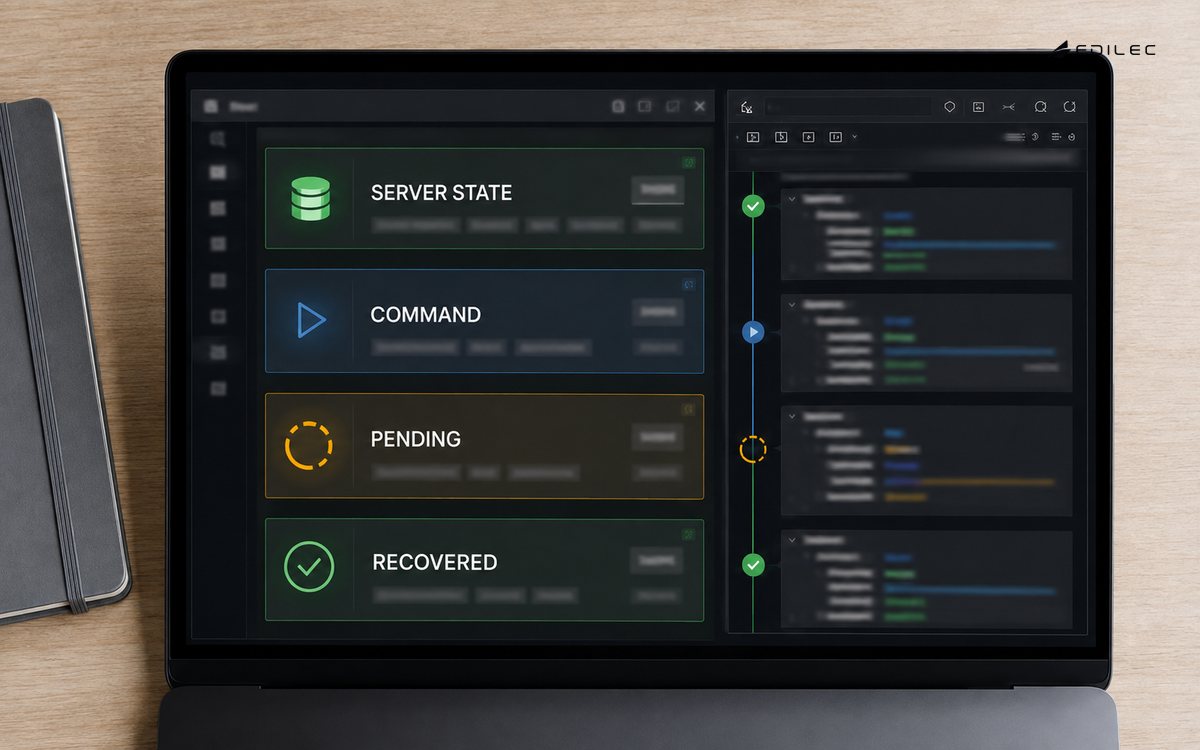
Model workflow states as finite, named conditions. A save command is not simply loading or done; it can be idle, validating, submitting, accepted, rejected or uncertain after a timeout. An asynchronous export can be queued, running, completed, expired or failed. The interface should disable only commands that are actually invalid, explain why, and offer a safe retry or outcome check. React keys affect whether component state is preserved or reset, so use them deliberately when switching between records or workflow instances.
| State class | Where it belongs | Example |
|---|---|---|
| Server truth | Query cache backed by API | Order status and record version |
| URL state | Router and validated parameters | Queue, filters and selected record |
| Draft state | Form or local reducer | Unsaved note and edited fields |
| Derived state | Calculated during render | Whether command prerequisites are met |
| Command state | Mutation or workflow controller | Pending, accepted, failed or ambiguous |
Design APIs around queries and explicit commands
Use read models shaped for the operator’s decision rather than forcing the browser to join many low-level resources. Include stable IDs, current version, status reason, permitted actions and timestamps. For changes, prefer explicit commands such as approve refund or assign case over generic record patches when business rules matter. Validate and authorize on the server. Return structured errors that distinguish invalid input, stale version, forbidden action, dependency failure and accepted asynchronous work.
Use optimistic updates only when reversal is straightforward and the consequence is low. Filtering a personal view can update immediately; approving a financial action should wait for server confirmation. Protect against lost updates with record versions or conditional requests. For ambiguous outcomes, return or preserve a command identifier so the client can query status. Avoid automatically retrying non-idempotent commands. A retry button should explain whether it submits again or checks the existing operation.
Make dense operational interfaces accessible and stable
Start with semantic HTML tables for read-only tabular information. Use the ARIA grid pattern only when spreadsheet-like cell navigation and interaction are truly needed; W3C’s grid guidance notes that authors must then manage focus and keyboard behavior. Dense rows still need readable hierarchy, visible focus, adequate targets, zoom and reflow. Pinning every column often makes mobile and magnified use worse; prioritize the record identity and next action.
Dialogs must have an accessible name, intentional initial focus, contained keyboard navigation and a clear return target. Announce status changes without stealing focus. Preserve operator context after completing a command: returning from detail to the same filtered queue and scroll position can save substantial time. Test with screen readers, keyboard-only use, 200 to 400 percent zoom and narrow viewports. WCAG 2.2 conformance applies to complete responsive pages and processes, not only components.
| Interaction | Failure to prevent | Design response |
|---|---|---|
| Bulk selection | Action applies to hidden or stale rows | Show count, scope, exclusions and confirmation |
| Inline edit | Draft disappears on refresh | Warn, autosave safely or persist local draft |
| Long command | User repeats an accepted action | Show operation ID and durable progress |
| Permission denied | Interface suggests a broken feature | Explain policy and route to an owner |
| Stale record | Later edit overwrites newer work | Version check and conflict comparison |
Treat permissions and audit as server capabilities
The interface can hide unavailable controls to reduce confusion, but it cannot grant authority. The server should evaluate the actor, tenant, record, command, current state and policy for every consequential request. Return allowed actions with the record when useful, but recheck during execution. Avoid a large role-name switch scattered through JSX; use domain capabilities such as can assign case or can export customer data.
Show operators the audit information needed to work: who last changed the record, why, when and through which command. Do not expose sensitive security logs to every user. Correlate frontend errors and commands with backend traces using a request or operation ID. OpenTelemetry distinguishes traces, metrics and logs as complementary signals; use them to follow a user action across browser, API, queue and worker without placing personal or secret data in telemetry.
Test the workflows and scale operators actually use
Performance work begins with realistic records and interactions. Measure initial route, filter change, row expansion, command feedback and return navigation at expected and large volumes. Virtualize long lists carefully so keyboard focus, browser find and assistive technology remain usable. Debounce search intentionally, cancel obsolete queries and avoid request waterfalls. Cache reference data separately from frequently changing records. Pagination should preserve stable sort and provide a clear total or continuation model.
Build tests around domain behavior. Unit-test deterministic rules and reducers; component-test validation and state transitions; integration-test API contracts and authorization; and keep a focused set of browser tests for critical operator journeys. Include stale data, double submission, partial dependency failure, session expiry and keyboard operation. Monitor escaped failures in production and remove tests that never influence a decision. Reliability comes from a balanced test system, not a single large end-to-end suite.
Design for long-running sessions and interrupted work
Operations users keep pages open while records change elsewhere. Define background refresh, stale indicators and conflict behavior. Do not replace a form under an operator without warning. Pause automatic refresh while a draft is being edited or merge only fields whose ownership is clear. When sessions expire, preserve non-sensitive draft input where policy permits, explain what happened and return the user to the same task after authentication rather than discarding work.
Browser tabs and duplicate windows create concurrency too. Show record versions and recent actors, then reject stale consequential commands on the server. Use broadcast or subscription updates when near-real-time collaboration is important, but provide reconnect and missed-event handling. A green connected indicator is insufficient; show the age of business data and the last successful synchronization.
Plan maintenance and degraded modes. Read-only access may be safer than a blank outage when commands are suspended. Queueing local commands is safe only when authorization, ordering, expiry and reconciliation are explicit. Tell operators which capabilities remain trustworthy and when to switch to a manual process. Capture the operation and user context needed to reconcile work after service returns. Rehearse the mode with operators so banners, disabled controls and manual records are understandable under pressure, then reconcile every temporary record after normal service resumes.
Key takeaways
- Structure code around operational domains and business commands.
- Separate server truth, URL context, local drafts, derived values and command lifecycle.
- Use server authorization and explicit record versions for consequential changes.
- Choose semantic tables before complex ARIA grids and test complete keyboard workflows.
- Preserve operator context and provide durable feedback for asynchronous work.
Frequently asked questions
Does an operations tool need a global state library?
Not automatically. A router, query cache and local component or form state cover many applications. Add a global client store only for state that genuinely spans distant features and cannot be derived, then define ownership and reset behavior.
Should a large console use micro-frontends?
Only when independent team deployment and ownership outweigh the costs of duplicated dependencies, inconsistent experience and cross-application state. Strong domain modules inside one application are usually a simpler first boundary.
Should operational changes work offline?
Offline reads can help field workflows, but queued commands create conflict and authorization risk. Implement them only with explicit business rules, encryption, expiry, synchronization evidence and a user-visible conflict path.
Conclusion
A dependable React operations tool makes state and authority legible. Domain slices keep change understandable; explicit command lifecycles prevent duplicate action; semantic interfaces support sustained use; and server-side policy protects the business. When the frontend preserves context and explains uncertain outcomes, operators can work quickly without trading away control.