Admin console design for SaaS platforms is the design of a privileged operating system, not a back-office collection of CRUD screens. Support, finance, trust and engineering staff use it when customer state is confusing, time is short and ordinary product controls are insufficient. A good console lets an authorized operator understand a tenant, perform a bounded intervention and leave evidence another person can review. A weak console turns routine support into impersonation, database edits, shared credentials and untraceable exceptions.
This guide is for product and engineering teams planning or replacing internal support tooling. It pairs naturally with product support tooling for SaaS companies, the tenant isolation review before launch and the threat-modeling working guide. The goal is not maximum operator power. It is the least authority and shortest path needed to resolve a legitimate case safely.
Start with operator jobs and intervention boundaries
Inventory real cases before drawing navigation. Common jobs include locating a tenant, explaining an invoice, resending an invitation, unlocking an account, inspecting integration status, correcting a reversible state and exporting evidence. For each job, capture the trigger, source records, permitted roles, customer communication, time pressure and consequence of error. Separate observation from intervention: the person who can inspect a payment timeline does not automatically need authority to refund it.
Define the boundary between product behavior and administrative exception. If operators repeatedly repair the same state, the customer workflow or service logic probably needs a durable fix. The console should record an issue category and resolution path so product teams can see recurring friction. Never make direct database access the normal fallback. A typed administrative command can validate preconditions, authorize the actor, apply one business operation, emit an event and support safe retry; a manual update bypasses those protections.
| Operator job | Minimum context | Control before action | Evidence retained |
|---|---|---|---|
| Explain account state | Tenant, timeline and source records | Read-only scoped access | Viewed case and correlated events |
| Resend or retry | Current status and prior attempts | Idempotency and rate limit | Request, result and provider reference |
| Correct state | Invariant, reason and expected outcome | Step-up approval for material change | Before/after values and policy version |
| Export customer data | Purpose, scope and recipient | Authorization plus re-authentication | Manifest, requester and delivery status |
Design around cases, tenants and timelines
Make tenant context impossible to miss. Persistent tenant name, stable identifier, environment and risk markers should remain visible while an operator moves between records. Search results must disambiguate similar names without exposing more personal data than necessary. Deep links should restore the case context but never encode secrets. When the product is multi-region or includes delegated organizations, show the actual authority boundary rather than presenting every account as a flat customer row.
A timeline is usually more useful than separate tabs full of current values. Correlate user actions, system transitions, integrations, administrative interventions and customer-visible notifications with consistent identifiers. Present source and freshness so operators can distinguish an authoritative record from a cached projection. The interface should explain pending and partial states instead of collapsing them into success or failure. That reduces repeated actions when a queue, payment provider or identity service is merely delayed.
Authorize business operations on the server
Use individual workforce identities, strong authentication and server-side authorization for every protected operation. Model permissions as understandable business capabilities such as view_billing, retry_webhook or approve_refund, then add tenant, region, amount, time and case constraints where needed. A hidden button is not access control. The backend must evaluate the current actor, active role, target tenant, requested operation and policy version at execution time, with default denial for combinations that were not designed.
Reserve broad break-glass access for genuine incidents. Require a reason, short expiry, strong re-authentication, prominent session state and rapid review. Avoid routine customer impersonation because it confuses attribution and can expose data outside the support need. When reproducing a customer view is essential, prefer a read-only perspective with an unmistakable banner and separate audit identity. Periodically review role assignments, unused privileges and operations that are frequently denied or escalated.
Use a controlled sequence for every consequential action
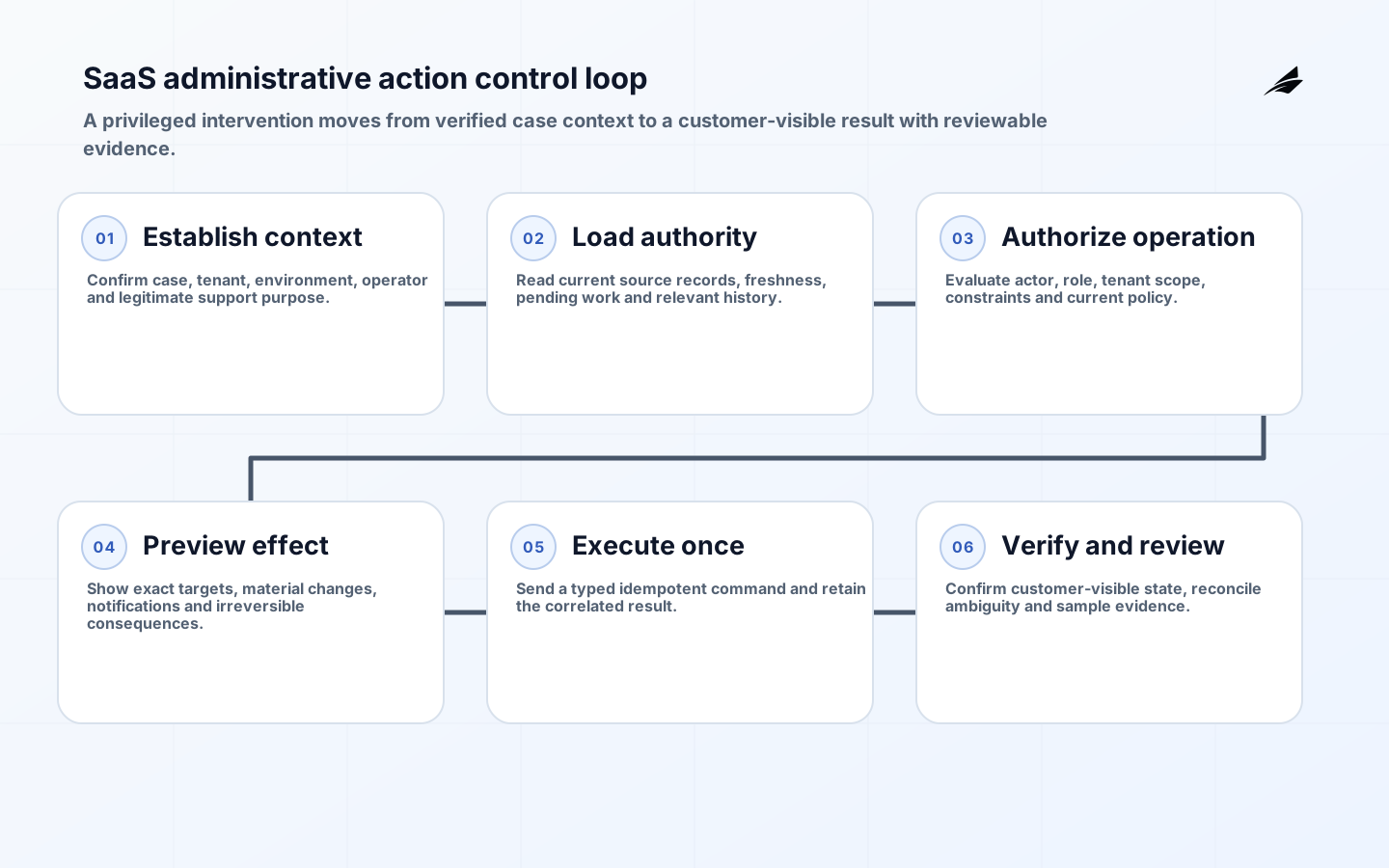
A consequential action should move through six explicit stages: establish case and tenant context; load authoritative state; evaluate actor and policy; preview the effect; execute an idempotent command; and verify the customer-visible result. Preview matters for refunds, permission changes, deletions and bulk actions because the target set or monetary effect may be different from the operator's initial assumption. Show the exact scope and irreversible consequences in plain language.
Design retries and reversals as product behavior. Disable duplicate submission while a request is in flight, attach a stable operation identifier, and surface ambiguous outcomes for reconciliation rather than inviting another click. A reversal should be a new authorized business event, not deletion of history. For an irreversible action, require stronger evidence and a deliberate confirmation appropriate to risk; typing arbitrary phrases for every action adds friction without necessarily improving understanding.
Build audit evidence and service observability together
Security audit and operational telemetry answer related but different questions. Audit evidence explains a consequential decision: actor, case, tenant, operation, material inputs, authorization result, approval, time and outcome. Metrics, logs and traces explain whether the console and downstream services functioned correctly. Correlate them with stable identifiers while applying different access, retention and integrity controls. OWASP guidance emphasizes logging authentication and authorization events, but logs must also resist injection and excessive disclosure.
Measure the operator journey, not page views. Useful signals include time to establish tenant context, cases resolved without engineering access, failed or ambiguous administrative commands, use of break-glass authority, repeated corrections and customer-impacting errors. Instrument latency and dependency failures across the command path with trace context. Alerts should identify conditions requiring action, such as a refund command accepted internally but not confirmed by the payment provider, rather than merely reporting every exception.
| Signal | Healthy interpretation | Investigate when |
|---|---|---|
| Resolution without escalation | Operators have enough safe capability | Engineering access remains the common path |
| Repeated intervention category | Product friction is visible and falling | The same correction grows month over month |
| Denied-action rate | Policies block occasional mistakes | One role is systematically mis-scoped |
| Ambiguous command outcomes | Rare and reconciled promptly | Operators retry or customers see duplicates |
| Break-glass use | Exceptional, short and reviewed | It becomes a normal shift procedure |
Make high-pressure work accessible and error resistant
Internal status does not remove accessibility obligations or usability risk. Apply WCAG 2.2 to keyboard operation, visible focus, labels, status messages, contrast, reflow and error prevention. Dense tables need meaningful headers, predictable reading order and alternatives to color-only status. Dialogs must trap and restore focus correctly. Timeouts should warn operators and preserve non-sensitive work where safe. Test with the assistive technologies and browsers used by the actual operations team.
Progressive disclosure can keep the default surface calm while preserving detail. Place common read-only facts first, advanced diagnostics behind named sections and destructive operations in a clearly separated area. Use consistent domain language across customer product, console, runbook and event schema. Show why an action is unavailable and the legitimate escalation path. Safety improves when an operator can understand the current state and next responsible step without guessing what an icon or database code means.
Deliver the console as a governed product
- Observe support cases and rank jobs by frequency, customer impact and intervention risk.
- Map tenant boundaries, authoritative records, command preconditions and recovery behavior.
- Define roles and scoped operations; test allow and deny cases at the service layer.
- Prototype case search, timeline and action preview with operators and accessibility users.
- Ship one bounded workflow with audit evidence, telemetry, runbook and feature exposure controls.
- Review outcomes, remove recurring manual repairs and expand only where evidence supports it.
Treat console changes like customer-facing releases. Use code review, automated policy tests, representative tenant fixtures and a staging environment that cannot mutate production. Test cross-tenant isolation, stale sessions, partial dependencies, duplicate submissions, exports and rollback. Give support leaders ownership of workflow acceptance while security owns control criteria and engineering owns command correctness. A named product owner should resolve tradeoffs instead of letting the console accumulate unrelated requests.
Key takeaways
- Design the admin console around real cases and bounded business operations.
- Keep tenant context persistent and evaluate authorization on every server-side action.
- Prefer typed, idempotent commands to impersonation or direct database edits.
- Separate audit evidence from diagnostic telemetry while correlating both safely.
- Measure whether the console resolves cases without creating new customer or security risk.
Frequently asked questions
Should a small SaaS team build an admin console early?
Build the smallest safe support surface when real customers create recurring operational work. Start with tenant lookup, timeline, read-only evidence and one or two bounded commands. Waiting until support depends on production database access makes later control and audit design harder.
Can a generic internal-tool platform be used?
Yes, if server-side authorization, tenant scoping, change review, strong identity, audit integrity and accessible workflows can be enforced. Keep business commands in owned services rather than embedding sensitive logic only in a low-code screen.
How long should administrative audit records be retained?
Set retention from legal, security, customer-contract and incident-investigation needs, then minimize fields and restrict access. There is no universal duration. Document the purpose, deletion method and any legal hold process, and confirm jurisdiction-specific duties with qualified counsel.
Conclusion
A SaaS admin console earns trust by making privileged work narrower, clearer and more reviewable. Anchor it in cases and tenant boundaries, authorize explicit commands, preview material effects and preserve proportionate evidence. When operators can resolve customer problems without unsafe shortcuts, the console becomes part of the product's reliability system rather than a hidden source of risk.